
A content audit is a structured review of all the content on a website, where you list each page, check how well it performs and decide whether to keep, update or remove it. It usually starts with a full inventory of your pages and ends with a clear action plan. It matters because most sites build up old, thin or overlapping pages over time, and an audit shows you exactly where to improve, so your best content can do its job.
Key Takeaways
- Nielsen Norman Group (NN/g) says an audit “examines, assesses, and evaluates the quality of the content listed in the inventory.”
- Start with a content inventory: a list of every page, with details such as URL, format, date and author.
- Give each page a status: keep, update or remove.
- Google suggests reviewing pages that lost traffic and asking which searches were affected.
- It is never truly finished. NN/g calls inventories and audits “ongoing tasks.”
What Is a Content Audit?
Nielsen Norman Group, a respected user experience research firm, separates two related jobs. A content inventory is “a list of every piece of digital content you currently have.” A content audit then judges the quality of each item on that list.
According to NN/g, audits “uncover content that needs updating, where gaps exist that new content could fill, and if certain pieces of content are ready for removal.” So the inventory tells you what you have, while the audit tells you what to do about it.
Think of it like clearing out a wardrobe. First, you take everything out and lay it on the bed. Then you decide what to keep, what needs mending and what to give away. A website works the same way, except the “clothes” are pages, posts and downloads.
How a Content Audit Works
Every audit follows three broad stages. First, you build an inventory of your content. Next, you assess each item against clear criteria, such as traffic, accuracy and quality. Finally, you mark each one to keep, update or remove, and assign the work.
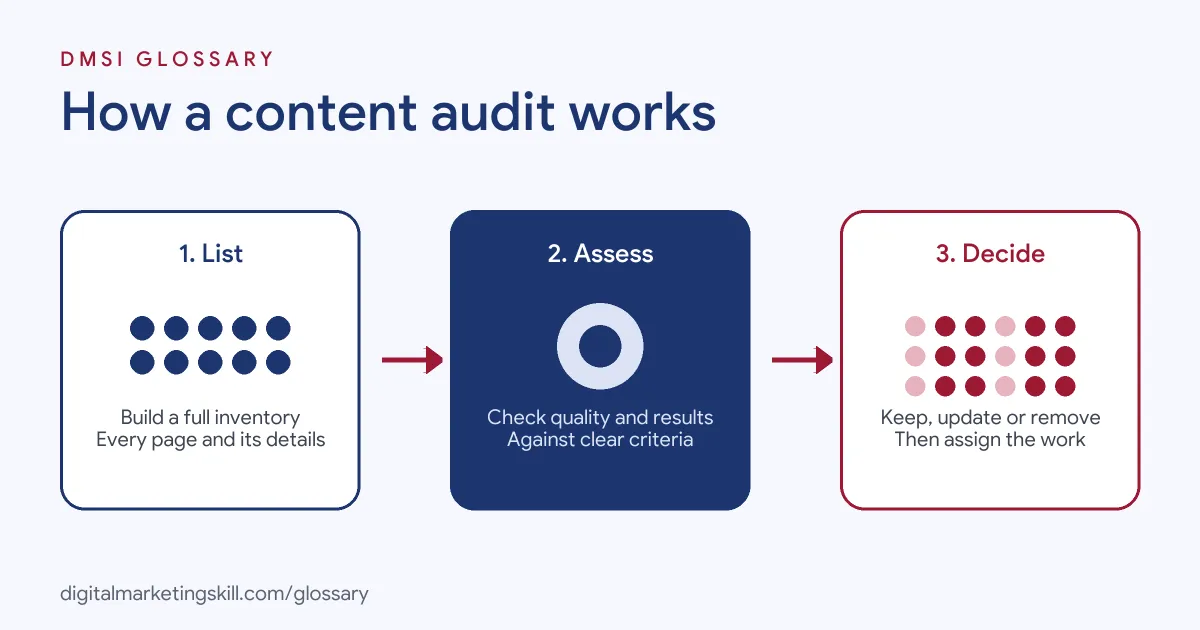
Build the Inventory
NN/g says an inventory captures details such as “each pieces’ name, format, URL, creation date, author, and metadata.” You can speed this up with tools. For example, NN/g suggests crawling tools and exports from your content management system for titles, dates, authors and metadata.
Assess Each Piece
Next, you judge each item. NN/g notes you may need your analytics platform for performance numbers and sometimes user research to see whether content meets people’s needs. However, it says the auditing itself is best done by people “looking at and assessing each piece of content.”
Decide What Happens Next
Finally, NN/g advises recording a status for each piece: “keep, update, or remove.” For pages that need updating, document exactly what needs to change and assign an owner. Then review big changes, especially removals, with the people involved from the start.
Content Audit Examples
Here are three made-up examples of what an audit might find:
- Online shop: Twenty old product pages for items no longer sold. The team removes them and points their addresses to the closest current products.
- Software blog: Three posts covering the same topic, each getting a little traffic. The team merges them into one stronger guide.
- Charity site: A popular “how to volunteer” page with outdated steps. The team updates it, because people still visit it every day.
In each case, the audit replaced guesswork with a clear decision for every page.
Content Inventory vs Content Audit
| Feature | Content inventory | Content audit |
|---|---|---|
| Question it answers | What content do we have? | How good is it, and what should we do? |
| What it records | Name, format, URL, date, author, metadata | Quality, performance and a status |
| How it’s done | Often helped by crawlers and exports | Best done by people reviewing each piece |
| Result | A complete list | An action plan: keep, update or remove |
NN/g recommends doing both together. As it puts it, an inventory alone “won’t tell you much about the content’s quality or how to improve it.”
How to Run a Content Audit
- Set the goal and scope. NN/g says you can audit a whole site, one section or a full customer journey.
- Pick owners. Decide who runs the audit and who must be kept informed.
- Choose your tool. A shared spreadsheet that everyone already knows usually works best.
- Build the inventory. Next, export or crawl every URL and add key details.
- Add performance data. Pull traffic, engagement and conversions from your analytics.
- Review and rate each piece. Check accuracy, quality and whether it meets user needs.
- Mark each one. Choose keep, update or remove, and note what each update needs.
- Act and maintain. Finally, make the changes and keep the spreadsheet up to date.
What to Put in Your Spreadsheet
A simple sheet with one row per page is enough. Useful columns include:
- URL and page title
- Content type, such as blog post, product page or guide
- Author or owner, and the date it was last updated
- Main topic or target search
- Visits and conversions over a set period
- Quality notes, such as “out of date” or “thin”
- Status: keep, update or remove
- Next action and who will do it
A Worked Example
Here is a made-up example. A small agency audits its blog of 120 posts. It marks 70 to keep, 35 to update and 15 to remove or merge. The team fixes the 35 updates over two months, starting with the ten posts that get the most visits. After that, it sets a reminder to review the top 20 pages every quarter, so the list never grows out of control again.
Best Practices
- Start small. NN/g suggests a “start-small” mindset and focusing first on content that is most visited or supports top tasks.
- Timebox the first round. For example, NN/g mentions working within a set period, such as six weeks, to keep momentum.
- Check traffic drops. Google suggests asking which pages were most affected by a drop, and for what types of searches.
- Fix the easy things first. NN/g says bringing content up to your basic standards is usually quickest, so start there.
- Keep people informed. Share regular, short updates so authors trust your decisions.
Common Mistakes
A common mistake is trying to audit everything at once, then giving up halfway. Another is relying only on traffic numbers, which can hide useful pages that serve a small but important group. Some teams also delete pages without checking who uses them or where they link. Finally, NN/g warns that audits quickly go out of date without care. Treat yours as a living document, not a one-off report.
Where You’ll Use Content Audits at Work
Content and SEO roles often list this skill. For example, one real remote job listing includes this line:
- “Deep SEO knowledge: You’re fluent in keyword research, on-page optimization, content audits, and competitive analysis, and you can diagnose why a piece isn’t ranking and what to do about it” (Senior Content Marketer, SEO).
So as an SEO Specialist, you will run audits to find quick wins. A Website Manager will use them to keep a site tidy and accurate, while a WordPress Developer may handle redirects and clean-up afterwards.
Learn It in the WordPress and SEO Track
The AI-Powered WordPress and SEO Specialist track covers WordPress website development, search engine optimisation and content marketing. You build a WordPress site or store and rank it with an SEO content plan, which gives you a real site to audit and improve. You also get unlimited 1-on-1 mentoring and a U.S. Project Internship from day one.
For a hands-on walkthrough, read our blog guide on how to run your own content audit. To keep pages fresh afterwards, see our glossary entry on evergreen content.
Frequently Asked Questions
What is a content audit in simple terms?
It is a review of all your website content, where you check each page and decide whether to keep, update or remove it.
What is the difference between a content inventory and a content audit?
An inventory lists what content you have. An audit judges its quality and decides what to do with each piece.
How often should I run a content audit?
There is no fixed rule. NN/g describes audits as ongoing, so many teams review key pages regularly and run a full audit less often. Ahrefs adds that fast-moving topics, such as software comparisons, often need monthly or quarterly updates.
What tools do I need for a content audit?
A spreadsheet, your analytics and a crawling tool are enough for most sites. Your CMS export can also help.
Should I delete old content?
Only after checking it. Some old pages still help people. If you remove one, consider redirecting its address to the closest relevant page.
Sources: Nielsen Norman Group: Content inventory and auditing 101; Google Search Central: Creating helpful, reliable, people-first content; Ahrefs: Evergreen content; remote job listings on Himalayas.