
On-page SEO is the work you do on a web page itself to help search engines understand it and to help people find what they need on it. It covers the words, titles, headings, links, images and web address of each page. It matters because it is the part of search engine optimisation you fully control, so it is often the fastest way to improve how a page shows up in search.
Key Takeaways
- On-page SEO is everything on the page: content, title, meta description, headings, URL, images and internal links.
- Google says the most basic relevance signal is when a page “contains the same keywords as your search query.”
- Good titles and meta descriptions are unique to each page and describe it accurately.
- Google Search does not use the keywords meta tag, so you can skip it.
- Stuffing a page with keywords breaks Google’s spam policies. Write for readers first.
What Is On-Page SEO?
Search engine optimisation has three broad parts. Technical SEO deals with how a site is built and crawled. Off-page SEO deals with signals from other websites, such as links. On-page SEO deals with the page in front of you.
In other words, it is about making each page clear. When a page states its topic plainly, uses helpful headings and links to related pages, both readers and search engines can understand it. Google’s own guidance puts it simply: “Be sure that you’re writing content that your readers will find helpful and reliable.”
For a broader view of how all the parts fit together, see our glossary entry on search engine optimisation.
How On-Page SEO Works
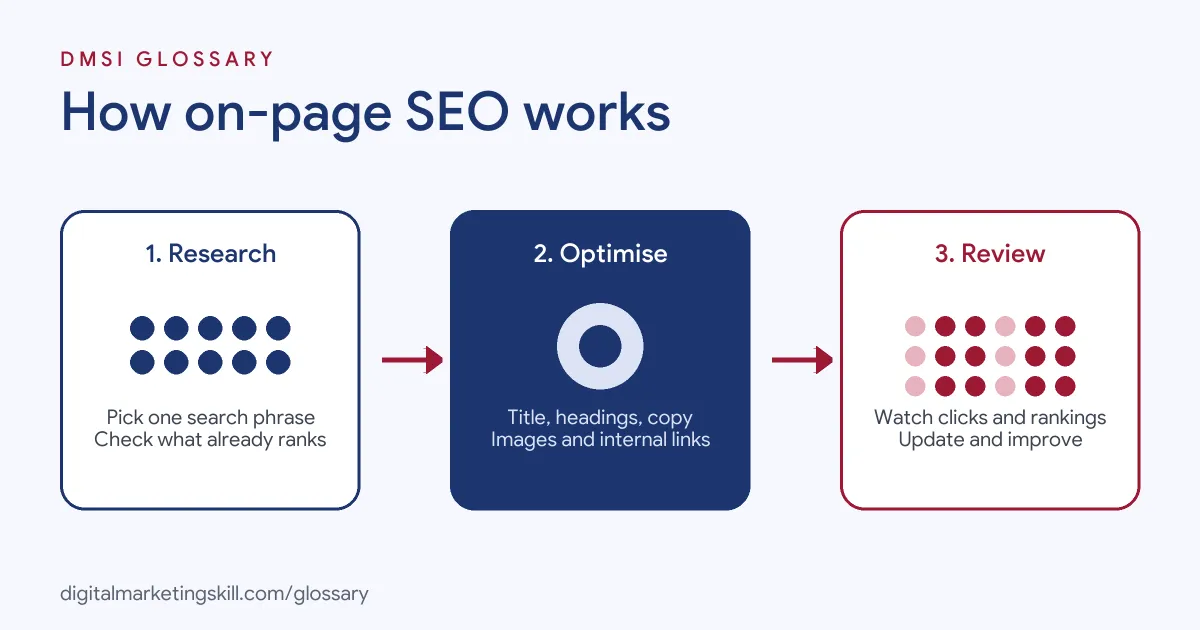
Search engines read a page and try to work out what it is about. Then they decide which searches it could answer. On-page work helps at each of those steps, because it makes the topic obvious and the page easy to use.
Relevance Signals
Google explains that the most basic sign of relevance is when “content contains the same keywords as your search query.” It adds that if those words appear “in the headings or body text of a webpage, the information might be more relevant.” So you should use the words your audience actually types, in the places where they help most.
Titles and Meta Descriptions
The title is often the first thing people see in search results. Google says a good title “is unique to the page, clear and concise, and accurately describes the contents of the page.” Similarly, a good meta description “is short, unique to one particular page, and includes the most relevant points of the page.” Google may still write its own snippet, but a strong description gives it a good starting point.
Headings, URLs and Images
Headings break long pages into sections, which helps readers scan. Interestingly, Google notes that “it doesn’t matter if you’re using them out of order.” For URLs, it suggests you “include words in the URL that may be useful for users.” For images, alt text should be “a short, but descriptive piece of text” that explains how the image relates to your content.
Internal Links
Finally, links between your own pages connect “your users and search engines to other parts of your site.” The visible words in a link, called anchor text, tell readers and Google what the linked page is about. As a result, “click here” is a wasted chance, while “lead magnet ideas” tells everyone what to expect.
On-Page SEO Examples
Here are three everyday examples of the work:
- Local bakery: The owner changes a product page title from “Products” to “Custom Birthday Cakes in Leeds”. Then she adds a short paragraph on flavours, sizes and how to order.
- Online shop: A clothing store renames image files and writes alt text such as “women’s navy wool coat, front view”. After that, it links each coat page to a sizing guide.
- Blog article: A training school rewrites a long post with clear H2 headings, a direct answer at the top and links to two related guides.
In each case, nothing changes off the site. The page simply becomes clearer for readers and search engines alike.
On-Page SEO vs Off-Page SEO vs Technical SEO
These three areas work together, but they are not the same. Here is a quick comparison:
| Area | What it covers | Examples |
|---|---|---|
| On-page SEO | The content and code of each page | Titles, headings, copy, images, internal links |
| Off-page SEO | Signals from outside your site | Links from other sites, reviews, mentions |
| Technical SEO | How the whole site is built and crawled | Speed, mobile layout, sitemaps, indexing |
In short, technical SEO lets search engines reach your pages, on-page work explains them, and off-page signals show that others trust them.
How to Do On-Page SEO on a Page
You can follow the same steps for almost any page. Work through them in order:
- Choose one main search phrase for the page, based on what your audience types.
- Check the search results for that phrase. Note what kind of page ranks, such as a guide, a list or a product page.
- Write a clear, unique title that includes the phrase near the start.
- Write a short meta description that sums up the page and gives people a reason to click.
- Answer the main question early, then use headings to organise the rest.
- Use a short, readable URL with words, not random numbers.
- Add descriptive alt text to every meaningful image.
- Link to two or three related pages on your site with clear anchor text.
After that, check the page in Google Search Console over the following weeks. Then adjust the title or content if it is not getting clicks.
Best Practices for On-Page SEO
A few habits make a big difference:
- Match the search intent. If people want a quick answer, give it at the top. If they want to compare, add a table.
- Write naturally. Use the phrase where it fits, and use related words too.
- Keep titles unique. Two pages with the same title compete with each other and confuse readers.
- Update old pages. Refresh facts, fix broken links and add new internal links as your site grows.
- Use a plugin wisely. On WordPress, an SEO plugin such as Yoast helps you edit titles and descriptions. However, its checks are a guide, not a ranking promise.
Common Mistakes to Avoid
Beginners often repeat the same errors. First, they stuff keywords into every sentence. Google’s spam policies describe keyword stuffing as filling a page with keywords “in an attempt to manipulate rankings,” and its guide warns that repeating words “is tiring for users”. Second, they copy one title across many pages. Third, they still add a meta keywords tag, even though “Google Search doesn’t use the keywords meta tag.” Finally, they write vague link text such as “read more”. Each fix takes minutes once you know to look for it.
Where You’ll Use On-Page SEO at Work
On-page skills appear in many remote marketing roles, not just SEO jobs. For example, recent job listings ask candidates to:
- “Apply on-page SEO best practices to written content” (Content Writer).
- Handle “keyword research, on-page optimization, meta titles and descriptions, internal linking, and monitoring rankings” (Marketing Specialist).
- Do work that “identifies, recommends, and implements on-page website SEO optimization” (SEO Strategist).
So whether you aim to be an SEO Specialist, a Website Manager or a content writer, employers will expect you to optimise pages and explain why each change matters.
Learn On-Page SEO in the WordPress and SEO Track
You can practise this skill in the AI-Powered WordPress and SEO Specialist track. There, you build a WordPress site or store and rank it with an SEO content plan, so you finish with real pages you can show an employer. You also join a U.S. Project Internship from day one and get unlimited 1-on-1 mentoring.
Want a quick list to work through? Our on-page SEO checklist covers each element step by step.
Frequently Asked Questions
What is on-page SEO in simple terms?
It is the work you do on a page itself, such as its words, title, headings, images and links. The goal is to make the page clear to readers and search engines.
What is the difference between on-page and off-page SEO?
On-page work happens on your own pages, so you control it. Off-page work involves signals from elsewhere, such as links from other websites and reviews.
Do meta keywords still matter?
No. Google states that its search engine does not use the keywords meta tag, so your time is better spent on titles, content and links.
How many times should I use a keyword on a page?
There is no magic number. Use the phrase in the title, early in the text and in a few headings, then write naturally. Repeating it too often can count as keyword stuffing.
Is on-page SEO enough to rank?
It helps, but it is only one part. Strong pages still need a site that search engines can crawl and, often, links or mentions from other trusted sites.
Sources: Google Search Central: SEO Starter Guide; Google: How Search works, ranking results; Google Search Central: Spam policies; remote job listings on Himalayas.