
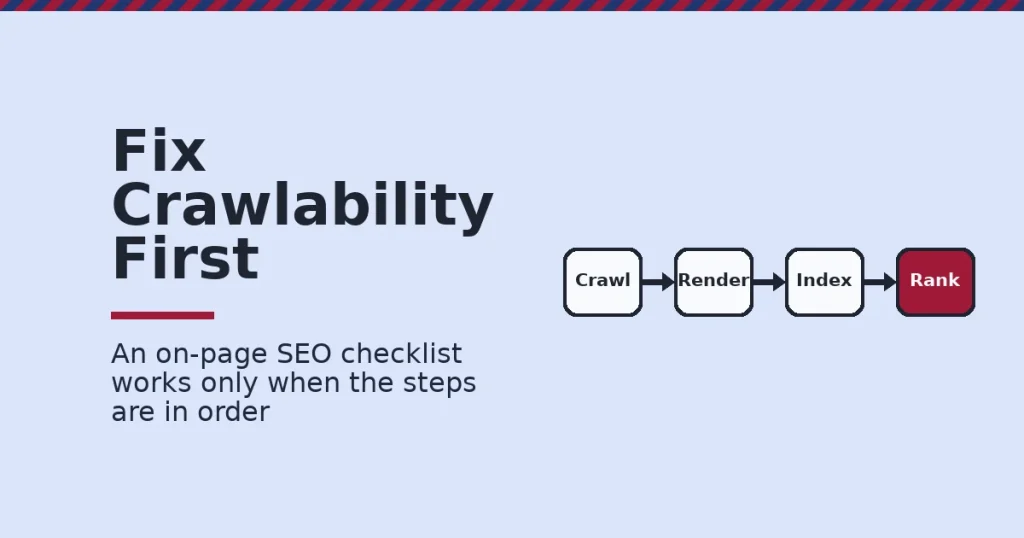
An on-page SEO checklist works only when it is ordered by impact, not alphabetized by habit. Fix crawlability and titles first, then structure, then trust signals, because each layer depends on the one before it. This guide ranks the real steps. It shows what changes between a blog post and a product page, and gives the one rule that decides what to fix first.
Key Takeaways
- Titles are rewritten more than people expect. Google’s own documentation on title links says a title is “truncated in Google Search results as needed.” It can replace your title entirely when the page’s own title is unclear.
- Meta descriptions do not rank pages, but they do earn clicks. Google’s snippet guidance states plainly that it “doesn’t use your meta description for ranking purposes,” though a clear one still shapes whether a searcher clicks your result.
- Every important page needs an internal link. Google’s crawling guidance is direct: “every page you care about should have a link from at least one other page on your site.” Without one, it may never get crawled at all.
- Speed has a real, if narrow, scoreboard. Google’s Core Web Vitals documentation sets “good” thresholds at 2.5 seconds for loading, 200 milliseconds for interactivity, and 0.1 for visual stability.
- Links still correlate with rankings, weakly but consistently. Ahrefs’ analysis of the top 1,000,000 US keywords found a Spearman correlation of 0.255 between referring domains and ranking position, a weak but real relationship.
In this guide
- What Most On-Page SEO Checklists Get Wrong
- How On-Page SEO Actually Works
- What Changes by Page Type
- How to Lead With Each Page Type
- How to Measure an On-Page SEO Checklist
- The One Decision Rule: Fix Crawlability and Titles First
- A Real Case: What a Controlled Title Tag Test Found
- Frequently Asked Questions About On-Page SEO Checklists
- Start With Crawlability, Then Work Down the List
What Most On-Page SEO Checklists Get Wrong
Most on-page SEO checklists read like a shopping list. Write a title tag. Add alt text. Use your keyword in the first paragraph. Nobody tells you which item matters more, so every item gets equal weight, and equal weight is the wrong weight.
A real on-page SEO checklist is ordered. Some fixes unlock everything else, and some fixes do almost nothing on their own. Treating them the same wastes the first hour of every project on low-impact tasks.
This happens because most checklists are written as reference lists, not as a sequence. A reference list is fine for looking something up later. It gives no guidance on where to start, though, when a site has fifty problems and one afternoon to fix them.
The fix is to think in dependencies, not categories. Ask what breaks everything downstream if it is wrong, and start there. A missing internal link or a blocked page breaks every later optimization on that page. A slightly long meta description, by contrast, barely moves the needle on its own.
Here are the limits of what follows. The statistics below come from named sources, each with its own scope. Google’s own documentation describes intended behavior, not a guaranteed outcome for every page. Correlation studies show a relationship, not a cause. Read every number as a snapshot, not a permanent ranking.
How On-Page SEO Actually Works
On-page SEO feeds a pipeline with four stages: crawl, render, index, rank. A page has to pass through all four before it can show up for a search. A failure early in the pipeline makes everything after it pointless.
Most people learn this pipeline backwards, starting at rank and working toward crawl only after something breaks. Learning it in order, instead, is what turns a random list of tasks into an actual on-page SEO checklist that tells you where to start.
The Four Stages, in Order
Crawling comes first. Google has to find your page through a link. Its own documentation states that a link only counts if it is “an <a> HTML element with an href attribute.” A page with no working link pointing to it may never be crawled.
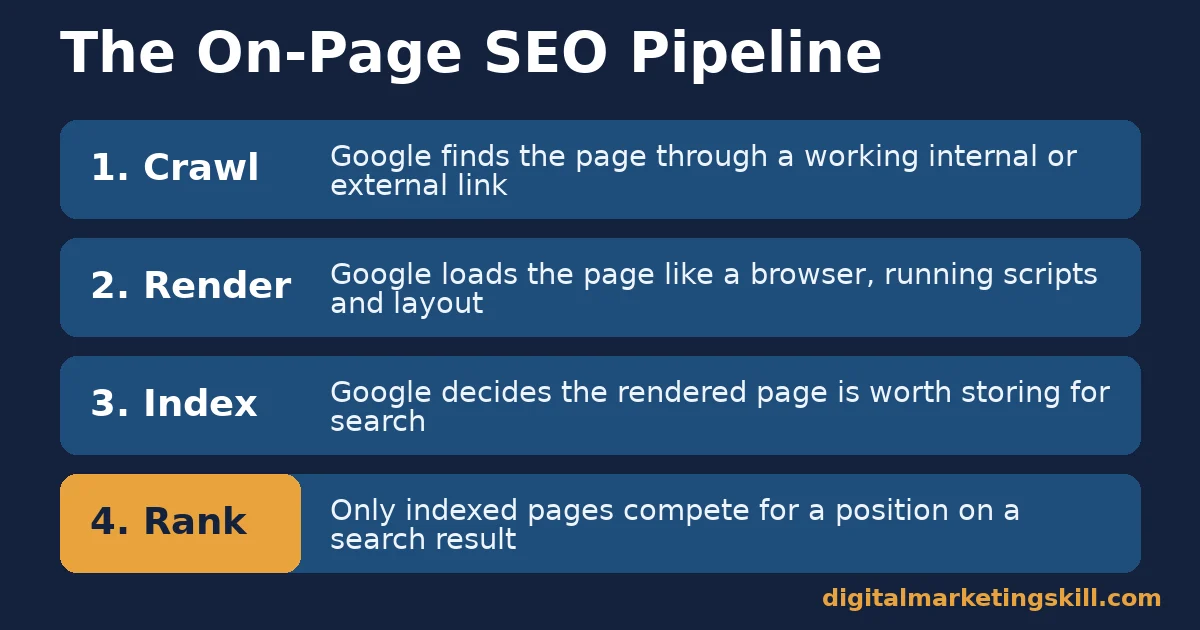
Rendering comes next. Google loads the page the way a browser would, running scripts and building the final layout. A page that looks complete in raw HTML but depends on broken scripts can render as an empty shell.
Indexing follows rendering. Google decides whether the rendered page is worth storing and serving for future searches. Thin, duplicate, or blocked pages often get crawled and rendered, then left out of the index entirely.
Ranking is the last stage, and it is the one most checklists obsess over while skipping the first three. A perfectly optimized page that never gets indexed ranks for nothing, which is why this on-page SEO checklist starts with crawlability, not keywords.
Each stage also has its own failure signature. A crawling failure shows up as a page missing from Search Console entirely. A rendering failure shows up as a page indexed with almost no visible content.
An indexing failure looks different again: the page is crawled, it renders fine, and it still never appears for any query. Knowing which signature you are looking at tells you which stage to fix, instead of guessing.
What Changes by Page Type
An on-page SEO checklist cannot treat every page the same way. A blog post and a product page answer different questions for different readers at different moments.
Running one checklist across both page types usually goes wrong in one of two ways. Either blog-style depth gets applied to a page that needs brevity, or product-style brevity gets applied to a page that needs depth. Neither mistake shows up immediately, but both quietly cap how well each page can perform.
Blog Posts: Built to Answer a Question
A blog post exists to satisfy curiosity or solve a specific problem. The reader usually arrives through a search query, so the title and opening paragraph have to match that query closely or the visit ends in seconds.
Depth matters here more than anywhere else on a site. One widely cited ranking factors analysis put the average top-10 Google result at around 1,447 words, which signals that short, thin posts are competing against far more thorough pages.
That number is an average across competitive topics, not a minimum for every post. A narrow, well-answered question can rank at a few hundred words. A broad comparison topic, on the other hand, often needs the full depth to cover every angle a reader might ask about.
What matters more than the raw count is whether every paragraph earns its place. A 2,000-word post padded with repetition reads worse to both readers and search systems than a tight 900-word post that actually answers the question asked.
Product Pages: Built to Close a Decision
A product or service page exists to move a visitor who is already close to a decision. Over-explaining the category wastes their time, since they usually already understand what the product is.
Trust elements carry more weight here than word count. Specific details, verifiable claims, and clear next steps matter more than ranking for every related keyword in the category.
A product page padded with generic category explanation tends to rank for the wrong intent anyway. It pulls in visitors who are still researching rather than ready to act. Shorter, sharper pages aimed at the actual decision usually outperform it.
That does not mean skip explanation entirely. It means moving the broad, educational content to a linked blog post and keeping the product page itself focused on the specific choice in front of the visitor.
How to Lead With Each Page Type
Once you know what each page type needs, the next question is how to open it. The first screen still decides whether anyone keeps reading or scrolling.
Blog Posts: Lead With Structure
Open with a direct answer in plain words, then use subheadings that state a specific claim instead of a vague label. A heading like “Results” tells a scanning reader nothing, while a heading naming the actual finding earns a second look.
Internal links matter heavily here. Point to a related local SEO guide or an international SEO resource exactly where the topic comes up naturally. Avoid bunching every link into one generic “related posts” list at the bottom.
Product Pages: Lead With Trust Signals
Open with the specific outcome the product delivers, not a generic category description. State what makes this option different in terms the visitor can verify themselves.
Back the page with the kind of detail a skeptical buyer checks for: a clear policy, a real example, or a specific number. Vague superlatives do less work here than one checkable fact.
Close with one clear action, matched to where the visitor actually stands. A reader who just arrived from a broad search needs more context than one who clicked through from a comparison already decided in your favor.
How to Measure an On-Page SEO Checklist
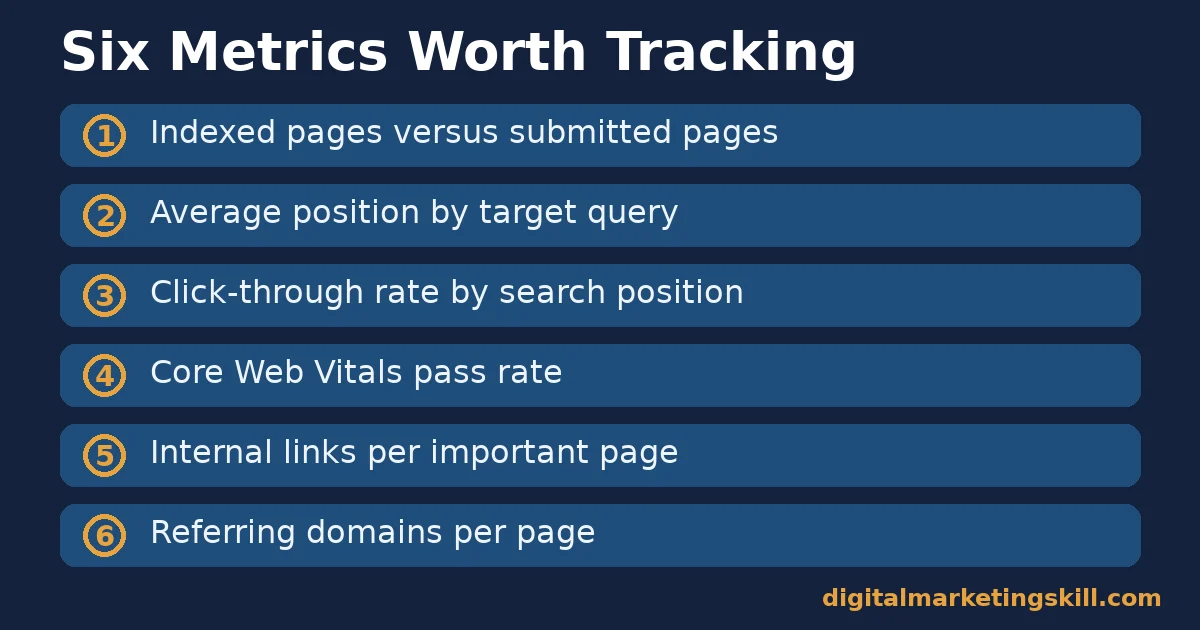
An on-page SEO checklist is only useful if you can tell whether it worked. Six metrics, read together, show the real picture.
Six Metrics Worth Tracking
- Indexed pages versus submitted pages. The share of your sitemap that Google actually chose to index. A large gap usually points to thin or duplicate content.
- Average position by query. Where your pages typically rank for their target terms, tracked over time rather than as a single snapshot.
- Click-through rate by position. Whether your titles and descriptions earn clicks relative to other results at the same rank.
- Core Web Vitals pass rate. The share of your pages meeting Google’s thresholds of 2.5 seconds for loading, 200 milliseconds for interactivity, and 0.1 for layout stability.
- Internal links per important page. How many other pages on your own site link to the page you care about, since Google says every important page needs at least one.
- Referring domains. The number of separate websites linking to a page, which Ahrefs found carries a weak but measurable correlation with ranking.
How to Read These Numbers Together
A page with a high average position but a low click-through rate usually has a weak title, not a ranking problem. Fixing the title is cheap, and it is often the fastest win on the whole list.
A page with strong Core Web Vitals but almost no internal links is likely an orphan page that Google rarely revisits. Speed will not rescue a page that nothing on your own site points to.
Track all six together on a simple spreadsheet, updated monthly rather than daily. Search rankings move slowly enough that daily tracking mostly measures noise, not real change.
Keep a simple note of what changed on each page and when. Without that record, a traffic shift three months later is impossible to trace back to a specific fix, and you end up repeating guesswork instead of building on what actually worked. A plain spreadsheet with a date column is enough; the tool matters far less than the habit of writing the change down.
The One Decision Rule: Fix Crawlability and Titles First
Here is the single most useful rule for any on-page SEO checklist. Never spend time on keyword density or schema markup before confirming every important page is crawlable, indexed, and has a clear title.
Apply it with a simple test. Pick your ten highest-value pages. Check whether each one has at least one internal link pointing to it. Confirm it appears in Google’s index, and that its title clearly states what the page is about. Fix any failures before touching anything else on the checklist.
Here is an illustrative example, with invented numbers. A site has 200 pages, and an audit finds 18 with no internal links at all and 7 missing from the index. Fixing those 25 pages first, before any content rewrite, recovers more total traffic than optimizing the other 175 pages would have. The 25 were previously invisible to search entirely.
That is the logic behind ordering an on-page SEO checklist by impact. A perfect title on an unindexed page changes nothing, while one working internal link can bring a whole page back into contention.
Run the same audit on a schedule, not just once. New pages go live, old links break as content gets reorganized, and a page that was perfectly crawlable before a redesign can quietly become an orphan after a site redesign nobody flagged.
A Real Case: What a Controlled Title Tag Test Found
TrustRadius, a software review site, ran a controlled test on its category pages rather than guessing at title tag changes. Its technical SEO team split 20 category pages into a control group and tested two alternate title formats against them over several weeks.
The test found a 73% increase in queries containing the word “list” during the test period for pages using one specific title format. That compares with the prior month. After rolling the winning format out sitewide, the site recorded a 22% traffic increase across those pages within two weeks.
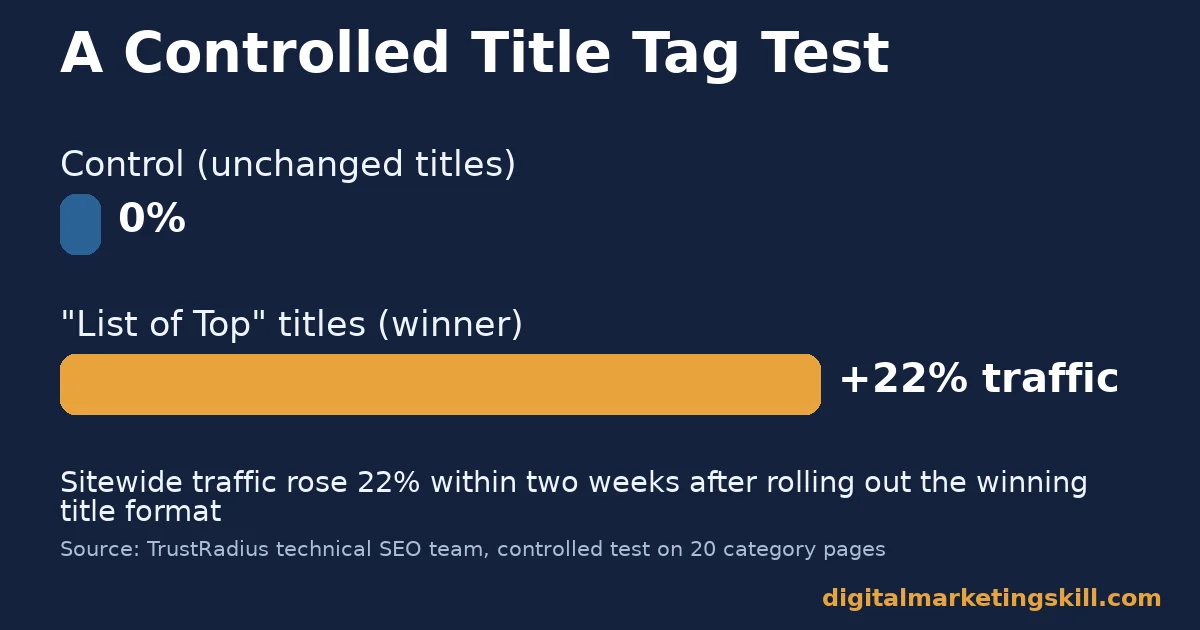
The limits matter here. The test covered one page type, on one site, during a period when competitors were not targeting the same title modifiers. A result this strong will not repeat on every site or every page type. The method is the real lesson: test title changes on a sample before rolling them out everywhere.
What the Test Did Not Change
Notice what the test did not do. It did not touch page content, internal links, or site structure. A single, narrow change to one on-page element produced a measurable, attributable result, because the team isolated that one variable instead of changing five things at once and guessing which one mattered.
That discipline is harder to copy than the title format itself. Most sites never run a controlled test on anything, which means they never really know which fix produced which result, only that traffic went up or down sometime after a batch of changes.
A smaller site without enough traffic for a formal split test can still borrow the principle. Change one element on a handful of pages, note the date, leave everything else untouched, and compare performance a month later before changing the next element. It is slower than a formal test. It still beats changing everything at once and never knowing why traffic moved.
Frequently Asked Questions About On-Page SEO Checklists
What should be first on an on-page SEO checklist?
Crawlability and indexing, not keywords. Confirm Google can reach, render, and index a page before worrying about title wording or content length, because none of those later fixes matter on a page Google cannot find. A quick way to check is Search Console’s URL inspection tool, which shows whether a specific page is indexed right now.
Do meta descriptions affect rankings?
No. Google states directly that it does not use meta descriptions as a ranking signal. They still matter for click-through rate, since a clear description can earn a click even at the same ranking position.
How long should a page be for good on-page SEO?
Long enough to answer the question completely, with roughly 1,447 words as the average length among top-10 results in one widely cited analysis. Treat that as a signal of depth expected in competitive topics, not a strict target to hit on every page.
Do internal links really matter that much?
Yes. Google’s own crawling guidance says every page you care about needs a link from somewhere else on your site. Without one, it risks never being discovered during a crawl at all. Internal links also spread ranking signal from your strongest pages toward newer or weaker ones, which an external link building campaign cannot do on its own.
Does page speed affect search rankings?
It is one signal among many, measured through Core Web Vitals thresholds of 2.5 seconds for loading, 200 milliseconds for interactivity, and 0.1 for visual stability. Meeting those thresholds supports user experience, even where its direct ranking weight is modest. A slow page also loses visitors before they ever read your content, which matters regardless of its exact ranking impact.
How is on-page SEO different for blog posts and product pages?
Blog posts win on depth and structure, since readers arrive with a question. Product pages win on trust signals and specific, checkable claims, since readers usually arrive closer to a decision already made. Treating a product page like a blog post, or the reverse, usually hurts conversion even when both still rank. Match the format to the reader’s actual stage, not to a single template reused across the whole site.
How often should an on-page SEO checklist be reviewed?
Review your highest-value pages at least twice a year. Recheck any page after a major site change, such as a theme update or a URL migration, since both can silently break internal links or crawlability. Keep a short list of your top twenty pages specifically for this recurring check, so the review never turns into auditing the entire site from scratch each time.
Start With Crawlability, Then Work Down the List
An on-page SEO checklist works best in order: crawlability and titles first, structure and internal links next, trust signals and speed after that. Pick your ten most important pages and run through that order this week before adding anything new to the site.
Resist the urge to fix everything on every page at once. Work through the order on your highest-value pages first, confirm the impact, then repeat the same sequence further down the list.
Want structured practice applying this kind of checklist? The Master Diploma in Digital & AI Marketing at Digital Marketing Skill Institute includes an AI-Powered WordPress and SEO Specialist track built around exactly this kind of technical and on-page work.
The program pairs unlimited one-on-one mentoring with project-based work experience on a real U.S. partner company’s site. You practice fixing crawlability and titles on a live account, not a simulation.
The diploma is dual accredited in the US and UK and recognised in more than 100 countries. It runs 100% online, so you can build this skill from anywhere in your country. Read student outcomes on the reviews page, or browse more guides on the blog. Go straight to the application page when you are ready to build your own on-page SEO checklist at Digital Marketing Skill Institute.
Every figure in this guide was checked against its original source before publication. Figures marked as illustrative are invented examples, not real results.
![9 Amazing Digital Marketing Skills to Make Money Online [With Proof]](https://digitalmarketingskill.com/wp-content/uploads/2019/07/9-Amazing-Digital-Marketing-Skills-to-Make-Money-Online-With-Proof-17.png)






