
Retargeting is a type of online advertising that shows ads to people who have already interacted with your business, such as visiting your website, using your app or engaging with your social posts. It reminds them of what they looked at and invites them back to finish what they started. It matters because people who already know you are usually far more likely to buy than strangers.
Key Takeaways
- Retargeting reaches people who already know you, unlike prospecting, which finds new people.
- It relies on a tracking tag or pixel, or on lists of your own contacts.
- Google Ads now calls retargeting lists “your data” segments, and once called them remarketing.
- TikTok needs at least 1,000 matched users before you can use a custom audience in an ad group.
- Good retargeting uses frequency limits, exclusions and fresh ads, so it reminds without annoying.
What Is Retargeting?
Most people don’t buy the first time they visit a site. They browse, compare and leave. Retargeting gives you a second chance to reach them.
Google describes it as a way to “re-engage people who have previously interacted with your brand or services”. Your ads then appear to those people as they browse Google or partner websites. Google gives a classic example: targeting people who added something to their basket but didn’t complete the purchase.
You may also hear the word remarketing. In practice, marketers use the two terms for much the same thing. Google Ads now uses the label “your data” for these segments.
How Retargeting Works
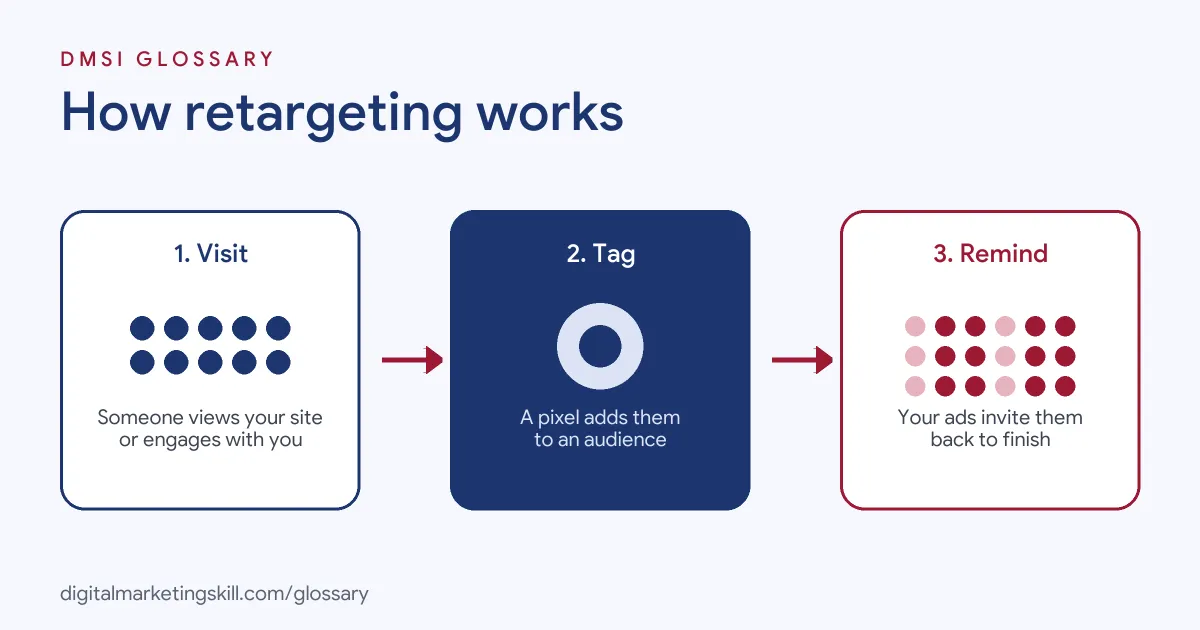
The process has three steps. First, a tag or pixel on your site records visitors, or you upload a list of contacts. Next, the ad platform groups those people into an audience. Finally, it shows them your ads as they move around other sites, apps or social feeds.
Where Retargeting Audiences Come From
Each platform offers several sources:
- Website visitors: people tracked by your pixel or tag, such as everyone who viewed a product page.
- App users: people who opened or used your app.
- Customer lists: emails or phone numbers you upload, which the platform matches to its users.
- Engagement: people who watched your videos, followed your page or interacted with your ads.
For example, LinkedIn’s Matched Audiences can use contact lists, website visitors, company page followers and people who engaged with your ads. TikTok’s custom audiences can use customer files, website traffic, app activity, engagement and lead forms.
Minimum Audience Size
Platforms need enough people to run ads. TikTok, for instance, says a custom audience needs at least 1,000 matched users before you can use it in an ad group. So very small lists may not work until they grow.
Privacy and Consent
Website audiences depend on tags that store or read data on a visitor’s device. In the UK, the ICO says you must tell people about such cookies, explain them and get consent, except for strictly necessary ones. Privacy changes also affect reach. For instance, Google notes that Apple’s App Tracking Transparency rules may affect your data segments on iOS traffic. So your audiences may be smaller than your visitor numbers suggest.
Retargeting Examples
Here are three made-up examples:
- Abandoned basket (example): A homeware shop shows a reminder ad to people who added a lamp to their basket but didn’t buy. It excludes anyone who has already purchased.
- Webinar follow-up (example): A software firm retargets people who signed up for its webinar but didn’t attend, with a link to the recording.
- Video viewers (example): A fitness brand retargets people who watched at least half of its product video with an offer for a free trial.
In each case, the ad matches what the person already did, so it feels relevant rather than random.
Retargeting on Google, LinkedIn and TikTok
Here is how three platforms describe their retargeting tools:
| Platform | Feature name | Key detail |
|---|---|---|
| Google Ads | Your data segments | Reach past visitors across their devices on over 2 million websites and apps |
| Matched Audiences | Build segments from contacts, site visitors, page followers and ad engagers | |
| TikTok | Custom Audiences | Needs at least 1,000 matched users; can also exclude recent customers |
TikTok also notes that custom audiences can help you save budget by excluding recent customers, and can be used to build lookalike audiences for prospecting.
Retargeting vs Prospecting
These two jobs work together, but they reach different people:
| Approach | Who it reaches | Typical goal |
|---|---|---|
| Prospecting | New people who don’t know you yet | Awareness and first visits |
| Retargeting | People who already interacted with you | Sales, sign-ups and return visits |
So most campaigns need both. Prospecting fills the top of the funnel, while retargeting helps turn that interest into action.
A Simple Audience Plan
Here is a made-up plan for an online clothing shop. It splits past visitors into four groups, each with its own message:
- Viewed a product in the last 7 days: show that product, with a review from a happy customer.
- Added to basket but didn’t buy: remind them, and mention free returns.
- Bought in the last 30 days: exclude them from sales ads, but show matching items.
- Visited 30 to 90 days ago: show a new collection to spark fresh interest.
Each group sees one or two ads a day at most. As a result, the most interested people get the most relevant message, and nobody sees the same ad all day. Then, each month, the shop checks which group brings the best return and moves budget to match.
How to Set Up Retargeting
Follow these steps on most platforms:
- Install the tag or pixel. Add the platform’s tag to every page, ideally through a tag manager.
- Check consent. Make sure your cookie banner and privacy notice cover advertising tags.
- Build audiences by behaviour. For example, create “viewed product”, “added to basket” and “purchased” groups.
- Set exclusions. Exclude recent buyers from offers they no longer need.
- Match ads to the audience. Show basket reminders to basket abandoners, and guides to blog readers.
- Cap frequency. Limit how often each person sees your ads.
- Review and refresh. Check results each week and swap in new creative before people tire of it.
Best Practices
A few habits make retargeting effective and respectful:
- Segment by intent. Someone who reached checkout is warmer than someone who saw one blog post.
- Use time windows. A visitor from yesterday needs a different message from one who visited months ago.
- Offer something new. A review, guide or limited offer gives people a reason to return.
- Exclude converters. Nothing annoys customers more than ads for something they just bought.
Common Mistakes to Avoid
First, many advertisers show the same ad to every visitor, whatever they looked at. Second, they forget to exclude buyers. Third, they run retargeting with no frequency limit, so people see the same ad again and again. Finally, they rely on retargeting alone and never add new people to the funnel. Each of these wastes budget or irritates potential customers.
Where You’ll Use Retargeting at Work
Retargeting is a standard task in paid media roles. For example, current remote job listings include these lines:
- “Set up and manage pixel-based retargeting for property page visitors, search and booking abandoners” (Digital Marketing Manager).
- “Hands-on experience executing paid media campaigns across LinkedIn and retargeting channels” (Director, Demand Generation and Account-Based Marketing).
So as a Paid Social Specialist, Social Media Manager or Content Creator, you will build retargeting audiences and the ads that speak to them. It builds on the custom audience, which is how Meta and TikTok store these groups.
Learn It in the Social Media Track
You can learn to plan and run retargeting in the AI-Powered Social Media Management and Advertising track. There, you plan, create and run a paid social campaign for a real brand. You also get unlimited 1-on-1 mentoring and a U.S. Project Internship from day one.
For more ideas and examples, read our guide to retargeting ads.
Frequently Asked Questions
What is retargeting in simple terms?
It means showing ads to people who have already visited your site, used your app or engaged with your content, to bring them back.
Is retargeting the same as remarketing?
Mostly, yes. The terms are often used to mean the same thing. Google Ads now calls these audiences “your data” segments.
How big does a retargeting audience need to be?
It depends on the platform. TikTok, for example, needs at least 1,000 matched users in a custom audience before you can use it.
Does retargeting need cookies?
Website retargeting usually relies on a tag or pixel, which uses cookies or similar tools. Customer lists and on-platform engagement can work without them.
How do I stop retargeting ads annoying people?
Limit how often they see ads, exclude people who have already bought, and refresh your creative regularly.
Sources: Google Ads Help: About your data segments; LinkedIn Help: Targeting options for LinkedIn Ads; TikTok Ads Help: About Custom Audiences; remote job listings on Himalayas.