
An AI avatar is a digital presenter, made by artificial intelligence, that can speak and move on screen from a script you type. It can be a stock character, a made-up person built from a prompt, or a digital copy of a real person. It matters because marketers can make presenter-led videos in many versions and languages without filming each one.
Key Takeaways
- You type a script, choose an avatar and a voice, and the tool creates a video of the avatar speaking it.
- Avatars come in four main types: stock, personal (a digital twin), prompt-built and interactive.
- Making a copy of a real person needs that person’s clear consent. Some tools record it on camera.
- In the EU, AI Act rules require you to disclose deepfake content that could pass as real.
- Avatars help you scale video, but they work best alongside real people, not instead of them.
What Is an AI Avatar?
Think of an AI avatar as a presenter who never needs a studio. You write what it should say, and the software turns that text into a video. The avatar’s lips move with the words, and its face and hands move in a natural way.
Tools such as Synthesia and HeyGen offer this. For example, Synthesia says it has “240+ ready-made AI avatars” and can turn you into an avatar “from a single photo”. Meanwhile, HeyGen lets you build a digital twin from your own video footage.
So a brand can make one training video, then swap the script to create ten more. As a result, video becomes as easy to update as a web page.
How an AI Avatar Works
Every avatar video follows three basic steps. First, you pick or create the avatar. Next, you add a script and a voice. Finally, the tool renders a video that matches the voice to the avatar’s face and body.
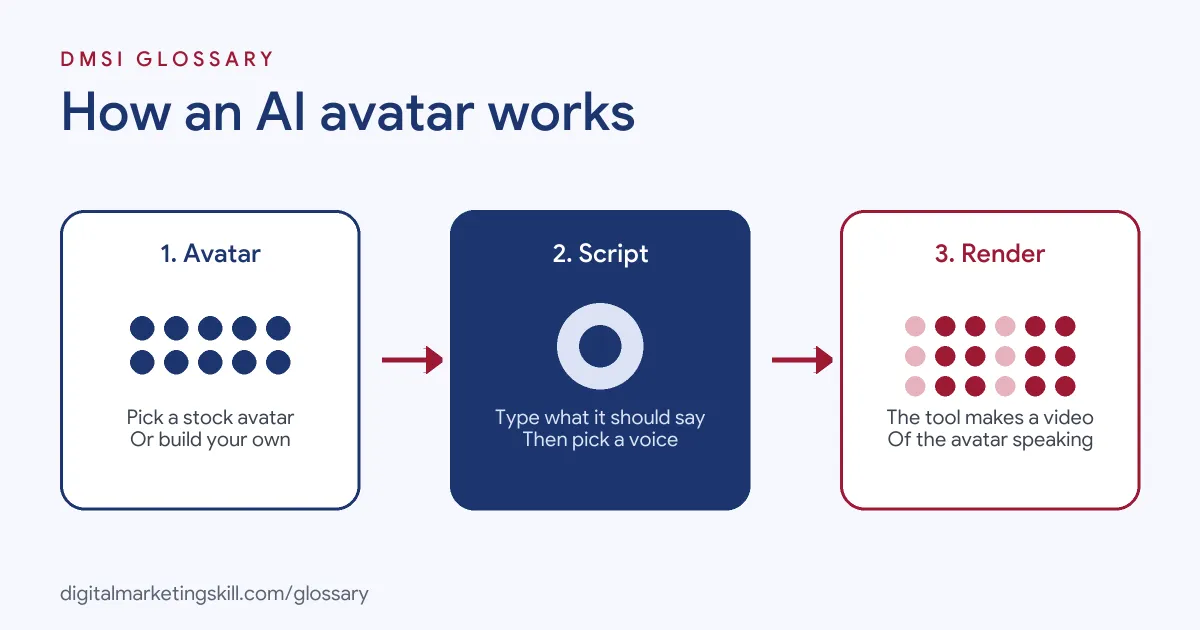
Choosing or Creating the AI Avatar
You can start with a stock character, which needs no filming or consent process. Alternatively, you can build one from a text prompt, from cartoon style to lifelike. If you want a copy of yourself, you upload a photo or a short video. HeyGen notes that hand movements and facial expressions “are derived from your original materials”, so good footage matters.
Adding the Voice
Next, the avatar needs a voice. You can pick a stock voice or clone your own. For instance, HeyGen says each video avatar “includes a voice cloning feature”. Synthesia also lets you clone your voice, so every video “looks and sounds like you”.
Consent Checks
Copying a real person carries risk, so tools add checks. HeyGen asks the person to record “a short consent statement on camera” before it will make a digital twin. However, it also warns that a photo avatar has no consent check. In that case, getting the person’s agreement is your job.
AI Avatar Examples
Here are three made-up examples of how a business might use avatars:
- Product explainers: A software company uses a stock avatar to present short how-to videos. When the product changes, the team edits the script and renders a new version in minutes.
- Founder videos at scale: A coach records a digital twin once. Then she makes weekly update videos from scripts, without filming each one.
- Ad testing: A shop creates five avatar ads with different hooks. It runs them side by side to see which opening line keeps viewers watching.
In each case, the avatar saves filming time. But the script and the idea still decide whether the video works.
Types of AI Avatar
Here is how the main types compare:
| Type | How you make it | Best for |
|---|---|---|
| Stock avatar | Pick from a ready-made library | Fast explainers and training videos |
| Personal avatar (digital twin) | Upload your photo or video, plus consent | Founder, coach or creator content |
| Prompt-built avatar | Describe a character in text | Brand mascots and stylised characters |
| Interactive avatar | Connect the avatar to a chatbot or agent | Live support, sales demos and onboarding |
Synthesia, for example, says its interactive avatars “listen, talk, and respond live”. In other words, they turn a video into a conversation.
How to Create an AI Avatar Video
The steps below work in most avatar tools. Menu names differ, but the flow is the same.
- Write the script first. Keep it short and spoken, as if you were talking to one person.
- Choose the avatar type. Use a stock avatar for speed, or a digital twin if your own face builds trust.
- Get consent if a real person is involved. Record it through the tool, and keep your own record too.
- Pick or clone a voice. Match the accent and tone to your audience.
- Add brand elements. Set the background, outfit, logo and captions.
- Render and review. Watch the whole video for odd lip sync, wrong words or strange gestures.
- Label it if needed. Check the rules of the platform and the country where you publish.
After that, test the video against a human-presented version. The numbers will tell you where avatars fit best.
Best Practices for Using an AI Avatar
- Be open about it. Viewers may feel misled if they later learn the presenter was not real.
- Record clean source footage. Good light and a quiet room give a more natural avatar.
- Keep scripts conversational. Short sentences sound more human when a synthetic voice reads them.
- Use avatars for updates and versions. They shine when you need many similar videos fast.
- Plan your looks. On HeyGen, one avatar slot allows up to 500 looks of the same person, all based on one consent video. So you can change outfits and settings without filming consent again.
- Keep humans in the loop. A real person should check every script and every final video.
Common Mistakes to Avoid
A common mistake is using someone’s likeness without written consent. Another is hiding that a video uses an avatar, which can break platform rules or the law. Some teams also paste in long, formal scripts, so the result sounds stiff. Finally, many people judge avatars on cost alone. Instead, judge them on watch time, clicks and sales, just as you would any video.
AI Avatars and Disclosure Rules
Rules on synthetic media are growing. The EU AI Act, for example, defines a deep fake as AI-made content that “resembles existing persons” and “would falsely appear to a person to be authentic or truthful”. Article 50 says those who use such systems “shall disclose that the content has been artificially generated or manipulated”. For clearly creative or satirical work, the duty is lighter. Even so, you still need to show that the content is generated. So if you use a lifelike avatar of a real person, plan to label it.
Where You’ll Use AI Avatars at Work
Avatars now appear in creative and video job ads. For example, remote listings ask candidates to:
- “mix UGC, creator footage, stock, and AI-generated video, avatars and voiceovers” (Video Editor and Producer, AI and Performance Ads).
- “Use AI tools (avatars, voice, generative video, etc.) to supplement and enhance creative output” (Video Editor and Storyboard Writer).
- “Pilot emerging communication styles like interactive video, AI avatars, and short-form” content (Integrated Communications Manager).
So if you want to work as a Content Creator, Social Media Manager or Paid Social Specialist, knowing how to brief, build and test an AI avatar is a useful extra skill.
Learn It in the Social Media Track
You can learn to create AI avatar videos in the AI-Powered Social Media Management and Advertising track. It covers AI fundamentals, content creation with graphics and video, and social media advertising. You plan, create and run a paid social campaign for a real brand, with unlimited 1-on-1 mentoring and a U.S. Project Internship from day one.
For more ideas, see our guide to AI marketing tools and video marketing for beginners. You can also read about AI video generation and deepfakes.
Frequently Asked Questions
What is an AI avatar in simple terms?
It is a digital presenter, made by AI, that speaks a script you type. It can be a stock character or a copy of a real person.
Can I make an AI avatar of myself?
Yes. Many tools let you build one from a photo or a short video. Some, such as HeyGen, ask you to record a consent statement first.
Do I need to label AI avatar videos?
It depends on where you publish. In the EU, the AI Act requires disclosure of deepfake content that could seem real. Check each platform’s rules too.
Is an AI avatar the same as a deepfake?
Not always. A cartoon or stock avatar is not pretending to be a real person. A lifelike copy of a real person can count as a deepfake, so consent and disclosure matter.
Will AI avatars replace human presenters?
They are best for updates, versions and translations. Real people still matter for trust, personality and original ideas.
Sources: Synthesia: AI avatars; HeyGen Docs: Avatar consent; HeyGen Help: Video avatar FAQ; EU AI Act: Article 50; remote job listings on Himalayas.