
AI video generation is the use of artificial intelligence to create video clips from a text prompt, an image or another video, without filming anything yourself. You describe the scene, and a model such as Google’s Veo produces moving footage that matches it, sometimes with sound. It matters because marketers can now test many short video ideas quickly, as long as they follow each platform’s rules on labelling AI content.
Key Takeaways
- AI video generation turns a prompt, image or clip into new footage. Common modes are text-to-video and image-to-video.
- Well-known tools include Google’s Veo, Runway and Kling. Some models can now generate audio alongside the picture.
- Platforms want transparency. YouTube requires creators to disclose realistic AI-generated or altered content.
- Meta and TikTok add AI labels, and they can detect some AI content through industry-standard signals in the file.
- AI video works best for quick tests, b-roll and concepts. Human editing still decides whether the final ad works.
What Is AI Video Generation?
Think of AI video generation as a camera you control with words. Instead of booking a shoot, you write what you want to see: the setting, the subject, the movement and the mood. The model then predicts frames that fit your description.
There are a few common ways to start. With text-to-video, you begin with a written prompt. With image-to-video, you upload a still, such as a product photo, and the model animates it. Some tools also edit existing footage, for example by changing the style or extending a clip.
It is part of the wider field of generative AI, which also covers text and images. The difference is that video adds time, so the model must keep people, objects and lighting consistent from one frame to the next.
How AI Video Generation Works
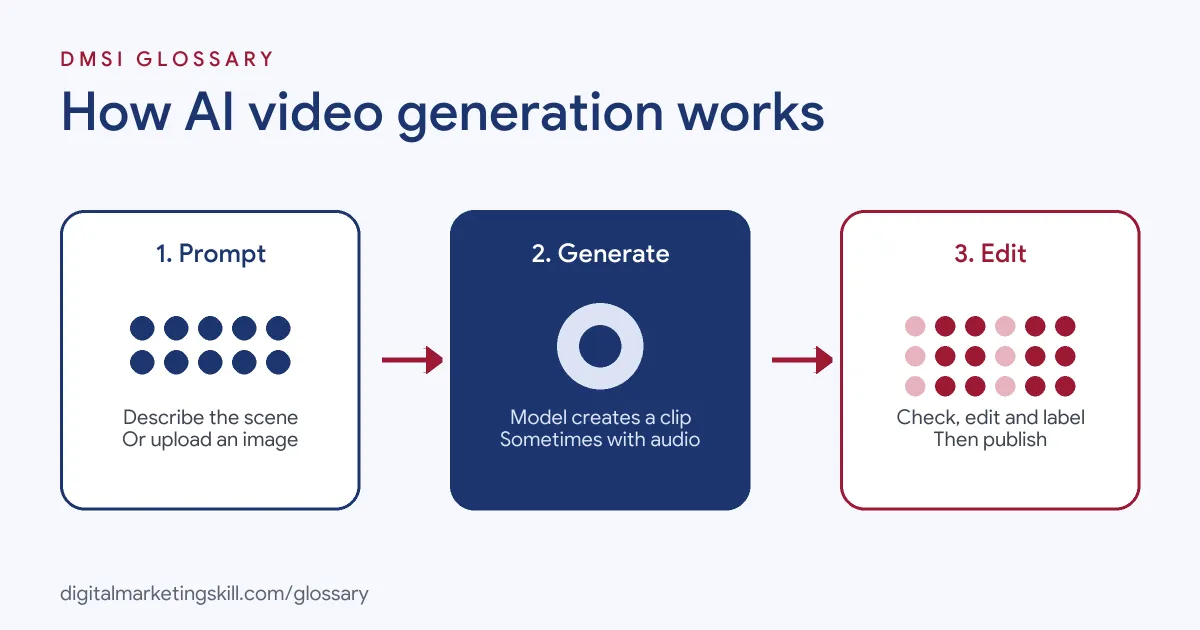
Most tools follow three steps. First, you give the model a prompt, image or clip. Next, the model generates a short video that matches it. Finally, you review, edit and label the result before you publish.
Prompts and Inputs
The prompt is your brief. A clear prompt names the subject, the action, the camera angle and the style. For example, “slow close-up of a hand pouring iced coffee, morning light, shallow focus” gives the model much more to work with than “coffee advert”.
Google says its Veo model offers “improved prompt adherence, meaning more accurate responses to your instructions.” Even so, you will often need several attempts to get the shot you want.
Audio and Limits
Some newer models create sound as well as pictures. Google describes Veo as having “native audio”. However, Google also notes that “creating videos with natural and consistent spoken audio, particularly for shorter speech segments, remains an area of active development.” So check dialogue and lip movement closely.
Watermarks and Labels
Many tools mark their output. Google says videos made with Veo carry SynthID, its technology “for watermarking and detecting content generated by AI.” Similarly, TikTok reads Content Credentials, a standard from the Coalition for Content Provenance and Authenticity (C2PA). These credentials “attach metadata to content”, which TikTok uses to recognise and label AI-generated content from some other platforms.
AI Video Generation Examples
These made-up examples show how teams use it:
- Ad concept tests: A skincare brand generates five short clips with different opening hooks. It runs them as small test ads, then films the winning idea properly.
- Product animation: An online shop uploads a still photo of a trainer and turns it into a slow rotating shot for a product page.
- B-roll: A training company needs background footage of a busy office for a YouTube explainer. It generates the clips instead of buying stock footage.
In each case, the AI clip saves time early on. Then a person still checks quality, brand fit and accuracy.
AI Video Labels on YouTube, Meta and TikTok
Each platform handles AI content a little differently:
| Platform | What it asks | How labels work |
|---|---|---|
| YouTube | Disclose realistic AI-generated or altered content when you upload | Choose Yes under “AI use” in YouTube Studio, and YouTube adds a label |
| Meta (Facebook and Instagram) | Lets people self-disclose AI-generated content at upload | An “AI info” label appears when Meta detects industry signals or when people self-disclose |
| TikTok | Label AI-generated content | TikTok labels content made with its AI effects and reads C2PA Content Credentials from other tools |
Meta also separates generated content from edited content. When its systems detect that content was only modified or edited by AI tools, Meta moves the “AI info” label to the post’s menu instead.
The rules change from time to time, so check each platform’s help pages before a campaign goes live.
How to Use AI Video Generation for Marketing
Follow these steps to make your first marketing clip:
- Start with the goal. For example, decide whether the clip is a hook test, a product shot or background footage.
- Write a detailed prompt with the subject, action, camera, lighting and style.
- Add a reference image if the tool allows it, such as your real product photo.
- Generate several versions. Then pick the one with the fewest errors.
- Edit the clip in a video editor. Add captions, your logo and a clear call to action.
- Check hands, faces, text and product details. AI often gets these wrong.
- Label the content where the platform requires it, then publish and track results.
Treat the first round as a draft. As a result, you can learn fast without spending a full production budget.
Best Practices for AI Video Generation
- Be honest about AI. YouTube says creators must disclose content that “makes a real person appear to say or do something that they didn’t say or do.”
- Protect real products. Generated footage can change colours, logos or shapes. Always compare it with the real item.
- Use it for speed, not shortcuts. AI clips are great for testing ideas. Your best-performing concept may still deserve a real shoot.
- Keep the brand consistent. Save the prompts that work, so future clips match in style and tone.
- Check rights and terms. Read each tool’s terms of use before you use its output in paid ads.
Common Mistakes to Avoid
Many beginners make the same errors. First, they write vague prompts and blame the tool for vague results. Second, they publish clips with warped hands, garbled text or a product that looks wrong. Third, they skip disclosure for realistic content, which breaks platform rules. Finally, they rely on AI for every video and lose the real faces and stories that build trust. A quick human review fixes most of these problems.
Where You’ll Use AI Video Generation at Work
AI video skills now show up in creative and paid social roles. For example, remote job listings ask candidates to:
- “Generate realistic AI video and image assets using industry-leading AI tools (Kling, Seedance, NanoBanana)” (Video Editor, Ads Campaign Creative).
- “Create short AI-generated videos for website sections” (Freelance AI Image and Video Generation Expert).
- “Set up and place AI-generated video and image content into Google Ads (YouTube) campaigns” (Generative AI Content and YouTube Advertising Specialist).
So if you want to work as a Content Creator, Paid Social Specialist or Social Media Manager, employers will expect you to create AI clips, edit them and use them in real campaigns.
Learn It in the Social Media Track
AI fundamentals are part of every DMSI track. For AI video, the best fit is the AI-Powered Social Media Management and Advertising track, which covers content creation with graphics and video. There, you plan, create and run a paid social campaign for a real brand. You also work on a U.S. Project Internship from day one, with unlimited 1-on-1 mentoring.
New to video? Start with our guide to video marketing for beginners, then see what each platform rewards in our online video strategy guide.
Frequently Asked Questions
What is AI video generation in simple terms?
It is using an AI model to create video from a description, an image or another clip. You write what you want, and the model produces the footage.
Do I have to label AI-generated video?
Often, yes. YouTube requires disclosure for realistic AI content, although non-realistic content and minor edits don’t need it. Meta and TikTok use AI labels too. Check each platform’s rules before you post.
Can AI video replace filming?
Not fully. It works well for tests, concepts and b-roll. However, real footage still matters for trust, product accuracy and people’s faces.
Which tools are used for AI video generation?
Common names include Google’s Veo, Runway and Kling. Job listings also mention tools such as Seedance alongside image tools like Midjourney.
Is AI video generation good for ads?
It can be, especially for testing hooks quickly. Even so, judge each clip on results, and edit it so it looks and sounds like your brand.
Sources: Google DeepMind: Veo; YouTube Help: Disclosing altered or synthetic content; Meta: Approach to labelling AI-generated content; TikTok Newsroom: Advancing AI transparency; remote job listings on Himalayas.