
Maximise Clicks is an automated Google Ads bid strategy that sets your bids to get as many clicks as possible within your budget. You tell Google how much to spend, and it handles the bid for each auction. As a result, it is a simple way to drive traffic to a website. It also suits new accounts that don’t yet have conversion data.
Key Takeaways
- Maximise Clicks aims for the most clicks your budget can buy.
- Google spells it “Maximize clicks” in the Google Ads interface.
- You can set a maximum CPC bid limit to cap what you pay per click.
- It focuses on traffic, not on conversions or sales.
- It works well for new campaigns, then you can move to conversion-based bidding.
What Is Maximise Clicks?
Maximise Clicks is one of the bid strategies you can choose in Google Ads. Google describes it simply: it “sets your bids to help get as many clicks as possible within your budget.” So instead of picking a bid for each keyword, you let Google adjust bids for you.
Think of it like giving a friend a fixed amount of money for a market. You ask them to bring back as many apples as they can. They buy cheap apples where they find them and pay a bit more only when it’s worth it. In the same way, Google spreads your budget to get the most clicks.
It is a form of automated bidding. However, it is not the same as Smart Bidding. Google says Smart Bidding “refers to bidding strategies that use Google AI to optimize for conversions or conversion value.” By contrast, Maximise Clicks only looks at clicks.
In Google’s own table of goals, Maximise Clicks matches the goal “Increase site visits.” So it fits best when traffic is what you need most.
Why It Matters
Many new advertisers find bidding hard. For example, they don’t know if a keyword is worth 50p or £3 a click. Maximise Clicks removes that guesswork. Also, it helps you collect data fast. After that, you can learn which keywords and ads bring sales. Then you can switch to a strategy that targets results, not just visits.
How Maximise Clicks Works
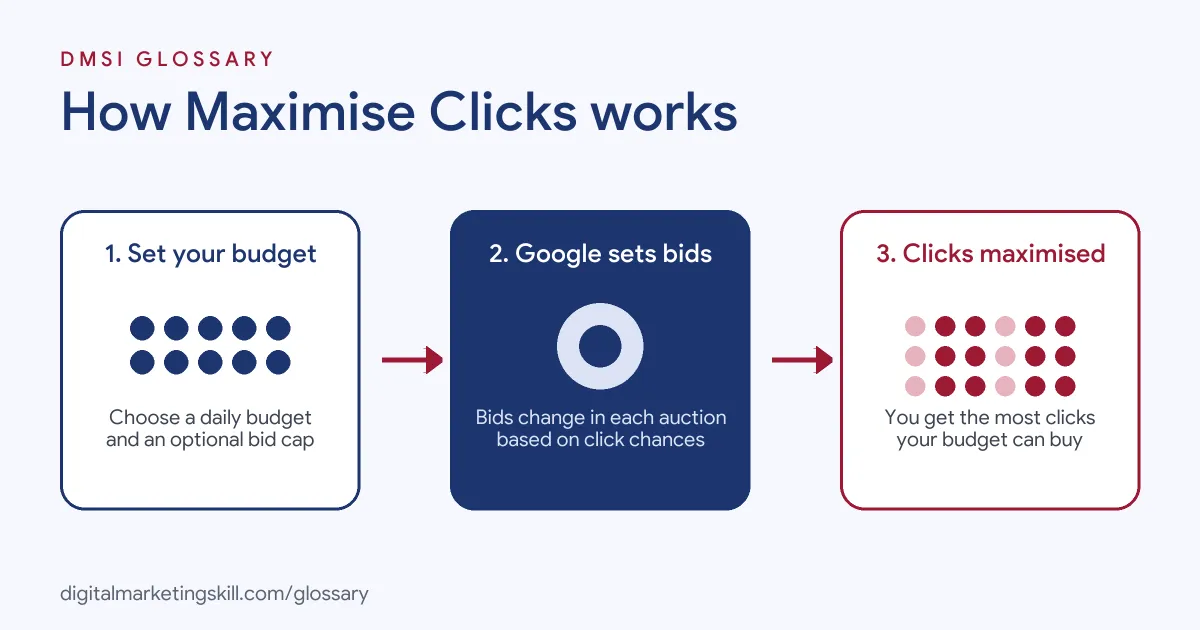
Maximise Clicks works inside your daily budget. For each auction, Google sets a bid that it expects will help you win clicks at a good price. Then it repeats this across all your auctions to get the most clicks for your spend.
You set the budget
First, you choose a daily budget for the campaign. This is the main control you have. Google says that without a bid cap, it “adjusts your bids to try to get you as many clicks as possible while spending your budget.” So the budget is both your limit and your target.
Google sets the bids
Next, Google changes your bids in real time. It looks at the chance of a click in each auction. For instance, it may bid higher when a click looks likely and lower when it doesn’t. You don’t set keyword-level bids yourself.
You can add a bid cap
On top of that, you can set a maximum CPC bid limit. Google explains that this “allows you to set a cap on bids when using a Maximize clicks bid strategy.” However, a low cap can stop you from winning some auctions. So set it with care, and check your reports after a few days.
Where it is available
You can use it on a single campaign or as a portfolio bid strategy across several campaigns. In addition, Demand Gen campaigns support it. But Google notes that they don’t support “portfolio bidding or maximum CPC bid limits” with this strategy.
What it does not do
Maximise Clicks does not look at what happens after the click. So it can’t tell a buyer from someone who leaves after two seconds. For example, it may favour cheap clicks from broad searches, because they help it reach more clicks for your money. Also, Google notes that it “doesn’t optimize towards impression share.” In other words, it won’t try to show your ad as often as possible. Instead, it only chases clicks. That is why your keyword choice, ad copy and landing page still matter a lot.
How results can change
Your click numbers will not be the same every day. Google says clicks can be affected by things such as “holidays, weekends, special events.” For instance, a gift shop may see costs rise before a busy season. So look at trends over a few weeks, not single days. Then you can judge if the strategy is working.
Examples of Maximise Clicks
- A new local bakery. The owner launches a first Search campaign with a small budget. She picks Maximise Clicks to see which searches bring visits. After a few weeks, she has data to plan her next step.
- A blog with ad income. The site earns from page views, so traffic is the main goal. As a result, the team uses Maximise Clicks with a bid cap to keep costs steady.
- A software company testing a new market. The team wants to test interest in a new country before tracking sign-ups. So they run a short campaign with Maximise Clicks and compare click-through rates by keyword.
Maximise Clicks vs Other Bid Strategies
| Point | Maximise Clicks | Maximise Conversions | Manual CPC |
|---|---|---|---|
| Main goal | Most clicks | Most conversions | Your own bid control |
| Who sets bids | You | ||
| Needs conversion tracking | No | Yes | No |
| Bid cap | Optional max CPC | Not used | Your bid is the cap |
| Best for | Traffic and new campaigns | Leads and sales | Tight control |
In short, each strategy suits a different stage. Many advertisers start with clicks, then move to conversions once tracking is in place. Others keep manual bids for small, tightly managed campaigns. You can read more about Maximise Conversions and manual CPC in their own entries.
How to Set Up Maximise Clicks
- Pick your goal. Make sure traffic is the goal for this campaign, not leads or sales.
- Open your campaign settings. In Google Ads, go to the campaign and find the Bidding section.
- Choose the strategy. Pick “Maximize clicks” from the list of bid strategies.
- Set a bid cap if needed. Add a maximum CPC bid limit if you want to stop very expensive clicks.
- Set your daily budget. Then choose a budget you are happy for Google to spend in full.
- Check the landing page. Make sure the page loads fast and matches your ads, so clicks don’t go to waste.
- Review after a week. Finally, look at cost per click, click-through rate and search terms, and adjust.
Best Practices for Maximise Clicks
- Use it for traffic goals. Choose it when visits matter more than direct sales.
- Add negative keywords. Block searches that bring cheap but useless clicks.
- Track conversions anyway. Set up conversion tracking so you can see which clicks turn into results.
- Watch your cost per click. Check average cost per click often, and add a cap if it climbs too high.
- Treat it as a first step. Once you have enough data, test a conversion-based strategy.
- Check click share. Google says that if your click share is very high, this strategy “might not bring you significantly more traffic.”
Common Mistakes to Avoid
- Using it for sales goals. More clicks don’t always mean more sales, so pick a conversion strategy for that.
- Setting the bid cap too low. A very low cap can stop your ads from showing at all.
- Ignoring search terms. Without checks, your budget may go on broad, low-quality searches.
- Judging too quickly. Give the strategy time to settle before you make big changes.
- Forgetting the landing page. Cheap clicks to a weak page still waste money.
Where You’ll Use Maximise Clicks at Work
Job listings rarely name Maximise Clicks on its own. Instead, they ask for strong skills in bidding strategies, and Maximise Clicks is one of the core options in Google Ads. For example, real remote job listings ask for:
- “Strong understanding of bidding strategies, attribution models, and conversion rate optimization (CRO).” (Senior Google Ads Specialist).
- “Understanding of campaign structure, bidding strategies, keyword management, and conversion optimization.” (Senior Channel Specialist, Paid Search & Affiliate Marketing).
- “Develop and execute campaign strategies aligned with business goals across keyword targeting, bidding strategies, audience segmentation, campaign structure, and budget allocation.” (Paid Search & Youtube Manager).
Learn It in the Google Ads and Analytics Track
You can learn Maximise Clicks and the other Google Ads bid strategies in the AI-Powered Google Specialist track. Every track includes a U.S. Project Internship from day one, with unlimited 1-on-1 mentoring.
Frequently Asked Questions
Is Maximise Clicks good for beginners?
Yes, it is often a good start. It removes manual bidding, so you can focus on keywords, ads and landing pages.
Does Maximise Clicks need conversion tracking?
No, it only looks at clicks. However, you should still track conversions to judge the real value of your traffic.
Can I control how much I pay per click?
Yes. You can set a maximum CPC bid limit, although Demand Gen campaigns don’t support this limit.
Will Google spend my whole budget?
It tries to. Without a cap, Google adjusts bids to get as many clicks as possible while spending your budget.
When should I switch away from Maximise Clicks?
Switch when you have steady conversion data and your goal is leads or sales. Then test Maximise Conversions or Target CPA.
Sources: Google Ads Help: About Maximize clicks; Google Ads Help: About automated bidding; Google Ads Help: About Smart Bidding; remote job listings on Himalayas, Himalayas and Himalayas.