
Conversion tracking is the setup that records when someone takes a valuable action after interacting with your ad, such as buying, signing up or calling your business. In Google Ads, it usually works through a tag on your website, a link to Google Analytics, call tracking or imported offline data. It matters because without it you cannot tell which keywords, ads and campaigns actually bring results, or let automated bidding optimise for them.
Key Takeaways
- Google Ads can measure website, app, phone call and offline conversions.
- For website actions, you can use the Google tag or import key events from Google Analytics.
- Some conversions need no tag. For example, calls from call assets can use a Google forwarding number.
- Conversion data powers Smart Bidding, so bad tracking leads to bad automated decisions.
- Imported Google Analytics key events can take 24 to 48 hours before the import options appear in Google Ads.
What Is Conversion Tracking?
A conversion is any action you count as valuable. Tracking simply means recording those actions and linking them back to the ad that led there.
Google explains the benefits clearly. Conversion measurement helps you “learn which keywords, ads, ad groups, and campaigns are best at driving valuable customer activity.” It also helps you “understand your return on investment (ROI) and make better informed decisions about your ad spend,” and it supports Smart Bidding strategies.
For example, a dental clinic might run ads for “teeth whitening.” Without tracking, it only sees clicks. With tracking, it sees how many of those clicks booked an appointment, and which keywords brought the bookings.
How Conversion Tracking Works
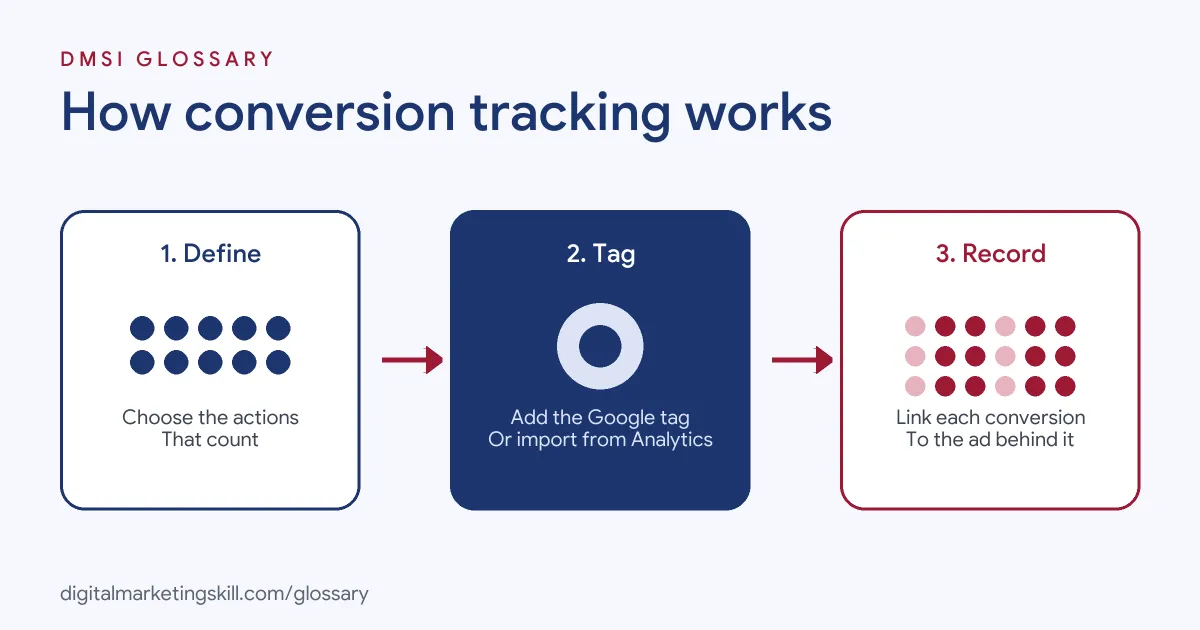
The process has three steps. First, you choose which actions count as conversions. Next, you add a way to record them, such as the Google tag. Finally, when a customer completes the action, the system records a conversion and links it to the ad interaction.
Conversion Sources
Google Ads groups conversions by where they happen:
- Website conversions: “purchases, sign-ups, and other actions that customers complete on your website.”
- App conversions: installs of Android or iOS apps, and purchases or other activity inside them.
- Phone call conversions: calls that you connect to your campaigns, so you can see which ads drive phone leads.
- Offline conversions: sales or actions that happen elsewhere, such as in a physical store, which you can bring into Google Ads.
Google Tag or Google Analytics
For website actions, Google gives two main options. If you already use Google Analytics, Google calls it “the most efficient choice for advertisers who want to reuse existing website event tracking.” By contrast, the Google tag is recommended if you do not use Google Analytics, or if you need advanced Ads features such as enhanced conversions. You can also use both.
Conversions Without a Tag
Not every conversion needs code on your site. Google notes that calls from call assets or call-only ads can be tracked with a Google forwarding number. Likewise, app downloads and in-app purchases from Google Play, and local actions, “will automatically be recorded as conversions, and no tracking code is needed.”
Key Events and Enhanced Conversions
In Google Analytics, important actions are called key events. Google defines a key event as “an event that measures an action that’s particularly important to the success of your business.” You can create a Google Ads conversion from a key event, which Google says “reduces the risk of data discrepancies” between the two tools.
Enhanced conversions add accuracy. According to Google, the feature sends “hashed first party conversion data” to Google, using a one-way hashing algorithm called SHA256 on data such as email addresses. In short, it helps match more conversions to ads without sending raw customer details.
Conversion Tracking Examples
Here are three made-up setups for different businesses:
- Online shop: A clothing brand tracks purchases with the Google tag and passes the order value. As a result, it can see revenue by campaign.
- Local plumber: A plumber gets most leads by phone. So it tracks calls from call assets and calls from its website.
- B2B software: A software firm tracks demo requests online. Later, it imports which demos became paying customers from its CRM, using offline conversion imports.
Conversion Tracking Methods Compared
This table compares the main ways to measure conversions in Google Ads:
| Method | Best for | Key detail |
|---|---|---|
| Google tag | Website actions, with Ads-specific features | Recommended for enhanced conversions |
| Google Analytics import | Sites that already track key events in Google Analytics | Import options can take 24 to 48 hours to appear |
| Call tracking | Businesses that get leads by phone | Calls from call assets can use a Google forwarding number |
| Offline import | Sales that close later or offline | Brings CRM or in-store results back into Google Ads |
How to Set Up Conversion Tracking
Follow these steps for a typical website setup:
- List your key actions. Decide what counts, such as purchases, form fills or calls.
- Choose your data source. Use the Google tag, Google Analytics, or both.
- Create conversion actions in Google Ads. Give each one a clear name and, where possible, a value.
- Install the tag. Add it to your site directly or through Google Tag Manager.
- Test the setup. Complete a test action and confirm that it is recorded.
- Set primary actions. Mark the actions that bidding should optimise for. For calls, Google advises setting the action to “Primary.”
- Review regularly. After that, check the data each week for drops or sudden spikes.
Checking Your Data Makes Sense
Even a working tag can record the wrong thing. So compare your tracked numbers with real business records every month. For example, if Google Ads shows 40 sales but your shop recorded 25 orders from paid search, something is double counting. Similarly, if leads drop to zero overnight, a site change has probably broken a tag. A quick monthly check like this keeps your reports, and your bidding, honest.
Best Practices for Conversion Tracking
- Track what matters to the business. A sale or qualified lead is worth more than a page view.
- Add values. Values let you measure revenue and use value-based bidding.
- Avoid double counting. Make sure one purchase is not recorded twice by two tags.
- Match platforms. On Meta, the equivalent tools are the Meta Pixel and the Conversions API.
- Document everything. Keep a simple sheet of each action, where it fires and who set it up.
Common Conversion Tracking Mistakes
A few errors cause most problems. First, advertisers count low-value actions, such as page views, as primary conversions, so bidding chases the wrong goal. Second, they install tags twice and inflate results. Third, they forget to test after a website redesign, and tracking quietly breaks. Finally, they ignore phone and offline sales, so campaigns look weaker than they are.
Where You’ll Use Conversion Tracking at Work
Tracking is a core skill in paid media and analytics roles. For example, recent remote job listings ask candidates to:
- “Set up, audit and troubleshoot conversion tracking across Google Ads, GA4, Google Tag Manager and Cloudflare Zaraz, including Enhanced Conversions, Consent Mode v2, call tracking and offline conversion imports” (Google Ads Specialist).
- “Set up, monitor, and analyze conversion tracking for paid advertising campaigns using tools such as Google Tag Manager and Google Analytics” (Digital Marketing Specialist).
- Show a “Solid understanding of conversion tracking, attribution models, and data quality tradeoffs” (Performance Marketing Specialist).
So as a Google Ads Specialist, PPC Specialist or Web Analytics Specialist, you will set up tracking, check it works and explain the results.
Learn It in the Google Ads Track
Conversion tracking is built into the AI-Powered Google Specialist track. There, you launch and measure a Google Ads campaign with conversion tracking, so you can show real, measured results. You also join a U.S. Project Internship from day one, with unlimited 1-on-1 mentoring.
To connect tracking with analytics, read our guide to Google Analytics campaign tracking.
Frequently Asked Questions
What is conversion tracking in simple terms?
It is a way to record when people take a valuable action after seeing or clicking your ad, such as buying or signing up.
Do I need Google Analytics for conversion tracking?
No. You can use the Google tag on its own. However, if you already track key events in Google Analytics, you can import them into Google Ads.
Can I track phone calls as conversions?
Yes. Google Ads can track calls from call assets and call-only ads using a Google forwarding number, as well as calls from your website.
Why are my conversions not showing?
The tag may be missing or broken, or the data may still be processing. Google notes that imported key events can take 24 to 48 hours to appear.
What is offline conversion tracking?
It is bringing results that happen outside your website, such as in-store sales or closed deals, back into Google Ads.
Sources: Google Ads Help: About conversion measurement; Google Analytics Help: About key events; Google Ads Help: About enhanced conversions; remote job listings on Himalayas.