
Enhanced conversions is a Google Ads feature that improves conversion tracking by sending scrambled, or hashed, customer details such as an email address to Google when someone converts. Google matches that hashed data to signed-in Google accounts, so it can credit more sales and leads to the right ads. It matters because better measurement means smarter bidding and a truer picture of what your ads achieve.
Key Takeaways
- The feature adds to your existing conversion tags. It doesn’t replace them.
- Your tag hashes customer data with SHA256, a one-way method, before it reaches Google.
- There are two versions: one for web sales, and one for leads that close offline.
- You can set it up with the Google tag, Google Tag Manager or the Google Ads API.
- Google recommends it as part of a strong first-party data set-up for value-based bidding.
What Are Enhanced Conversions?
Standard conversion tracking relies on tags and cookies to link a sale back to an ad click. However, cookies don’t always survive. People switch devices, clear their browsers or block tracking. As a result, some sales that came from your ads go uncounted.
This feature helps fill that gap. Google describes it as a feature that can improve the accuracy of your conversion measurement and unlock more powerful bidding. It supplements your existing conversion tags by sending hashed first-party conversion data to Google in a privacy-safe way.
For example, a customer clicks your ad on their phone, then buys on their laptop later. If they enter an email address at checkout, Google can match the hashed version to the account they used when they saw the ad. The sale then counts towards the right campaign.
How Enhanced Conversions Work
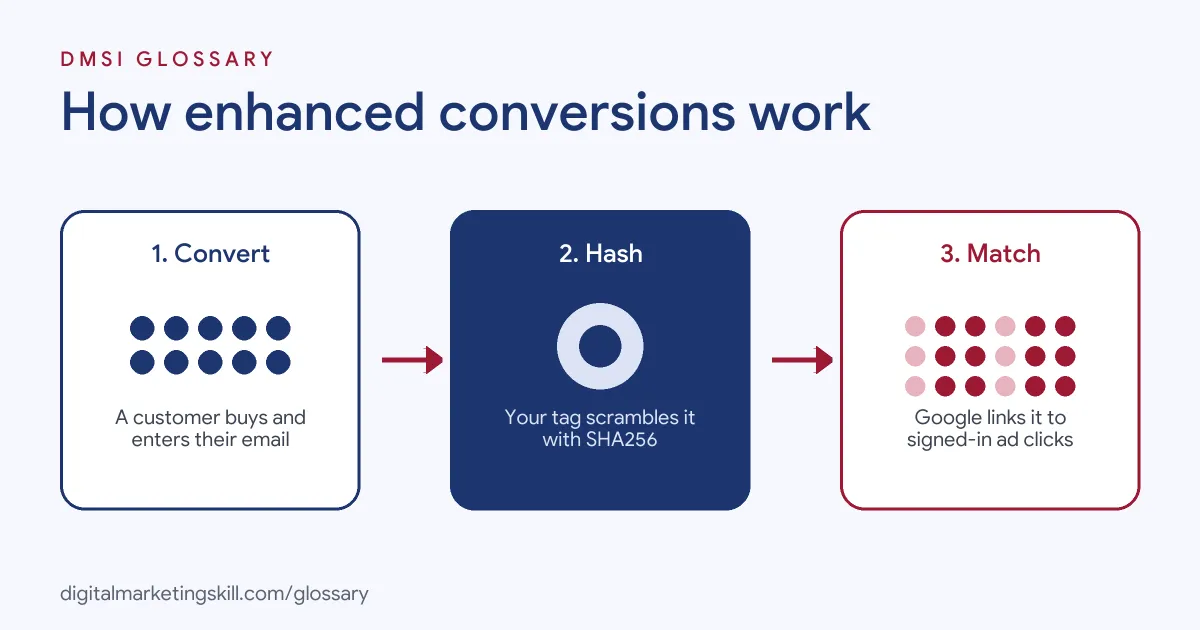
The process has three steps. First, a customer converts on your site and enters details such as an email address. Next, your tag hashes that data and sends it to Google. Finally, Google matches it to signed-in accounts that engaged with your ads.
What Hashing Means
Hashing turns data into a fixed string of characters that can’t be turned back into the original. Google uses the SHA256 algorithm. So it receives a scrambled code, not the plain email address.
If you hash data yourself, Google asks you to tidy it first. Its steps are to remove spaces at the start and end, convert text to lower case, format phone numbers in the E.164 standard, and remove dots before the domain in gmail.com and googlemail.com addresses.
Enhanced Conversions for Web vs Leads
Google offers two versions, depending on where the sale happens:
| Type | Best for | How it works |
|---|---|---|
| Web | Sales and events that happen on your website | Sends hashed data when a user converts, then matches it to signed-in Google accounts that engaged with your ads |
| Leads | Sales that close offline after a website lead | Uses hashed data from your lead forms together with the offline conversions you import |
For instance, an online shop would use the web version. By contrast, an estate agent that books viewings from a web form and closes deals later would use the leads version. Google also notes that both now share a single on and off setting in Google Ads.
Enhanced Conversions Examples
Here are three made-up examples:
- Online fashion shop (example): Many shoppers browse on mobile but buy on desktop. After the shop switches on the feature, Google Ads credits more of those sales to its campaigns, so Smart Bidding gets more data.
- B2B software (example): A firm collects demo requests through a web form. It closes deals weeks later in its CRM, then imports them. The leads version links each closed deal back to the right ad.
- Course provider (example): A training school captures email addresses on its enrolment page. It sets it up through Google Tag Manager, reading the email field from the form.
In each case, the business sends no plain personal data. It only sends hashed details that Google can match.
How to Set Up Enhanced Conversions
Google offers three ways to set it up: the Google tag, Google Tag Manager or the Google Ads API. These steps follow the Google tag route:
- Check your conversion action. Google notes that conversions imported from Google Analytics goals aren’t supported. So use a Google Ads conversion action set up with the Google tag or Tag Manager.
- Know where the tag fires. Note the exact URL, such as your order confirmation page, and the event that triggers the conversion.
- Review the customer data terms. Accept Google’s customer data policies in your conversion settings.
- Turn on enhanced conversions. Find the setting in your Google Ads conversion settings.
- Tell the tag where the data is. Choose automatic detection, CSS selectors or JavaScript variables, or add a code snippet.
- Validate it. Use Google’s diagnostics to check that Google is receiving and matching the data.
Privacy Checks Before You Switch It On
Because this feature uses customer details, it pays to check a few things first. Start with your privacy notice. Does it tell people that you share hashed data with ad partners to measure results? If not, update it.
Next, look at consent. In many places, the law says you need a clear choice from visitors before you share their data for ads. So check that your cookie banner and tags respect that choice.
Then read Google’s customer data policies, which you must accept in your conversion settings. Finally, talk to whoever owns data protection in your business. A short chat now can save a much bigger problem later.
Best Practices
A few habits help you get the most from it:
- Collect an email address at conversion. It is the most common field, and it gives Google something reliable to match.
- Be open with customers. Explain in your privacy notice that you share hashed data with ad partners for measurement.
- Respect consent. Make sure your consent set-up allows you to send this data where the law requires it.
- Pair it with value-based bidding. Google’s bidding guide lists enhanced conversions as a way to build durable, accurate measurement.
Common Mistakes to Avoid
First, many advertisers turn on the setting but never point the tag at the email field, so the tag sends nothing. Second, they use Analytics-imported goals, which don’t support the feature. Third, they hash data themselves without tidying it first, so matches fail. Finally, they forget to check consent rules. Each of these quietly undoes the benefit.
Where You’ll Use Enhanced Conversions at Work
Tracking skills like this appear in Google Ads and analytics roles. For example, one current remote listing asks candidates to:
- “Set up, audit and troubleshoot conversion tracking across Google Ads, GA4, Google Tag Manager and Cloudflare Zaraz, including Enhanced Conversions, Consent Mode v2, call tracking and offline conversion imports” (Google Ads Specialist, Advanced Tracking and AI Automation).
So as a Google Ads Specialist, PPC Specialist or Web Analytics Specialist, employers will expect you to set it up, check it and explain what it changes in reports. It also builds on your first-party data, since that is the data your tag hashes and Google matches.
Learn It in the Google Specialist Track
You can learn to set up accurate tracking in the AI-Powered Google Specialist track. There, you launch and measure a Google Ads campaign with conversion tracking, so you finish with real data to show. You also get unlimited 1-on-1 mentoring and a U.S. Project Internship from day one.
For more on getting the most from your account, read our guide to Google Ads optimisation.
Frequently Asked Questions
What are enhanced conversions in simple terms?
They are a way to track more sales from your Google Ads by sending scrambled customer details, such as an email address, that Google can match to ad clicks.
Is enhanced conversions data safe?
The data is scrambled with SHA256 first, so Google receives a scrambled code rather than plain details. You still need to follow privacy and consent rules.
What is the difference between enhanced conversions for web and leads?
The web version improves tracking of sales on your website. The leads version links offline sales back to website leads you imported.
Can I set up enhanced conversions with Google Tag Manager?
Yes. Google supports set-up through the Google tag, Google Tag Manager or the Google Ads API.
Do I need a developer to set it up?
Not always. Google lets you point the tag at your form fields with CSS selectors or JavaScript variables, or use automatic detection. However, a developer can help if your checkout is custom-built or the fields are hard to find.
Do enhanced conversions work with Google Analytics goals?
No. Google says conversions imported from Analytics goals aren’t supported, so use a Google Ads conversion action instead.
Sources: Google Ads Help: About enhanced conversions; Google Ads Help: Set-up with the Google tag; Google Ads Help: Value-based bidding best practices; remote job listings on Himalayas.