
Crawl budget is the number of URLs a search engine can and wants to crawl on your site in a given time. Google describes it as the result of two things: how much crawling your server can handle, and how much Google wants to crawl your content. It matters most for very large or fast-changing sites, where wasted crawling can leave important pages undiscovered or out of date.
Key Takeaways
- Google says a site’s allowance “is determined by two main elements: crawl capacity limit and crawl demand.”
- Google’s guide is aimed mainly at large sites with over a million pages, or sites with over 10,000 pages that change daily.
- Duplicate and low-value URLs waste crawling time. Google calls inventory “the factor that you can positively control the most.”
- Slow responses, server errors and rate-limit signals make Google crawl less.
- Crawled does not mean indexed. Each page is still assessed before it enters the index.
What Is Crawl Budget?
Google cannot crawl every URL on the web all the time. So it decides how much time and how many connections to spend on each site. That allowance is what SEOs call the crawl budget, and it can change over time rather than staying fixed.
Also, it is set per hostname. Google gives the example that https://www.example.com/ and https://code.example.com/ “are treated as separate sites and have separate crawl budgets.” In other words, a blog on a subdomain gets its own allowance.
The idea builds on crawling, the process of fetching pages. However, crawl budget asks a narrower question: of all the URLs Google knows about on your site, how many will it fetch, and how often?
How Crawl Budget Works
To do this, Google combines two forces. First, it works out how fast it can crawl without overloading your server. Next, it decides how much it wants to crawl, based on your content. Finally, the result is the set of URLs it actually fetches.
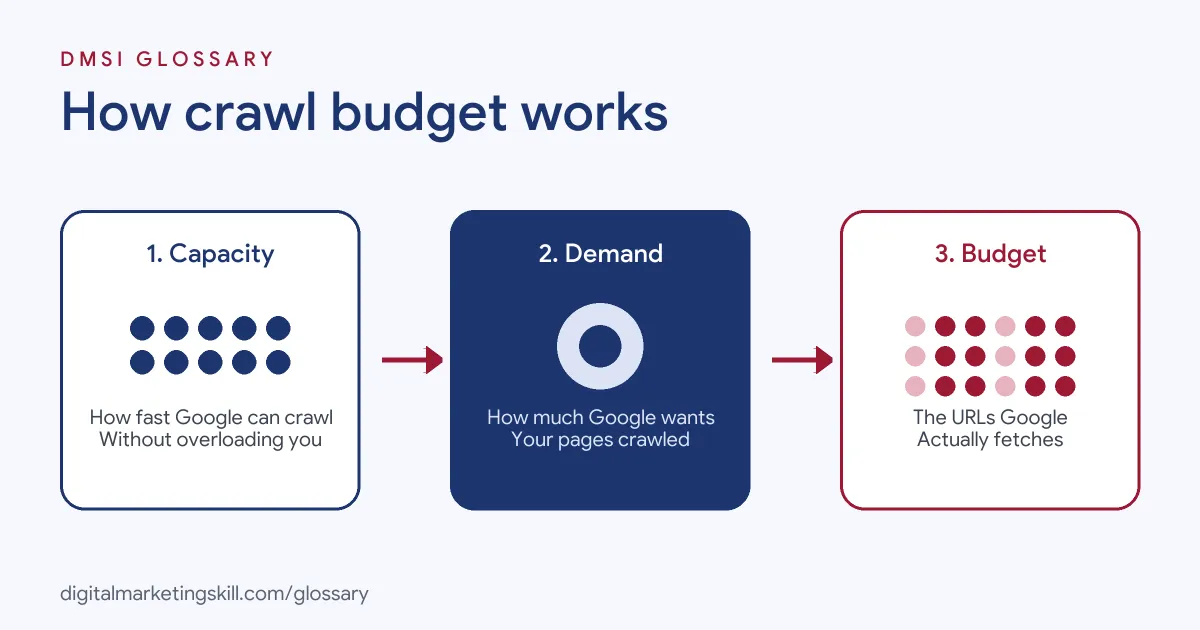
Crawl Capacity Limit
Google says it wants “to crawl your site without overwhelming your servers.” So it sets a crawl capacity limit, which can rise and fall. If your site responds consistently, with stable or improving response times, “the limit goes up.” By contrast, if the site slows down or returns server errors (5xx) or rate-limiting signals such as HTTP 429, “the limit goes down and Google crawls less.”
Crawl Demand
Demand, on the other hand, is about how much Google wants your pages. Its guide names three factors:
- Perceived inventory: the URLs Google knows about. If many are duplicates or unimportant, this “wastes a lot of Google crawling time on your site.”
- Popularity: “URLs that are more popular on the Internet tend to be crawled more often.”
- Staleness: Google wants to recrawl pages “frequently enough to pick up any changes.”
Google adds that site-wide events, such as a site move, may increase crawl demand while it reprocesses the new URLs.
Crawled Is Not Indexed
Crawling a URL is only the first step. Google notes that “not every page that is crawled will necessarily be indexed.” Each page must still be “evaluated, consolidated, and assessed” before it joins the index. That’s why indexing problems can look similar but need different fixes.
Who Needs to Worry About Crawl Budget?
In fact, most small sites never need to think about it. Google’s guide says it is intended mainly for:
- Large sites with 1 million or more unique pages whose content changes moderately often, such as once a week.
- Medium or larger sites with 10,000 or more unique pages whose content changes very rapidly, such as daily.
- Sites where a large share of URLs show as “Discovered – currently not indexed” in Search Console.
Google stresses that these numbers “are not exact thresholds.” For a small brochure site, a clean sitemap and regular checks are usually enough.
Crawl Budget Examples
Here are three made-up examples of where it matters:
- Large online shop: A retailer has thousands of products, but its filters create millions of URL combinations. Googlebot spends its time on filter pages, so new products take longer to appear.
- News site: A publisher adds hundreds of articles a day. However, a slow server makes Google crawl less, so fresh stories are picked up late.
- Site migration: A company moves to a new domain. Google’s crawl demand rises while it reprocesses the content under the new URLs.
What Helps and What Hurts Crawl Budget
This table sums up Google’s own guidance:
| Action | Effect | Google’s advice |
|---|---|---|
| Duplicate URLs | Wastes crawling time | Consolidate duplicate content |
| Unimportant pages, such as sorted versions | Wastes crawling time | Block them with robots.txt if you can’t consolidate |
| Removed pages | A 404 is “a strong signal not to crawl that URL again” | Return a real 404 status |
| Soft 404 pages | Keep being crawled | Eliminate them |
| Long redirect chains | Negative effect on crawling | Avoid them |
| Fast, cacheable pages | Google may read more content | Improve speed and support 304 responses |
How to Optimise Crawl Budget
Follow these steps if your site is large enough to need it:
- Check the Crawl Stats report. In Search Console, look at how often Google crawls and how your server responds.
- Review the Page Indexing report. Look for many URLs marked “Discovered – currently not indexed” and for soft 404 errors.
- Cut duplicate URLs. Consolidate pages so each piece of content has one URL.
- Block low-value URLs. Use robots.txt for infinite filters or sorted lists you do not want crawled at all.
- Return honest status codes. Use a real 404 for removed pages, and fix soft 404s.
- Keep sitemaps up to date. Google recommends including the <lastmod> tag for updated content.
- Speed up the server. After that, watch whether crawl activity rises as response times improve.
A Simple Crawl Audit for Large Sites
If you manage a big site, a short audit shows where crawling goes. First, export a sample of the URLs Google has crawled from Search Console. Next, group them by type, such as product pages, filter pages and old campaign pages. Then compare those groups with the pages you actually want in search.
For example, an audit might show that a large share of crawled URLs are sorted or filtered views of the same lists. In that case, the fix is clear: consolidate those views, or block them in robots.txt. After that, check the Crawl Stats report again. As a result, you can see whether Google is spending more of its time on the pages that matter.
Best Practices for Crawl Budget
- Fix inventory first. Google says it is the factor you can control the most.
- Don’t use noindex to save budget. Google will still request the page, then drop it, “wasting crawling time.”
- Don’t shuffle budget with robots.txt. Google says blocking pages this way won’t automatically shift the freed-up budget to other pages.
- Link to key pages. Strong internal links help Google find the URLs that matter.
- Monitor after big changes. Migrations and redesigns can change crawling patterns quickly.
Common Crawl Budget Mistakes
Some myths cause wasted effort. First, small sites worry about it when Google says they usually don’t need to. Second, teams add noindex to thousands of pages to save crawling, which does not stop the requests. Third, they let faceted navigation create endless URLs. Finally, they ignore slow server responses, which directly lower the crawl capacity limit.
Where You’ll Use Crawl Budget at Work
Senior and technical SEO roles name this skill directly. For example, recent remote job listings ask for:
- “Deep technical SEO: JavaScript rendering, structured data, international SEO and crawl budget” (Head of SEO and AI Search).
- “Deep technical SEO experience, including Core Web Vitals, structured data / JSON-LD schema, site architecture, crawl budget, and indexation” (Organic Growth Specialist).
So as an SEO Specialist or Website Manager on a large site, you will read crawl reports, find wasted URLs and work with developers on fixes.
Learn It in the WordPress and SEO Track
You can learn technical SEO, including crawl and index health, in the AI-Powered WordPress and SEO Specialist track. There, you build a WordPress site or store and rank it with an SEO content plan. You also work on a U.S. Project Internship from day one, with unlimited 1-on-1 mentoring.
Speed also affects how much Google can crawl, so read our guide to website page speed.
Frequently Asked Questions
What is crawl budget in simple terms?
It is how many pages Google can and wants to crawl on your site in a period. It depends on your server’s capacity and Google’s demand for your content.
Does crawl budget matter for small sites?
Usually not. Google’s guide targets large or fast-changing sites. For most small sites, an up-to-date sitemap and regular checks are enough.
How do I check my crawl budget?
Use the Crawl Stats report in Google Search Console. It shows crawl requests over time and how your server responded.
Does noindex save crawl budget?
No. Google says it still requests noindex pages, then drops them, which wastes crawling time. Use robots.txt for pages you never want crawled.
Do subdomains share a crawl budget?
No. Google treats each hostname as a separate site with its own crawl budget.
Sources: Google Search Central: Crawl budget management for large sites; Google Search Central: In-depth guide to how Google Search works; Google Search Central: Googlebot; remote job listings on Himalayas.