
First-party data is information a business collects directly from its own customers and audience, through its website, app, emails, shop or customer service. Because you gather it yourself, you know its source and how people agreed to share it. It matters because it is the most reliable data you have, and ad platforms now lean on it to target and measure campaigns.
Key Takeaways
- First-party data comes from your own channels, such as sign-ups, purchases and site visits.
- It is usually more accurate than data bought from other firms, because it reflects real dealings with you.
- Google Ads, Meta and other platforms let you upload or connect it for targeting and measurement.
- Much of it is personal data, so privacy laws such as the UK GDPR apply.
- Good collection, consent and storage matter as much as the data itself.
What Is First-Party Data?
Every time someone buys from you, joins your email list or browses your site, they leave a trace. Those traces, collected by you and kept in your own systems, are first-party data.
For example, an online bookshop knows which books each customer bought, when they last ordered and which emails they opened. Nobody else holds that exact record. So the shop can use it to send better offers and to build ad audiences.
The “first party” is you. By contrast, “third-party” data is gathered by other companies, often across many websites, and then sold or shared. That difference is why first-party data is easier to trust and easier to explain to your customers.
How First-Party Data Works
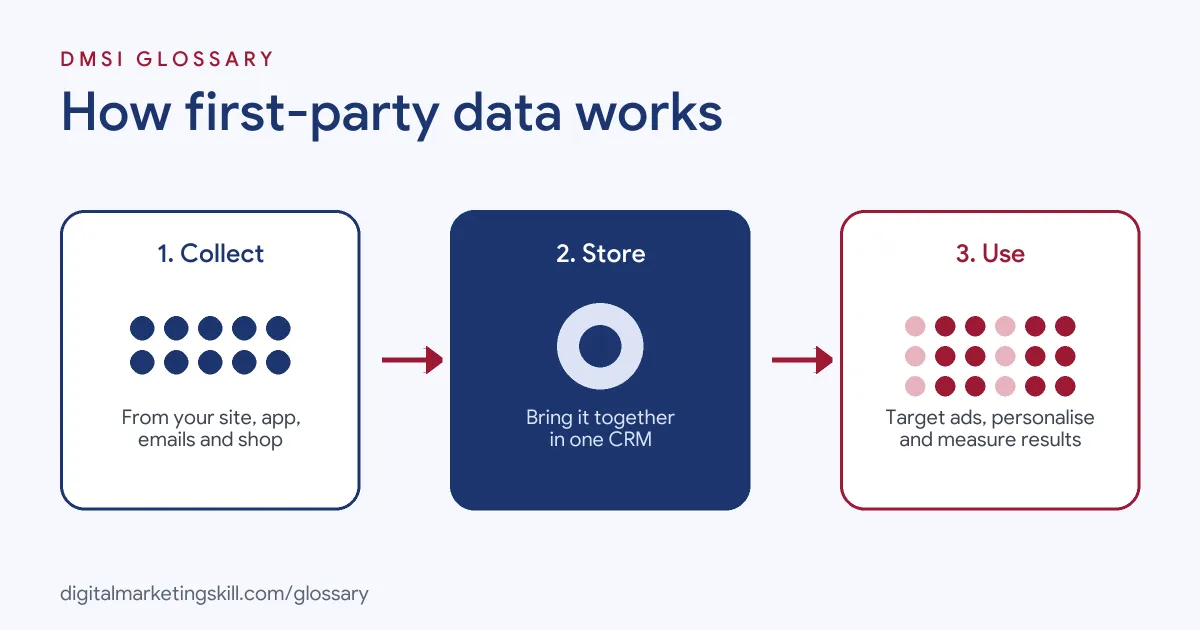
The process has three stages. First, you collect data through your own channels. Next, you store and organise it, often in a CRM. Finally, you activate it in your marketing, ads and reports.
Where It Comes From
Common sources include:
- Website and app activity, such as pages viewed and items added to a basket.
- Purchase and order history.
- Email sign-ups, opens and clicks.
- Lead forms, surveys and quiz answers.
- Customer service chats and calls.
How Ad Platforms Use It
Ad platforms give you ways to bring this data in. Google’s Customer Match, for instance, lets you use your online and offline data to reach and re-engage your customers across Search, the Shopping tab, Gmail, YouTube and Display. Google says it can also reach “other customers like them”.
Google also notes that campaigns using Smart Bidding and optimised targeting automatically include all Customer Match lists in your account, unless you opt out. In other words, your own customer lists quietly help steer automated campaigns.
For measurement, Google’s value-based bidding guide recommends enhanced conversions and its Data Manager tool. Data Manager connects sources such as CRMs, customer data platforms and cloud storage to Google Ads.
Privacy and the Law
Much first-party data is personal data. The UK’s Information Commissioner’s Office (ICO) explains that personal data is information about an identified or identifiable person. That can be as simple as a name, but it can also be an IP address or a cookie identifier. So you need a lawful basis and clear privacy information before you collect and use it.
First-Party Data Examples
Here are three made-up examples of it in action:
- Online shop (example): A pet food brand uploads a list of customers who haven’t ordered in 90 days to Customer Match. It then shows them a reminder ad on YouTube with a reorder offer.
- Training provider (example): A school tags each lead in its CRM with the course they asked about. It sends tailored emails, and it feeds enrolled students back into its ad platforms as conversions.
- Local service (example): A dental clinic adds a short survey to its booking form. The answers show most new patients want evening slots, so it changes its ads to promote late openings.
In each case, the business uses data it already owns to make smarter choices.
A Simple Worked Example
Here is a made-up case that shows why your own data pays off. A shop sends the same email to all 10,000 people on its list. It gets 100 sales. Next month, it uses past orders to split the list in two. People who bought shoes get a shoe offer. People who bought bags get a bag offer.
This time, the shop gets 160 sales from the same 10,000 people. Nothing else changed. It simply used what it already knew. So even a small step, such as one split based on past orders, can lift results. Then, as you learn more, you can add more segments and test each one.
First-Party Data vs Other Types
Marketers often sort data by who collected it. Here is a quick comparison:
| Type | Who collects it | Example |
|---|---|---|
| Zero-party data | You, when customers tell you on purpose | Preferences chosen in a quiz or profile |
| First-party data | You, from your own channels | Purchases, site visits, email clicks |
| Second-party data | Another firm, shared with you directly | A partner sharing its own customer insights |
| Third-party data | Outside firms, often across many sites | Bought audience segments |
In short, the closer the data is to you, the more you can trust it, and the clearer your customers’ consent tends to be.
How to Build and Use First-Party Data
Follow these steps to start or improve your data strategy:
- Map what you already have. List every place you collect data, from your shop to your email tool.
- Check consent and privacy notices. Make sure people know what you collect and why.
- Give people a reason to share. Offer something useful, such as a guide, discount or account features.
- Bring it together. Store contacts and activity in one CRM, so records match up.
- Set up tracking. Use a correctly installed Google tag or Google Tag Manager to record key actions on your site.
- Activate it. Upload lists to ad platforms, segment your emails and personalise your site.
- Keep it clean. Remove duplicates and outdated records, and honour opt-outs quickly.
Best Practices
A few habits help you get more value from your data:
- Collect only what you need. Less data is easier to protect and to explain.
- Be open about it. A clear, plain privacy notice builds trust.
- Value your best customers. Use purchase data to spot them, then build ads around them.
- Review where lists run. Google notes that Customer Match lists no longer run on its partner or third-party exchange sites in the EEA, the UK and Switzerland, though they still work on Google’s own properties.
Common Mistakes to Avoid
First, many businesses collect data in separate tools that never talk to each other. Second, they upload old or messy lists, so matches are poor. Third, they forget that a cookie ID or IP address can count as personal data. Finally, they collect lots of data but never use it. Each of these wastes the value you’ve built.
Where You’ll Use First-Party Data at Work
This skill appears across media, analytics and ad tech roles. For example, current remote job listings ask candidates to:
- “Lead and support strategic audience segmentation, personalization, and customer journey initiatives using first-party data” (Audience Strategy Analyst).
- “Implement and manage floodlight tracking, conversion tagging, and first-party data infrastructure for client measurement and attribution needs” (Senior Consultant, Digital Media).
- “Educate prospects on cookieless targeting, first-party data, and audience solutions” (Sales Director, AdTech).
So whether you aim to be a Digital Marketing Manager, Growth Marketer or Freelance Digital Marketer, you will need to collect, organise and use it well. A good place to start is a CRM, where most of this data lives.
Learn It in the Full Stack Programme
To use your own data across every channel, the Full Stack programme covers all four DMSI tracks and all ten courses, with one portfolio project from each. That includes lead generation, email automation, Google Analytics and paid social. You also get unlimited 1-on-1 mentoring and a U.S. Project Internship from day one.
For ideas on putting data to work, read our guide to data-driven marketing.
Frequently Asked Questions
What is first-party data in simple terms?
It is the information you collect yourself from your customers and visitors, such as what they buy, when they sign up and how they use your site.
Why is first-party data important?
It is accurate, you control it, and you know how it was collected. Ad platforms also use it to target and measure campaigns.
Is first-party data personal data?
Often, yes. The ICO says names, IP addresses and cookie identifiers can all be personal data, so privacy laws apply.
What is the difference between first-party and third-party data?
First-party data comes from your own channels. Third-party data comes from outside firms that collect it across many sites and sell or share it.
How do I use first-party data in Google Ads?
Upload customer lists with Customer Match, track actions with the Google tag, and use enhanced conversions or Data Manager to improve measurement.
Sources: Google Ads Help: About Customer Match; Google Ads Help: Value-based bidding best practices; ICO: What is personal information; remote job listings on Himalayas.