
Customer relationship management (CRM) is the way a business stores and manages everything it knows about its leads and customers, usually in one piece of software called a CRM system. It keeps contact details, conversations, deals and purchases in one place, so every team sees the same picture of each person. It matters because marketing, sales and service all work better when they share accurate customer data instead of scattered spreadsheets and inboxes.
Key Takeaways
- A CRM system stores contacts, companies, deals and the history of every interaction.
- HubSpot calls it “your business’s single source of truth for customer information.”
- Salesforce lists four types of CRM: operational, analytical, collaborative and strategic.
- Marketers also use a CRM to group lists, trigger emails, score leads and pass them to sales.
- In the end, clean data and clear consent records matter as much as the tool you choose.
What Is Customer Relationship Management?
The term covers both a strategy and a tool. As a strategy, it means building long-term relationships with customers, using what you know about them. As a tool, on the other hand, it means the software that holds that knowledge. HubSpot describes a CRM as a “technology system that helps businesses manage interactions with current and potential customers.”
For example, imagine a small business without one. A lead fills in a form, and the details land in one person’s inbox. A salesperson calls them, but the notes stay in a notebook. Later, a support agent has no idea what was promised. With a CRM, however, all of that sits in one record that everyone can see.
According to Salesforce, a CRM keeps contact details, past chats, what people bought, order status and open service issues. It also tracks sales opportunities as they move through the pipeline.
How Customer Relationship Management Works
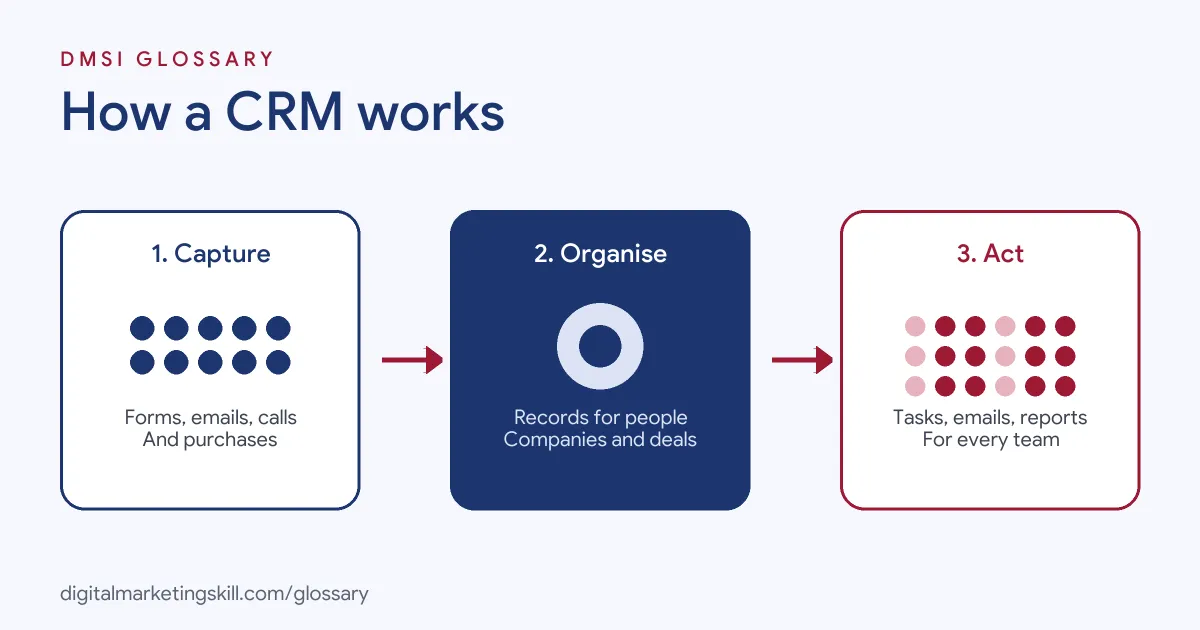
In general, most CRM tools follow the same three-step pattern. First, they capture data from forms, emails, calls and purchases. Next, they organise it into records for people, companies and deals. Finally, they let teams act on it, through tasks, automated emails and reports.
Contacts and Companies
First of all, the contact record is the heart of any CRM. HubSpot explains that it stores “detailed profiles of every lead, prospect, and customer,” including their details, communication preferences and history. Company records then group contacts who work for the same organisation, which is useful in business-to-business sales.
Deals and Pipelines
Next comes the deal, which is a sales opportunity. CRMs let you move each deal through stages, such as “new lead”, “call booked” and “won”. HubSpot says this lets teams “visualize and track sales opportunities through customizable stages.” As a result, managers can see how much business is in progress at any time.
Automation and Reporting
Modern CRMs also log emails, calls and meetings automatically. They also create follow-up tasks and reminders, and many can send new leads to the right person. Salesforce adds that they can run marketing campaigns, so a form fill can start an email sequence without anyone lifting a finger.
Customer Relationship Management Examples
Here are three made-up examples of how businesses use a CRM:
- Example: online course provider. Every application form creates a contact. Then the CRM tags them by course, starts a nurture sequence and creates a call task for an adviser.
- Example: web design agency. Each enquiry becomes a deal. After that, the team moves it from “proposal sent” to “won”, and the CRM reminds them to follow up after five days of silence.
- Example: online shop. First, the CRM links each customer to their orders. Marketing sends a thank-you email after a first purchase and a reminder to people who haven’t bought in a while.
In each case, the business replaces memory and spreadsheets with one shared record. That’s why follow-ups become reliable.
Types of CRM
Salesforce groups CRM into four types. Many tools combine all four:
| Type | Main focus | Typical use |
|---|---|---|
| Operational | Makes daily tasks faster and more automatic | For example, lead routing, reminders and email sequences |
| Analytical | Turns data into insights | For example, sales forecasts and campaign reports |
| Collaborative | Shares data between teams | So sales, marketing and support see the same history |
| Strategic | Puts the customer at the centre of plans | For example, keeping customers for the long term |
For a marketer, the operational and analytical sides usually matter most. Together, they decide who gets which message and show which campaigns brought in customers.
How to Set Up Customer Relationship Management
Whatever tool you choose, the setup follows similar steps:
- Map your customer journey. Write down each stage, from first contact to repeat purchase.
- Choose your fields. Decide what you need to know, such as source, interest and stage. Then skip anything you won’t use.
- Import and clean your data. Remove duplicates and fix formatting before you upload old lists.
- Connect your sources. Link website forms, email tools and ad lead forms, so new leads arrive automatically.
- Build your pipeline. Set deal stages that match how your team really sells, so the board reflects real life.
- Record consent. Store how and when each person agreed to hear from you, and who has opted out.
- Automate one thing at a time. Start with a welcome email or a follow-up task, then add more.
- Set up reports. Finally, track leads by source, deals by stage and sales by campaign.
Choosing a Customer Relationship Management Tool
There are many CRMs, from free tools to large paid suites. So before you pick one, ask a few plain questions:
- Does it link to the forms, email tool and ad accounts you already use?
- Can your team learn it in a day or two?
- Can you build the reports you need without help?
- Does it let you record consent and opt-outs?
- Will it still fit when your list is ten times bigger?
Also try before you buy. Many tools offer a free plan or a trial, so test it with real leads first.
Best Practices
- Keep the data clean. Bad data spreads fast, so set rules for how people enter names, sources and stages.
- Agree on definitions. For instance, marketing and sales should agree on what counts as a qualified lead.
- Respect consent. In the UK, the ICO says “you must not send marketing emails or texts to individuals without specific consent,” except under the soft opt-in for existing customers.
- Keep a suppression list. In addition, the ICO expects you to screen campaigns against a “do not contact” list of people who opted out.
- Train the team. A CRM only works if everyone updates it, so make it part of daily work.
Common Mistakes
Many teams buy a CRM and never set clear stages, so deals sit in “new” forever. Others create dozens of extra fields that nobody fills in. Some import old lists without consent and email them straight away. As a result, they break the rules and hurt their inbox placement. Finally, many businesses don’t connect their forms, so staff copy leads in by hand and some go missing.
Where You’ll Use Customer Relationship Management at Work
As you might expect, CRM skills appear across marketing and sales job listings. For example, real remote listings ask candidates to:
- “Use CRM tools to track and manage leads, ensuring a consistent pipeline” (Lead Generation Specialist).
- Bring experience “developing lead nurture, lifecycle, CRM, email, or marketing automation programs” (Lifecycle Marketing Manager).
- “Maintain accurate forecasting, pipeline management, and CRM hygiene” (Strategic Account Director).
So whether you aim to be an Email Marketing Specialist, a Marketing Automation Specialist or a Lead Generation Specialist, you will spend a lot of time inside a CRM. Above all, employers will expect you to keep it tidy and use it to report results.
Learn It in the Lead Generation Track
You can learn how a CRM supports lead generation in the AI-Powered Lead Generation and Email Automation track. There, you build a lead magnet and an automated email sequence that converts, using the same customer data a CRM holds. You also join a U.S. Project Internship from day one, with unlimited 1-on-1 mentoring.
Want more context? Read our guide to CRM in digital marketing, or see how CRM data feeds email marketing automation.
Frequently Asked Questions
What is customer relationship management in simple terms?
It is how a business keeps track of its leads and customers, usually with software that stores their details, conversations and purchases in one place.
What does a CRM system do?
It stores contact and company records, tracks deals through a pipeline, logs emails and calls, creates follow-up tasks and reports on sales and marketing results.
Is a CRM only for sales teams?
No. For example, marketing uses it for segments and automated emails, and service teams use it to see a customer’s full history. Salesforce notes that almost any department that talks to customers can use one.
Do small businesses need a CRM?
Many do. In fact, Salesforce says small businesses use CRM to do more with fewer resources. Even a simple, free CRM beats a spreadsheet once you have more than a handful of leads.
What is the difference between a CRM and an email marketing tool?
An email tool sends campaigns. A CRM, by contrast, holds the full customer record, including deals and service history. However, many tools now combine both.
Sources: Salesforce: What is CRM?; HubSpot: What is a CRM?; ICO: Electronic mail marketing; remote job listings on Himalayas.