
Page speed is how quickly a web page loads its content and becomes ready to use after someone opens it. It isn’t one single number. Instead, it is measured with several metrics, such as how fast the main content appears and how quickly the page responds to a tap. It matters because faster pages keep more visitors, convert better and give Google a better page experience to reward.
Key Takeaways
- Page speed covers loading, responsiveness and visual stability, not just total load time.
- Google’s Core Web Vitals are the main speed metrics to watch: LCP, INP and CLS.
- PageSpeed Insights gives a lab score from 0 to 100, where 90 or above is good.
- Real-user field data matters more than lab scores for judging what visitors actually feel.
- Large images, heavy scripts, slow servers and unsized ads are the most common causes of slow pages.
What Is Page Speed?
When you open a page, a lot happens before you can use it. The browser asks the server for the page, downloads files, runs scripts and draws everything on screen. Page speed describes how long all of that takes, and how smooth it feels.
Google’s web.dev guide explains why this matters. It says sites that load quickly and respond to input in good time engage and retain users better than slow, sluggish ones. It also cites a study by the BBC, which found it lost an additional 10% of users for every extra second its site took to load.
For example, imagine two shops selling the same trainers. One page shows the product in under two seconds. The other leaves a blank screen for five. Many shoppers will never see the slow shop’s product at all.
How Page Speed Is Measured
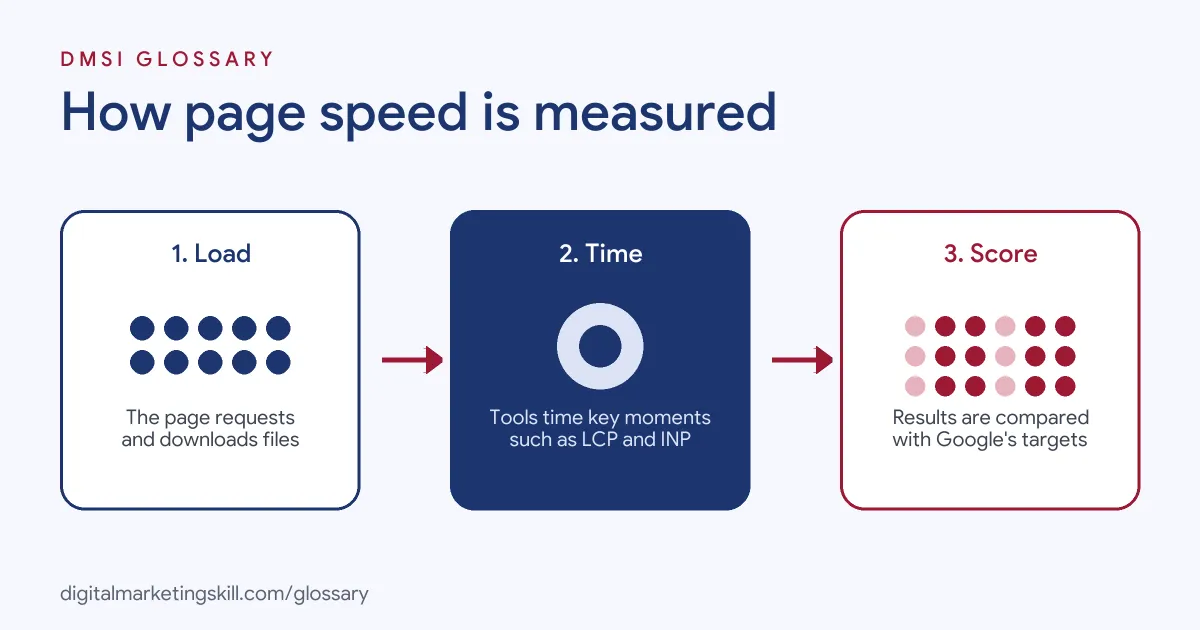
Modern tools don’t just time the whole load. Instead, they break the experience into moments that people notice, then compare each with a target.
The Core Metrics
PageSpeed Insights rates these metrics as good, needs improvement or poor. Here are the good targets it uses:
| Metric | What it measures | Good |
|---|---|---|
| First Contentful Paint (FCP) | When the first content appears | 1.8 seconds or less |
| Largest Contentful Paint (LCP) | When the main content appears | 2.5 seconds or less |
| Interaction to Next Paint (INP) | How quickly the page responds to input | 200 milliseconds or less |
| Cumulative Layout Shift (CLS) | How much content jumps around | 0.1 or less |
| Time to First Byte (TTFB) | How fast the server starts to respond | 0.8 seconds or less |
LCP, INP and CLS are the three Core Web Vitals. TTFB is listed as experimental.
Lab Data and Field Data
PageSpeed Insights shows two kinds of data. Field data comes from real Chrome users over the previous 28 days. Lab data comes from Lighthouse, which simulates a page load on one device and network. Google says lab data is useful for debugging, while field data captures the true, real-world experience. If a page has too little real-user data, the tool falls back to data for the whole site, known as the origin.
The Performance Score
The lab test gives a performance score. A score of 90 or above is good, 50 to 89 needs improvement and below 50 is poor. However, the score can move between tests. Google’s Lighthouse docs say changes often come from things like A/B tests, different ads, network routing, browser extensions or antivirus software.
Page Speed Examples
Google’s web.dev site collects real case studies. Here are three it highlights:
- Vodafone: a 31% improvement in LCP increased sales by 8%.
- Rakuten 24: its work on Core Web Vitals raised revenue per visitor by 53.37% and conversion rate by 33.13%.
- redBus: improving INP increased sales by 7%.
These are reported results from large companies, so your gains may differ. Even so, they show that speed work can affect revenue, not just scores.
Common Causes of Slow Page Speed
Most slow pages share the same few problems:
| Cause | What it affects | Typical fix |
|---|---|---|
| Large, uncompressed images | Loading (LCP) | Compress them and use modern formats such as WebP or AVIF |
| Lazy-loaded main image | Loading (LCP) | Load the hero image straight away; Google says never lazy-load it |
| Heavy JavaScript | Responsiveness (INP) | Remove unused scripts and break up long tasks |
| Images and ads without set sizes | Stability (CLS) | Set width and height, and reserve space for ads |
| Slow server | Everything (TTFB) | Use caching or better hosting |
How to Test and Improve Page Speed
Follow these steps to find and fix slow pages:
- Run PageSpeed Insights. Test your key templates, such as the home, product and blog pages, on mobile and desktop.
- Check field data first. If real users pass, focus on pages that fail. If there is no field data, use lab results as a guide.
- Open the Core Web Vitals report. In Search Console, find groups of pages marked poor or needs improvement.
- Fix the biggest problem. Start with the issue the report flags most, such as a large hero image.
- Trim scripts and plugins. Remove tools you don’t use, and delay those you don’t need straight away.
- Re-test and wait. Lab scores change at once, but field data covers 28 days, so allow a few weeks.
A Simple Speed Audit
Here is a made-up audit of a small WordPress shop. First, the owner runs PageSpeed Insights on the product page. On mobile, LCP is 4.2 seconds, which is poor, while CLS and INP are fine.
Next, the report shows the LCP element is the main product photo. It is a 2.4 MB image, and a plugin lazy-loads it. So the owner compresses the photo to WebP and turns off lazy loading for that one image.
Then the owner checks scripts. As a result, they find three plugins they no longer use, including an old slider, and remove them. After that, the lab test shows LCP at 2.1 seconds.
Finally, the owner waits a few weeks for field data to update. Because field data covers 28 days, the change appears in Search Console gradually. In short, two simple fixes moved the page from poor to good.
Best Practices
A few habits keep pages fast over time:
- Set a speed budget. Agree a limit for page weight and scripts before adding new features.
- Test on mobile. Lighthouse simulates a mid-tier phone on a mobile network for its mobile test.
- Review after every change. New themes, plugins and tags often slow pages without warning.
- Look at the whole experience. Google says there is no single page experience signal, so speed is one part of a good page.
Common Mistakes to Avoid
First, many site owners chase a perfect score of 100 and ignore field data. Second, they test only the home page. Third, they install a speed plugin that lazy-loads every image, including the main one. Finally, they add more tracking tags without checking the cost. Each of these wastes effort or makes pages slower.
Where You’ll Use Page Speed at Work
Speed is a core part of technical SEO and web roles. For example, one current remote listing for a Technical SEO Specialist includes these lines:
- “Perform page speed optimization, address Core Web Vitals gaps, and recommend enhancements to reduce load time and improve mobile responsiveness” (Technical SEO Specialist).
- “Experience optimizing page speed, improving site structure, and applying schema markup” (Technical SEO Specialist).
So as an SEO Specialist, WordPress Developer or Website Manager, you will test speed, explain results and fix common issues. For the metrics behind it, see our page on Core Web Vitals.
Learn It in the WordPress and SEO Track
You can learn to build fast sites in the AI-Powered WordPress and SEO Specialist track. There, you build a WordPress site or store and rank it with an SEO content plan. You also get unlimited 1-on-1 mentoring and a U.S. Project Internship from day one.
For hands-on tips, read our guide to website page speed.
Frequently Asked Questions
What is page speed in simple terms?
It is how fast a web page loads and becomes usable. Tools measure it with several metrics rather than one load time.
What is a good PageSpeed Insights score?
A score of 90 or above is good, 50 to 89 needs improvement and below 50 is poor.
Does page speed affect SEO?
Yes. Google says its ranking systems use Core Web Vitals. However, speed is one of many signals, and helpful content still matters most.
Why does my speed score change each time?
Google says scores can shift because of ads, A/B tests, network routing, browser extensions and other changing conditions.
What is the quickest way to speed up a page?
Often, it is compressing large images and making sure the main image isn’t lazy-loaded. Then remove scripts you don’t need.
Sources: About PageSpeed Insights; web.dev: Why speed matters; Chrome for Developers: Lighthouse performance scoring; web.dev: Optimise LCP; Google Search Central: Page experience; remote job listings on Himalayas.