
Phrase match is a Google Ads keyword match type that shows your ad on searches that include the meaning of your keyword, even when people add other words around it. You set it by putting your keyword in quotation marks, such as “tennis shoes”. It matters because it gives you a middle ground: more reach than exact match, but more control than broad match.
Key Takeaways
- It sits between broad and exact in both reach and control.
- You add it by wrapping the keyword in quotation marks.
- Google matches on meaning, not just the exact words. Close variants, such as plurals, misspellings and synonyms, can all trigger your ad.
- A keyword in quotes also covers every search its exact version would.
- Negative keywords and the search terms report keep these keywords on track.
What Is Phrase Match?
Google Ads explains that keyword match types “dictate how closely the keyword needs to match with the user’s search query so that the ad can be considered for the auction.” There are three options: broad, phrase and exact.
For this option, Google says: “Ads may show on searches that include the meaning of your keyword. The meaning of the keyword can be implied, and user searches can be a more specific form of the meaning.” In other words, people can search for something longer or more detailed, and your ad can still appear, as long as the meaning of your keyword is there.
For example, a shoe shop might bid on “running shoes”. Its ad could then show for “best running shoes for women” or “buy running shoes online”. However, it is unlikely to show for “running tips”, because that search doesn’t include the meaning of the keyword.
How Phrase Match Works
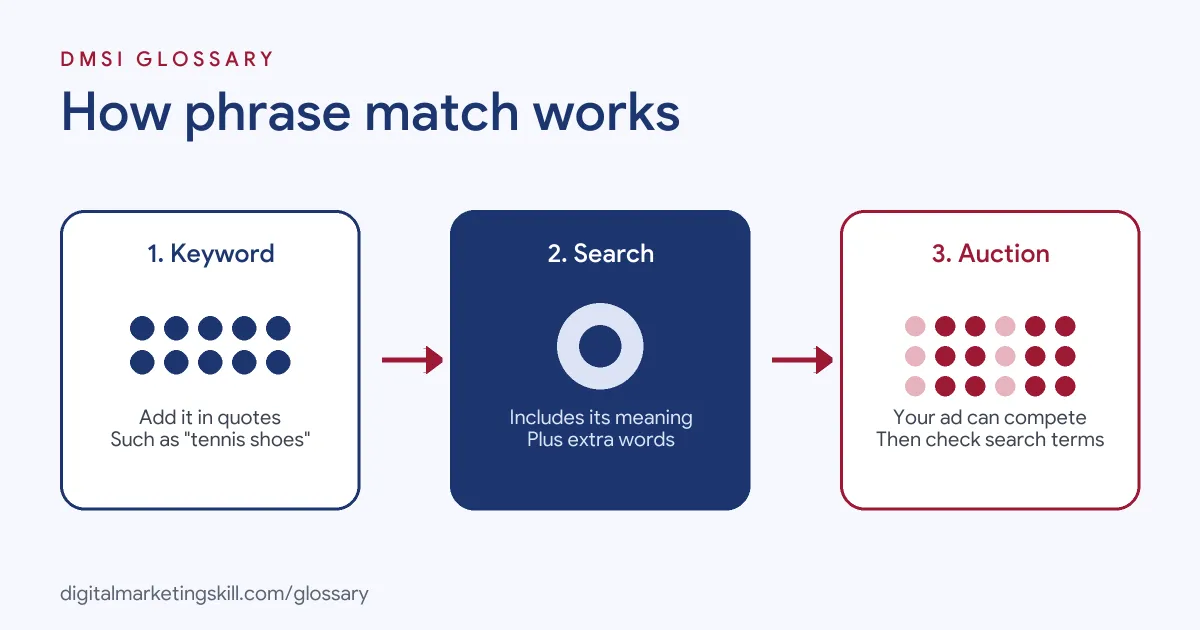
When someone searches, Google compares their query with the keywords in your account. It then decides which keywords are eligible for the auction. Here, the query must include the meaning of your keyword, but it can add words before, after or around it.
Close Variants
Google doesn’t match only the exact words you type. All match types can match close variants, and Google’s help centre says “There’s no way to opt out.” For keywords in quotes, close variants may include:
- Spelling and word forms: misspellings, singular or plural forms and stemmings, such as floor and flooring.
- Reordered words: Google’s example is that “red shoes” may show on searches for “running shoes red”.
- Function words: “hats for winter” could match “winter hats on sale”, with “for” removed.
- Implied words: “daydream vr headset” may show for “daydream headsets for sale”, since “vr” is implied.
- Same intent: “images royalty free” may show for “free copyright images of baseball”.
How It Fits with Other Match Types
Google explains that broader match types capture all the queries of narrower ones, plus more. So a keyword in quotes will match all the searches of the same keyword in square brackets. Similarly, a broad match keyword covers both. If you use the same keyword in several match types, you still only get one bid in the auction for a given search.
Phrase Match Examples
Here are three made-up examples of keywords in quotes, and searches that could trigger them:
- Plumber: The keyword “emergency plumber” could match “emergency plumber near me” or “24 hour emergency plumber London”.
- Online course: The keyword “digital marketing course” could match “online digital marketing course for beginners”.
- Software: The keyword “invoice software” could match “simple invoice software for freelancers”.
In each case, the search adds detail around the core idea. That extra detail often tells you a lot about what the person wants.
Phrase Match vs Broad Match vs Exact Match
Here is how the three keyword match types compare, based on Google’s descriptions:
| Match type | Syntax | When ads may show | Reach and control |
|---|---|---|---|
| Broad match | keyword | Searches related to your keyword, even without its direct meaning | Most reach, least control |
| Phrase match | “keyword” | Searches that include the meaning of your keyword | Middle reach and control |
| Exact match | [keyword] | Searches with the same meaning or intent as your keyword | Least reach, most control |
Broad match is the default type in Google Ads. As a result, you need to add the quotation marks yourself if you want this type. For a full overview, see our entry on keyword match types.
When to Choose This Match Type
Quotes are a good fit in a few common situations. Think about your budget, your data and how precise your offer is:
- Your budget is tight. You want more reach than exact match without paying for loosely related searches.
- Your offer has a clear name. A product or service that people describe in similar words, such as “wedding photographer”, suits it well.
- You want to learn. The longer searches it brings in show you new keyword ideas and new negatives.
- You don’t have much conversion data yet. Smart Bidding learns from your results, so more control can help while you build them up.
How to Use Phrase Match in Google Ads
Follow these steps to set up and manage your keywords:
- Research your keywords. List the core phrases that describe what you sell.
- Add quotation marks. In your ad group, type each keyword inside quotes, such as “dog grooming”.
- Group by theme. Keep closely related keywords in the same ad group, so your ads stay relevant.
- Add negative keywords. Exclude terms you don’t want, such as “free” or “jobs”, if they don’t fit your offer.
- Choose a bid strategy. Google suggests using Smart Bidding with all match types.
- Check the search terms report. Review the real searches that triggered your ads, then add new keywords or negatives.
Best Practices for Phrase Match
- Start with your core phrases. This type suits keywords that clearly describe your product or service.
- Review search terms often. Close variants can bring in searches you didn’t expect.
- Use negatives carefully. Google says negative keywords don’t match close variants, so add plurals and synonyms yourself.
- Avoid duplicate keywords. Similar keywords in the same account only give you one bid per search anyway.
- Judge on conversions. A keyword with cheap clicks but no sales is not a good keyword.
Common Mistakes to Avoid
Many beginners make the same few errors. First, they forget the quotation marks, so the keyword runs as broad match. Second, they expect Google to match only the exact words, then get surprised by close variants. Third, they never open the search terms report. Finally, they add a negative keyword in one form and assume Google blocks every version of it. Each mistake is easy to fix once you check your account weekly.
Negative Phrase Match
You can also use phrase match for negative keywords, but it works differently. Google explains that with a negative keyword of this type, “your ad won’t show if the search contains the exact keyword terms in the same order.” The search may include extra words, and the ad still won’t show.
For example, a negative “running shoes” blocks “blue running shoes”. However, it doesn’t block “shoes running” or “running shoe”, because the words are reordered or in a different form. That’s why you should add the variations you want to exclude.
Where You’ll Use Phrase Match at Work
Match types are a basic skill in paid search jobs. For example, one remote Google Ads Specialist (PPC / Search) listing asks for a:
- “Solid grasp of campaign structure, keyword analysis, match types, negatives and bid strategies (CPC, CPA and others)” (Google Ads Specialist).
In practice, a Google Ads Specialist or PPC Specialist chooses match types for each keyword, reviews search terms, adds negatives and reports on cost per conversion. So employers will want to see that you can explain why you chose this match type for a keyword and what happened next.
Learn It in the Google Specialist Track
You can learn to plan and manage keywords like these in the AI-Powered Google Specialist track. There, you launch and measure a Google Ads campaign with conversion tracking, so you have real results to show. You also work on a U.S. Project Internship from day one, with unlimited 1-on-1 mentoring.
Want a deeper look at all three options? Read our guide to Google Ads match types.
Frequently Asked Questions
What is phrase match in simple terms?
It is a keyword setting that lets your ad show on searches that include the meaning of your keyword, even with extra words around it.
How do you write a phrase match keyword?
Put the keyword inside quotation marks, such as “tennis shoes”. Without them, Google treats it as broad match.
Does word order matter in phrase match?
Not always. Google may match reordered words if the meaning stays the same, such as “red shoes” and “running shoes red”.
Is phrase match better than broad match?
Neither is always better. Quotes give you more control, while broad match reaches more searches and works best with Smart Bidding, according to Google.
Can I use phrase match for negative keywords?
Yes. A negative phrase match blocks searches that contain your words in the same order, even with extra words added.
Sources: Google Ads Help: About keyword matching options; Google Ads Help: Keyword close variants; Google Ads Help: About negative keywords; remote job listings on Himalayas.