
Web hosting is a service that stores your website’s files and database on a server connected to the internet, so people can visit your site at any time. When someone types your domain name, their browser connects to that server, which sends back your pages. It matters because your host affects your site’s speed, uptime and security, which shape both visitor experience and search performance.
Key Takeaways
- A host provides the server space, software and connection that keep your site online.
- The main types are shared, VPS, dedicated and cloud hosting, plus managed options for platforms like WordPress.
- OVHcloud calls uptime “the most critical element for any website.”
- WordPress.org recommends a host that supports PHP 8.3 or greater, a recent MariaDB or MySQL version and HTTPS.
- Your domain name and your hosting are separate services, even if one company sells both.
What Is Web Hosting?
OVHcloud puts it simply: “Web hosting is simply making a website available on the internet.” Every website lives on a computer called a server. Hosting companies own and run these servers, and they rent space and power on them to website owners.
Think of your domain name as your address and your hosting as the building. The address tells people where to go, and the building holds everything they find when they arrive. So you need both for a working website.
WordPress.org notes that “there are hundreds of thousands of web hosts out there, the vast majority of which meet the WordPress minimum requirements.” The choice can feel overwhelming, so it helps to understand the main types first.
How Web Hosting Works
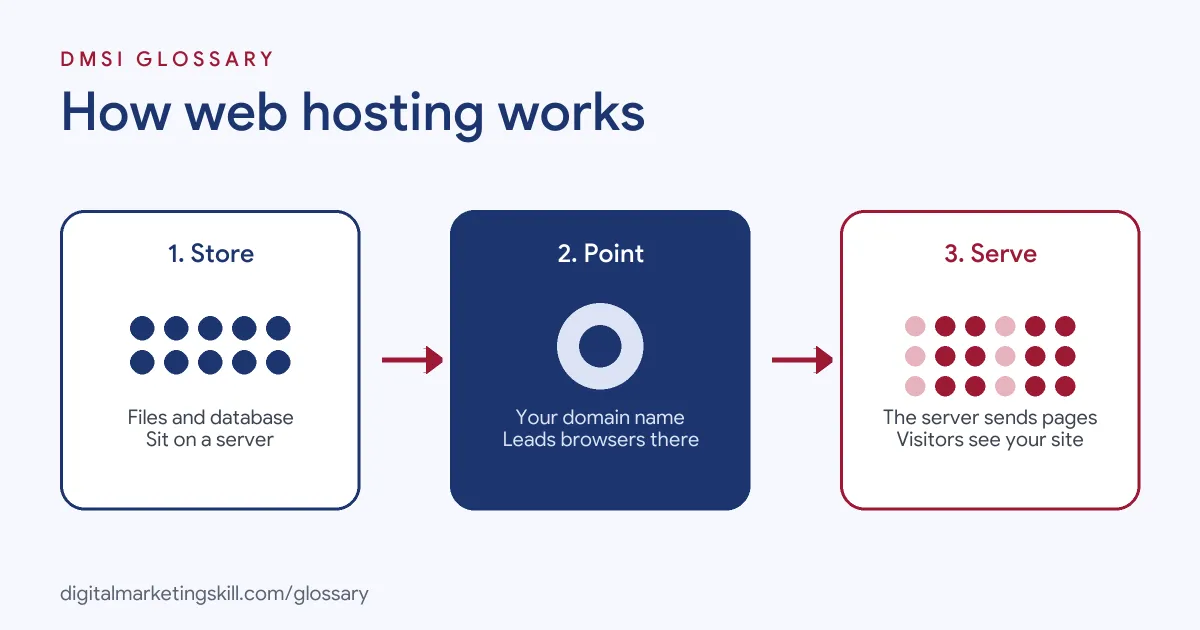
The process has three steps. First, your website’s files and database sit on the host’s server. Next, a visitor types your domain, and the domain points their browser to that server. Finally, the server sends back the page, and the browser displays it.
Servers and Files
A typical website has two parts on the server: files, such as images and code, and a database that stores content and settings. WordPress’s install guide, for example, asks you to “create a database for WordPress on your web server, as well as a MySQL (or MariaDB) user.” You can then upload the files, often using FTP or your host’s tools.
What Your Site Needs
Different software has different needs. For WordPress, the official requirements page recommends a host that supports “PHP version 8.3 or greater,” “MariaDB version 10.11 or greater OR MySQL version 8.0 or greater” and “HTTPS support.” It adds that Apache or Nginx is recommended, but “any server that supports PHP and MySQL will do.”
Security and Support
A good host also protects your site. OVHcloud advises you to “look for a provider with security built in for virus and malware protection,” along with SSL, DDoS protection and automatic backups. It also suggests choosing a company that can “at least offer support via phone and email during working hours.”
Web Hosting Examples
Here are three made-up examples of how businesses might choose a plan:
- New blog: A food blogger starts on shared hosting, because traffic is low and the cost is small.
- Growing shop: An online store moves to a VPS when traffic grows, so it gets its own share of server resources.
- Busy agency site: An agency uses managed WordPress hosting, so the host handles updates, backups and security for its client sites.
In each case, the plan matches the site’s size, traffic and the owner’s technical skills.
Types of Web Hosting
Here is how the main types compare, based on OVHcloud’s descriptions:
| Type | How it works | Best for |
|---|---|---|
| Shared hosting | “Many users share the same server resources for their websites” | New and small sites with modest traffic |
| VPS hosting | Users share one server, “split into individual virtual compartments” | Growing sites that need more control |
| Dedicated hosting | One client has a whole server to themselves | Large sites needing maximum performance and control |
| Cloud hosting | Uses “a network of virtual servers,” so resources can scale | Sites with changing or fast-growing traffic |
Managed hosting can sit on top of any of these. In that case, the host takes care of more of the technical work for you.
How to Choose Web Hosting
- List what your site needs, such as WordPress, a shop or email.
- Estimate your traffic now and as the site grows.
- Check that the host meets your software’s requirements, such as PHP and database versions.
- Compare uptime promises, security features and backup options.
- Check support hours and channels, such as chat, phone and email.
- Read the renewal terms and what is included before you sign up.
- Test speed after launch and move plans if the site outgrows its hosting.
For more help, read our guide to website hosting services.
Web Hosting Best Practices
- Turn on HTTPS. WordPress.org lists HTTPS support as a basic requirement.
- Back up regularly. OVHcloud notes that backups are usually the customer’s responsibility.
- Keep software updated. Update your CMS, themes and plugins to close security holes.
- Watch speed. A slow server hurts visitors and search performance.
- Keep your domain separate if you can. That makes it easier to switch hosts later.
Hosting and SEO
Hosting affects SEO more than many people expect. First, a slow server makes pages load slowly, which frustrates visitors. Next, frequent downtime means search engines and visitors may find your site unavailable. Finally, a secure set-up with HTTPS protects visitors and builds trust. So a reliable host is part of a strong SEO foundation. For speed tips, see our glossary entry on page speed.
Key Hosting Terms
Hosting comes with its own jargon. Here are the words you will meet most:
- Domain: your site’s address, such as example.com.
- DNS: the system that points your domain to the right server.
- Uptime: how much of the time your site is online.
- SSL certificate: what makes HTTPS work, so data travels securely.
- Bandwidth: how much data your site can send to visitors.
- Staging site: a private copy of your site for testing changes.
Moving to a New Host
Sooner or later, many sites switch hosts. Here is a simple order to follow:
- Take a full backup of your files and database.
- Set up the new hosting account and copy the site across.
- Test the copy on the new server before anyone sees it.
- Update your DNS so the domain points to the new host.
- Check pages, forms and checkout once the change takes effect.
Keep the old account running for a short time, just in case. That way, you can switch back if something goes wrong.
Common Mistakes to Avoid
Many beginners choose the cheapest plan without checking support or speed. Others never set up backups, so one problem can wipe out their site. Some forget to renew their domain or hosting, and the site goes offline. Finally, many stay on a plan they have outgrown, so pages slow down as traffic grows. A yearly hosting review prevents most of these problems.
Where You’ll Use Web Hosting at Work
Hosting tasks appear in many web and marketing roles. For example, recent remote job listings ask candidates to:
- “Manage hosting, DNS configuration, and deployments.” (Web Developer, Marketing Sites).
- “Use company tools to purchase, configure, and set up domains; submit finished sites to the internal hosting platform.” (Web Developer & Customer Onboarding Specialist).
- Bring “preferred experience in web hosting, SaaS, or another technology environment” (Senior SEO Specialist).
So as a WordPress Developer, SEO Specialist or Website Manager, you may set up hosting, point domains and keep sites fast and secure.
Learn It in the WordPress and SEO Track
You can learn how to launch and run a site in the AI-Powered WordPress and SEO Specialist track. It covers WordPress website and eCommerce development, search engine optimisation and content marketing. Your portfolio project is to build a WordPress site or store and rank it with an SEO content plan. You also get unlimited 1-on-1 mentoring and a U.S. Project Internship from day one.
Frequently Asked Questions
What is web hosting in simple terms?
It is renting space on a server so your website’s files are available on the internet all the time.
Do I need hosting and a domain?
Yes. The domain is your address, and hosting stores the site. You need both, although one company can provide both.
What is the best type of hosting for beginners?
Shared hosting is a common starting point for small sites. As traffic grows, many move to a VPS, cloud or managed plan.
What does WordPress need from a host?
WordPress.org recommends PHP 8.3 or greater, MariaDB 10.11 or greater or MySQL 8.0 or greater, and HTTPS support.
Does hosting affect SEO?
Yes, indirectly. Speed, uptime and security all depend partly on your host, and they all affect visitors and search performance.
Sources: OVHcloud: What is web hosting?; WordPress.org: Requirements; WordPress.org: Hosting; WordPress Advanced Administration: How to install; remote job listings on Himalayas.