
Google Business Profile optimization is the set of changes that move a listing higher in local search. It means filling in accurate categories, adding real photos, posting updates, and managing reviews on a schedule. None of these steps are secret, and most are free.
The gap is that few owners do all of them at once. That gap is why the ones who do tend to win the map pack.
Key Takeaways
- Google’s own ranking guidance names three local ranking factors: relevance, distance and prominence. Prominence is the only one you can actively build. So Google Business Profile optimization should focus there first.
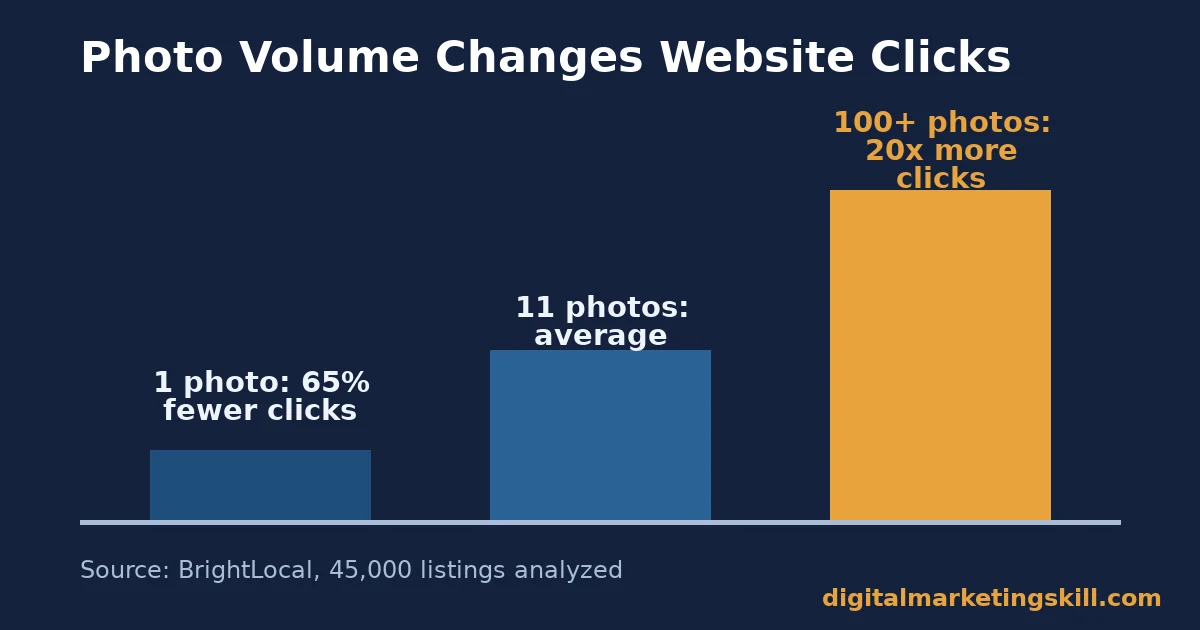
- BrightLocal’s analysis of 45,000 listings found that profiles with over 100 photos earned 20 times more website clicks than the average listing. Single-photo listings earned 65% fewer clicks than average.
- BrightLocal’s latest consumer review survey found 97% of people read reviews before choosing a local business. 31% now require a rating of 4.5 stars or higher, double the share from the year before.
- 80% of consumers favor businesses that respond to every review, the same survey found. But templated replies make half of consumers less likely to choose that business anyway.
- Posts, photos, categories and reviews each move a different ranking lever. Treating them as one task is why most Google Business Profile optimization efforts stall after the first week.
So, Google Business Profile optimization is less about one clever trick and more about steady work across all four levers, in the right order.
In this guide
- The Gap Most Local SEO Advice Misses
- How Google Business Profile Optimization Actually Works
- What Differs by Profile Element
- Fix Each Element This Way
- How to Measure Whether Google Business Profile Optimization Is Working
- The One Decision Rule
- What Doing This Right Looks Like
- Frequently Asked Questions About Google Business Profile Optimization
- Put This Into Practice
The Gap Most Local SEO Advice Misses
Most guides to Google Business Profile optimization give you a checklist. Fill in your hours, add photos, ask for reviews. The checklist is accurate, but it treats every item as equally important. It is not. Some changes move prominence within days. Others take months to compound.
Our wider local SEO guide covers the surrounding fundamentals. This guide stays narrow. It separates the profile-specific changes, so you spend your first hour on the one that actually shifts your ranking, not the one that is easiest to tick off.
Two Ground Rules First
Local ranking data is a snapshot, not a permanent position. Google re-ranks results for every single search, so what you see today is one data point, not a verdict. The photo and review figures below also come from analyses of thousands of listings, not your specific market. Treat the percentages as a direction to move in, not a guarantee.
One more limit is worth stating plainly. Google Business Profile optimization cannot fix a business with no real demand, poor service or a broken website. It can only make sure the demand that already exists in your area finds you first, not a rival who filled in the same free fields more completely.
That is a smaller promise than most marketing pitches make. It is also a more honest one.
This guide is for any owner who runs a shop, a clinic, a trade business or a local office. It works whether you serve walk-in customers or jobs across a wider area. The steps below are the same either way.
How Google Business Profile Optimization Actually Works
Google states plainly that local results depend on three factors: relevance, distance and prominence. Relevance is “how well a Business Profile matches what someone is searching for.” Distance is “how far each business is from the customer who’s searching.” Prominence is “how well-known a business is,” and prominent places “are more likely to show up in search results.”
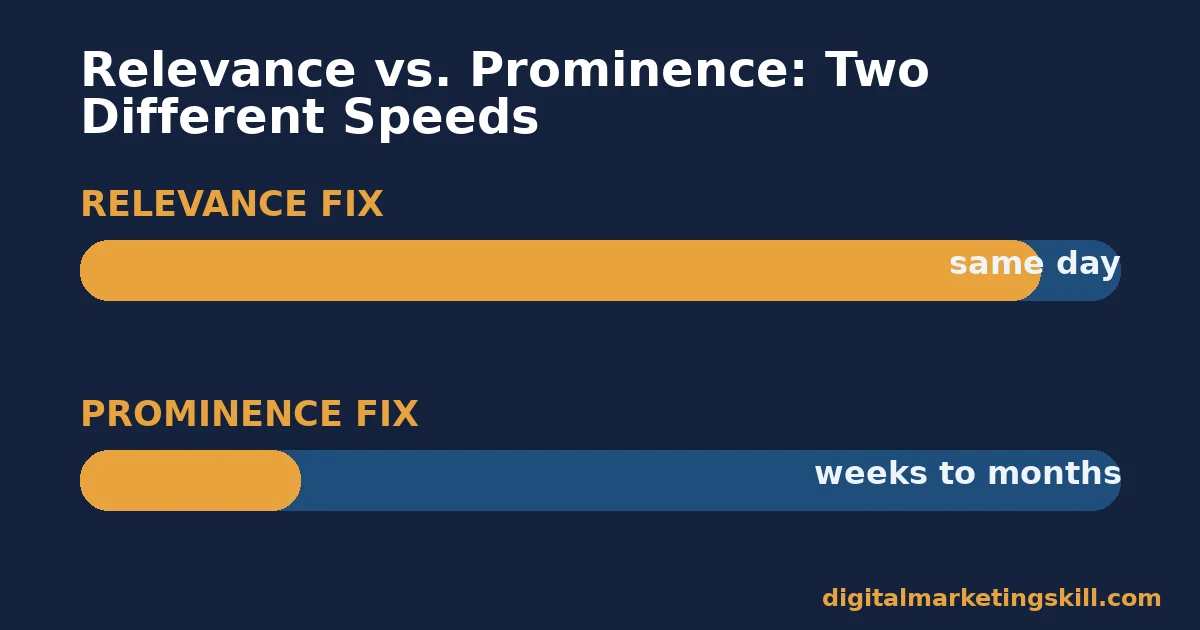
You cannot change distance. That is set by where the searcher stands. You can improve relevance quickly, mostly by matching your categories and description to real search terms. Prominence is the slow-build lever. It comes from reviews, citations, photos, posts and general engagement with your profile, accumulated over time. Optimization that ignores prominence is optimization that stalls, because relevance fixes run out of room fast while prominence keeps compounding.
Think of the two as separate projects with separate timelines, not one combined task. Fixing your category can change which searches find you within a single re-index. Building review volume needs weeks of normal customer activity first.
Running both at once is correct. Expecting them to move at the same speed is the mistake that makes people quit too early.
What Google’s Own Guidance Adds
Google’s own guidance for improving ranking backs this up. It tells businesses to match “how it’s consistently represented and recognized in the real world across signage, stationery, and other branding.” Choosing “the smallest number of categories needed to describe your core business” is the other main instruction.
A local phone number “rather than central call center numbers” is also suggested, where possible. Every one of those is a relevance fix. None of them touches prominence, which is why relevance alone will not carry a profile past a certain point.
What Differs by Profile Element
Four elements of a Google Business Profile behave differently. Conflating them is the most common mistake in Google Business Profile optimization. Each one below is built to do one specific job.
Photos: Built for First Impressions
BrightLocal analyzed 45,000 listings across 36 industries, covering more than 8 million data points. The average listing carried 11 photos. Listings with more than 100 photos generated 20 times more website clicks than the average listing. Listings with only one photo generated 65% fewer clicks than average. Photos are a first-impression signal. They decide whether a searcher clicks through at all, before any ranking factor even matters.
Reviews: Built for Trust Signals
BrightLocal’s latest consumer review survey found that 97% of consumers read reviews when choosing a local business. 41% say they always do, up sharply from the year before.
Nearly half, 49%, trust online reviews as much as a personal advice from someone they know. 85% say they are more likely to use a business with positive reviews.
Reviews are a trust signal that both searchers and Google read. Google calls prominence a function of how well-known a business is. Our guide on what customer reviews are and how to get good ones goes deeper into collecting them well.
Posts: Built for Recency
Google’s Business Profile Posts feature lets you publish an Update, Offer or Event. Each one can carry a photo or video and an action button that sends the reader to book, order or learn more.
Posts show up in the Updates and Overview tabs on mobile, and in the “From the owner” section on desktop. Posts are a recency signal. An empty Updates tab tells a searcher, rightly or not, that nobody runs the profile anymore.
Categories and Description: Built for Relevance Matching
Google’s ranking guidance says to choose the smallest number of categories that describe your core business. It also says to avoid taglines, hours or sales language in your business name field.
Categories and the description are the only elements that speak directly to Google’s relevance factor. They are the text Google matches against a search query. Get the category wrong, and no number of photos or reviews will put you in front of the right searcher.
Fix Each Element This Way
Understanding the mechanism only matters if it changes what you do first. Here is the tactic that matches each element above, in the order that produces the fastest visible change.
Photos: Lead With Volume and Variety
Aim past the 11-photo average BrightLocal found. The real gains show up well beyond it. Add exterior shots so a searcher recognizes your storefront, then interior shots so they know what to expect inside.
Add product or service shots that show the result you deliver, plus a few team photos so the business feels staffed by real people. Replace old photos rather than letting them pile up, because a profile full of stale images undercuts the first impression a photo is meant to make.
Reviews: Lead With Speed and Specificity
Ask every customer, not just the happy ones. Google’s review policy bans “offering incentives, like free or discounted goods or services, in exchange for customers to post reviews.” It also treats asking only satisfied customers as a related violation.
Build the request into your process for everyone. Google itself suggests asking customers to “visit a Google link or scan a QR code.” That removes the friction of asking them to search for your name.
Once reviews arrive, reply fast and exactly. The same BrightLocal survey found 19% of consumers now expect a same-day reply, up from a small share the year before. Generic replies make half of consumers less likely to choose that business anyway.
Name the customer, name the service, and answer the point they raised. For the revenue case behind this habit, see how online reputation drives revenue beyond any single ranking factor.
Posts: Lead With a Weekly Cadence
Pick one Update post and one Offer or Event, and publish on a fixed day each week rather than in bursts. A weekly cadence keeps the Updates tab from ever looking abandoned, which matters more than any single post’s content. Use the action button every time. A post without a next step wastes the recency signal it just earned.
Categories and Description: Lead With Precision
Open your profile and list every category it uses today. Remove any that describe a service you no longer offer. Check your main category against two or three rivals who already outrank you for your top search term.
Rewrite your description around the services, products and history you actually have. Use plain words a customer would type, not internal jargon. This is a 20-minute fix with no cost, and it is the one relevance lever Google Business Profile optimization controls directly.
If your website’s own on-page signals are weak too, pair this with the fixes in our WordPress SEO guide. A profile that ranks well still needs a site that turns the click into a customer.
How to Measure Whether Google Business Profile Optimization Is Working
Four numbers tell you whether Google Business Profile optimization is paying off. Each one lives inside your profile’s own performance data.
- Discovery versus direct searches. Discovery searches happen when someone finds you by searching for a category or product, not your name. BrightLocal’s 45,000-listing analysis found 84% of views came from discovery searches. A rising discovery share means your fixes are working, because strangers are finding you, not just people who already knew your name.
- Direction requests and website clicks. These are the two actions BrightLocal’s photo analysis tracked. They are the clearest sign a searcher moved from browsing to intent. Track them monthly, not weekly, because local search volume for any single business is naturally noisy.
- Review velocity and average rating. Count new reviews per month, not just the total, because velocity is what keeps your rating looking current. Watch your average against the 4.5-star threshold that 31% of consumers now treat as a hard filter. Falling just under that line removes you from a meaningful share of consideration.
- Post views inside Updates. If this number stays flat for a month, your cadence is not reaching anyone. The post content, timing or action button needs a change.
The One-Row Habit
Pull these four numbers on the same day each month. Write them in one row of a spreadsheet, next to the changes you made that month.
After three or four rows, the pattern becomes clear. You will see which lever actually moved the discovery share, and which one you can stop spending time on. In short, the method matters more than the tool, because a plain spreadsheet beats a fancy dashboard nobody checks.
The One Decision Rule
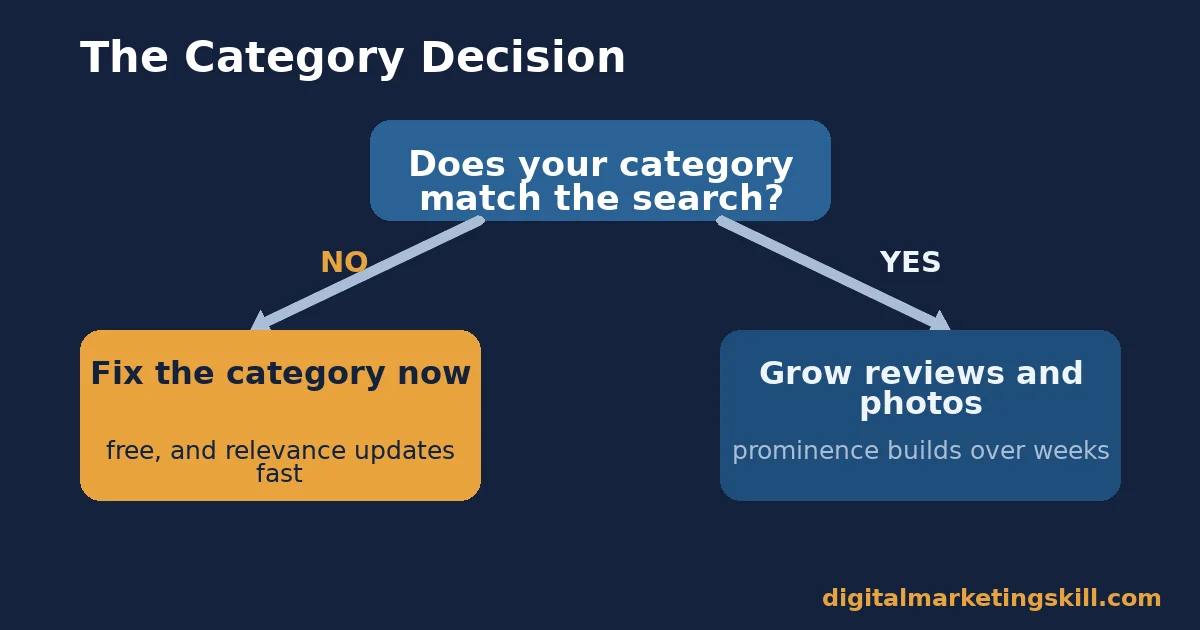
If you can only fix one thing this month, fix your categories and description first. Photos and reviews both take weeks to accumulate enough volume to move prominence. A wrong or overly broad category can misroute every search Google would otherwise send you, today, for free.
Here is an illustrative, invented example to show the logic, not a real case. Picture two identical bakeries. Bakery A lists itself under a broad “Restaurant” category. Bakery B lists itself under “Bakery” and adds “Wedding Cake Shop” as a second category.
Someone searches for a wedding cake nearby. Google’s relevance factor favors Bakery B, no matter which one has better reviews or more photos, because Bakery B’s category text actually matches the query. Fix relevance first. It is free, and it decides whether you are even in the race before prominence gets a chance to matter.
What Doing This Right Looks Like
CDC Detailing, an auto detailing business in Pitman, New Jersey, published a case through the local marketing agency that carried out the work. Treat the numbers as the agency’s own account, not an independently audited figure. Calls tracked from the business’s Google Business Profile rose from 21 a month to 120 a month over a five-month stretch.
The agency’s account lists the same four levers covered above. Categories were rebuilt against rival data and real search volume. A full services section went up with pricing signals. A systematic photo plan covered the shop, work in progress and finished results. Weekly posts rotated between service highlights, offers and educational content. Review replies went out within one to two days, naming each customer and the specific service performed.
The Honest Limits of This Case
The honest limit: this is one business in one niche, published by the agency that ran the campaign. Call volume can shift for reasons that have nothing to do with a profile, such as seasonal demand or a rival closing nearby. No outside audit checked the numbers, so read the percentage as a best case, not a typical one.
What the case still shows, reliably, is the order of operations: relevance first, then visible proof through photos, then a steady cadence, then fast review replies. That sequence is what Google Business Profile optimization looks like in practice. It is a repeating monthly habit, not a one-time setup task.
Frequently Asked Questions About Google Business Profile Optimization
How long does Google Business Profile optimization take to show results?
Category and description fixes can change which searches you appear for within days, because Google re-indexes profile text quickly. Prominence signals such as reviews and photos build over weeks to months, since they depend on real customer activity rather than a one-time edit.
How many photos should a Google Business Profile have?
BrightLocal’s analysis put the average listing at 11 photos, with meaningfully higher clicks once a profile passes 100. There is no fixed cap. Keep adding current, varied photos rather than stopping once you clear the average.
Can I offer a discount in exchange for a review?
No. Google’s policy prohibits offering incentives for reviews. It also treats asking only satisfied customers, while skipping everyone else, as a related violation. Ask every customer the same way instead.
Does responding to reviews affect ranking?
Google frames prominence as a function of how well-known and engaged-with a business is. Survey data shows 80% of consumers prefer businesses that respond to every review. So replying consistently supports both the trust signal searchers read and the activity signal Google tracks, which is why it belongs in any serious Google Business Profile optimization routine.
Do Google Business Profile posts replace a website?
No. Posts are a recency signal that keeps your profile looking active, and they can carry an action button. But they cannot host full navigation, forms or detailed service pages the way a website can. Use posts to pull searchers toward your website, not to replace it.
Can a business use more than one category?
Yes, with one primary category and extra secondary categories. Google’s own guidance suggests choosing the smallest number of categories needed to describe your core business. Add secondary categories only when they describe something you genuinely offer.
How does Google Business Profile optimization change with multiple locations?
The mechanism stays the same at every location. But each one needs its own accurate categories, its own current photos and its own review activity. Google’s guidance is explicit that a business should maintain only one profile per location. Resist the shortcut of sharing one set of photos or one review link across several addresses.
What if a business has almost no reviews yet?
Start the request habit right away instead of waiting for a milestone, because review velocity matters as much as the total count. A new profile with five recent, specific reviews and active posting can out-rank an older profile that collected reviews once and then went quiet. So a thin review history is not a reason to delay Google Business Profile optimization; it is a reason to start sooner.
Put This Into Practice
Start with the one decision rule above. Fix your categories and description this week, because it costs nothing and resets your relevance match right away. Then add a standing request for reviews from every customer.
Build a weekly posting habit. Keep adding real, current photos past the point where it feels like enough. Measure discovery share, direction requests, review velocity and post views every month, and adjust whichever lever has gone flat. You can find every guide named here on the Digital Marketing Skill Institute site.
If you want this kind of optimization taught step by step, the Master Diploma in Digital & AI Marketing at Digital Marketing Skill Institute covers it inside a wider search curriculum. It runs ten practical courses across four tracks, with unlimited one-on-one coaching and real project work inside a U.S. partner company.
The diploma carries dual US and UK accreditation, known in more than 100 countries. It runs 100% online, so you can study from anywhere in your country.
See the full Master Diploma programme, browse more guides on the digital marketing blog, or read real outcomes on the student reviews page. It works wherever you live. Apply to the programme when ready, or start this week with the category fix above and measure the change yourself.
Every figure in this guide was checked against its original source before publication. Figures marked as illustrative are invented examples, not real results.
![9 Amazing Digital Marketing Skills to Make Money Online [With Proof]](https://digitalmarketingskill.com/wp-content/uploads/2019/07/9-Amazing-Digital-Marketing-Skills-to-Make-Money-Online-With-Proof-17.png)






