
Small business marketing apps grow sales only when each one does a clear job. That job sits somewhere on the path from stranger to repeat buyer. Most owners add apps one at a time and end up paying for overlap. This guide maps apps to five jobs, shows what to lead with in each, and explains how to measure every app.
Key Takeaways
- Time is the real cost of an app. In an OECD survey of 1,009 small and medium firms, 39% named lack of time for training as a barrier. That is almost level with maintenance costs, at 40%.
- Unused apps are common, even in big companies. Zylo’s SaaS Management Index found companies use only 49% of the software licences they pay for. So a lean stack is a skill, not a budget problem.
- Your buyers are spread thin. GWI data in the DataReportal global report shows online adults use 6.75 social platforms a month on average. Pick two where your buyers act, not all of them.
- Mobile comes first. StatCounter recorded 58.99% of worldwide web page views on mobile in a recent month. Every app you choose must work well on a phone.
- Skills matter more than the app. In the same OECD survey, 42% of firms named digital marketing and SEO as their most urgent training need, ahead of every other digital skill.
In this guide
- Why Most Lists of Small Business Marketing Apps Miss the Point
- How Small Business Marketing Apps Actually Grow Sales
- What Each Type of App Is Built For
- How to Lead With Each of Your Small Business Marketing Apps
- Website and Blogging Apps: Lead With One Page That Answers a Buying Question
- Social Scheduling Apps: Lead With a Weekly Batch on Two Platforms
- Messaging Apps: Lead With Quick Replies and a Catalogue
- Design Apps: Lead With Three Locked Templates
- Email Apps: Lead With a Welcome Sequence
- Analytics Apps: Lead With Key Events and Tagged Links
- How to Measure Whether Small Business Marketing Apps Earn Their Place
- The One-In, One-Out Rule for Small Business Marketing Apps
- What Doing This Right Looks Like: One Graduate’s Email Results
- Frequently Asked Questions About Small Business Marketing Apps
- Learn to Run Small Business Marketing Apps Like a Professional
Why Most Lists of Small Business Marketing Apps Miss the Point
Most lists of small business marketing apps rank tools by features. But a feature list does not tell you which job an app should do. Nor does it tell you what to stop using once you add it. That gap is why so many owners pay for five apps and use two.
The OECD Digital for SMEs Survey asked 1,009 small and medium firms in ten OECD countries how they use digital tools. The top barriers were maintenance costs (40%), lack of time for training (39%) and hardware costs (32%). Also, 42% said adapting to digital tools caused them stress. The sample covers firms that already sell through large platforms, so it does not represent every small business.
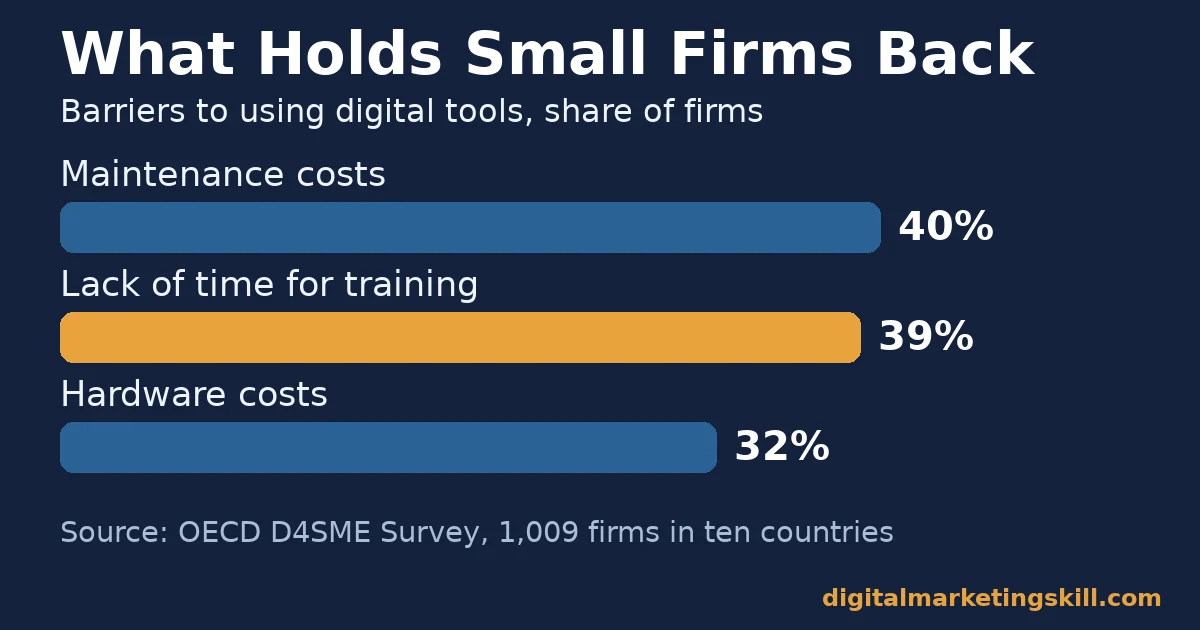
So the real question is not “which app is best?” Instead, it is “which job is still undone, and what is the simplest app that does it?” The same OECD survey found digital marketing and SEO was the most urgent training need. In fact, 42% of firms named it, and so did 51% of retailers.
Ground Rules for This Guide
First, we name app types and well-known examples, not a ranking. No company paid for a mention. Next, features and free plans change often, so treat every app name as a snapshot, not a permanent ranking. Finally, where we go beyond the data, we say it is an informed inference, not a settled fact.
How we checked this: the Digital Marketing Skill Institute team opened every source linked here and read the method notes. When a figure comes from a vendor or covers one region only, we say so next to it.
How Small Business Marketing Apps Actually Grow Sales
An app grows sales in only two ways. It either removes a step between a stranger and a sale, or it makes a step visible so you can fix it. If an app does neither, it is a cost, however good the demo looks.
The Five Jobs Every App Stack Must Cover
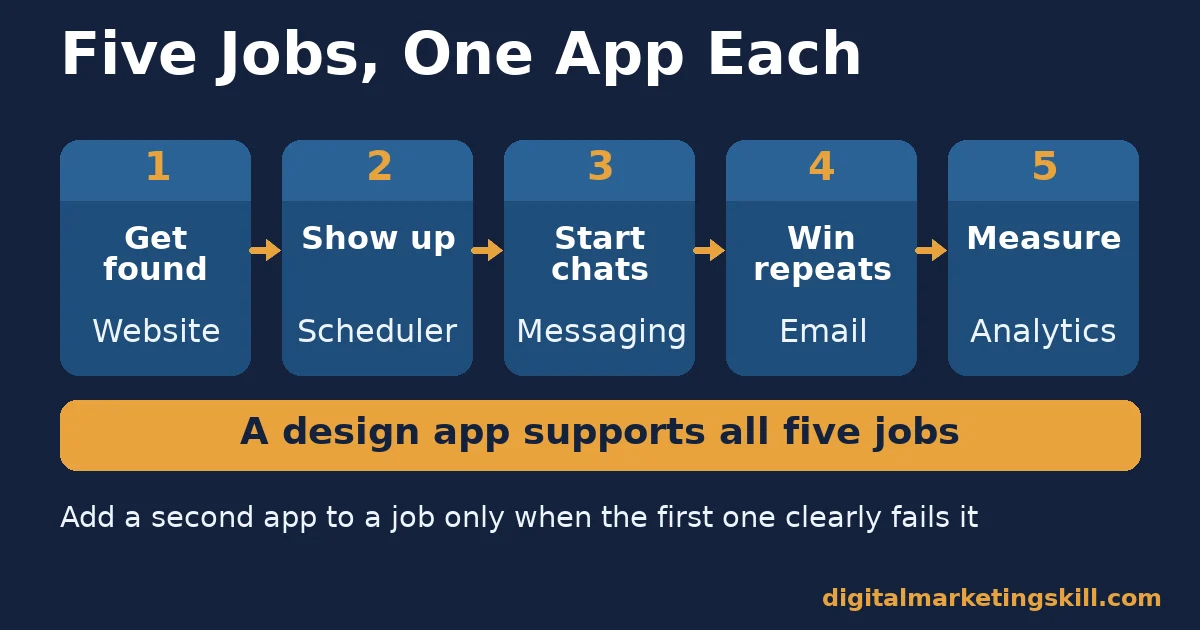
That logic gives every business five jobs. Each job has its own type of app, and you rarely need more than one app per job:
- Get found: a website or blog that answers buying questions. Search engines and AI tools need a page to point to.
- Show up: a social scheduler, so you post on a steady rhythm, not only when you have a spare hour.
- Start conversations: a messaging app, because many buyers want to ask one question before they pay.
- Bring buyers back: an email app, since a past buyer is the cheapest person to sell to again.
- Measure: an analytics app that shows which of the other four jobs produces sales.
A design app supports all five jobs, so it sits beside them rather than in the chain. In practice, your stack can be as small as five or six apps. The condition is that each one has a named job and a named owner.
Why Every App Must Work on a Phone
The path also runs on phones. For example, StatCounter’s worldwide platform data recorded 58.99% of web page views on mobile in a recent month. Desktop took 39.26% and tablet 1.76%. So test small business marketing apps on a phone first, because that is where most buyers meet your business.
What Each Type of App Is Built For
Each app type is good at one thing and weak at others. Once you know what an app does best, you stop asking it to do a job it was never meant to do.
Website and Blogging Apps: Built for Being Found
Website builders and blogging apps give your business a page that search engines and AI tools can find and quote. W3Techs reports that WordPress runs 40.1% of all websites it monitors. Shopify follows at 5.4% and Wix at 4.2%, while 31.5% of sites use no content management system that W3Techs detects.
Shopify suits shops that sell products online, while WordPress suits firms that win customers with helpful content. Both are weak at follow-up. A visitor who reads a page and leaves is gone, unless another app catches them with a sign-up form or a chat button.
Social Scheduling Apps: Built for Showing Up Consistently
Schedulers such as Buffer, Hootsuite and Meta Business Suite let you write a week of posts in one sitting. That matters because social reach rewards a steady rhythm. According to the DataReportal global overview, Kepios counts 5.66 billion social media user identities. That equals 68.7% of the world’s population, although one person can hold several accounts.
The same report cites GWI data showing online adults use 6.75 social platforms each month on average. Schedulers tempt you to post everywhere, because adding one more account takes seconds. However, two platforms done well usually beat six done badly. That is our informed inference, not a measured rule.
Messaging Apps: Built for Conversations That Close
Messaging apps turn a browser into a buyer by answering the one question that stops a sale. TechCrunch reported Meta’s news that the WhatsApp Business app passed 200 million monthly active users. That was up from 50 million a few years earlier. The figure counts active users of the app, not the sales they make.
Messaging is weak at scale. Every chat needs a human reply, so it works best for higher-value sales or small daily volumes that one person can answer within the hour.
Design Apps: Built for Speed, Not Brand Strategy
Design apps such as Canva and Adobe Express turn a template into a post, banner or flyer in minutes. They are made for speed. But they cannot decide what your brand should look like, which is a job for you and not for the app. As a result, ten people with the same app can still produce ten different styles.
Email Apps: Built for Repeat Sales
Email apps such as Mailchimp, Brevo and MailerLite reach people who have already chosen to hear from you. Litmus, an email testing company, says email returns $36 for every dollar spent. But its page does not show how it got that number. So treat it as a vendor claim, not a forecast for your business.
Email is weak at finding new people, because it only grows sales when another app, usually your website or social profile, keeps adding subscribers.
Analytics Apps: Built for Decisions
Analytics apps show what visitors do after they arrive. Google Analytics counts an engaged session when a visit lasts over 10 seconds, has a key event or has two or more page views. That definition lets you separate real interest from people who leave at once.
Analytics is weak when nobody acts on it. A dashboard you never open costs nothing in fees. Still, it costs you every decision it could have improved.
How to Lead With Each of Your Small Business Marketing Apps
Knowing what small business marketing apps do best tells you where to start with each one. Each section below mirrors one app type above and gives you the first move that earns its keep.
Website and Blogging Apps: Lead With One Page That Answers a Buying Question
Start with the question buyers ask most before they pay, such as price, delivery time or fit. Then write one page that answers it in the first two sentences. After that, add a clear next step, like a contact button or a sign-up form. Our guide to where website traffic comes from shows how to grow visits to that page.
Social Scheduling Apps: Lead With a Weekly Batch on Two Platforms
Pick the two platforms where your buyers already ask questions or share purchases. Next, block one hour a week to write and schedule every post for both. Then spend ten minutes a day replying to comments, because the scheduler handles posting but cannot hold a conversation for you.
Messaging Apps: Lead With Quick Replies and a Catalogue
Write saved replies for your five most common questions, so every answer is fast and consistent. Also, add your main products or services with prices to the app’s catalogue, if it has one. As a result, a buyer can go from question to order in one chat.
Design Apps: Lead With Three Locked Templates
Create three templates: one for offers, one for tips and one for customer stories. Lock your colours, fonts and logo in each. Then anyone on your team can make a new post in five minutes without drifting off brand, even if they have never studied design.
Email Apps: Lead With a Welcome Sequence
Before you send any newsletter, set up three automated emails for new subscribers. The first delivers what they signed up for. The second shares a useful tip, and the third makes one clear offer. Also, follow Gmail’s email sender guidelines. They ask every sender to keep the spam rate shown in Postmaster Tools below 0.3%, and bulk senders must offer one-click unsubscribe. Our guide to email deliverability explains the full checklist.
Analytics Apps: Lead With Key Events and Tagged Links
Mark the actions that matter as key events, such as a form sent, a chat started or a purchase. Google defines a key event as an action that is especially important to your business. Then tag every link you share in posts and emails. Google’s campaign URL guidance says to always use utm_source, utm_medium and utm_campaign. That way, each sale traces back to the app that started it.
How to Measure Whether Small Business Marketing Apps Earn Their Place
Every app should pass a short review each quarter. The point is not to collect more data. Instead, it is to decide which apps stay, which change and which go.
Waste is normal, so expect to find some. Zylo’s SaaS Management Index draws on 30 million software licences the company tracks. It found companies use only 49% of the licences they pay for, and the average company also ran 15 overlapping training apps and 11 project management tools.
Those are mostly large firms, and Zylo sells software to fix the problem. Even so, the pattern is a warning for anyone running small business marketing apps, because overlap creeps in one free trial at a time.
Six Measures That Decide Whether an App Stays
Read each measure against the job the app was hired to do:
- Weekly use: whether someone opened the app for its job in each of the last four weeks. An app nobody opens is the first to cut.
- Engagement rate: the share of website visits that count as engaged sessions. A falling rate means your pages miss the visitor’s question.
- Key event rate: the share of sessions that include a key event, such as a form or a chat. It tells you whether traffic turns into leads.
- Email click rate: the share of delivered emails that get at least one click. It beats opens, because privacy features can record opens that never happened.
- Unsubscribe rate: the share of recipients who leave after each send. A sudden rise means the content or timing missed.
- Cost per result: the app’s monthly fee divided by the leads or sales it helped create. This number decides whether the app stays.
For context, Mailchimp’s email marketing benchmarks show an average open rate of 35.63% across its customers. The click rate is 2.62% and the unsubscribe rate 0.22%. Those figures only cover campaigns sent to at least 1,000 subscribers. So compare your own trend over time rather than chasing one average.
How to Run a 30-Minute Quarterly App Review
A review only works if it is short enough to actually happen. So keep it to 30 minutes, and follow the same four steps each time:
- List every app and its fee. Check your card statements too, because forgotten free trials often turn into paid plans without anyone noticing.
- Write one job next to each app. If two apps share a job, mark the weaker one for removal before you look at any numbers.
- Add the six measures. Use the last quarter’s tagged links and key events, so each app is judged on results rather than on how busy it looks.
- Decide keep, change or cut. Then put the next review in your calendar, since small business marketing apps drift back into overlap within a few months.
The One-In, One-Out Rule for Small Business Marketing Apps
If you remember one thing from this guide, make it this rule. It is the most useful habit for keeping small business marketing apps lean, because it forces a decision whenever a new tool looks tempting.
Decision rule: add a new app only if it does a job no current app does, someone will use it weekly, and its result shows within 30 days. When you add one, remove one.
A Worked Example: The Bakery With Seven Apps
Here is a worked example with illustrative, invented numbers. A small bakery pays for seven apps that cost $160 a month in total. Two are social schedulers, and the owner uses only one. A third is a design app that copies templates already inside the email app.
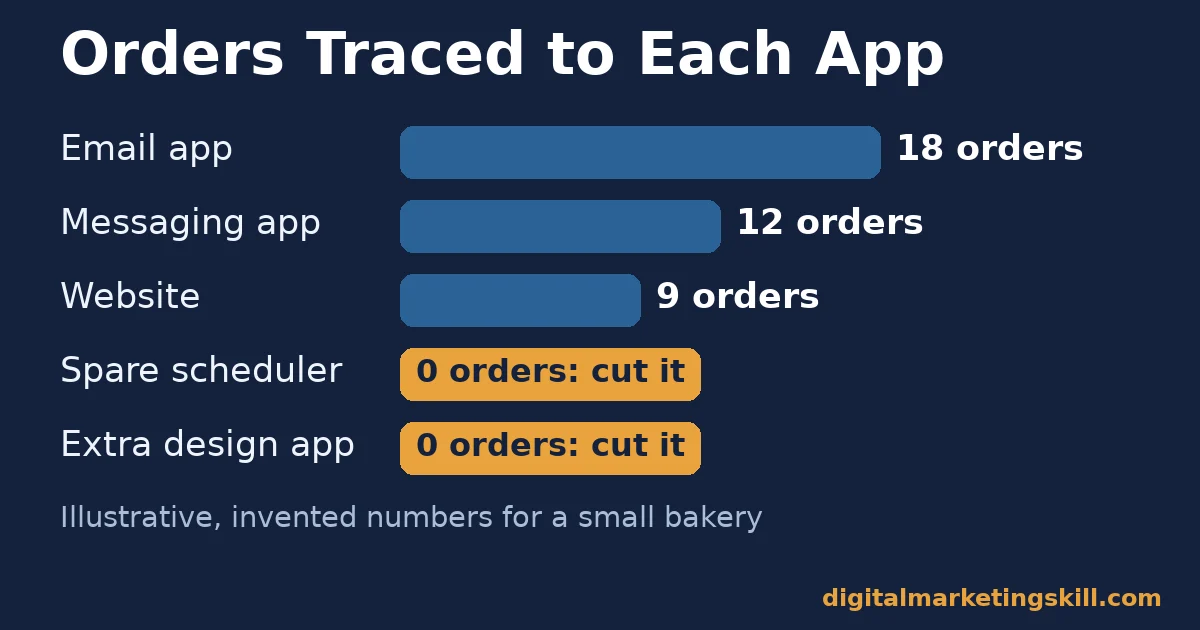
Next, the owner tags every link for one month. Email brings 18 orders, messaging brings 12 and the website brings 9. The spare scheduler and the extra design app bring none, because nobody uses them. So cancelling both saves $45 a month, and that money pays for a messaging upgrade that takes catalogue orders.
The result is five small business marketing apps, each with one job and one owner. Of course, your numbers will differ. But the method holds: tag first, count results, then cut what produces nothing.
For a deeper look at tools as a team grows, read our guide to a martech stack your team will actually use. To decide which channels deserve budget first, see our guide to the marketing channel mix.
What Doing This Right Looks Like: One Graduate’s Email Results
Olajire Jacob, a Digital Marketing Skill Institute graduate, focused on one app job: email automation for clients. Their Google review appears on our student reviews page. In it, they wrote that they charged an average of $500 to set up email marketing flows for clients in the US, UK and Canada. They added that they later scaled to $5K a month.
Why did it work? Instead of learning every app at once, Olajire went deep on one job that clients pay for. Email flows bring past buyers back, so a business can see the value in its own sales numbers.
This case has clear limits. It is one self-reported review, it does not show costs or hours, and it is not a typical result. Your results will depend on your skills, effort and market, as our earnings disclaimer explains.
Frequently Asked Questions About Small Business Marketing Apps
How many marketing apps does a small business need?
Most firms can cover the five core jobs with five or six small business marketing apps. That means a website, a social scheduler, a messaging app, an email app, an analytics app and a design app. Add more only when one of those jobs is clearly undone.
Are free marketing apps good enough for a small business?
Free plans are often enough to start, as long as they cover the job you need done and the volume of contacts or posts you handle. Upgrade when the free plan blocks a measurable result, such as automated emails. More features alone are not a reason to pay.
Which marketing app should a small business set up first?
Set up the website and analytics first, because every other app sends people somewhere. You need to see what visitors do on your site before you can judge any other app. Then add email, so visitors who are not ready to buy can stay in touch.
How do I know if a marketing app is worth paying for?
Divide the app’s monthly fee by the leads or sales it helped create. Use tagged links and key events to count them. If nobody uses the app weekly, or the cost per result keeps rising, cancel it.
Can one all-in-one app replace several small business marketing apps?
An all-in-one app can replace several tools if it does each job well enough for your needs. Test it against the five-job list first, because a weak feature inside a bundle still leaves that job undone.
Do I need technical skills to use marketing apps?
Most marketing apps are designed for non-specialists and include templates and guided setup. The harder skill is deciding what each app should achieve and reading the results. That is where training pays off most.
Learn to Run Small Business Marketing Apps Like a Professional
Apps are only as useful as the person running them. So the best next step is simple. Pick one job from this guide, set up its app, tag its links and check the result in 30 days. Then repeat with the next job.
If you want guided practice, the Digital Marketing Skill Institute teaches these tools hands-on. The Master Diploma in Digital & AI Marketing offers AI-powered tracks in social media and ads, lead generation and email, Google Ads and analytics, and WordPress and SEO.
Every track includes unlimited 1-on-1 coaching and mentoring, plus project-based work experience with a U.S. partner company. The diploma is dual US and UK accredited and recognised in more than 100 countries.
The programme is fully online, so you can study from anywhere in your country. You can find more guides on the Digital Marketing Skill Institute blog. When you are ready, apply for the Master Diploma or start from the Digital Marketing Skill Institute homepage.
Every figure in this guide was checked against its original source before publication. Figures marked as illustrative are invented examples, not real results.
![9 Amazing Digital Marketing Skills to Make Money Online [With Proof]](https://digitalmarketingskill.com/wp-content/uploads/2019/07/9-Amazing-Digital-Marketing-Skills-to-Make-Money-Online-With-Proof-17.png)






