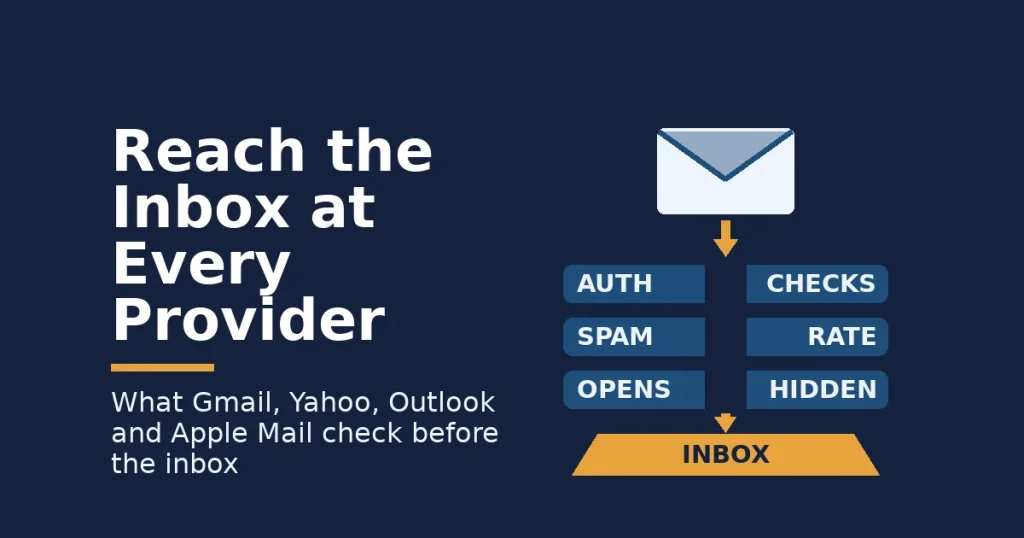
Email deliverability is the share of your messages that reach the inbox, rather than the spam folder or nowhere at all. It depends on who runs the inbox. Gmail, Yahoo and Outlook each publish their own sender rules. Apple Mail hides opens. So one fix never covers every subscriber.
Key Takeaways
- Gmail says its defences stop more than 99.9% of spam, phishing and malware, and block nearly 15 billion unwanted emails a day. Your mail has to prove it is not part of that flood.
- Gmail and Yahoo both ask senders to keep spam complaints below 0.3%, and Gmail recommends staying below 0.1%. That is one complaint per 1,000 messages.
- Outlook applies SPF, DKIM and DMARC rules to domains that send more than 5,000 emails a day. Mail that fails goes to Junk first and may later be rejected.
- Litmus tracked over 1 billion opens and credited 62.26% to Apple, whose Mail Privacy Protection stops senders from seeing if you opened a message. So open rates are no longer a reliable test of email deliverability.
- The one rule worth remembering: when complaints pass one in a thousand, stop mailing people who have not clicked in months, before you change anything else.
In this guide
- Why Most Email Deliverability Advice Misses the Mailbox Provider
- How Email Deliverability Works: Four Gates Before a Click
- What Each Mailbox Provider Checks Before Your Email Reaches the Inbox
- How to Improve Email Deliverability Provider by Provider
- The List Habits That Protect Email Deliverability Everywhere
- How to Measure Email Deliverability Without Trusting Open Rates
- The One Email Deliverability Rule to Remember: One Complaint in a Thousand
- What Doing This Right Looks Like: A Real Email Case
- Frequently Asked Questions About Email Deliverability
- Build Email Skills That Reach the Inbox
Why Most Email Deliverability Advice Misses the Mailbox Provider
Most guides treat “the inbox” as one place. They list tips such as avoiding spam words, warming up your domain or sending at the right time. But the inbox is not one place. Your subscribers read mail through Gmail, Yahoo, Outlook and Apple Mail. Each one filters, counts and reports in its own way.
So the useful question is not “how do I improve email deliverability?” in general. Instead, it is “what does each provider check, and what should I do differently for each one?” This guide answers it in order. You will see how filtering works, what differs by provider, what to change for each, how to measure email deliverability, and the one rule that matters most.
First, a few ground rules. The requirements quoted here come from the providers’ own help pages, so they are documented facts. However, the filters behind them are secret. Anything this guide says about how a filter weighs signals is an informed inference, not a settled fact. The rules also change over time, so read the numbers as a snapshot, not a permanent rulebook.
How Email Deliverability Works: Four Gates Before a Click
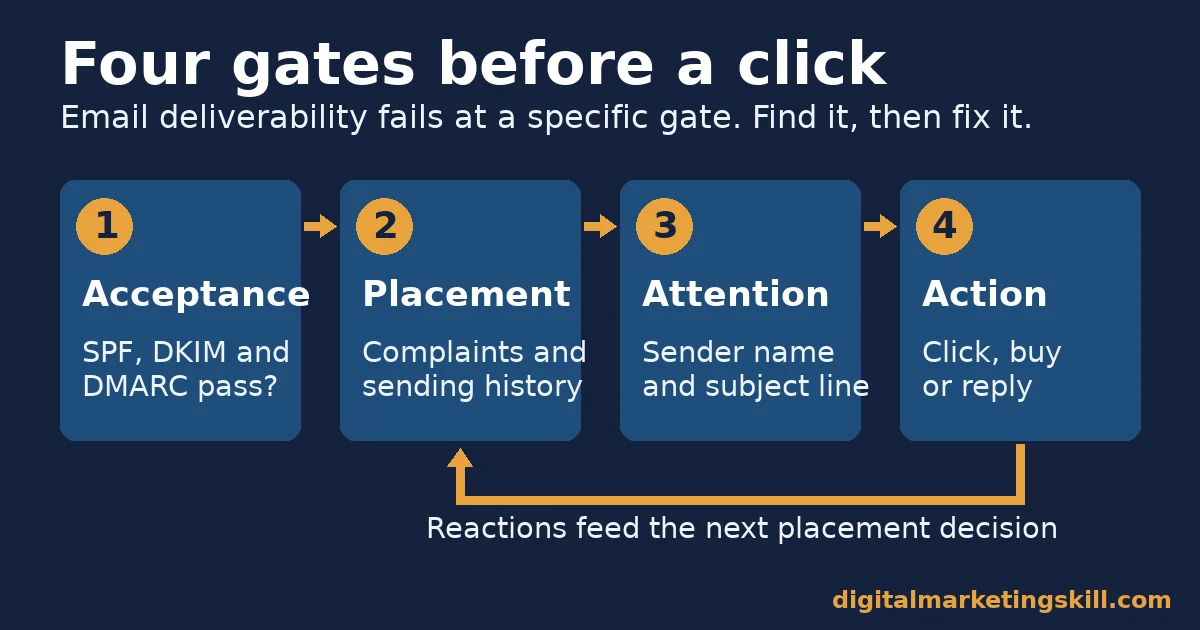
Every marketing email passes four gates before it earns a click. Knowing which gate failed tells you which fix to use, because each one has a different cause.
- Acceptance. The receiving server checks that the message really comes from your domain. If the checks fail, the email can bounce back or vanish.
- Placement. Next, the filter decides between the inbox, a promotions tab and the spam folder. It uses your sending history and how people react to your mail.
- Attention. Then your sender name and subject line compete with dozens of other messages for a glance.
- Action. Finally, the reader clicks, buys, replies or leaves. That result feeds back into placement for your next send.
Three Checks Decide Email Deliverability at the First Gate
The first gate relies on three checks with ugly names but simple jobs. SPF (Sender Policy Framework) is a public list of the servers allowed to send mail for your domain. DKIM (DomainKeys Identified Mail) adds a digital signature. It lets the receiver confirm that nobody changed the message on the way.
DMARC tells receivers what to do when those checks fail. It also sends you reports about who is sending in your name.
These checks matter because the scale of abuse is huge. Google’s announcement of its Gmail bulk sender requirements says Gmail blocks nearly 15 billion unwanted emails every day. It also says that once Gmail began requiring some form of authentication, unauthenticated messages to its users fell by 75%. In other words, a sender without these checks now looks like the problem the filter was built to stop.
Next, keep two numbers apart, because people often mix them up. Delivery rate counts messages the receiving server accepted. Inbox placement counts messages that actually reached the inbox. Your email platform usually shows the first one, so a 99% delivery rate can still hide a spam-folder problem.
What Each Mailbox Provider Checks Before Your Email Reaches the Inbox
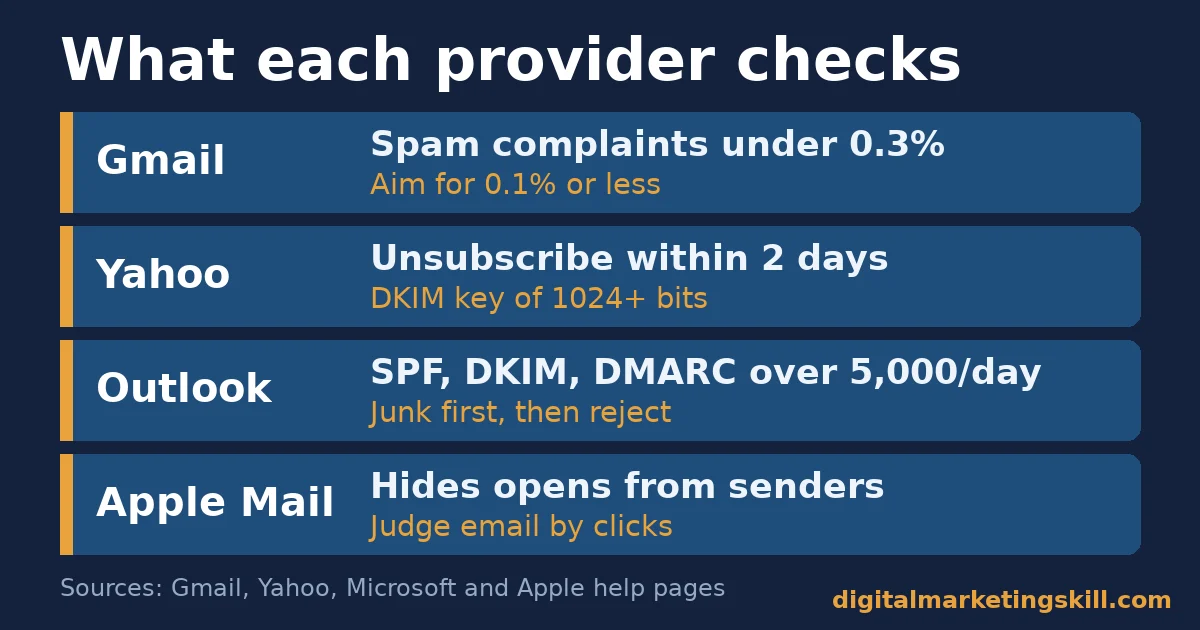
The big providers agree on the basics, but they differ in what they enforce and how they punish mistakes. Here is what each one publishes, based on its own help pages.
Gmail: Built Around Spam Complaints and Bulk Status
Gmail’s email sender guidelines ask every sender for SPF or DKIM, a secure connection and a spam rate below 0.3%. Gmail measures that rate in Postmaster Tools, a free dashboard for people who send to Gmail. Bulk senders face extra rules. They need SPF, DKIM and DMARC, a From address that matches their signed domain, and one-click unsubscribe on marketing mail.
Gmail defines a bulk sender as anyone sending close to 5,000 messages or more to personal Gmail accounts in 24 hours. Its sender guidelines FAQ adds two details that most guides skip. First, the status is permanent once assigned. Second, a sender whose complaint rate passes 0.3% loses access to Gmail’s help until the rate stays below 0.3% for seven days in a row.
Yahoo: Built on the Same Rules, With a Two-Day Unsubscribe Clock
Yahoo’s sender best practices mirror Gmail’s closely. All senders need SPF or DKIM and a spam rate below 0.3%. Bulk senders need both SPF and DKIM, plus a DMARC policy of at least “p=none”. Their DKIM key must be at least 1024 bits long.
Yahoo is also explicit about timing, because it tells bulk senders to honour unsubscribes within two days. Gmail’s FAQ recommends the same 48-hour window. So a platform that processes opt-outs in a weekly batch is a deliverability risk, not just a customer service flaw.
Outlook: Built to Junk First, Then Reject
Microsoft’s Outlook requirements for high-volume senders apply to domains sending more than 5,000 emails a day to its consumer services. SPF and DKIM must pass, and DMARC must be at least “p=none” and aligned with SPF or DKIM.
The penalty works in two steps. Non-compliant messages go to Junk first, and they may later be rejected outright. Microsoft also warns that an SPF record needing more than 10 DNS lookups can fail. That trap is common, because every email tool you add tends to add another “include” to the record.
Apple Mail: Built to Hide Opens, Not to Filter Them
Apple Mail is different, because it is mostly an email app, not a filter. Many people use it to read Gmail, Yahoo or iCloud accounts. Apple’s own guide to Mail Privacy Protection says the feature hides the reader’s IP address. It also “prevents senders from seeing if you’ve opened the email message they sent you.”
The reach of that change is large. The Litmus email client market share tracker is based on over 1 billion opens. It credits 62.26% of opens to Apple, 27.03% to Gmail, 5.83% to Outlook and 2.59% to Yahoo Mail. However, Litmus sells email testing tools and sees only the emails its customers track. Treat these shares as a guide, not a census.
How to Improve Email Deliverability Provider by Provider
Once you know what each provider checks, the fixes become specific. Each one below matches the claim above it, so you can start with the provider that sends most of your subscribers.
Gmail: Lead With Complaint Control
Because Gmail punishes complaints hardest, treat every “report spam” click as a cost. First, verify your domain in Postmaster Tools, so you can see the complaint rate Gmail sees. Then make unsubscribing easier than complaining: put the link near the top of promotional emails, and support the one-click header.
Next, check how often you mail people who never click. Unengaged readers are the ones most likely to hit “report spam”, since they no longer remember signing up. Finally, Gmail counts all mail from your main domain toward the 5,000 limit. So newsletters, receipts and sales emails share one reputation, and one careless campaign can hurt the email deliverability of your receipts.
Yahoo: Lead With Fast, One-Click Exits
Yahoo’s clearest demand is speed, so test your unsubscribe flow like a customer would. Click the link, then time how long it takes before the emails stop. If it takes more than two days, change the setting or the tool.
Also check your DKIM key length in your email platform’s settings. Older setups can still use short keys, so if you are in any doubt, ask your platform’s support team to confirm the key meets Yahoo’s 1024-bit minimum.
Outlook: Lead With Clean Authentication Records
For Outlook, the fix is mostly technical, so start with your DNS records. List every tool that sends email for your domain, such as your newsletter, shop, help desk and invoicing app. Then confirm each one appears in SPF and signs with DKIM.
After that, count the lookups in your SPF record. If you pass 10, remove tools you no longer use before you try anything complex. Finally, publish a DMARC record at “p=none” and read its reports for a few weeks, because they show every server sending in your name.
Apple Mail: Lead With Clicks, Not Opens
Since Apple hides real opens, stop using opens to make decisions. Instead, judge subject lines by clicks. Then define an “engaged” subscriber as someone who clicked or bought something recently, not someone who merely opened.
This change also protects your sender reputation elsewhere. A list cleaned by fake opens keeps inactive people who then complain at Gmail or Yahoo. Our guide to raising your email click-through rate covers ways to earn more of those clicks.
The List Habits That Protect Email Deliverability Everywhere
Technical setup gets you through the first gate. However, the list itself decides the second, because complaints and silence come from the people on it. Four habits protect every provider at once.
Build the List on Clear Consent
Add people only when they ask to hear from you. Good sources include a signup form on key pages, a checkbox at checkout and your survey forms. Our guide to growing an email list the right way lists more ideas.
The law points the same way in many places. The UK Information Commissioner’s Office guide to electronic mail marketing says you need consent to email individuals. Its only exception is a “soft opt-in” for past customers. It also says that exception never covers bought-in lists. That is a UK rule, but bought lists hurt email deliverability everywhere, because strangers complain.
Segment Before You Send
Sending the same message to everyone is the fastest way to raise complaints. So split your list by what people asked for, what they bought and how recently they clicked. Then give each email one clear purpose, such as a new guide or a product launch. Send it only to the segment that cares, and your email deliverability improves because fewer people feel spammed.
Write Subject Lines That Match the Email
A misleading subject line may lift one send, but it trains readers to complain. In the US, the Federal Trade Commission’s CAN-SPAM compliance guide says the subject line must reflect the content. It also requires a valid postal address, a clear way to opt out, and opt-outs honoured within 10 business days. Each email that breaks the law can cost up to $53,088.
Remove Addresses That Stay Silent
Every list decays, as people change jobs and abandon inboxes. Remove hard bounces at once, since those addresses no longer exist. Next, ask people who have not clicked in several months whether they still want your emails, and remove anyone who ignores the question. A smaller list with active readers beats a large list full of silence.
How to Measure Email Deliverability Without Trusting Open Rates
You cannot fix what you do not measure. But the favourite email metric, the open rate, is now the weakest. Mailchimp’s email marketing benchmarks cover campaigns sent to at least 1,000 subscribers. They show an average open rate of 35.63%.
Yet Mailchimp itself warns that Apple’s Mail Privacy Protection may affect those open rates, so use them with care. Mailchimp is also an email platform reporting on its own customers, so its averages describe its users rather than every sender.
Six Numbers That Show Real Email Deliverability
Track these six numbers instead, and read them together rather than alone:
- Delivery rate: the share of sent emails the receiving servers accepted. A drop points to an authentication or blocklist problem.
- Hard bounce rate: the share sent to addresses that do not exist. A rise means your signup forms or list sources need checking.
- Spam complaint rate: in Postmaster Tools, the share of inbox emails that engaged readers marked as spam. Aim below 0.1%.
- Click rate: the share of delivered emails that got at least one click. Mailchimp’s all-industry average is 2.62%, so compare yourself with your own past sends first.
- Unsubscribe rate: the share who opted out. Mailchimp’s average is 0.22%, and a sudden jump usually follows a mismatch between the subject line and the email.
- Revenue or leads per email sent: the business result divided by the number of emails sent. This is the number that shows whether better placement is worth the work.
Read a Low Complaint Rate With Care
One warning applies to the complaint rate. Google’s Postmaster help notes a trap. If Gmail already sends much of your mail to spam, the dashboard rate can look low, because fewer messages reach the inbox for people to report. So a low complaint rate alongside falling clicks is a warning sign, not good news. Our email marketing checklist helps you review these numbers before every campaign.
The One Email Deliverability Rule to Remember: One Complaint in a Thousand
If you remember only one thing from this guide, make it this rule. It is the most useful point here. Complaints are the signal every provider watches, and the one you control most directly.
Decision rule: when your Gmail spam complaint rate passes 0.1%, stop sending promotions to anyone who has not clicked in months. Fix that first, before you touch design, timing or copy. If it reaches 0.3%, pause all marketing email until it falls. Keep only transactional mail, such as receipts and password resets.
Here is a worked example with illustrative, invented numbers. A shop sends 20,000 promotional emails a week to Gmail users and gets 30 spam complaints. That is 30 divided by 20,000, or 0.15%, which sits above Google’s 0.1% target. The shop finds that 6,000 subscribers have not clicked in six months. So it stops mailing them, and sends each one a single re-permission email instead.
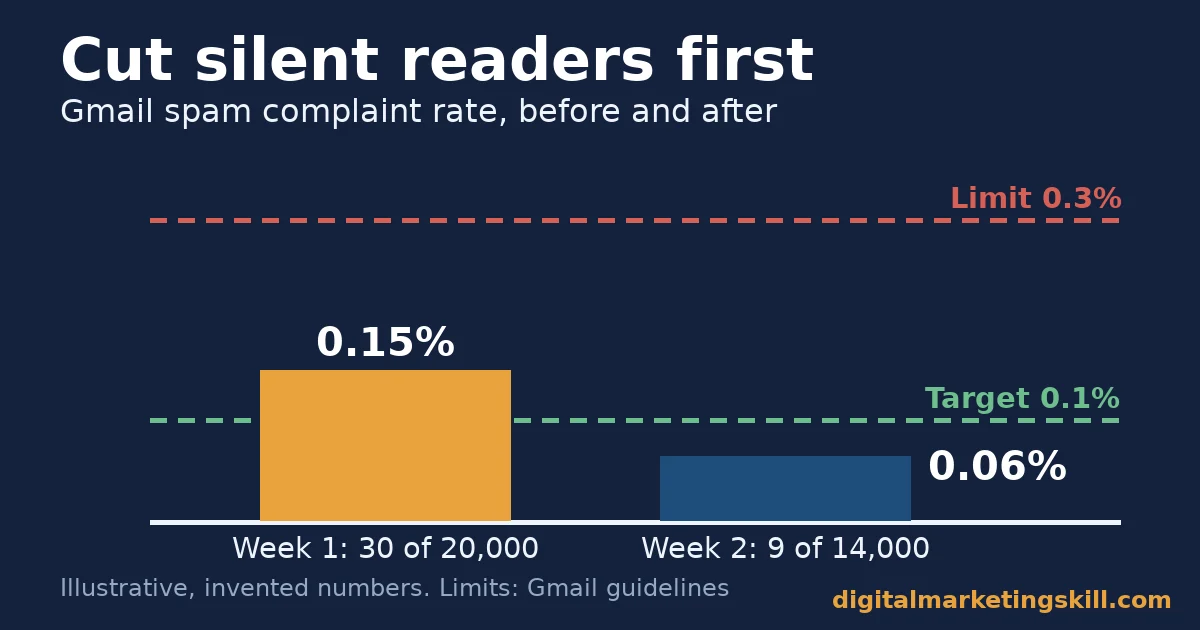
The next week it sends 14,000 emails and gets 9 complaints, which is about 0.06%. Clicks barely move, because the removed readers were not clicking anyway. As a result, the shop lowers its risk without losing any real buyers. Your numbers will differ, but the logic holds: cut the silent readers first, then measure again.
What Doing This Right Looks Like: A Real Email Case
Deliverability skills are also paid skills. Olajire Jacob, a graduate featured on the Digital Marketing Skill Institute student reviews page, wrote: “Fresh from the course, I was charging an average of $500 to set up email marketing flows for clients in the US, UK & Ca.” Olajire added that the Institute’s resources and support helped them “scale to $5K/mo.”
My reading is that clients pay for flows because flows reach people at the moment they act, such as signing up or leaving a cart. Those people expect the email, which keeps complaints low and clicks high. That is the same principle as the decision rule above, applied from the start.
Note the limits of this case. It is one person’s self-reported result, and it is not an independent audit. Results vary with effort, market and client base, as the Institute’s earnings disclaimer explains. Nothing here is a promise of income.
At a much larger scale, Google’s own figure is the clearest published case. After Gmail began requiring authentication, the number of unauthenticated messages reaching its users fell by 75%. That result came from rules, not tricks, which is why the basics in this guide deserve your time first. To turn these steps into automated sequences, see our guide to building an email automation strategy.
Frequently Asked Questions About Email Deliverability
What is a good email deliverability rate?
Good email deliverability means a delivery rate close to 100% and a Gmail spam complaint rate below 0.1%, Google’s recommended target. Inbox placement matters more than delivery, so watch clicks as well.
Do small senders need SPF, DKIM and DMARC?
Yes. Gmail and Yahoo ask all senders for SPF or DKIM, and Microsoft says every sender benefits from the same checks. Setting all three up early is easier than fixing them after a problem.
Why do my emails go to spam when my content is fine?
Filters judge the sender as much as the message. Missing authentication, high complaints or mail to inactive readers can hurt email deliverability even when the content is good.
Are open rates still useful?
Only as a rough trend. Apple’s Mail Privacy Protection hides whether people opened a message, so judge email deliverability and content by clicks and conversions.
How fast must I process unsubscribe requests?
Yahoo asks bulk senders to honour unsubscribes within two days, and Gmail recommends 48 hours. In the US, the CAN-SPAM Act sets a legal limit of 10 business days.
Can I email a list I bought?
You should not. Bought lists usually lack consent, which breaks the law in many countries and drives up complaints. The UK regulator says the soft opt-in never covers bought-in lists.
Build Email Skills That Reach the Inbox
Email deliverability rewards people who treat it as a system, not a trick. So start with the provider that holds most of your subscribers and apply its fixes. Measure clicks and complaints for a few weeks, then move on to the next one.
If you want guided practice, the Digital Marketing Skill Institute teaches these skills in its Master Diploma in Digital & AI Marketing. The nine practical courses include AI-Powered Lead Generation, Email Marketing & Automation, plus AI-Powered Google Analytics for the measurement side. You also get unlimited 1-on-1 coaching and mentoring, and real project work inside a U.S. company.
The diploma is dual US and UK accredited and recognised in more than 100 countries. It is also 100% online, so you can study from anywhere in your country. The skills travel too, wherever you live, because every mailbox provider in this guide serves readers in your country and far beyond.
When you are ready, apply to the Master Diploma. You can also browse more guides on the Digital Marketing Skill Institute blog, or visit digitalmarketingskill.com to explore the programme.
Every figure in this guide was checked against its original source before publication. Figures marked as illustrative are invented examples, not real results.
![9 Amazing Digital Marketing Skills to Make Money Online [With Proof]](https://digitalmarketingskill.com/wp-content/uploads/2019/07/9-Amazing-Digital-Marketing-Skills-to-Make-Money-Online-With-Proof-17.png)