
Search ads are paid text ads that appear on search engine results pages when someone types a query that matches the keywords you bid on. You usually pay only when someone clicks, and the ad sends them to a page on your website. They matter because they reach people at the moment they are actively looking for what you sell.
Key Takeaways
- Search ads show up on search results pages, alongside the free listings, when a query matches your keywords.
- Keywords and match types decide which searches can trigger your ad.
- An auction runs for every search. Ad Rank, not just your bid, decides if and where your ad shows.
- Responsive search ads let you enter up to 15 headlines and 4 descriptions, and Google tests the combinations.
- Conversion tracking tells you which keywords bring sales or leads, not just clicks.
What Are Search Ads?
Google explains that Search campaigns “allow you to place ads across Google’s vast network of search results.” They target people who are already looking for what your business offers.
Here is a simple example. Someone in Manchester types “same day boiler repair”. A heating firm has bid on that keyword. Its ad appears at the top of the page with a headline, a short description and a link. The person clicks, lands on the booking page and calls. In other words, the ad met a need at the exact moment it arose.
Google is the best-known place to run them, but not the only one. Microsoft Advertising also lets you run text ads on Bing. In fact, Microsoft lets you import existing Google Ads campaigns, so you can “run the same ads on Bing.”
How Search Ads Work
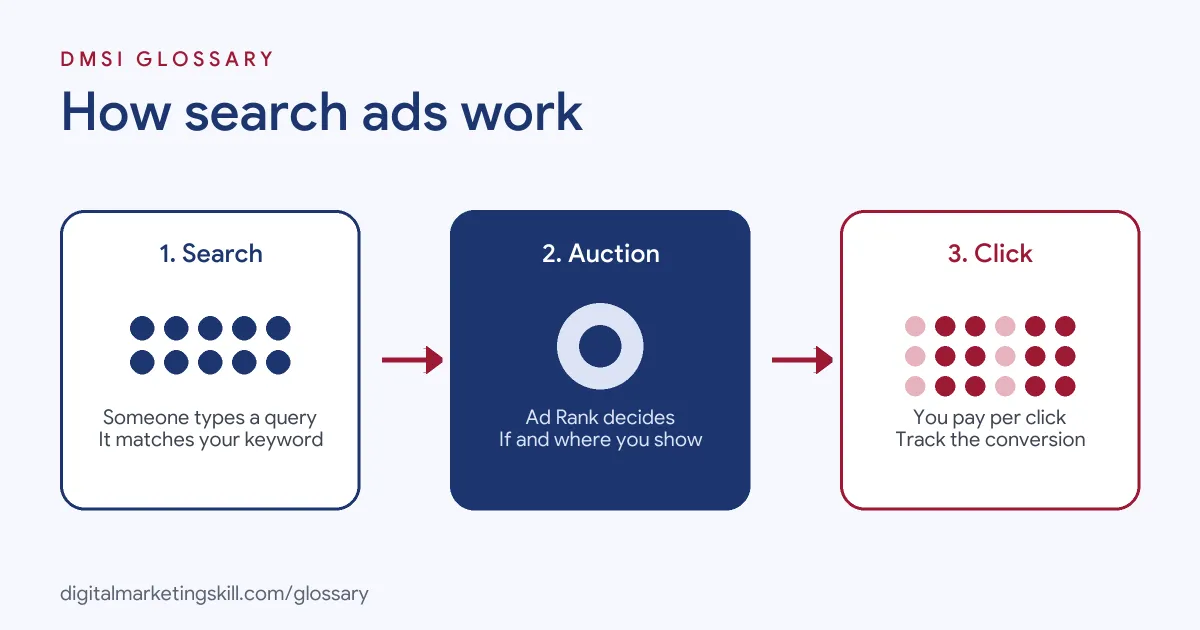
Every search sets off a quick chain of events. First, the search engine finds ads whose keywords match the query. Next, it runs an auction to score them. Finally, it shows the winners in order, and you pay if someone clicks.
Keywords and Match Types
Keywords are the words and phrases you choose to target. Match types control how closely a search must match them. According to Google, broad match “is the default match type” and reaches the widest range of related searches. Phrase match, shown in quotation marks, targets searches that “include the meaning of your keyword.” Exact match, shown in square brackets, targets searches with “the same meaning or same intent as the keyword.”
The Auction and Ad Rank
Google states that Ad Rank decides “whether your ads are eligible to show” and where they appear. It uses six factors, including your bid, the quality of your ad and landing page, and the context of the search. As a result, a relevant ad can outrank a higher bid. Google also notes that “higher quality ads can often lead to lower CPCs.”
Responsive Search Ads
The standard format on Google is the responsive search ad. You “can provide up to 15 headlines and 4 descriptions for a single responsive search ad.” Headlines can be up to 30 characters, and descriptions up to 90. Google then mixes and matches them to find the combinations that perform best. You can pin a line to a set position, although Google says “pinning isn’t recommended for most advertisers.”
Ad Assets
You can also add extra details to your ads, which Google calls assets. Common ones include sitelinks, which point to other pages on your site, and call assets, which add a phone number. These give people more reasons and more ways to act. They can also help your position, because Ad Rank includes the expected effect of your assets and other formats. So it is worth adding a few relevant ones to every campaign, then checking which get the most use.
Search Ads Examples
Here are three common ways businesses use these campaigns:
- Local service: A locksmith targets “emergency locksmith” plus the town name. It shows ads only within a short distance of its base.
- Online shop: A bike store bids on exact product names, such as a model of e-bike. These searches show strong buying intent.
- B2B software: A payroll tool bids on “payroll software for small business” and sends clicks to a free trial page.
In each case, the keyword reflects a clear need, and the landing page answers it directly.
Search Ads vs Display Ads vs Shopping Ads
These formats are often confused, so here is a quick comparison:
| Format | Where it shows | Best for |
|---|---|---|
| Search | Text ads on search results pages | People actively searching for a product or service |
| Display | Image ads across websites, apps and Google sites such as YouTube | Awareness and remarketing |
| Shopping | Product listings on search results and the Shopping tab | Retailers with a Merchant Center account |
In short, search catches existing demand, while display helps create it.
How to Set Up Search Ads in Google Ads
These steps follow Google’s standard flow for a new Search campaign:
- Open the Campaigns page and select the plus button to start a new campaign.
- Choose a goal, such as sales, leads or website traffic, then select Search.
- Name the campaign and choose your bidding, locations, languages and ad assets, such as sitelinks.
- Decide whether to include Google search partners. Untick the Display Network box if you want text ads only on search.
- Create ad groups of closely related keywords.
- Write your ads with a final URL, headlines and descriptions. Google suggests at least three ads per ad group.
- Set a daily budget, fix any flagged issues and publish.
Best Practices
- Track conversions first. Otherwise, you can’t tell which keywords bring customers.
- Keep ad groups tight. Group close keywords, so each headline matches the search.
- Aim for strong Ad Strength. Google recommends at least two responsive search ads with “Good” or “Excellent” Ad Strength per ad group.
- Use negative keywords. Block searches that will never convert, such as “jobs” or “free”, if they don’t fit.
- Review search terms weekly. Add good new terms as keywords and bad ones as negatives.
Common Mistakes to Avoid
New advertisers tend to repeat a few errors. First, they rely on broad match without checking which searches triggered their ads. Second, they send every click to the home page. Third, they write one ad with the same few headlines. Another error is leaving the Display Network on by accident, which spends money outside search. Finally, they pin every headline, which Google says can lower Ad Strength.
Where You’ll Use Search Ads at Work
Paid search is a core skill in PPC and performance roles. For example, recent remote job listings ask candidates to:
- “Create and optimize ad campaigns and paid search landing pages” (Google Ads Specialist).
- “Setup search campaigns, within each required platform, following agency and advertiser guidelines” (Search Analyst).
- Help “advertisers reduce their spending on Google and Bing Search ads” (Google Ads Specialist, PPC and Search).
Notice how practical these tasks are. Employers want people who can set up campaigns, write the ads and improve the landing pages behind them.
So if you want to work as a Google Ads Specialist, PPC Specialist or Web Analytics Specialist, expect to build campaigns, write ads and report on cost per result. Employers will also want proof, such as a live campaign with conversion tracking.
Learn It in the Google Specialist Track
You can learn this in the AI-Powered Google Specialist track. It covers AI fundamentals, Google Ads across Search, Display, Discovery, Gmail and YouTube, and Google Analytics. For your portfolio, you launch and measure a Google Ads campaign with conversion tracking. You also join a U.S. Project Internship from day one, with unlimited 1-on-1 mentoring.
To go deeper, read our guide to Google Ads match types and our tips on PPC campaign optimisation. You can also read our glossary entry on pay-per-click.
Frequently Asked Questions
What are search ads in simple terms?
They are paid text ads that appear on search results when someone searches for words you have chosen. You usually pay when someone clicks.
How much text can a responsive search ad have?
Up to 15 headlines of 30 characters and 4 descriptions of 90 characters. Google shows a mix of them in each ad.
Do search ads appear only on Google?
No. Microsoft Advertising runs text ads on Bing too. You can even import your Google campaigns there.
What is the difference between search ads and SEO?
Paid ads appear as soon as your campaign is live, and you pay for clicks. SEO earns free listings, but it takes longer to build.
Does the highest bid always get the top spot?
No. Ad Rank also looks at ad quality, landing page quality and the search context. So a more relevant ad can win with a lower bid.
Sources: Google Ads Help: Create a Search campaign; Google Ads Help: About responsive search ads; Google Ads Help: About Ad Rank; Google Ads Help: About keyword matching options; Microsoft Advertising: Google Ads import; remote job listings on Himalayas.