
Demand Gen campaigns are a Google Ads campaign type that shows image and video ads across YouTube, Discover, Gmail and the Google Display Network. They aim to catch people’s attention while they browse and watch, then turn that interest into clicks, sign-ups or sales. They matter because they let you reach people before they search, using the visual formats that work on social media.
Key Takeaways
- This campaign type runs on YouTube (including Shorts), Discover, Gmail and the Google Display Network.
- You can mix images, videos, carousels and product feeds in one campaign.
- Lookalike segments help you find new people who resemble your customers or site visitors.
- You can bid for clicks, conversions or conversion value.
- Google has replaced Video action campaigns with this format, and it adds channel controls they lacked.
What Are Demand Gen Campaigns?
Most Google Ads campaigns wait for someone to search. These do not. Instead, Google says they “capture engagement and action across YouTube (including Shorts)” and other Google surfaces. In other words, they put your ads in front of people while they scroll, read email or watch videos.
Think of the difference this way. A Search ad answers a question someone just asked. A visual ad on YouTube or Discover sparks interest the person didn’t know they had. That’s why the format suits brands with strong images or video. It also fits brands that already advertise on social media, because the same kinds of visuals often work here too.
For example, a fitness app might show a short vertical video on YouTube Shorts, an image ad in the Discover feed and a carousel in Gmail. All three come from one campaign with one budget.
How Demand Gen Campaigns Work
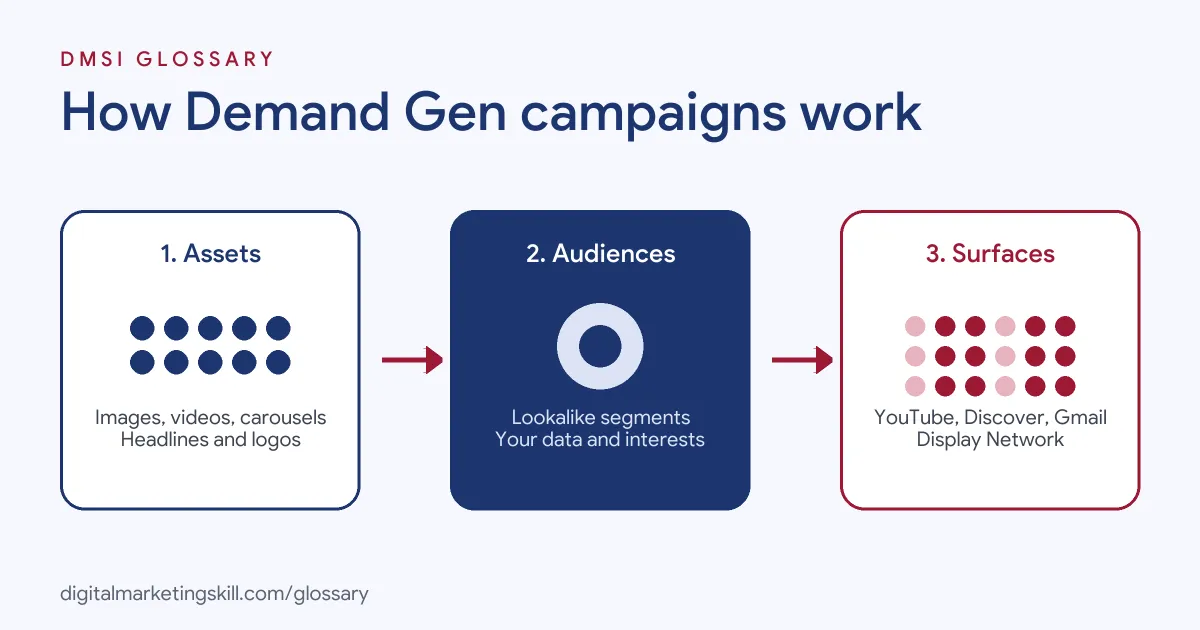
The setup rests on three parts. First, you supply creative assets. Next, you choose your audiences. Finally, Google shows the ads across its visual surfaces and bids to reach your goal.
Where the Ads Appear
On YouTube alone, Google lists several placements: Shorts, in-feed, the Home feed, watch next and YouTube Search. Beyond YouTube, ads can also show in the Discover feed, in Gmail and across the Google Display Network. However, ads in sensitive categories are generally limited to YouTube. So check the policy for your industry before you plan the media mix.
Ad Formats
You can use several formats in one campaign:
- Image: landscape (1.91:1), square (1:1) and portrait (4:5) images, plus a square logo.
- Video: landscape, square and vertical videos for in-stream, in-feed and Shorts placements.
- Carousel: two to ten image cards that people can swipe.
- Product feeds: products from your feed, shown with your ads.
You can run image-only or video-only campaigns. However, Google says “using both typically yields better performance.”
Audiences and Lookalike Segments
Lookalike segments are a key feature. They help you reach “new, qualified audiences” who resemble a list you provide, such as past buyers, website visitors or YouTube channel viewers. You can also use your own data and Google’s interest-based segments. Campaigns in sensitive categories must use predefined Google audiences instead.
Bidding and Budget
Google lets you bid for clicks, conversions or conversion value. Options include Maximize Clicks, Maximize conversions and target CPA. If you use a CPA target, Google recommends a budget of at least ten times that target. Otherwise, the campaign may struggle to learn.
Channel Controls in Demand Gen Campaigns
Google has upgraded Video action campaigns to this format. One big change is control over placement. Google says it lets you “choose precisely where your ads appear across YouTube, Discover, Gmail, and Google Display Network.” So you can keep a campaign on YouTube only, or let it run everywhere. The upgrade also brought image ads, creative A/B experiments and AI-generated image assets to former video-only advertisers.
Examples You Can Learn From
- Online store: A homeware brand links its product feed. Its ads show items next to a short lifestyle video on YouTube, so viewers can tap straight to a product.
- App install or sign-up: A language app builds a lookalike segment from people who completed its free trial. It then runs vertical videos on Shorts to reach similar people.
- Lead generation: A training provider runs a carousel in Gmail and Discover. Each card shows one benefit and links to a sign-up page.
In each case, strong visuals do the heavy lifting, and the audience setting decides who sees them. Clear tracking then shows which of the three paid off.
Demand Gen vs Performance Max vs Search
| Campaign type | Where ads show | Main strength |
|---|---|---|
| Search | Google search results | Catching people who already look for what you sell |
| Performance Max | All Google channels, including Search and Maps | Chasing conversion goals with maximum automation |
| Demand Gen | YouTube, Discover, Gmail and the Display Network | Visual ads, lookalike segments and channel control |
In short, Search meets existing demand, while this format helps create it. Performance Max sits across both. You can read more in our glossary entry on Performance Max.
How to Set Up Demand Gen Campaigns
- Set up conversion tracking, so the campaign can learn from real results.
- In Google Ads, create a new campaign and choose Demand Gen as the campaign type.
- Pick your bidding goal: clicks, conversions or conversion value.
- Set a budget. If you use a CPA target, aim for at least ten times that target per day.
- Choose your channels, or leave all of them on.
- Add audiences, such as a lookalike segment built from your customers.
- Upload images in all three ratios, your logo, headlines, descriptions and at least one video.
- Review the ad previews for each surface, then publish.
After launch, give the campaign time to gather data before you make big changes. Then check the reports. Google lets you segment results by ad format, such as in-feed, skippable in-stream and Shorts. As a result, you can see which placements drive action and move budget or creative effort towards them.
Best Practices for Demand Gen Campaigns
- Use images and video together. Google’s guidance says mixing both usually performs better.
- Design for mobile. Vertical video and portrait images suit Shorts and feeds.
- Build lookalikes from your best people. Buyers make a better seed than casual visitors.
- Test creative on purpose. Google offers creative A/B experiments, so test one change at a time.
- Judge on the right goal. Interest takes time to turn into sales, so watch conversions over weeks, not days.
For broader planning, read our guide to YouTube marketing.
Common Mistakes to Avoid
Many beginners reuse Search thinking and write text-heavy ads with weak images. Others upload one landscape image and no video, so the ads look poor on Shorts. Some set a CPA target with a tiny budget, and the campaign barely spends. Another error is building a lookalike from everyone who visited the site. Finally, many judge results on last-click sales alone, which can hide the interest these ads create.
Where You’ll Use Demand Gen Campaigns at Work
Employers now list this format by name. For example, recent remote job listings include:
- “Plan, launch, and scale large-scale Google Ads campaigns with a strong focus on Demand Gen” (Google Ads Demand Gen Manager).
- “Drive the video creative direction for YouTube and Demand Gen campaigns — creative testing, performance analysis, and hypothesis generation” (Google Ads Demand Gen Manager).
- “Lead campaign strategy and execution across Search, Shopping and Performance Max” while including Google Demand Gen where it supports the goals (Performance Marketing Manager, Paid Search).
So if you want to work as a Google Ads Specialist or PPC Specialist, you will need to plan visual campaigns, brief creative and report on results.
Learn It in the Google Specialist Track
You can learn Google Ads across Search, Display, Discovery, Gmail and YouTube in the AI-Powered Google Specialist track. There, you launch and measure a Google Ads campaign with conversion tracking, so you finish with results you can show an employer. You also join a U.S. Project Internship from day one, with unlimited 1-on-1 mentoring.
New to the platform? Start with our glossary entry on Google Ads.
Frequently Asked Questions
What are Demand Gen campaigns in Google Ads?
They are a campaign type that shows image, video and carousel ads on YouTube, Discover, Gmail and the Google Display Network.
Did Demand Gen replace Video action campaigns?
Google has upgraded Video action campaigns to this format. It also says Display campaigns are moving into it.
Does this format support lookalike audiences?
Yes. Lookalike segments find new people who resemble your customers, site visitors or YouTube viewers.
What budget does Google recommend?
If you use a target CPA, Google recommends a budget of at least ten times that target.
Can I show these ads only on YouTube?
Yes. Channel controls let you choose YouTube, Discover, Gmail and the Display Network separately.
Sources: Google Ads Help: About Demand Gen campaigns; Google Ads Help: Video action campaigns are being upgraded to Demand Gen; Google Ads Help: About Performance Max campaigns; remote job listings on Himalayas.