
YouTube ads are video ads you create and manage in Google Ads that play on YouTube and, depending on your settings, on partner websites and apps. They come in several formats, from short six-second bumpers to longer ads that viewers can skip after five seconds. They matter because video lets you show a product in action, and you can pay only when people watch or act.
Key Takeaways
- You run them through Google Ads, and the video itself must be hosted on YouTube.
- The main formats are skippable in-stream, non-skippable in-stream, in-feed, bumper, Shorts and Masthead ads.
- Viewers can skip a skippable in-stream ad after five seconds.
- With cost-per-view bidding, you pay when someone watches 30 seconds, the whole ad if it is shorter, or interacts with it.
- Strong ads hook people in the first few seconds and give one clear next step.
What Are YouTube Ads?
They are paid video placements that run on YouTube itself and beyond it. You upload your video to YouTube, then build a campaign in Google Ads that tells Google who to show it to, where and for how much.
For example, a language school might create a 20-second video showing a nervous learner chatting confidently after a few lessons. It runs the ad before videos about travel and learning. Some viewers skip it after five seconds. However, the ones who keep watching are interested, and some click through to book a free trial lesson.
So YouTube ads are not just TV ads online. In other words, you can target, measure and change them while they run.
How YouTube Ads Work
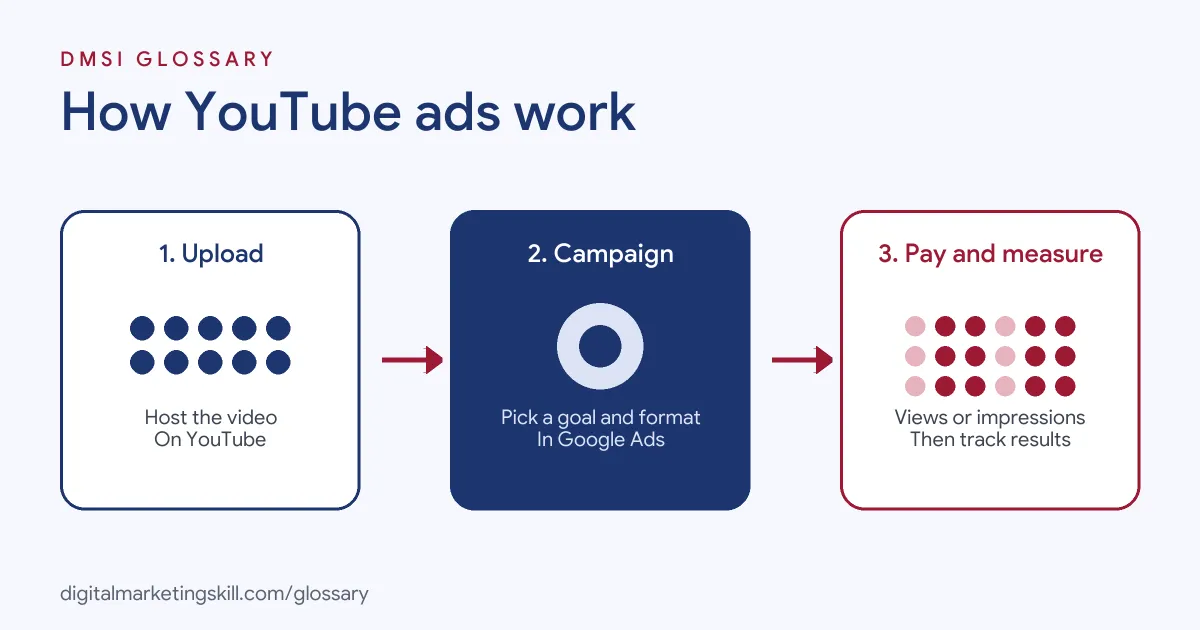
Every campaign follows three steps. First, you upload your video to a YouTube channel. Next, you create a video campaign in Google Ads and choose a goal, a format and a budget. Then Google shows the ad to the right viewers, and you pay by view or by impression.
Where the Ads Appear
Google Ads Help explains that the video must be hosted on YouTube. However, the ad can appear on YouTube and across sites and apps that run on Google video partners. Google also says video campaigns can reach people on Google TV. Which places you get depends on the format and your campaign settings.
How You Pay
For skippable in-stream ads, there are two main ways to pay. With cost-per-view (CPV) bidding, you pay when a viewer watches 30 seconds of your video, or the whole video if it is shorter, or interacts with it, whichever comes first. With Target CPM, Target CPA or Maximise conversions bidding, you pay based on impressions instead.
How Viewability Is Measured
Google also tracks whether a video ad had a real chance to be seen. According to Google Ads Help, a video ad counts as viewable when at least 50% of it is on screen while it plays for at least two seconds.
YouTube Ad Formats Compared
Here are the main formats, based on Google’s own format guide:
| Format | How it works | Best for |
|---|---|---|
| Skippable in-stream | Plays on YouTube watch pages and partner sites; viewers can skip after five seconds | Sales, leads and traffic |
| Non-skippable in-stream | Viewers can’t skip, so they see the whole message; 15 to 60 seconds depending on the campaign subtype | Getting a full message across |
| In-feed | A thumbnail from your video in places of discovery, such as YouTube search results and next to related videos | Getting people to choose to watch |
| Bumper | A non-skippable ad of five to six seconds that plays before, during or after another video | Short, memorable reach |
| Shorts | Runs in YouTube Shorts | Reaching mobile, short-form viewers |
| Masthead | A featured spot on the YouTube homepage | Large launches and big reach |
For skippable in-stream ads, Google sets no maximum length but recommends keeping them under three minutes.
So how do you choose? Start with the goal. If you want sales or leads, skippable in-stream ads give interested viewers time to act, while others can skip. For a short reminder, bumpers keep the message tight. If your video teaches something, in-feed ads let people choose to watch. Then, once you have results, test a second format against the first.
YouTube Ads Examples
Here are three ways businesses use video ads on the platform:
- Online store: A skincare brand runs a 30-second skippable ad that shows the product before and after use. The goal is sales, so it adds a clear “Shop now” button.
- Local service: A dental clinic runs six-second bumper ads to people nearby. As a result, more people recognise the name when they later search for a dentist.
- Course provider: A coding school runs in-feed ads next to tutorial videos. People who click watch a longer free lesson, and some then sign up.
In each case, the format matches the goal. That choice matters more than the size of the budget.
How to Set Up YouTube Ads
The steps below follow the standard flow in Google Ads. Menu names can change, but the logic stays the same.
- Upload your video to YouTube. Make sure it is the final, edited version.
- Create a new campaign in Google Ads. Choose an objective, such as sales, leads, website traffic or YouTube reach and views.
- Select Video as the campaign type. Then pick a subtype. For instance, Google’s “Efficient reach” subtype uses bumper, skippable in-stream, in-feed and Shorts ads.
- Set your budget and bidding. Pick a bid strategy that matches your goal.
- Choose your audience and placements. Start with people who match your ideal customer.
- Add your video and a clear call to action. After that, publish and monitor the results daily at first.
Before you launch, set up conversion tracking. Otherwise, you will only see views, not the leads or sales they create.
Best Practices for YouTube Ads
- Hook people fast. With skippable ads, the first five seconds decide whether people stay.
- Show the brand early. Even viewers who skip should know who the ad was from.
- Use one message per ad. A single clear idea beats a list of features.
- Design for mobile and sound-off viewing. Add captions and big, readable text.
- Match the landing page. If the ad promises a free lesson, the page should offer that lesson straight away.
- Test several versions. For example, try different openings with the same main video.
Common Mistakes to Avoid
Beginners often reuse a TV ad or a long brand film without editing it. As a result, the key message comes too late and most people skip. Another mistake is choosing the wrong format, such as bumpers for a complex product that needs explaining. Some advertisers also judge success on views alone, without tracking conversions. Others send good clicks to a slow or vague landing page, which wastes them. Finally, many forget to check where their ads appear. So review your placements and exclude any that don’t fit your brand.
Where You’ll Use YouTube Ads at Work
Video ad skills show up in paid media, growth and creative roles. For example, recent remote job listings ask candidates to:
- “Develop and script YouTube ads and mini VSLs for competitive e-commerce markets” (Creative Strategist, YouTube Ads).
- Handle “research, angle development, hook writing, scripting, and iterating based on performance data” (Creative Strategist, YouTube Ads).
- Show “Familiarity with paid social (Meta, TikTok, YouTube ads), or a real interest in learning it fast” (Growth Lead).
So whether you aim to be a Google Ads Specialist, PPC Specialist or Web Analytics Specialist, you should know how to plan, launch and measure a video campaign.
Learn It in the Google Specialist Track
You can learn to run YouTube ads in the AI-Powered Google Specialist track. It covers AI fundamentals, Google Ads across Search, Display, Discovery, Gmail and YouTube, and Google Analytics. For your portfolio, you launch and measure a Google Ads campaign with conversion tracking. You also join a U.S. Project Internship from day one, with unlimited 1-on-1 mentoring.
To go further, read our complete guide to YouTube marketing and our glossary entry on Google Ads.
Frequently Asked Questions
What are YouTube ads in simple terms?
They are video ads that play on YouTube and partner sites. You set them up and pay for them in Google Ads.
How long can a YouTube ad be?
It depends on the format. Bumper ads last five to six seconds, while skippable in-stream ads have no maximum length, although Google recommends under three minutes.
When do you pay for YouTube ads?
With cost-per-view bidding, you pay when someone watches 30 seconds, the whole ad if it is shorter, or interacts with it. With CPM-style bidding, you pay based on impressions.
Do I need a YouTube channel to advertise?
Yes. Your video ad must be hosted on YouTube, so you upload it to a channel first.
Are YouTube ads good for small businesses?
They can be, if you choose a clear goal and track conversions. Start with a small budget and one strong video, then improve it based on results.
Sources: Google Ads Help: Video ad formats; Google Ads Help: Create a video campaign; Google Ads Help: About Active View metrics; remote job listings on Himalayas.