
AI image generation is the use of generative AI models to create new images, or edit existing ones, from a written description called a prompt. You describe what you want to see, and the model produces a picture that matches. It matters because marketers can now make concepts, ad variations and social graphics in minutes, as long as they check the results and use them responsibly.
Key Takeaways
- Most tools offer two main jobs: generating an image from scratch and editing an existing image with a new prompt.
- Clear prompts that describe the subject, setting, style and format give the most useful results.
- Google Merchant Center requires AI-generated product images to carry IPTC metadata that marks them as AI-made.
- Google’s SynthID adds an invisible watermark to images made with Google AI.
- The C2PA’s Content Credentials standard records where a piece of content came from and how it was edited.
- A person should always check images for errors, brand fit and misleading details before use.
What Is AI Image Generation?
Traditionally, a marketing image came from a photo shoot, a stock library or a designer. Now AI gives you a fourth option. You type a description, and a model creates the image for you.
For example, a coffee shop wants a poster for its spiced latte. Instead of booking a photographer, the owner writes a prompt: “A steaming cup of spiced latte on a wooden café table, warm morning light, shallow depth of field, square format.” A few seconds later, they have several options to choose from.
This is one branch of generative AI, the same family of technology behind AI chat tools. The difference is the output: pictures rather than words.
How AI Image Generation Works
From the user’s side, the process has three steps. First, you write a prompt. Next, the model generates one or more images. Finally, you refine the result with edits or a new prompt.
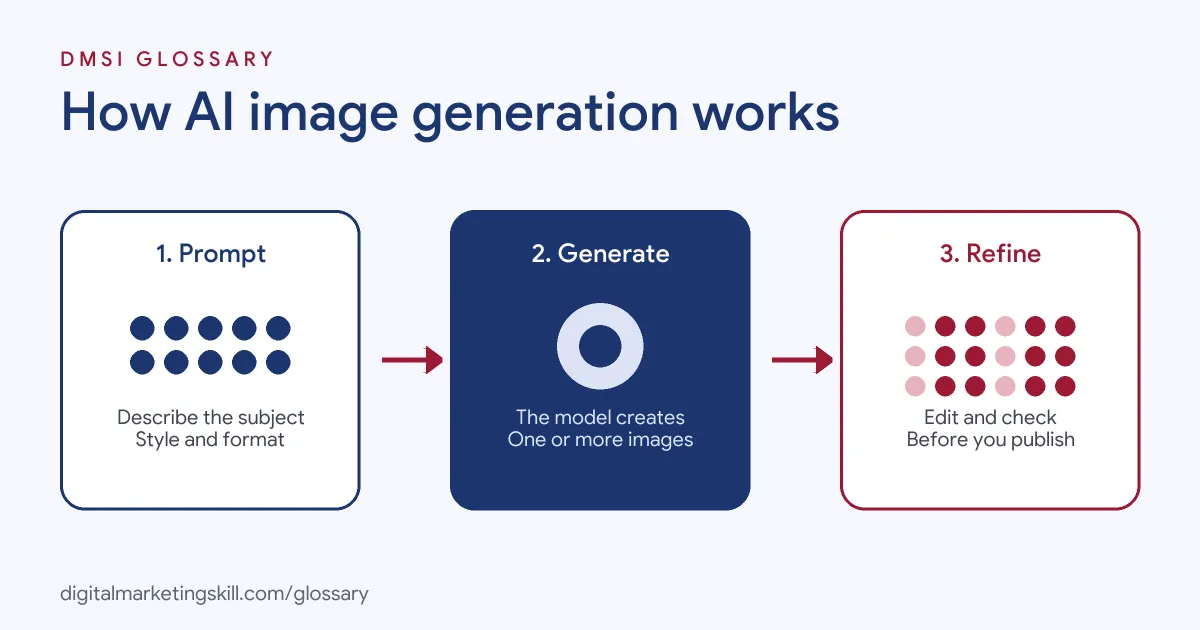
Generate and Edit
OpenAI’s documentation shows the two core jobs clearly. Its Image API has a “Generations” endpoint to “generate images from scratch based on a text prompt”. It also has an “Edits” endpoint to “modify existing images using a new prompt, either partially or entirely”. In addition, OpenAI supports multi-turn editing in conversation, so you can refine an image step by step.
Other tools work in a similar way, and ad platforms use the same technology. For instance, Google says responsive display ads may use “AI-generated assets such as backgrounds and images” to help improve performance.
Writing a Good Prompt
The prompt does most of the work, so it pays to be clear. Here is a made-up “before” prompt: “a dog in a park”. It works, but the result could be any dog, any park and any style.
Now here is an “after” prompt: “A small brown dog runs across a green park at sunset. Low camera angle. Soft, warm light. Bright, clean photo style. Wide format for a web banner.” This time, you set the subject, the place, the light, the look and the shape. As a result, the first try is much closer to what you need.
So think like a photographer. Say what is in the shot, where it is, how it is lit and how it will be used. Then change one thing at a time until it looks right.
Watermarks and Labels
Because AI images can look real, the industry is adding ways to identify them. Google’s SynthID “adds an invisible digital watermark to an AI-generated image”, and Google says the watermark doesn’t change image quality. Meanwhile, the C2PA provides “an open technical standard” called Content Credentials, which it compares to “a nutrition label for digital content”.
AI Image Generation Examples
Here are three made-up examples of how marketers use it:
- Ad testing: A meal-kit brand creates six background scenes for the same product photo. It then tests which setting gets the best click-through rate.
- Social content: A travel agency generates illustrated headers for a carousel about packing tips. Real destination photos stay real.
- Concept work: A design team generates rough mood boards for a rebrand before a real photo shoot. As a result, the client agrees on a direction sooner.
In each case, AI handles ideas and variations. However, real products and places are shown as they really are.
AI Images vs Stock Photos vs Original Photography
Each source of images has a place. Here is how they compare:
| Source | Strengths | Watch out for |
|---|---|---|
| AI-generated images | Fast, cheap to iterate, endless variations | Odd details, made-up features, labelling rules on some platforms |
| Stock photos | Real, licensed, quick to find | Generic look; the same image may appear on rival sites |
| Original photography | Shows your real product, team and customers | Takes more time and budget |
For product listings, original photos are usually the safest choice, because buyers need to see exactly what they will get.
How to Use AI Image Generation for Marketing
Follow these steps to get usable images:
- Start with the purpose. Decide where the image will go, such as a feed ad, a blog header or a story.
- Write a detailed prompt. Describe the subject, setting, lighting, style, colours and format.
- Generate several options. Compare them, then pick the closest one.
- Refine with edits. Ask for specific changes, such as “make the background plainer” or “remove the second cup”.
- Check every detail. Look closely at hands, text, logos and product features, because models can get these wrong.
- Add your brand. Place your logo and real text in a design tool, where you control the result.
- Keep records. Save the prompt and the tool used, in case you need to explain how the image was made.
AI Image Generation Best Practices
- Never fake the product. If you sell a blue chair, show the real blue chair, not an AI version that looks better.
- Follow platform rules. Google Merchant Center says AI-generated images “must contain metadata using the IPTC DigitalSourceType TrainedAlgorithmicMedia metadata”.
- Write good alt text. Google’s guidance says the review of AI content also applies to alternate text for images.
- Be open about automation. Google suggests telling your audience how content was made, for example by adding image metadata.
- Check tool terms. Read each tool’s usage rules before you use images in paid ads.
Common AI Image Generation Mistakes
A common mistake is using AI images to show results a product can’t deliver. That can mislead buyers. Another mistake is skipping the close check, so an ad goes live with garbled text or an extra finger. Some teams also strip metadata when they export, which can break platform rules like Merchant Center’s. Finally, many marketers write one-line prompts, then wonder why the images look generic.
Where You’ll Use AI Image Generation at Work
Design and social media roles increasingly list these skills. For example, remote job listings ask for:
- “Hands-on experience with AI image generation tools and the ability to integrate AI-generated assets into production-ready designs” (Graphic Designer (SMM)).
- The ability to “Leverage AI tools (for image generation, variations, and ideation) to scale production efficiently while maintaining creative quality” (Graphic Designer).
- To “Integrate generative AI tools into daily workflows for creative exploration, concept development, image generation, and production” (Senior Designer for an DTC company).
So if you aim to be a Content Creator or Social Media Manager, you will be expected to use these tools quickly and with good judgement.
Learn It in the Social Media Track
AI fundamentals, including strategy and planning, are part of every DMSI track. You will use these tools most in the AI-Powered Social Media Management and Advertising track, which covers content creation for graphics and video. There, you plan, create and run a paid social campaign for a real brand. You also get unlimited 1-on-1 mentoring and a U.S. Project Internship from day one.
To choose the right tools, read our guide to AI marketing tools, or see the bigger picture in AI in digital marketing.
Frequently Asked Questions
What is AI image generation in simple terms?
It is using an AI tool to create a picture from a written description. You can also ask it to edit an image you already have.
Can I use AI images in ads?
Often, yes, but check each platform’s rules and each tool’s terms first. Never use AI images to show a product differently from how it really is.
Do I have to label AI-generated images?
It depends on the platform. Google Merchant Center, for example, requires IPTC metadata that marks AI-generated product images.
How can people tell if an image is AI-made?
Some tools add hidden signals. Google’s SynthID embeds an invisible watermark, and C2PA Content Credentials record an image’s origin and edits.
What makes a good image prompt?
A good prompt names the subject, setting, lighting, style and format. The more specific you are, the closer the first result will be.
Sources: OpenAI: Image generation guide; Google Search Central: Guidance on using generative AI content; Google DeepMind: SynthID; C2PA: Content Credentials; Google Ads Help: About responsive display ads; remote job listings on Himalayas.