
Remarketing is a way of showing ads to people who have already interacted with your business, such as visiting your website, using your app or watching your videos. In Google Ads, you build lists of these people and then target them as they browse, search or watch YouTube. It matters because people who already know you are often closer to buying than strangers, so remarketing helps you win back interest you have already paid to earn.
Key Takeaways
- Remarketing targets people who have already engaged with your site, app, videos or customer list.
- Google Ads now calls these lists “your data” segments, but the idea is the same.
- Google says your ads can reach these people across over 2 million websites and mobile apps.
- A list needs at least 100 active users in the last 30 days to serve on Display, Search or YouTube.
- Dynamic remarketing shows people the exact products or services they viewed.
What Is Remarketing?
Most people don’t buy on their first visit. They look around, leave and maybe compare prices elsewhere. Remarketing gives you a second chance to reach them.
Google describes the goal as helping you “re-engage people who have previously interacted with your brand or services on mobile or desktop.” It adds that your ads appear to people in your segment “as they browse Google or partner websites.”
The term has a naming twist worth knowing. Google Ads renamed remarketing to “your data” inside the platform. So when you build a remarketing list, you’ll usually find it under your data segments. Meanwhile, many marketers still say remarketing, and many job ads still use the old word.
You will also hear the word retargeting. In everyday use, the two mean much the same thing. Google tends to say remarketing, while Meta and many agencies say retargeting.
How Remarketing Works
Remarketing in Google Ads follows three steps. First, a tag on your site or app adds visitors to a list. Next, Google matches those people when they appear on its networks. Finally, it shows them ads from the campaign that targets that list.
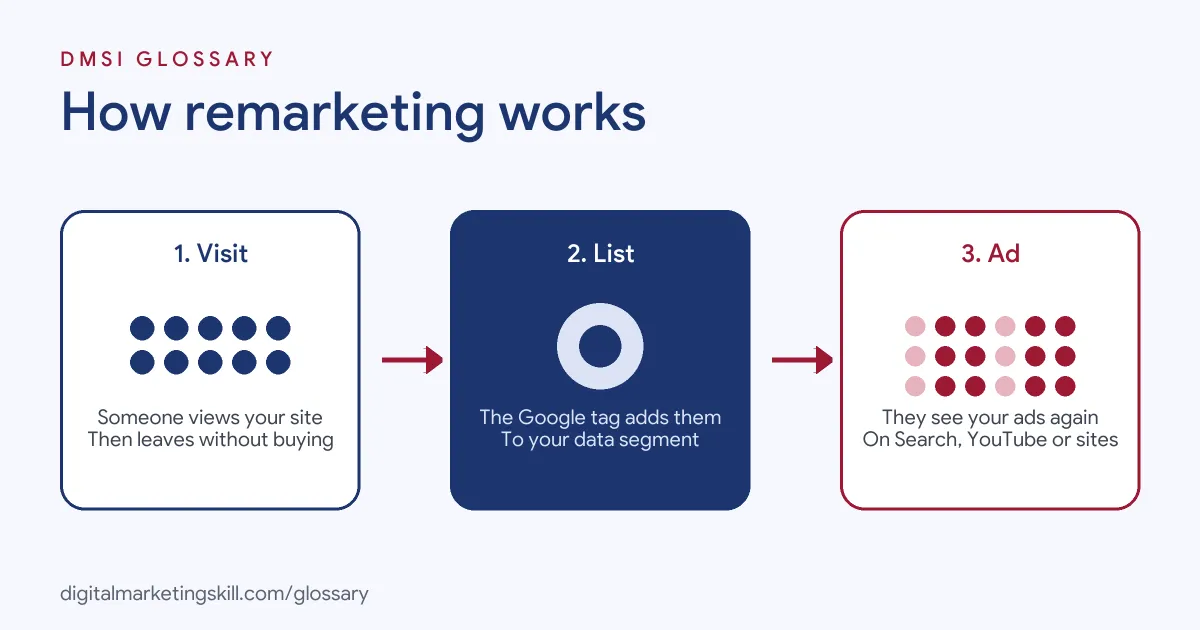
The Google Tag and Lists
Google explains that your data segments are collections of visitors or app users “gathered by snippets of code added to your site or app.” When you set up the Google tag, visitors join your segments within seconds of visiting a tagged page.
You control who joins with rules. Google’s own example is an airline that wants to reach people who looked at flight deals. It creates a segment with a rule to collect everyone who visits a page whose address ends in “flight-deals.html.”
Membership Duration
Each list also has a membership duration, which sets how long people stay on it. In the airline example, the duration is 30 days. Every time someone visits a tagged page again, Google updates their timestamp, so the clock restarts. As a result, active visitors stay on the list, while inactive ones drop off.
List Size Rules
A list must be big enough before ads can run. Google says a segment needs “a minimum of 100 active visitors or users within the last 30 days” to serve on the Display Network, the Search Network or YouTube. It also notes that a new list can take 48 to 72 hours to fill fully. So build your lists early, before you need them.
Types of Remarketing in Google Ads
Google lists several ways to use your data:
| Type | Who you reach | Where ads show |
|---|---|---|
| Website visitors | People who visited your site | Sites and apps on the Display Network |
| Dynamic remarketing | Visitors, with ads showing the products they viewed | Display and other placements |
| Your data for search ads | Past visitors who search again on Google | Google Search |
| YouTube users | People who watched your videos or channel | YouTube and Display Network videos |
| Customer Match | Customers whose contact details you upload | Several Google products |
| App users | People who used your mobile app | Google’s networks |
Remarketing Examples
Here are three common uses. The first is Google’s own example; the others are made up:
- Abandoned baskets: Google suggests targeting “people who added something to their shopping basket but didn’t complete a transaction.”
- Course enquiries (example): A training provider shows a short video ad to people who read its course page but didn’t apply.
- Search follow-up (example): A plumber raises its bids when past visitors search again for “emergency plumber,” because they already know the brand.
How to Set Up Remarketing in Google Ads
- Install the Google tag. Add it to every page of your site, or enable data collection in your app.
- Plan your lists. Decide which groups matter, such as all visitors, product viewers and basket abandoners.
- Create your data segments. In Google Ads, set rules for each segment and choose a membership duration.
- Wait for the lists to fill. Next, check that each one reaches the minimum size for your network.
- Build the campaign. Add the segment to the targeting of an ad group, and write ads that match where people left off.
- Exclude converters. After that, exclude people who already bought, unless you want to upsell them.
- Measure and adjust. Finally, compare conversion rates and costs against your other campaigns.
A Worked Example
Here is a made-up example. An online shoe shop gets 3,000 visitors a month. It splits them into three lists: everyone who visited, people who viewed a product, and people who added shoes to their basket. The basket list is the smallest, at around 150 people, but it shows the strongest intent. So the shop gives that list its highest bids and a free delivery message. The product viewers see ads for the shoes they looked at. Everyone else sees a simple brand ad. Because each list gets its own message, the shop can compare results and move budget to the list that sells best.
Best Practices
- Segment by intent. A basket abandoner deserves a different message from someone who only saw the home page.
- Match the duration to your sales cycle. For instance, a pizza shop might use days, while a university might use months.
- Use exclusions. Google notes that you can only add exclusions for your data segments and custom segments, so plan them around your lists.
- Refresh the creative. People see these ads often, so change them before they get tired of them.
- Know how optimised targeting behaves. Google says that with optimised targeting, your ads may reach people outside your selected audience if they are likely to convert.
Common Mistakes
A common mistake is putting every visitor in one list and showing everyone the same ad. Another is forgetting to exclude buyers, which wastes money and annoys customers. Some advertisers also launch a remarketing campaign before the list is big enough, then wonder why nothing serves. Finally, check the rules before you tag pages. Google doesn’t allow tags on pages related to policy-restricted offers, and users can turn off personalised ads.
Where You’ll Use Remarketing at Work
Paid search and media roles ask for remarketing skills directly. For example, real remote job listings include lines like these:
- “Experience with campaign optimization, bidding strategies, audience segmentation, and remarketing” (Remote Senior Google Ads Specialist).
- “Create, QA, and maintain tracking solutions including pixels, remarketing lists, and conversion tracking” (Account Coordinator, Paid Search).
- “Identify the appropriate balance between awareness, consideration, lead generation, conversion, and remarketing tactics” (Media Supervisor).
So as a Google Ads Specialist or PPC Specialist, you will set up tags, build remarketing lists and report on how they perform. A Web Analytics Specialist will often check that the tags fire correctly.
Learn It in the Google Specialist Track
You can practise remarketing in the AI-Powered Google Specialist track. It covers Google Ads across Search, Display, Discovery, Gmail and YouTube, plus Google Analytics. Your portfolio project is to launch and measure a Google Ads campaign with conversion tracking. You also get unlimited 1-on-1 mentoring and a U.S. Project Internship from day one.
To compare platforms, read our guide to retargeting ads. For the wider plan, see our Google Ads strategy guide.
Frequently Asked Questions
What is remarketing in simple terms?
It means showing ads to people who have already visited your site, used your app or engaged with your videos. You remind them about you after they leave.
Is remarketing the same as retargeting?
In practice, yes. Google tends to say remarketing, while Meta and many agencies say retargeting. Both reach people who already know you.
Where is remarketing in Google Ads now?
Google Ads now calls it “your data.” You will find your lists under your data segments in the audience settings.
How big does a remarketing list need to be?
Google says a list needs at least 100 active users in the last 30 days to serve on Display, Search or YouTube.
How long should people stay on a list?
It depends on how long your customers take to decide. Choose a membership duration that matches your typical sales cycle.
Sources: Google Ads Help: About your data segments; Google Ads Help: How your data segments work; Google Ads Help: About audience segments; remote job listings on Himalayas.