
Quality Score is a 1 to 10 rating in Google Ads that shows how your ads and landing pages compare with other advertisers’ for the same keyword. A higher score means your ad and page look more relevant and useful to people who search that term. It matters because it points you to the exact part of a campaign that needs work, whether that is the ad, the keyword or the page.
Key Takeaways
- Google reports the score at keyword level, on a scale of 1 to 10.
- It has three parts: expected click-through rate, ad relevance and landing page experience.
- Each part is rated above average, average or below average against other advertisers.
- Google says it is a diagnostic tool and “not an input in the ad auction.”
- Ad Rank, which decides where ads show, uses ad and landing page quality as one of its inputs.
What Is Quality Score?
Google Ads Help describes Quality Score as a diagnostic tool. It shows “how your ad quality compares to other advertisers.” In other words, it is a health check for each keyword, not a target to chase.
Google is clear on this point. It says the score “is not a key performance indicator and should not be optimized or aggregated with the rest of your data.” So you use it to find weak spots, then fix the ads, keywords or pages behind them.
For example, imagine a bakery bids on “wedding cakes” but sends clicks to its home page. The keyword might show a low score with a below average landing page rating. That tells the bakery to build a page about wedding cakes, rather than to raise the bid.
How Quality Score Works
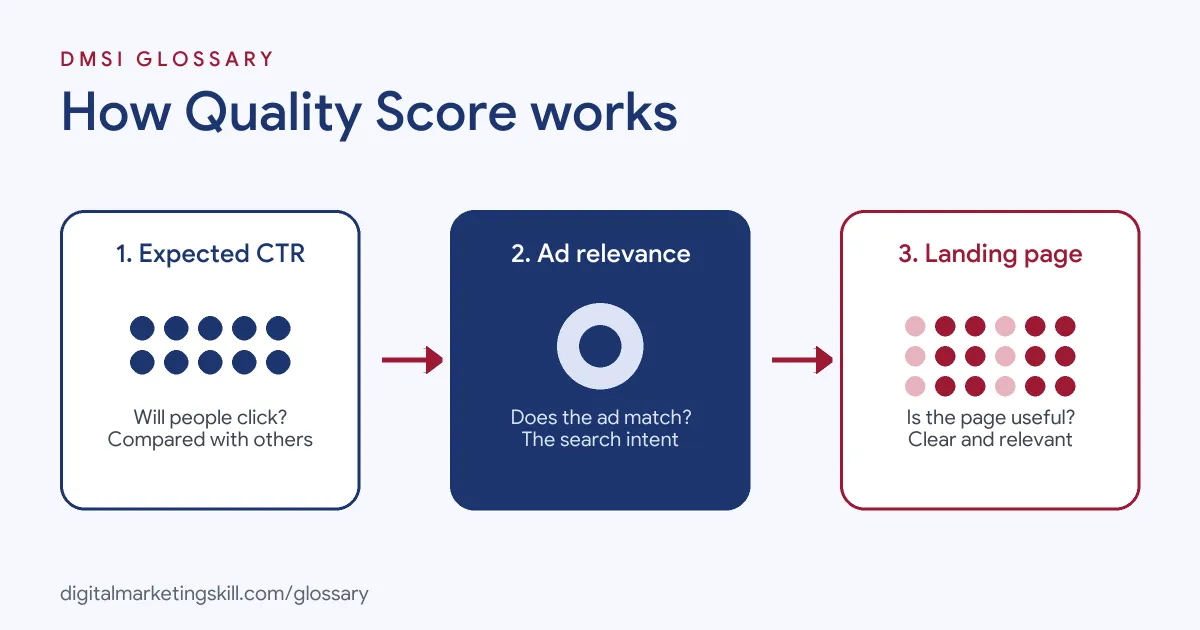
Google rates three parts of every keyword’s journey. First, it estimates whether people will click your ad. Next, it checks how well the ad matches the search. Finally, it looks at whether the landing page is useful. Together, these make up the score.
The Three Components
- Expected click-through rate: how likely people are to click your ad when it shows for that keyword.
- Ad relevance: how closely your ad matches the intent behind the search.
- Landing page experience: how relevant and useful your page is to people who click.
Google rates each one as “Above average,” “Average” or “Below average.” That rating compares your ads with others that showed for the exact same search over the last 90 days.
How Much Data It Needs
The score comes from past impressions on exact searches for your keyword. So if there aren’t enough exact searches yet, Google shows a dash instead of a number. Changing a keyword’s match type doesn’t change its score. There is one exception for broad match. A broad match keyword can still get a score if the same keyword in exact match, in the same ad group, has had impressions in the last 90 days.
What It Leaves Out
The rating is a summary, so it can’t capture everything that happens in each auction. Google lists devices, user location, time of day and assets as factors the score may not reflect. In other words, one rating can’t tell you how the same ad does on each device, in each place or at each hour of the day. So always read the score next to real results, such as cost per conversion, before you change a campaign that is working. Google also notes that it may use information from its crawlers when it assesses ad quality, so your landing page content counts too.
Quality Score and Ad Rank
Google is careful to separate the two. The score itself plays no part in the auction. Ad Rank, however, does, and Google lists ad and landing page quality among its inputs, along with your bid, the search context and the expected impact of assets. As a result, Google says that “even if your competition has higher bids than yours, you can still win a higher position at a lower price” with highly relevant keywords and ads.
Quality Score Examples
Here is how reading the three ratings points to different fixes:
- Low expected CTR: A plumber’s keyword “boiler repair” shows below average expected CTR. The ad headline only says “Local Plumber.” So the plumber rewrites it to mention boiler repair directly.
- Low ad relevance: An ad group mixes “running shoes” and “hiking boots” under one ad. Because the ad can’t match both, the shop splits them into two ad groups with their own ads.
- Low landing page experience: A course provider sends “data analytics course” clicks to a general page. It builds a page focused on that course instead.
In each case, the score doesn’t fix anything by itself. Rather, it shows which part to fix.
Quality Score Components and Fixes
Use this table to match each rating with the right action:
| Component | What it asks | If it is below average |
|---|---|---|
| Expected CTR | Will people click this ad? | Rewrite headlines, add a clear benefit and check the keyword fits the offer |
| Ad relevance | Does the ad match the search? | Group fewer, closer keywords and use their words in the ad |
| Landing page experience | Is the page useful and relevant? | Send clicks to a page that answers the search directly |
How to Check Quality Score in Google Ads
The score isn’t shown by default, so you need to add it. Google’s steps are:
- Open Campaigns, then go to Keywords.
- Select the columns icon above the table.
- Choose Modify columns for keywords, then expand the Quality score section.
- Add Quality Score and its three component columns. You can also add the “(hist.)” versions to see past scores.
- To see daily changes, segment the table by day.
- Select Apply, then sort by spend so you fix the costly keywords first.
Best Practices for Quality Score
- Start with the weakest part. Google advises reviewing any component rated average or below average.
- Keep ad groups tight. Close keyword themes make relevant ads easier to write.
- Match the page to the promise. The page should deliver what the ad and keyword suggest.
- Find better keywords. Google suggests Keyword Planner for relevant, higher-volume terms.
- Give new keywords data. Google notes that broader match types let a keyword enter more auctions, which can build enough exact-match data for a rating.
- Focus where money goes. A low score on a keyword with little spend matters less than one on your top keyword.
Common Mistakes to Avoid
Beginners often misuse this rating. First, they treat it as a goal and report an account average, which Google advises against. Second, they raise bids to make up for a weak ad or page. Third, they send every keyword to the home page. Finally, they panic over a dash, when it simply means there isn’t enough exact-match data yet.
Where You’ll Use Quality Score at Work
This score comes up often in paid search roles. For example, remote job listings ask candidates to:
- “Continuously improve Quality Score and Ad Rank to lower costs and win more valuable impressions” (PPC Specialist).
- “maintain Quality Score, impression share, and other essential metrics” (Marketplace PPC freelancer).
- “Optimize keywords, ads, extensions, and Quality Scores” (Paid Media and Digital Fundraising Consultant).
So as a Google Ads Specialist or PPC Specialist, you will read these ratings, spot weak keywords and work with designers or developers on better pages.
Learn It in the Google Specialist Track
You can learn to read and improve these ratings in the AI-Powered Google Specialist track. There, you launch and measure a Google Ads campaign with conversion tracking, so you see how ads, keywords and pages work together. You also work on a U.S. Project Internship from day one, with unlimited 1-on-1 mentoring.
Want to understand the auction behind it? Read our guide to Google Ads and how the auction works, or learn more about click-through rate.
Frequently Asked Questions
What is a good Quality Score?
Higher is better, on a scale of 1 to 10. More usefully, aim for each component to be rated average or above average, and fix any rated below average.
Does Quality Score affect what I pay?
Not directly, because Google says it is not an auction input. However, ad and landing page quality feed Ad Rank, which can help you win a higher position at a lower price.
Why does my keyword show a dash instead of a score?
There isn’t enough data from exact searches of that keyword yet. Once it gets enough impressions, a score should appear.
How often does the score update?
Google compares your ads with others over the last 90 days. You can segment the keyword table by day to see how scores change.
How do I improve a low Quality Score?
Find the component rated below average. Then improve the ad text, tighten the ad group or build a more relevant landing page.
Sources: Google Ads Help: About Quality Score; Google Ads Help: About Ad Rank; Google Ads Help: Clickthrough rate; remote job listings on Himalayas.