
Indexing is the stage where a search engine analyses a page it has crawled and stores the information in its index, a huge database of pages it can show in results. If a page is not in the index, it cannot appear in search at all. It matters because ranking only starts once indexing has happened, so it is the gate every page must pass.
Key Takeaways
- Google works in three stages: crawling, indexing and serving results. A page has to pass the first two before it can rank.
- Google says plainly that indexing isn’t guaranteed. Not every page it processes gets stored.
- During this stage, Google groups duplicate pages and picks one canonical version to show.
- A noindex rule keeps a page out of Google, but only if Google can crawl the page and see the rule.
- Search Console’s URL Inspection tool shows whether a page is indexed and lets you request indexing.
What Is Indexing?
Google describes it like this: “Google analyzes the text, images, and video files on the page, and stores the information in the Google index, which is a large database.” Elsewhere, it adds that this database is “hosted on thousands of computers.”
Think of a library. Crawling is when the librarian collects a new book. Indexing is when they read it, decide what it is about and file it on the right shelf. Only then can a reader find it.
That’s why indexing is a core part of technical SEO. In other words, great content does nothing for search traffic until it is stored in the index.
How Indexing Works
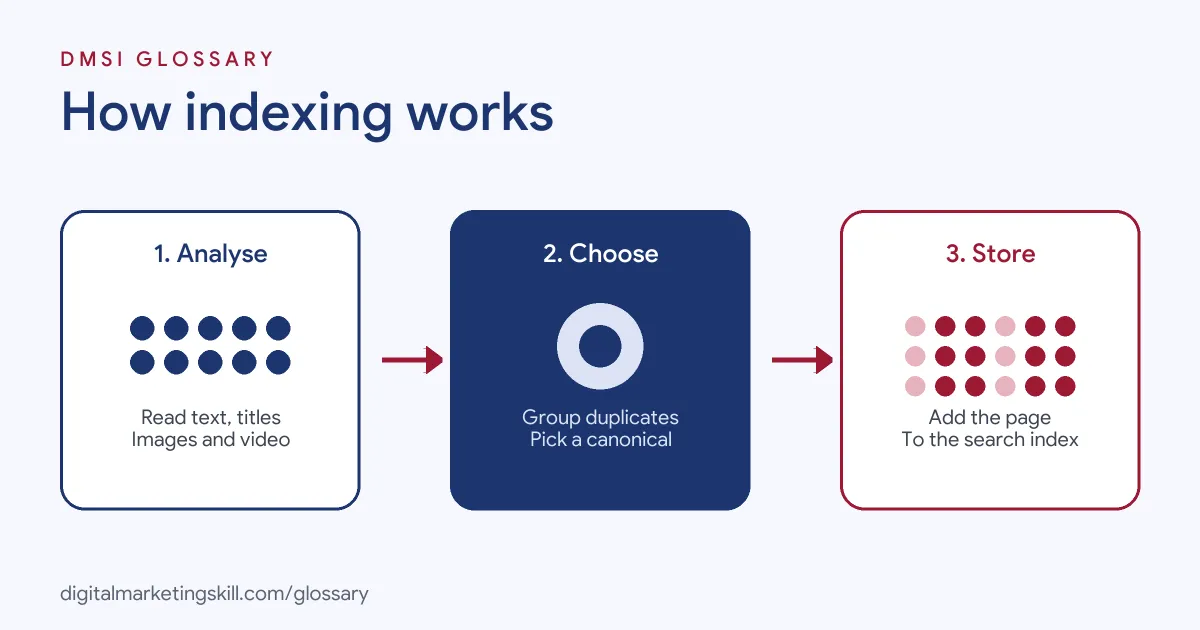
Once a page has been crawled, Google tries to understand it. This happens in three broad steps. First, it processes the content. Next, it decides whether the page duplicates another one. Finally, it collects signals and may store the page in the index.
Processing the Content
Google says this stage includes “processing and analyzing the textual content and key content tags and attributes, such as <title> elements and alt attributes, images, videos, and more.” So clear titles, headings and image descriptions all help Google understand what a page covers.
Duplicates and Canonicals
Many sites have several URLs with the same content. For example, a product might appear under two categories. During indexing, Google groups similar pages together, a process it calls clustering. Then it picks “the one that’s most representative of the group” as the canonical. That canonical is the page that may appear in search results, while the others become alternate versions.
Signals and Storage
Google also collects signals about the canonical page. Some of the signals it names are “the language of the page, the country the content is local to, and the usability of the page.” These signals feed into the next stage, when Google serves results.
However, storage is not automatic. Google states: “Indexing isn’t guaranteed; not every page that Google processes will be indexed.” It lists common reasons, such as low-quality content, robots meta rules that block indexing, and site designs that make indexing difficult.
Indexing Examples
Here are three made-up situations that show how this stage plays out:
- New service page: A plumber publishes a page and links to it from the home page. Google crawls it, finds clear, unique content, and adds it to the index.
- Duplicate product URLs: An online shop lists the same jacket under “Men” and “Sale.” Google clusters the two URLs and shows only the canonical version in results.
- Thank-you page: A business adds a noindex rule to its form thank-you page. As a result, the page still works for visitors but stays out of search results.
Indexing on a WordPress Site
If you build sites with WordPress, two settings deserve a check before every launch. First, go to Settings, then Reading, and look at the box labelled “Discourage search engines from indexing this site.” Developers often tick it while a site is being built. If it stays ticked after launch, the site asks search engines to stay away.
Second, SEO plugins such as Yoast SEO let you set individual posts or pages to noindex. That is useful for thank-you pages and tag archives. However, it also means one wrong click can hide an important page. So, after any big change, inspect a few key URLs in Search Console. A quick check takes only a few minutes, and it can catch a costly mistake before your rankings suffer.
Tools That Help With Indexing
Different tools help you check or speed up indexing. This table compares the main ones:
| Tool | What it does | Key detail |
|---|---|---|
| URL Inspection (Search Console) | Shows Google’s indexed version of a page and runs a live test | Lets you request that a URL be crawled |
| XML sitemap | Lists the URLs you want search engines to find | Up to 50MB uncompressed or 50,000 URLs per file |
| noindex rule | Tells Google to drop a page from results | Works only if the page is not blocked by robots.txt |
| IndexNow | Lets you notify supporting search engines when URLs change | Works only with search engines that support it |
How to Check and Fix Indexing
Follow these steps whenever an important page is missing from Google:
- Inspect the URL. In Search Console, paste the URL into the URL Inspection tool to see if it is indexed.
- Run a live test. This checks whether the page might be indexable right now.
- Look for a noindex rule. Check the page’s meta robots tag and HTTP headers.
- Check robots.txt. If crawling is blocked, Google will never see the page or its noindex rule.
- Review the canonical. Make sure Google has not chosen a different URL as the main version.
- Improve the content. Add unique, useful information if the page is thin or close to another page.
- Request indexing. After that, use the request option, and add internal links from strong pages.
Best Practices for Indexing
- Write unique pages. Each page should answer a different need, so Google has a reason to store it.
- Use descriptive titles and alt text. Google names both as content it analyses.
- Keep sitemaps clean. List only the canonical URLs you want indexed.
- Use noindex on purpose. Apply it to thank-you pages, internal search results and test pages.
- Check the Page Indexing report. Search Console groups pages by status, such as “Discovered – currently not indexed.”
Common Indexing Mistakes
Some errors keep good pages out of search. First, a site launches with a noindex rule left on from testing. Second, someone blocks a page in robots.txt and adds noindex as well, so Google cannot see the noindex rule. Third, many near-identical pages compete, so Google indexes only one. Finally, people request indexing again and again instead of fixing the cause. In each case, the fix starts with the URL Inspection tool.
Where You’ll Use Indexing at Work
Indexing checks appear in many SEO and web roles. For example, recent remote job listings ask candidates to:
- “Conduct SEO checks / technical audit including site speed, indexing status, broken links” (SEO Executive).
- “Implement on-page and technical SEO: site structure, metadata, page speed, and indexing” (Web Developer and Digital Marketing Specialist).
- “Diagnose schema errors, indexation issues, traffic drops, and migration fallout” (Technical SEO Team Lead).
So as an SEO Specialist, WordPress Developer or Website Manager, you will check indexing status, find the cause of missing pages and fix it.
Learn It in the WordPress and SEO Track
You can learn to get pages indexed and ranking in the AI-Powered WordPress and SEO Specialist track. There, you build a WordPress site or store and rank it with an SEO content plan. You also work on a U.S. Project Internship from day one, with unlimited 1-on-1 mentoring.
Google mainly uses the mobile version of a page, so read our guide to mobile-first indexing next.
Frequently Asked Questions
What is indexing in SEO?
It is when a search engine analyses a crawled page and stores it in its index. Only indexed pages can appear in search results.
How do I know if my page is indexed?
Use the URL Inspection tool in Google Search Console. It shows whether the page is in Google’s index and why it might not be.
Why is my page crawled but not indexed?
Google says indexing isn’t guaranteed. Common reasons include low-quality content, a noindex rule, duplicate pages or a site design that makes indexing hard.
How do I stop a page from being indexed?
Add a noindex rule with a meta tag or HTTP header. Do not block the page in robots.txt, or Google will never see the rule.
Can I pay Google to rank my pages higher?
No. Google states that it doesn’t accept payment to rank pages higher, and ranking is done programmatically.
Sources: Google Search Central: In-depth guide to how Google Search works; Google Search Central: Block Search indexing with noindex; Search Console Help: URL Inspection tool; IndexNow: FAQ; remote job listings on Himalayas.