
Technical SEO is the work of making a website easy for search engines to find, crawl, understand and index. It covers the parts of a site that visitors rarely notice, such as page speed, site structure, redirects, robots.txt and structured data. It matters because even the best content can’t rank if Google can’t reach it or read it properly.
Key Takeaways
- Google Search works in three stages: crawling, indexing and serving results. Technical work supports all three.
- Robots.txt manages crawler traffic. It is not a way to keep a page out of Google, so use noindex for that.
- Google groups duplicate pages and picks one canonical version to show.
- Core Web Vitals measure loading, responsiveness and visual stability. Google recommends good scores for success in Search.
- Most fixes are small and practical, such as removing broken links, fixing redirects and speeding up heavy pages.
What Is Technical SEO?
Search engine optimisation has three broad parts. On-page work covers your content and titles. Off-page work covers links and mentions from other sites. Technical work covers the site itself, which is the foundation for the other two.
Think of your website as a shop. Your content is the stock on the shelves. The technical side is the door, the lights and the signs. If the door is locked, nobody sees the stock, however good it is.
For example, a small online store might write great product pages. However, if a setting tells search engines not to index them, those pages will never show up. A quick technical check would spot the problem in minutes.
How Technical SEO Works
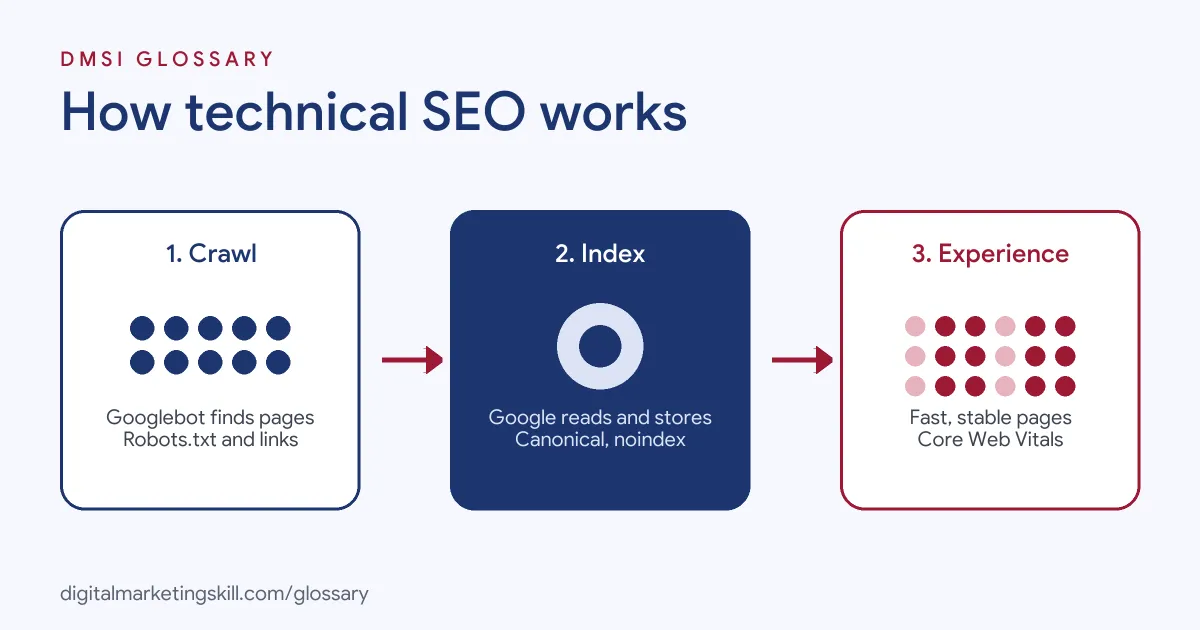
Google explains Search in three stages. First, it crawls the web to find pages. Next, it indexes them, which means it reads and stores what each page is about. Finally, it serves results when someone searches. Technical SEO removes anything that blocks these steps.
Crawling
Google uses “automated programs called crawlers” to download pages. Its main crawler is Googlebot. Google says pages may not get crawled if the owner blocks them, if they need a login, or if server problems stop Googlebot from reaching them.
Google also renders pages, which means it “runs any JavaScript it finds” with a recent version of Chrome. So if your content only appears after scripts load, test that Google can see it.
Indexing and Canonical Pages
During indexing, Google studies the text, images and video on each page. It then stores that information in what it calls “a large database”. Google also groups near-duplicate pages and picks one canonical page, which is “the page that may be shown in search results.”
That’s why duplicate URLs cause trouble. For instance, the same product might sit at three addresses with different filters. If you don’t point to a preferred version, Google chooses for you.
Robots.txt and Noindex
A robots.txt file “is used primarily to manage crawler traffic to your site.” In other words, it tells crawlers which areas to skip. However, Google warns that “it is not a mechanism for keeping a web page out of Google.” A blocked URL can still appear in results without a description. To keep a page out, use a noindex rule or password protection instead.
Page Experience and Core Web Vitals
Core Web Vitals measure how a page feels to use. Google’s guidance says a good page has Largest Contentful Paint (LCP) within 2.5 seconds, Interaction to Next Paint (INP) under 200 milliseconds, and Cumulative Layout Shift (CLS) under 0.1. Google adds: “We highly recommend site owners achieve good Core Web Vitals for success with Search.”
Structured Data
Structured data is code that labels the facts on a page, so search engines don’t have to guess. For example, Google’s guide to local business markup says you can use it to tell Google about “business hours, different departments within a business” and similar details. The examples in that guide use a format called JSON-LD. Done well, this markup can help your details appear in special Search features. However, you “must include the required properties”, such as the name and address, to be eligible.
Technical SEO Examples
- Blocked by mistake: A new site launches with a noindex rule left over from testing. The owner removes it, and Google can then index the pages.
- Duplicate pages: A clothing store has one product at several filtered URLs. The SEO adds a canonical tag that points to the main product page.
- Slow pages: A blog’s home page loads a huge uncompressed image first. After the team compresses it, the page loads faster and LCP improves.
In each case, the content stayed the same. Only the technical setup changed.
Technical SEO vs On-Page SEO vs Off-Page SEO
| Type | What it covers | Typical tasks |
|---|---|---|
| Technical | How search engines access and read your site | Speed, crawling, indexing, redirects, structured data |
| On-page | The content and tags on each page | Titles, headings, keywords, internal links |
| Off-page | Signals from outside your site | Backlinks, reviews, brand mentions |
In short, the technical side opens the door, on-page work makes each page relevant, and off-page work builds trust. You need all three, but the technical layer comes first, because the other two depend on it.
How to Run a Technical SEO Audit
You don’t need expensive tools to start. Here is a simple order to follow:
- Add your site to Google Search Console and check the page indexing report.
- Search Google for site:yourdomain.com to see roughly which pages appear.
- Open your robots.txt file and make sure it doesn’t block important sections.
- Check key pages for an accidental noindex rule.
- Look for duplicate URLs and set a canonical version for each.
- Find broken links and fix them, or redirect old URLs to the best new page.
- Test speed and Core Web Vitals on your most visited pages, then fix the heaviest files first.
After that, repeat the audit after every big site change, such as a redesign or a move to a new domain.
Best Practices
- Keep the structure simple. Group pages into clear sections and link between them, so crawlers and people can find everything.
- Use one URL per page. Pick a preferred version and redirect the rest.
- Make speed a habit. Compress images and avoid loading what a page doesn’t need.
- Check after every change. Plugins, themes and migrations often change settings without warning.
- Work with developers. Explain the business impact, not just the error code.
For hands-on speed fixes, read our guide to website page speed.
Common Mistakes to Avoid
Beginners often use robots.txt to hide a page, which doesn’t keep it out of Google. Others leave a staging site open to crawlers, so duplicate copies show up in search. Some redirect every old URL to the home page instead of the closest match. Many also chase a perfect speed score while ignoring pages that aren’t indexed at all. Fix access and indexing first, then speed.
Where You’ll Use Technical SEO at Work
Technical skills show up in many SEO and website roles. For example, recent remote job listings ask candidates to:
- “Manage technical SEO foundations (site structure, metadata, page speed, schema)” (Digital Marketing Manager).
- “Keep on-page technical SEO in good shape across all sites (metadata, heading structure, redirects, site architecture, and page speed)” (Web Developer, Marketing Sites).
- “Support technical SEO audits and provide findings and data to be turned into a prioritized roadmap” (SEO Strategist).
So if you want to work as an SEO Specialist, WordPress Developer or Website Manager, employers will expect you to run audits and fix what you find.
Learn It in the WordPress and SEO Track
You can learn these skills in the AI-Powered WordPress and SEO Specialist track. There, you build a WordPress site or store and rank it with an SEO content plan, so you finish with a real project to show employers. You also join a U.S. Project Internship from day one, with unlimited 1-on-1 mentoring.
Want the bigger picture first? See our glossary entry on search engine optimisation, or our guide to fixing crawlability before anything else.
Frequently Asked Questions
What is technical SEO in simple terms?
It is the work that helps search engines find, read and index your website. It covers speed, structure, redirects and settings rather than the words on the page.
Does robots.txt stop a page appearing in Google?
No. Google says robots.txt manages crawling. A blocked URL can still appear in results, so use noindex or a password to keep a page out.
What are good Core Web Vitals scores?
Google’s guidance is an LCP within 2.5 seconds, an INP under 200 milliseconds and a CLS under 0.1.
Do I need to code to do this work?
Not always. Many fixes happen in a CMS such as WordPress or in Search Console. However, basic HTML knowledge helps you talk to developers.
How often should I run an audit?
Run a light check every month and a full audit after any big change, such as a redesign or migration.
Sources: Google Search Central: Local business structured data; Google Search Central: How Google Search works; Google Search Central: Introduction to robots.txt; Google Search Central: Core Web Vitals; remote job listings on Himalayas.