
Impression share is the percentage of impressions your ads actually received compared with the total number they were eligible to receive. Google Ads calculates it as impressions divided by total eligible impressions. It matters because it shows how much of the available demand you are reaching, and whether budget or ad quality is holding you back.
Key Takeaways
- The formula is impressions ÷ total eligible impressions. Google estimates eligibility from your targeting, approval status and quality.
- Two “lost” metrics explain the gap: lost to budget and lost to rank.
- Google says the metric helps you see whether your ads “might reach more people if you increase your bid or budget.”
- Data is available for campaigns, ad groups, product groups (for Shopping) and keywords.
- Auction insights does not show data when your share is below 10%.
What Is Impression Share?
Every time someone searches, Google runs an auction. Your ad is eligible for some of those auctions, based on your keywords, targeting and settings. This metric tells you how many of those chances turned into actual impressions.
Google defines it as “the percentage of impressions that your ads receive compared to the total number of impressions that your ads could get.” For example, if your ads were eligible for 1,000 impressions and showed 600 times, your impression share is 60%. These numbers are an example only.
The metric works alongside impressions and clicks. However, unlike raw counts, it tells you how much room you still have to grow.
How Impression Share Works
Google works out the figure in three steps. First, it estimates how many impressions you were eligible for. Next, it counts the impressions you actually got. Finally, it divides one by the other and shows what caused any shortfall.
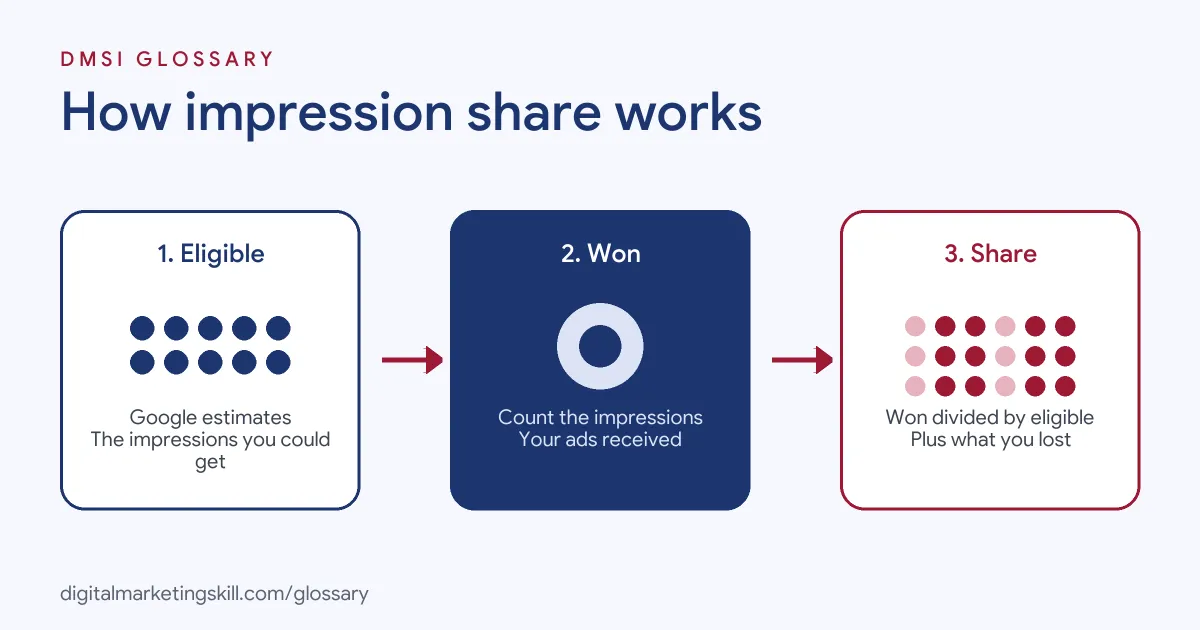
Eligible Impressions
The bottom half of the formula is an estimate. Google says eligible impressions “are estimated using many factors, including targeting settings, approval statuses, and quality.” In other words, if an ad is disapproved or not targeted at a location, those searches do not count as missed chances.
Lost Impression Share
Google splits the missing share into two causes. Search lost IS (budget) is “the percentage of time that your ads weren’t shown on the Search Network due to insufficient budget.” This data is available at campaign level only. Search lost IS (rank) is the percentage of time your ads weren’t shown “due to poor Ad Rank in the auction.”
So if your share is 60%, the other 40% is split between budget and rank. That split tells you what to fix first. A budget problem needs money or focus, while a rank problem needs better quality or bids.
Top and Absolute Top
Some metrics focus on prominence, not just presence. For Shopping, Google explains that absolute top impression share is the share of impressions “shown in the most prominent Shopping position.” It notes that “there’s only one ‘absolute top impression’ per auction.” Google also reports Search exact match IS, which looks only at searches that exactly match your keyword.
Impression Share Examples
Here are three made-up examples of how a PPC specialist might read the numbers:
- Budget-limited campaign: A plumber has 45% IS and 50% lost to budget. As a result, the fastest gain is a higher budget, or fewer, tighter keywords.
- Rank-limited campaign: A software firm has 30% IS and 65% lost to rank. Here, more budget will not help much. Instead, it needs better ads, landing pages or bids.
- Brand campaign: A shop checks its brand keywords and sees 95% IS. That means competitors rarely show instead of it on its own name.
A Worked Example
Here is a made-up campaign to show how the numbers fit together. A dentist runs a Search campaign for “emergency dentist” in one city. Google estimates the ads were eligible for 2,000 impressions in a week. The ads actually showed 900 times.
- Share of eligible impressions: 900 ÷ 2,000 = 45%.
- Lost to budget: 35%. The budget ran out by early afternoon on most days.
- Lost to rank: 20%. Some ads had weak relevance on a few keywords.
So the first fix is budget, because it causes the biggest gap. The dentist moves money from a weaker campaign into this one. Next, they rewrite the two ads with the lowest relevance. The following week, they check the same metrics again to see which change helped most. This step-by-step approach is easy to explain to a client, because each action ties to one number.
Impression Share Metrics Compared
Google Ads reports several related metrics. This table shows what each one tells you:
| Metric | What it measures | What it suggests |
|---|---|---|
| Search impression share | Impressions received ÷ estimated eligible impressions on Search | How much demand you are reaching |
| Search lost IS (budget) | Time ads did not show because of budget | Raise budget or narrow targeting |
| Search lost IS (rank) | Time ads did not show because of Ad Rank | Improve quality, relevance or bids |
| Search exact match IS | Share on searches that exactly match your keywords | Coverage of your core terms |
How to Check and Improve Impression Share
Follow these steps in Google Ads:
- Add the columns. On the Campaigns page, open the columns menu, choose Competitive metrics and add the share columns.
- Allow time for data. Google notes the data can take 24 to 48 hours to update, and a “—” may mean there is not enough data yet.
- Read the lost metrics. Check whether budget or rank causes most of the gap.
- Fix budget gaps. Raise the campaign budget, or focus spend on the best keywords and hours.
- Fix rank gaps. Improve ad relevance, landing pages and bids, since these feed into Ad Rank.
- Compare with rivals. After that, use auction insights to see how your share compares with other advertisers.
Best Practices for Impression Share
- Do not chase 100% everywhere. Full coverage can be expensive. Aim high on brand and best-converting terms first.
- Judge it with profit metrics. A rise in share is only good if cost per result stays healthy.
- Check at the right level. Lost IS (budget) is a campaign-level metric, so read it there.
- Know the bid strategy option. Google offers a Target impression share strategy for Search campaigns.
- Watch trends, not single days. Short date ranges can make the numbers jump around.
Common Mistakes to Avoid
A few errors lead to poor decisions. First, people raise the budget when the loss is due to rank, so they pay more without gaining much. Second, they compare the metric across campaigns with very different goals. Third, they forget that the bottom of the formula is an estimate. Finally, they read the data too soon, before it has had time to update.
Where You’ll Use Impression Share at Work
PPC roles often name this metric directly. For example, one recent remote job listing for a Google Ads Specialist (PPC / Search) asks the hire to “Monitor performance (CPC, CPA, ROAS, Impression Share) and diagnose issues.”
In practice, Google Ads Specialists and PPC Specialists use it in weekly reports. They explain why a campaign is missing searches and recommend whether to change budget, bids or ad quality. Web Analytics Specialists also pair it with conversion data to show where growth is possible. Because the metric links spend to missed demand, it is often the number that helps a client agree to a bigger budget or a change in strategy.
Learn It in the Google Ads Track
You can learn to read and improve competitive metrics in the AI-Powered Google Specialist track. There, you launch and measure a Google Ads campaign with conversion tracking, so you can show real results. You also join a U.S. Project Internship from day one, with unlimited 1-on-1 mentoring.
For more ways to lift results, read our guide to Google Ads optimisation.
Frequently Asked Questions
What is impression share in simple terms?
It is the share of the times your ads could have shown that they actually did show. For example, 600 impressions out of 1,000 eligible is 60%.
What is a good impression share?
It depends on your goal and budget. Many advertisers aim high on brand terms and accept lower coverage on broad, costly keywords.
What is the difference between lost IS (budget) and lost IS (rank)?
Lost IS (budget) is the share you missed because the budget ran out. Lost IS (rank) is the share you missed because your Ad Rank was too low.
Why does my IS column show a dash?
Google says a “—” can mean there is not enough data, such as low traffic or new keywords. Data can also take 24 to 48 hours to update.
Can I bid for impression share?
Yes. Google Ads offers a Target impression share bid strategy for Search campaigns.
Sources: Google Ads Help: About impression share; Google Ads Help: Get your impression share data; Google Ads Help: Use auction insights to compare performance; Google Ads Help: About campaign total budgets; remote job listings on Himalayas.