
Google Ads optimization means fixing what actually moves results. That is Quality Score, bidding and which keywords you exclude, not just better ad copy. This guide covers how Google’s own ranking signals work, the two levers that drive performance, and the fix for each.
Key Takeaways
- Quality Score is a diagnostic, not an auction input. Google states it is “a diagnostic tool,” built from expected CTR, ad relevance and landing page experience (Google Ads Help).
- Bidding is now largely automated. Smart Bidding sets a unique bid for every single auction, using signals like device, location and time of day (Google Ads Help, automated bidding).
- Negative keywords protect budget. Google says they “let you exclude search terms from your campaigns and help you focus on only the keywords that matter” (Google Ads Help, negative keywords).
- Remarketing lists need scale first. A remarketing list needs at least 1,000 cookies before Google will use it to tailor search ads, and it can hold data for up to 540 days (Google Analytics Help, RLSA).
In this guide
- What Most Google Ads Optimization Advice Gets Wrong
- How Quality Score Actually Works
- Google Ads Optimization Has Two Different Levers
- How to Fix Each Lever of Google Ads Optimization
- How to Measure Google Ads Optimization
- The One Decision Rule: Exclude Before You Bid
- A Real Case: How Automated Bidding Changed the Optimization Job
- Frequently Asked Questions About Google Ads Optimization
- Next Step: Audit Your Search Terms Report This Week
What Most Google Ads Optimization Advice Gets Wrong
Most Google Ads optimization guides lead with ad copy. Write better headlines. Add emotional words. Test more variations. Copy matters, but it is not where most wasted budget goes. The bigger levers are structural: what you bid on, what you exclude, and how bids adjust automatically.
This guide splits Google Ads optimization into two levers. The first is quality and relevance, covered through Quality Score. The second is spend control, covered through bidding and negative keywords. Each gets its own fix.
A few ground rules first. Every claim below links to Google’s own documentation, not a third party’s interpretation of it. Google’s guidance changes as the platform evolves. So re-check a support page before you trust an old screenshot or a dated course.
How Quality Score Actually Works
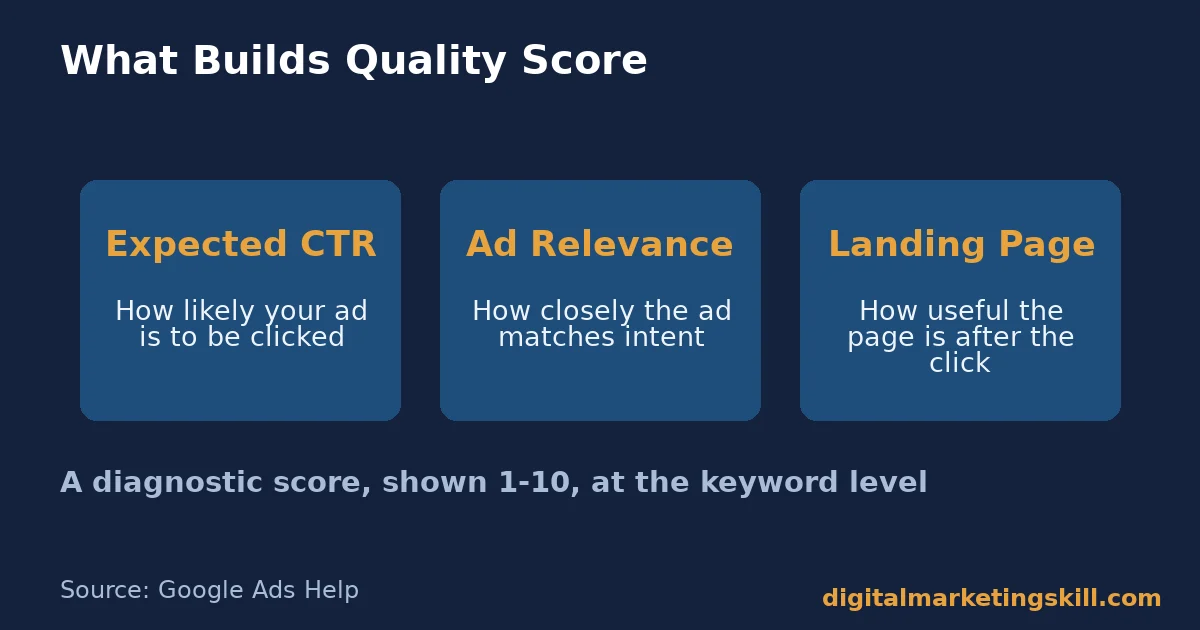
Quality Score is a 1-10 diagnostic score, shown at the keyword level. Google is explicit that it is “a diagnostic tool” and “not an input in the ad auction.” It shows how your ad experience compares with other advertisers. It does not set your rank directly.
Three components build it. Expected clickthrough rate is Google’s prediction of how likely your ad is to be clicked. Ad relevance is how closely your ad matches the intent behind the search. Landing page experience is how useful the page is once someone clicks.
Why a Diagnostic Score Still Matters for Spend
Quality Score is not used directly in the auction, but its three inputs are. A low expected CTR, weak ad relevance, or a poor landing page push your real cost per click the wrong way. So fixing the score’s components fixes your actual costs, even though the score itself is only a read-out. Our guide to Google Ads cost breaks down how these inputs flow through to what you pay.
Use Quality Score as a weekly check, not a goal. If it drops on a keyword that was previously healthy, check the ad copy, the keyword match, or the landing page before the real cost rises.
Google Ads Optimization Has Two Different Levers
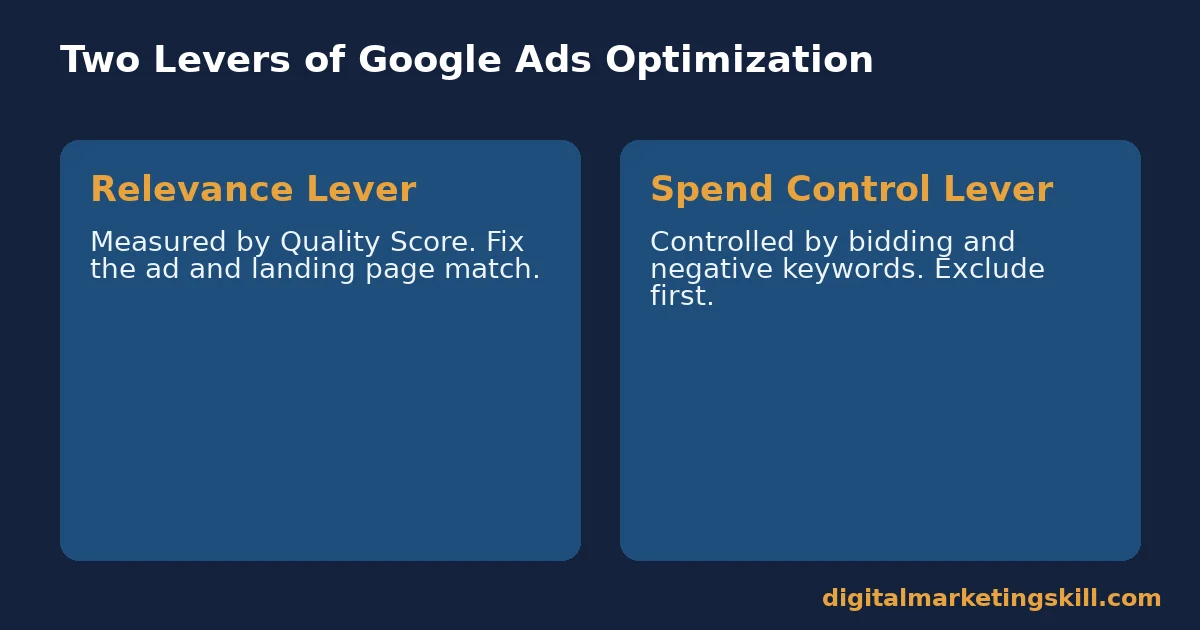
Every Google Ads optimization tactic fits into one of two levers. Either you are improving relevance, which Quality Score measures, or you are controlling spend, which bidding and negative keywords control. Mixing the two up wastes effort.
The Relevance Lever: Built From Ad and Page Matching
Relevance problems show up as a low Quality Score with reasonable traffic. The ad is shown and clicked, but Google’s signals say the experience is weak. This usually traces back to ad copy that does not match the keyword, or a landing page that does not deliver on the ad’s promise.
Fixing relevance changes what Google shows, and to whom, not just how much you pay. A tightly matched ad and page earns a better expected CTR over time. That gain adds up across every keyword in the ad group.
The Spend Control Lever: Built From Bidding and Exclusions
Spend problems show up as healthy relevance but a budget that burns out before it converts. This usually traces back to bids that are not adjusted for context, or search terms that are technically relevant but never convert.
Smart Bidding handles part of this automatically. It sets a bid for each individual auction, using signals such as device, location, time of day and remarketing list membership. Negative keywords handle the part automation cannot: terms you already know are irrelevant, before Google’s model learns it the expensive way.
How to Fix Each Lever of Google Ads Optimization
The sections below mirror the two levers above. Diagnose which one is weak using your own Quality Score and spend reports. Then apply the matching fix.
Relevance: Lead With the Landing Page, Not Just the Ad
Rewrite the landing page before you rewrite the ad. Google clearly scores landing page experience as one of three Quality Score inputs. So a mismatched page caps your relevance, no matter how good the ad copy is. A page that keeps readers engaged also helps on the organic side, which our guide to bounce rate covers in more depth.
Include your target keyword in the ad headline, the display path, and the first screen of the landing page. This is the fastest way to lift ad relevance and landing page experience together, since both are judged on the same match between promise and content.
Spend Control: Lead With Negative Keywords Before Bid Rules
Audit your search terms report for irrelevant queries before you touch bid changes. Google’s own example is an optometrist excluding “wine glasses” from an eyeglasses campaign. The same logic applies to every account. Find the terms that are close but wrong, and exclude them first. This is also where most of the Google Ads mistakes that drain small budgets actually start.
Once wasted spend is excluded, let Smart Bidding handle the context-based changes. It already factors in device, location, time of day and remarketing list membership automatically. Manual bid rules on top of it usually duplicate effort, rather than adding control. Our guide to Google Ads budget covers how to size the spend this feeds into.
How to Measure Google Ads Optimization
Quality Score alone does not say whether a campaign is profitable. Pair it with the metrics below.
Four Metrics That Explain Google Ads Performance
- Quality Score, by keyword. Google’s 1-10 diagnostic, built from expected CTR, ad relevance and landing page experience. Use it to find which keywords need a relevance fix.
- Search terms report. The actual queries that triggered your ads. Check it weekly to find negative keyword candidates before they waste spend.
- Cost per conversion, by keyword. The real cost of each sale or lead. Compare it against your own break-even point, not an industry average.
- Remarketing list size. The number of people in a list. It must reach 1,000 before Google will use it for search ads, so track this before planning an RLSA campaign.
Reading These Numbers Together
Start with the search terms report, since excluding irrelevant queries protects every other number downstream. Next, check Quality Score for keywords with a high cost per conversion. A relevance fix there often lowers cost faster than a bid change. Only once both are clean does a remarketing list become worth building, since it needs real traffic to reach the 1,000-cookie minimum.
The One Decision Rule: Exclude Before You Bid
If you take one rule from this guide on Google Ads optimization, make it this one. Clean your search terms report before you adjust a single bid. A bid increase on a keyword still collecting irrelevant clicks just spends more money, faster, on the same problem.
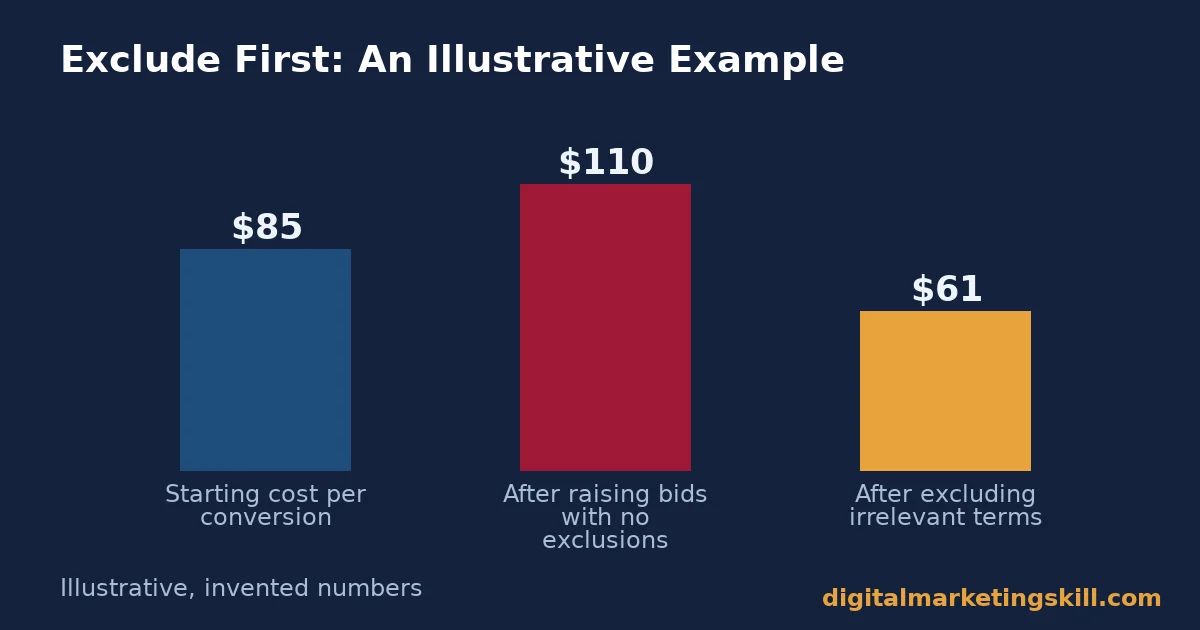
Here is an illustrative example, with invented numbers. A local services account spends $2,000 a month, with a cost per conversion of $85. The owner raises bids across the board, hoping for more volume. Cost per conversion rises to $110, with no increase in leads.
The owner then reviews the search terms report. 30% of spend is going to clearly irrelevant queries. After excluding them, and leaving bids unchanged, cost per conversion falls to $61. Lead volume rises slightly too, as budget is freed for relevant terms. That freed budget is often better spent driving qualified visits, the kind covered in our guide to increasing website traffic.
The lesson is about sequencing. A bid increase amplifies whatever is already happening, good or bad. Clean the targeting first, so the amplification works in your favour.
A Real Case: How Automated Bidding Changed the Optimization Job
Before Smart Bidding, optimization meant manually adjusting bids by device, time of day and audience. That job demanded constant attention across hundreds of keywords. Google’s own documentation describes Smart Bidding as true “auction-time bidding,” setting a bid for every individual auction, rather than a few times a day.
The shift changed what a human optimizer should spend time on. Google’s system already factors in device, location, time of day, remarketing list and operating system automatically. Manually copying those changes no longer adds value. Instead, the job moved to feeding the system better signals, through negative keywords, conversion tracking accuracy and landing page quality.
The case is a useful limit check. Smart Bidding needs enough conversion data to learn from. A brand-new account with few conversions will not see the same auction-time accuracy as an established one. Treat automation as a multiplier on good inputs, not a replacement for them.
Frequently Asked Questions About Google Ads Optimization
What is a good Quality Score?
Google does not publish a universal target, since Quality Score compares your ad against other advertisers bidding on the same keyword. Treat a dropping score on a previously healthy keyword as the signal to look closer, not as a fixed number to chase.
Does Quality Score directly affect my ad rank?
No. Google states Quality Score is a diagnostic tool, not an input in the auction itself. But its three components, expected CTR, ad relevance and landing page experience, do influence the auction. So improving them improves your real results.
Should I still set manual bids with Smart Bidding running?
Generally no. Smart Bidding already factors in device, location, time of day and remarketing list membership at auction time. Manual rules on top of it usually conflict with the auto change, rather than improving it.
How do negative keywords improve Google Ads optimization?
They stop your ads from showing for searches that are related but irrelevant, protecting budget for searches that actually convert. Google’s own guidance frames this as choosing “what not to target,” not just what to target.
How big does a remarketing list need to be before I can use it?
At least 1,000 cookies, per Google’s documentation, before it can be used to tailor search ads. Below that size, the list is not yet allowed for RLSA targeting.
Is manual bidding ever better than Smart Bidding?
Google’s documentation positions Smart Bidding as the more precise option, since it adjusts at auction time using more signals than a human reasonably can. A very new account with little conversion data is the main case where manual bidding may still make sense, until enough data builds up.
Next Step: Audit Your Search Terms Report This Week
Google Ads optimization moves fastest when you fix the cheapest problem first, and excluding irrelevant search terms is usually it. Open your search terms report today. Exclude anything clearly irrelevant, and leave your bids untouched for a week before judging the result.
If you want structured, hands-on practice with campaigns like this, the Master Diploma in Digital & AI Marketing at Digital Marketing Skill Institute runs four AI-powered tracks, including AI-Powered Google Specialist, totalling ten courses, with a Full Stack option to complete all four.
It includes unlimited 1-on-1 coaching and mentoring and a U.S. Project Internship with a verified U.S. Work Reference Letter. The diploma is dual US and UK accredited and recognised in more than 100 countries.
The programme is fully online, so you can study from anywhere in your country. Browse more guides on the Digital Marketing Skill Institute blog, read real outcomes on reviews, or when you are ready, apply for the Master Diploma from the Digital Marketing Skill Institute homepage.
Every figure in this guide was checked against its original source before publication. Figures marked as illustrative are invented examples, not real results.
![9 Amazing Digital Marketing Skills to Make Money Online [With Proof]](https://digitalmarketingskill.com/wp-content/uploads/2019/07/9-Amazing-Digital-Marketing-Skills-to-Make-Money-Online-With-Proof-17.png)






