
IndexNow is an open protocol that lets a website tell search engines straight away when a page is added, updated or deleted. Instead of waiting for a crawler to find the change, your site sends a short message with the URL and a key that proves you own the site. It matters because faster discovery means your new products, prices and articles can reach search results sooner on the engines that support it.
Key Takeaways
- IndexNow is a “push” system. Your site notifies search engines, rather than waiting to be crawled.
- One submission is shared with every participating engine, including Bing, Yandex, Naver, Seznam and Yep.
- Google is not on IndexNow’s list of participating search engines, so you still need sitemaps and good internal links.
- You prove ownership with a key file, and you can send up to 10,000 URLs in one request.
- Many platforms, including WordPress plugins, Shopify, Wix and Cloudflare, can handle it for you.
What Is IndexNow?
Search engines usually find changes by crawling. A bot visits your site, notices something new and then decides whether to index it. The IndexNow FAQ says this process “can be slow, taking days or even weeks”.
IndexNow flips that around. The moment you publish or change a page, your site pings a search engine with the URL. As a result, the engine knows exactly what changed and where to look. The FAQ adds that this also helps keep your content current in AI-powered search results.
For example, imagine an online shop that drops the price on 200 products. Without IndexNow, search engines might show the old price until they next crawl each page. With it, the shop can notify participating engines about all 200 URLs in one request.
How IndexNow Works
The protocol has three simple parts. First, you create a key and host it on your site. Next, you send the changed URLs with that key. Finally, the search engine checks the key file and accepts the submission.
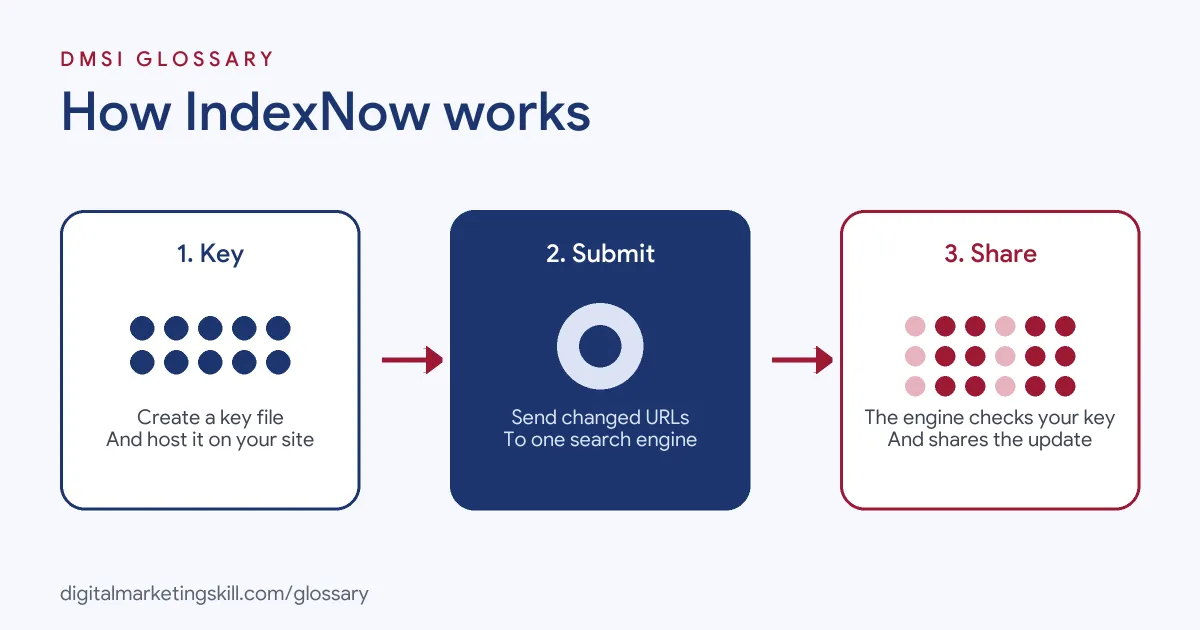
The API Key
Your key is a string of 8 to 128 characters. According to the IndexNow documentation, it can only use lowercase and uppercase letters, numbers and dashes. You save it in a UTF-8 text file named after the key, such as abcd1234.txt, and place it in the root folder of your site. Alternatively, you can host it elsewhere on the same site and point to it with the keyLocation setting.
Submitting URLs
You can send one URL with a simple web request, or many URLs in a single JSON request. The IndexNow FAQ says you can submit “up to 10,000 URLs per POST request”. Going over that limit may return an HTTP 422 error.
Shared Submissions
You only need to notify one engine. The FAQ explains that your submission “will be shared across all IndexNow-enabled search engines”. There is also a global endpoint at api.indexnow.org if you prefer not to pick one.
IndexNow Examples
Here are three made-up examples of when a site would send a submission:
- New blog post: A marketing blog publishes an article. Its SEO plugin notifies IndexNow at once, so Bing learns about the page within moments of it going live.
- Stock change: A shop sells out of a popular item. It sends the product URL, so engines can refresh the availability shown in results.
- Removed page: A travel site deletes an expired deal. It submits the URL too, because IndexNow covers deleted pages as well as new ones.
In each case, the site tells engines about a real change. That is the core rule: only notify when something has actually changed.
IndexNow vs XML Sitemap vs Crawling
These three methods work together. Here is how they compare:
| Method | How it works | Best for |
|---|---|---|
| Crawling | Bots discover pages by following links | All engines, all the time |
| XML sitemap | A file that lists the pages you want indexed | Helping every engine, including Google, find your pages |
| IndexNow | Your site pushes changed URLs instantly | Fast updates on participating engines |
In short, IndexNow does not replace a sitemap. Instead, it adds speed on top of the methods you already use.
How to Set Up IndexNow
Most sites can set it up in minutes. Follow these steps:
- Check your platform first. The FAQ lists built-in or plugin support in WordPress, Shopify, Wix, Joomla, Drupal and others. Cloudflare also offers it natively.
- Turn it on if supported. In that case, you do not need to make a key file yourself.
- Otherwise, generate a key. Use a UUID generator, and keep to the allowed characters.
- Upload the key file. Place it at the root, then open it in a browser to check it shows only your key.
- Send your first URL. Your first request may return HTTP 202, which means the engine will verify your key first.
- Automate submissions. Notify engines whenever content is added, updated or deleted.
After that, check that later requests return HTTP 200. Bear in mind that a 200 response only means the engine received your URL, not that it has indexed the page.
What the Response Codes Mean
Each submission returns an HTTP code. Here is what the main ones tell you, based on the IndexNow FAQ and documentation:
| Code | Meaning | What to do |
|---|---|---|
| 200 | The engine received your URL or URLs | Nothing; carry on as normal |
| 202 | Received, but the key still needs checking | Wait; later requests should return 200 |
| 422 | The request could not be processed, for example because it had too many URLs | Keep each batch under 10,000 URLs |
| Other codes | Something is wrong with the request | Check you are not sending too often and that the key and URLs are valid, then resend |
Keeping the Key Safe
Once you submit, engines crawl your key file to confirm you own the site. They then keep using that key until you change it. For that reason, the documentation says only you and the search engines should know the key and where the file lives. If you think it has leaked, simply rotate it.
Best Practices for IndexNow
- Submit real changes only. Do not resend pages that have not changed.
- Pace user-generated content. The FAQ suggests submitting each review from 1 to 20, then every 5th up to 100, then every 10th up to 1,000.
- Encode URLs properly. IndexNow expects URLs that follow the RFC-3986 standard.
- Keep your sitemap. It still helps engines that do not use IndexNow.
- Rotate keys safely. Replace the old key file with a new one, then start sending the new key.
Common Mistakes to Avoid
One common mistake is thinking IndexNow guarantees indexing. It only tells engines that a page changed. Another mistake is placing the key file behind a login, so engines cannot read it. Some sites also send too many requests, which can trigger errors. Finally, many people expect it to speed up Google. Since Google is not on the list of participating engines, your Google visibility still depends on crawling, sitemaps and quality.
Where You’ll Use IndexNow at Work
Job ads rarely name IndexNow directly. However, they often ask for the tools around it. For instance, one remote listing asks for a “Strong understanding of SEO, keyword research, and content analytics tools (Bing Webmaster Tools, Google Analytics)” (Content Marketing Manager).
In practice, an SEO Specialist, WordPress Developer or Website Manager sets up IndexNow, checks that it works and makes sure the site’s sitemap and internal links are healthy too. It is a small task, but it shows employers you understand how search engines find pages.
Learn It in the WordPress and SEO Track
You can learn to set up IndexNow and other technical SEO basics in the AI-Powered WordPress and SEO Specialist track. You build a WordPress site or store and rank it with an SEO content plan, so you handle indexing on a real project. In addition, you get unlimited 1-on-1 mentoring and a U.S. Project Internship from day one.
For more help, read our guides to WordPress SEO plugins and website SEO tips. You can also learn how indexing and an XML sitemap work.
Frequently Asked Questions
What is IndexNow in simple terms?
It is a way for your website to tell search engines instantly that a page was added, changed or deleted, so they do not have to find it by crawling.
Does Google support IndexNow?
Google is not on IndexNow’s list of participating search engines. So keep using sitemaps and Search Console for Google.
Which search engines use IndexNow?
The participating list includes Bing, Yandex, Seznam, Naver, Yep, Amazon’s Amazonbot and the Internet Archive.
Do I need to submit to every engine?
No. A submission to one participating endpoint is shared with all IndexNow-enabled search engines.
Does IndexNow guarantee my page will be indexed?
No. A successful response only means the engine received your URL. Each engine still decides whether to index it.
Sources: IndexNow.org: Documentation; IndexNow.org: FAQ; IndexNow.org: Participating search engines; remote job listings on Himalayas.