
A content management system (CMS) is software that lets you create, edit and publish website content without writing code for every page. You type into an editor, add images and press publish, and the system turns it into web pages. For marketers, a CMS is the tool that lets you launch landing pages, blog posts and product pages quickly, without waiting for a developer.
Key Takeaways
- A CMS separates your content from the code, so non-developers can run a website.
- WordPress is the most widely used CMS. In fact, W3Techs reports that it powers roughly four in ten of all websites.
- Options range from open source tools you host yourself to hosted builders such as Shopify, Wix and Squarespace.
- Also, Google notes that some CMSs create a sitemap for you, which helps search engines find your pages.
- The right choice depends on your goals: blogging, selling, design freedom or ease of use.
What Is a Content Management System?
Every website is made of files and code. So without a CMS, you would need to edit that code to change a headline or add a page. By contrast, with one you log in to a dashboard, make the change in a simple editor and save it.
Think of it like a word processor for your website. So you focus on the words and pictures. Meanwhile, the software handles the layout, menus and links behind the scenes.
That’s why most business sites use one. For example, marketing teams can publish a blog post in minutes. In addition, they can update prices, add a new landing page or fix a typo without opening a support ticket.
How a Content Management System Works
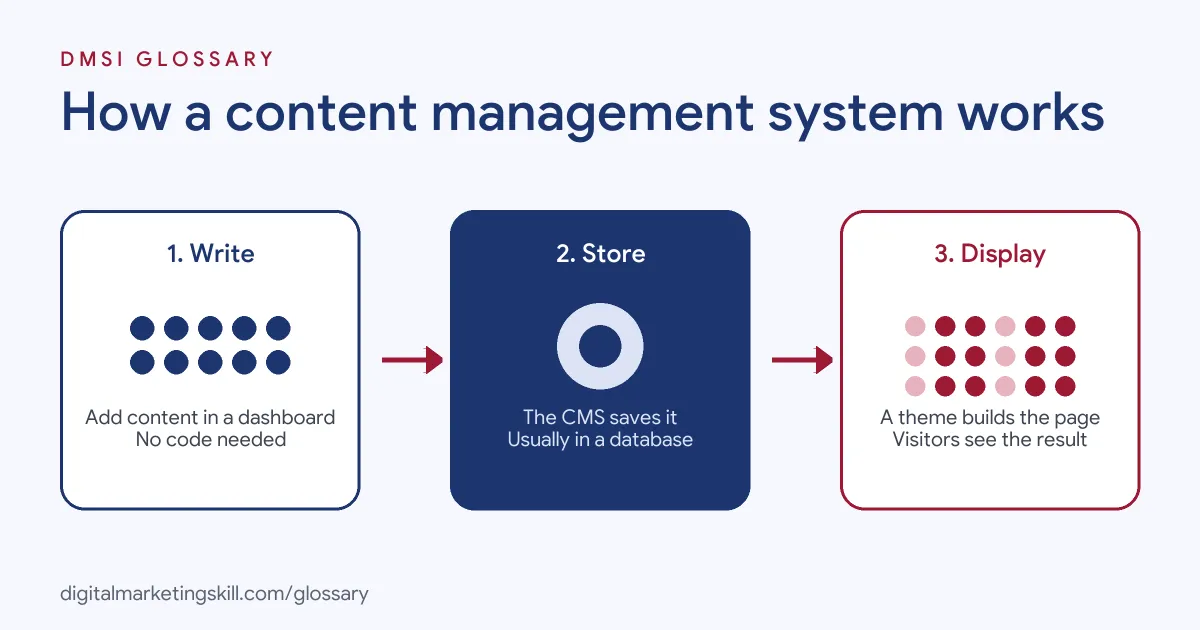
Most systems have two sides. There is the admin area, where you create content. Then there is the public site, where visitors see it. In between, the software stores your content and builds each page when someone asks for it.
The Editor and Dashboard
The dashboard is where you work. Here, you write posts, upload images, build pages and manage users. In WordPress, for example, the block editor lets you add headings, images and buttons as separate blocks. You can see roughly how the page will look as you build it.
The Database
Behind the scenes, your words, settings and page details usually live in a database. WordPress.org explains that WordPress “is built on PHP and MariaDB.” So when a visitor opens a page, the software pulls the right content from the database and assembles the page.
Themes and Plugins
The theme controls how the site looks: fonts, colours and layouts. Meanwhile, plugins, or apps on hosted platforms, add features. For example, you might add a plugin for SEO, contact forms or an online shop. As a result, you can change the design or add features without rebuilding your content.
Content Management System Examples
Here are three made-up examples of how businesses use a CMS:
- Local service firm: A cleaning company builds its site on WordPress. Then the owner adds a blog post each week to answer customer questions.
- Online store: A candle maker uses a hosted shop platform. As a result, it adds products, photos and prices from one dashboard.
- Marketing team: A software firm’s marketers build campaign landing pages in their CMS. So they publish and test new pages without help from engineers.
In each case, the people who own the content can update it themselves.
Popular Content Management System Platforms
W3Techs tracks how many websites use each system and updates its figures daily. On its survey, WordPress leads by a wide margin, followed by Shopify, Wix and Squarespace. Here is how the main types compare:
| Platform | Type | Best for | Trade-off |
|---|---|---|---|
| WordPress | Open source, self-hosted | Blogs, business sites, shops with WooCommerce | You handle hosting, updates and security |
| Shopify | Hosted, commerce-first | Online stores | Monthly fees; less control over the code |
| Wix and Squarespace | Hosted website builders | Simple sites, portfolios | Fewer advanced options; harder to move away |
| Drupal | Open source, self-hosted | Large, complex sites | Needs more technical skill |
Also, WordPress is licensed under the GPLv2. According to WordPress.org, that licence gives you the freedom to run, study, change and share the software.
How to Choose a Content Management System
- Write down your goals. Do you need a blog, a shop, a portfolio or all three?
- Check who will run it. A small team may prefer a hosted builder. A team with web skills may want full control.
- List must-have features. For instance, forms, booking, payments, languages or membership.
- Check SEO basics. Make sure you can edit titles, descriptions, URLs and redirects.
- Think about growth. Consider whether the platform will still fit when traffic and products grow.
- Test it. Build one real page before you commit.
If you pick WordPress, our guide on how to build a WordPress website walks you through the set-up.
Best Practices for a Content Management System
- Keep it updated. That’s because updates fix bugs and close security holes.
- Use fewer, better plugins. After all, each extra plugin adds code to maintain.
- Set user roles. Give writers access to posts, not to settings.
- Build templates. Reusable page layouts keep the brand consistent and also save time.
- Add nofollow to user links. Google’s SEO Starter Guide suggests your CMS should add a nofollow or similar annotation to links that users post.
- Back up regularly. Keep copies of both the files and the database.
Common Mistakes to Avoid
First, many owners install dozens of plugins, which slows the site and adds risk. Second, they pick a builder for a quick start, then find it cannot do what the business needs later. Third, they forget updates for months. Finally, they give every user full admin rights. Each mistake is easy to avoid with a little planning at the start.
How a Content Management System Helps SEO
A good CMS makes search basics simple. You can edit page titles, meta descriptions and URLs from the editor. Many systems also create an XML sitemap automatically. Google’s SEO Starter Guide notes that “some content management systems (CMS) may even do this automatically for you.” In addition, plugins such as Yoast SEO add checks for keyphrases, readability and structured data.
However, the tool cannot do the thinking for you. You still need useful content, a clear structure and fast pages. The CMS simply makes it easier to put those into practice.
Traditional vs Headless Systems
Most marketers use a traditional system, where the same software stores the content and shows the web pages. WordPress works this way by default. However, you may also hear about a headless CMS.
In a headless set-up, the system only stores and manages content. Then developers pull that content into a separate website, app or screen through code. As a result, one piece of content can appear in many places at once, such as a site, a mobile app and an in-store display.
The trade-off is effort. Headless set-ups give developers more freedom, but marketers usually lose the simple visual editor. So for most small and mid-sized businesses, a traditional system is the easier choice.
Where You’ll Use a CMS at Work
CMS skills appear in content, marketing and web roles. For example, remote job listings ask for:
- “Working knowledge of WordPress and Jira (or similar CMS and project management tools).” (Editor, Commercial Content).
- The ability to “Utilize HubSpot’s CMS to create and manage content, including blog posts, landing pages, and website optimization.” (HubSpot Specialist).
So if you want to work as a WordPress Developer, SEO Specialist or Website Manager, you will use a CMS every day. Many content and email roles expect it too.
Learn It in the WordPress and SEO Track
You can learn to build and manage sites in the AI-Powered WordPress and SEO Specialist track. It covers WordPress website and eCommerce development, plus search engine optimisation and content marketing. Your portfolio project is a WordPress site or store that you rank with an SEO content plan. You also get unlimited 1-on-1 mentoring and a U.S. Project Internship from day one.
For more on how marketers use these tools, read our guide to CMS marketing.
Frequently Asked Questions
What is a content management system in simple terms?
It is software that lets you build and update a website from a dashboard, without coding each page. You write, add images and publish.
What is the most popular CMS?
WordPress. W3Techs reports that it runs roughly 40% of all websites and more than half of the sites that use a known CMS.
Is WordPress free?
The WordPress software is free and open source. However, you still pay for hosting, a domain and any premium themes or plugins.
Do I need to code to use a CMS?
No. Most tasks, such as writing posts and editing pages, need no code. Coding helps for custom features and fixes.
Which CMS is best for SEO?
Most major platforms let you control titles, descriptions, URLs and sitemaps. The content you publish matters more than the platform.
Sources: W3Techs: Usage statistics of content management systems; WordPress.org: About; Google Search Central: SEO Starter Guide; remote job listings on Himalayas.