
Website maintenance is the regular work of keeping a website updated, secure, fast and working properly after it goes live. It includes software updates, backups, security checks, fixing broken links and refreshing content. Without it, a site slowly becomes slower, riskier and less useful, which costs a business visitors, trust and sales.
Key Takeaways
- A website is never “finished”. It needs ongoing care, much like a car needs servicing.
- WordPress applies minor and security updates in the background on most sites, but plugins, themes and major updates still need attention.
- WordPress advises you to back up your site before you update it.
- Its documentation recommends keeping three to five recent backups in different places.
- Good upkeep covers four areas: updates, security, performance and content.
What Is Website Maintenance?
Think of a website like a shop. Opening day is exciting, but the shop still needs cleaning, repairs, fresh stock and locks that work. Otherwise, customers stop coming. A website is the same. The launch is only the start.
The work falls into a few groups. First, there are technical tasks, such as updating software and checking backups. Next come security tasks, such as removing old user accounts. Then there are performance checks, such as testing page speed. Finally, there is content upkeep, such as updating prices and fixing broken links.
Some businesses do this in-house. Others pay a freelancer or agency for a monthly care plan. Either way, someone needs to own it.
How Website Maintenance Works
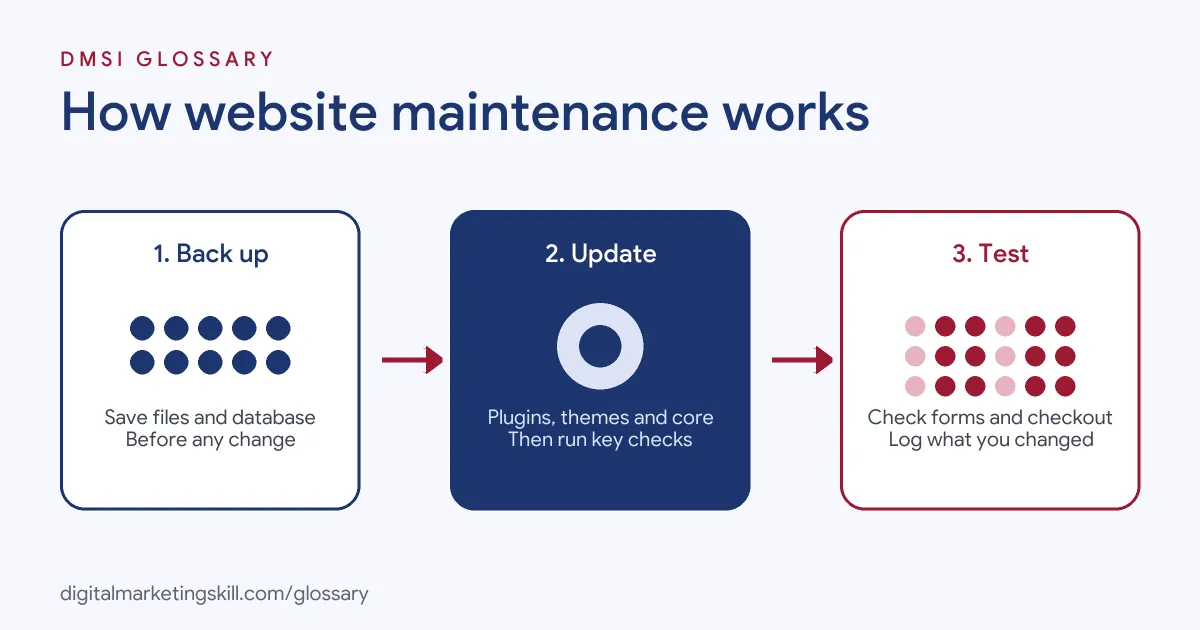
Most teams follow a simple cycle. First, they back up the site. Next, they apply updates and checks. Finally, they test that everything still works and note what changed. Then the cycle repeats.
Software Updates
On WordPress, the core software, themes and plugins all receive updates. The WordPress documentation explains that “you don’t have to lift a finger to apply minor and security updates” on most sites, because they install in the background. Major updates, plugins and themes are different. You can turn on auto-updates for them, and WordPress then sends email notifications by default after each attempt.
Updates matter for safety. The WordPress hardening guide warns that “older versions of WordPress are not maintained with security updates.”
Backups
Before any big change, take a backup. WordPress’s update guide says it is “a good idea to back up your website” first, so you can restore it if something goes wrong. Its backup guide adds that a full backup has two parts: the database and the files. You need both to restore a typical site.
Checks and Testing
After updates, check the pages that matter most. For instance, test the home page, contact form, checkout and any landing pages in live ads. Also look at speed, broken links and error messages. If something breaks, restore the backup and investigate.
Website Maintenance Examples
Here are three made-up examples of how businesses handle upkeep:
- Small business: A dentist’s office pays a freelancer for a monthly care plan. The freelancer updates plugins, checks backups and sends a short report.
- Online shop: A clothing store tests its checkout every week. It also updates product photos and removes items that are out of stock for good.
- Agency: A marketing agency looks after 30 client sites. It uses one dashboard to update them in batches, then spot-checks each one.
In each case, small regular tasks prevent big expensive problems.
A Suggested Website Maintenance Schedule
There is no single official schedule. However, the plan below is a sensible starting point for a small business site:
| How often | Tasks |
|---|---|
| Weekly | Check backups ran, apply plugin and theme updates, test key forms |
| Monthly | Review speed, fix broken links, remove unused plugins, check user accounts |
| Quarterly | Refresh key pages, review SEO titles, test a full restore from backup |
| Yearly | Renew domain and hosting, review the design and update legal pages |
Busy online shops may need daily backups. Meanwhile, a small brochure site may manage with less. Adjust the plan to how often your site changes.
How to Maintain a Website Step by Step
- Back up first. Save both the files and the database, and store a copy off the server.
- Update in order. Update plugins and themes, then the core software if a major release is waiting.
- Test key pages. Check forms, checkout, menus and mobile layout.
- Check security. Remove old users, confirm strong passwords and review any alerts.
- Review speed. Run a page speed test and fix large images or slow plugins.
- Fix content. Update old facts, prices and dates of events, and repair broken links.
- Record it. Keep a simple log of what you changed, so you can trace any problem.
Tools That Make the Job Easier
You do not need to do everything by hand. A few types of tool cover most of the routine:
- Backup plugin or host backups: run copies on a schedule and send one to cloud storage.
- Caching plugin: the WordPress handbook calls caching “the fastest way to improve performance” and names plugins such as WP Super Cache.
- Uptime monitor: sends you an alert when the site goes down, so you hear before customers do.
- Google Search Console: flags crawl errors, security issues and pages that drop out of search.
- Password manager: keeps strong, unique logins for the host, domain and dashboard.
Even with tools, someone still needs to read the alerts and act on them. So assign a named owner for each task, and add the checks to a shared calendar.
Best Practices for Website Maintenance
- Use fewer plugins. The WordPress optimisation guide says deactivating and deleting unnecessary plugins “is a significant way to improve performance.”
- Get plugins from trusted sources. WordPress advises sticking to its own repository or well-known companies.
- Keep several backups. WordPress suggests at least three to five recent copies in different places, such as the server, cloud storage and a local computer.
- Test on a copy first. For big changes, try them on a staging copy before the live site.
- Watch your speed. Slow pages hurt visitors and rankings, so track page speed over time.
Common Mistakes to Avoid
First, owners skip updates for months, then update everything at once and break the site. Second, they assume the host’s backup is enough and never test a restore. Third, they keep old plugins and admin accounts that nobody uses. Finally, they forget content. Old prices, dead links and past offers make a business look careless. A short monthly routine prevents all four problems, and it costs far less than an emergency repair.
Why It Matters for Marketing
Marketing sends people to your website. So if the site is slow, broken or out of date, every ad and email loses value. A form that fails quietly can lose leads for weeks before anyone notices. Likewise, a hacked site can lose search visibility and trust. In short, regular upkeep protects the money you spend on getting traffic.
Where You’ll Use Website Maintenance at Work
Upkeep tasks appear in many web and marketing roles. For example, remote job listings ask candidates to:
- “Carry out ongoing website maintenance, including content updates, plugin and theme updates, and routine checks.” (Website and Graphic Design Assistant).
- “Handle light updates to the company website and document clear Standard Operating Procedures (SOPs) for all key workflows.” (Executive Assistant).
- A hands-on manager “to coordinate website support and development projects.” (Website Maintenance Project Manager).
So if you want to work as a WordPress Developer or Website Manager, you will likely handle this kind of upkeep for clients. Care plans are also a common service that freelancers offer.
Learn It in the WordPress and SEO Track
You can learn to build and look after WordPress sites in the AI-Powered WordPress and SEO Specialist track. Your portfolio project is a WordPress site or store that you rank with an SEO content plan. The track is about 90% hands-on, with unlimited 1-on-1 mentoring and a U.S. Project Internship from day one.
To keep your site fast as well as safe, read our guide to website page speed.
Frequently Asked Questions
What does website maintenance include?
It includes software updates, backups, security checks, speed tests, broken link fixes and content updates. The aim is to keep the site safe and useful.
How often should I update my website?
Check for plugin and theme updates at least weekly. Review content and speed monthly, and test a full restore from backup every few months.
Does WordPress update itself?
Partly. Most sites apply minor and security updates automatically. You can also turn on auto-updates for plugins and themes.
How many backups should I keep?
WordPress suggests keeping at least three to five recent backups, stored in different locations.
Can I do website maintenance myself?
Yes, for most small sites. You need access to the dashboard and hosting, a backup tool and a simple checklist to follow.
Sources: WordPress.org: Updating WordPress; WordPress.org: Plugin and themes auto-updates; WordPress Developer Resources: Hardening WordPress; WordPress Developer Resources: Backups; WordPress Developer Resources: Optimization; WordPress Developer Resources: Cache; remote job listings on Himalayas.