
A content delivery network (CDN) is a group of servers spread around the world that store copies of your website’s files and deliver them from the location closest to each visitor. Instead of every request travelling to your main server, images, styles and scripts come from a nearby CDN server. As a result, pages load faster, your hosting does less work and your site copes better with traffic spikes.
Key Takeaways
- Cloudflare defines a CDN as “a geographically distributed group of servers that caches content close to end users.”
- It speeds up sites because servers sit closer to visitors, so data travels a shorter distance.
- It also cuts requests to your main server, which can lower bandwidth costs.
- A CDN does not replace web hosting. Your site still lives on an origin server.
- WordPress notes a CDN works best alongside a caching plugin.
What Is a Content Delivery Network?
Imagine a bakery with one shop in London. Customers in Manchester and Edinburgh must travel far for bread. Now imagine the bakery opens small outlets in each city, stocked with fresh loaves every morning. Everyone gets bread faster, and the main shop is far less crowded.
A CDN does the same for your website. Your main server, called the origin, holds the original files. The network keeps copies on servers in many locations. When someone visits, they get the files from the nearest copy.
Importantly, this is not a hosting service. Cloudflare is clear that a CDN “does not host content and can’t replace the need for proper web hosting.” Instead, it sits in front of your host and speeds up delivery.
How a Content Delivery Network Works
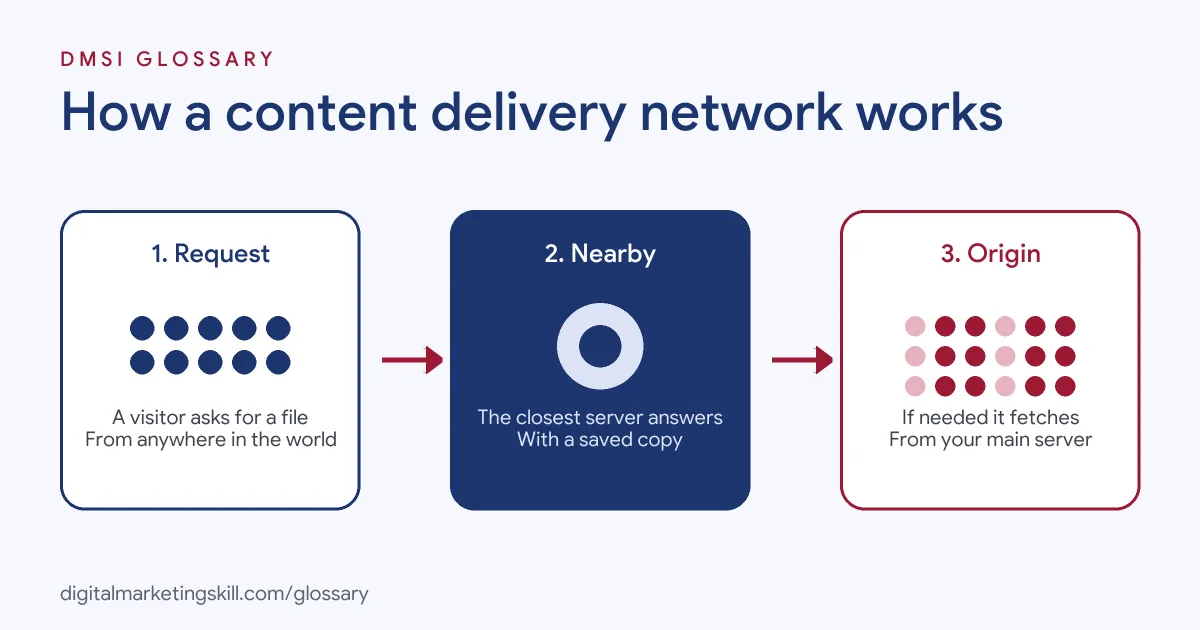
The process is simple. First, a visitor requests a file. Next, the nearest CDN server checks whether it already has a fresh copy. If so, it sends it at once. If not, it fetches the file from your origin server, sends it on and keeps a copy for the next visitor.
Points of Presence
CDN locations are often called points of presence, or PoPs. Google’s web.dev guide explains the trade-off. A network with many PoPs can deliver lower latency, but each cache sees less traffic, so it may hold fewer files. A network with fewer PoPs may sit further from users but find files in its cache more often. That’s why some CDNs use tiers: “edge caches” near users, backed by central PoPs.
Why It Is Faster
According to web.dev, the speed gain comes from three things. First, CDN servers “are located closer to users than origin servers,” so round trips are shorter. Second, networking optimisations deliver content more quickly. Third, CDN caches “eliminate the need for a request to travel to the origin server.”
What It Delivers
Most networks start with static files, such as images, fonts, styles and scripts. The WordPress handbook explains that a CDN “can mirror static files (like images) across various geographic regions.” Many services can also cache whole pages. Web.dev’s advice is simple: “the more of your site delivered by your CDN, the better.”
Content Delivery Network Examples
Here are three made-up examples that show how businesses use one:
- Global shop: A UK fashion brand sells to customers in Australia and Canada. With a CDN, product photos load from nearby servers rather than from London.
- Content site: A recipe blog with heavy images moves them to a CDN. Its server load drops, and pages feel quicker on mobile.
- Product launch: A software firm expects a rush after a big announcement. The network absorbs much of the traffic, so the site stays online.
In each case, the network takes pressure off the origin and brings files closer to people.
Benefits of a Content Delivery Network
| Benefit | What Cloudflare or web.dev says |
|---|---|
| Faster pages | CDN services “can help to reduce load times” |
| Lower hosting load | A CDN “cuts down on origin requests and reduces bandwidth costs” |
| Better uptime | “A well-rounded CDN has several features that will minimize downtime” |
| Some protection | It “may also help protect websites against some common malicious attacks,” such as DDoS attacks |
These benefits grow with traffic and distance. A small local site may see modest gains. However, a site with visitors around the world often sees a large difference.
How to Set Up a Content Delivery Network
- Check your host. Many hosts include a CDN or offer one-click set-up.
- Choose a provider. Compare locations near your audience, features and support.
- Connect your domain. Most services ask you to change DNS records or nameservers.
- Set caching rules. Cache static files for a long time, and exclude carts, checkouts and logged-in pages.
- Pair it with caching on the server. WordPress says a CDN “is most effective if used with a WordPress caching plugin.”
- Test the site. Check pages, forms and checkout from different devices and locations.
- Measure speed. Compare page speed and Core Web Vitals before and after.
Best Practices for a Content Delivery Network
- Serve as much as you safely can. Static files are easy wins; whole-page caching gives more speed.
- Keep personal pages out. Never cache pages that show one user’s data.
- Use versioned file names. Then you can cache files for a long time and still push updates.
- Purge after big changes. Clear the network’s cache when you change the design or key content.
- Keep good hosting. The CDN speeds up delivery, but a slow origin still slows uncached pages.
Common Mistakes to Avoid
First, owners expect a CDN to fix a slow host on its own. Second, they cache the checkout or account pages, which can show the wrong data to visitors. Third, they change DNS without checking email records, and mail stops. Finally, they forget to purge the cache after an update, then think the change failed. A careful set-up checklist prevents all four.
How a CDN Helps With Security
Speed is the main reason most sites add a CDN, but security is a close second. Because the network sits in front of your origin server, much of the traffic never reaches your host directly. As a result, it can absorb some sudden floods of requests. Cloudflare notes that a properly configured CDN “may also help protect websites against some common malicious attacks,” such as DDoS attacks.
However, it is not a complete security plan. You still need updates, strong passwords, backups and a secure host. Think of the CDN as one extra layer, not a replacement for the basics.
Why It Matters for Marketing
Marketers pay to bring visitors to a site. If the pages load slowly, many of those visitors leave before they see the offer. A CDN helps protect that spend by speeding up delivery, especially for visitors far from your server. It also helps the site stay online during launches, sales and viral moments, when traffic matters most.
Where You’ll Use a Content Delivery Network at Work
CDN knowledge appears in many web and hosting roles. For example, remote job listings ask for:
- “Experience with CDN services (e.g., Akamai, Cloudflare) for optimized content delivery.” (Live Captioning and Streaming Project Manager).
- Someone “comfortable in conversations about DNS, SSL, the LAMP/WordPress stack, control panels, email delivery, caching and CDNs” (Senior Product Manager, Shared Hosting).
- The ability to “Architect edge networking including CDN, global load balancing, and WAF integration.” (Cloud Network Engineer).
So if you plan to work as a WordPress Developer or Website Manager, you will set up and troubleshoot a CDN for clients. SEO Specialists also need to understand it, because it affects page speed.
Learn It in the WordPress and SEO Track
You can learn to build fast, reliable sites in the AI-Powered WordPress and SEO Specialist track. Your portfolio project is a WordPress site or store that you rank with an SEO content plan. The track is about 90% hands-on, with unlimited 1-on-1 mentoring and a U.S. Project Internship from day one.
For a wider look at speed, read our guide to website page speed.
Frequently Asked Questions
What is a content delivery network in simple terms?
It is a network of servers around the world that keeps copies of your site’s files. Visitors get those files from the nearest server, so pages load faster.
Do I need a CDN for a small website?
Not always. A local site with a good host may see small gains. However, a CDN helps a lot if your visitors are spread across countries.
Does a CDN replace hosting?
No. Your site still lives on a host, called the origin server. The CDN only speeds up delivery.
Does a CDN help SEO?
Indirectly. It can make pages faster, which improves the visitor experience and speed measures such as Core Web Vitals.
Is a CDN the same as caching?
A CDN is a type of shared cache spread across many locations. You can also cache files in the browser and on your own server.
Sources: Cloudflare: What is a CDN?; web.dev: Content delivery networks; WordPress Developer Resources: Optimization; remote job listings on Himalayas.