
YouTube SEO is the practice of optimising your videos, titles, descriptions and channel so they show up in YouTube search and suggested videos. YouTube is a huge search engine in its own right, so a good video can keep finding new viewers for a long time. As a result, YouTube SEO helps your content earn views without paying for every one. It also helps the right people find you, not just more people.
Key Takeaways
- YouTube SEO helps your videos appear in YouTube search and suggested videos.
- YouTube says its search looks at three main elements: relevance, engagement and quality.
- Your title, thumbnail and description matter far more than tags.
- Chapters, captions and clear descriptions help both viewers and the system understand your video.
- Watch behaviour, such as how long people keep watching, shapes how far a video travels.
What Is YouTube SEO?
YouTube SEO is a branch of search engine optimisation that focuses on video. Instead of ranking web pages on Google, you aim to rank videos on YouTube. So the goal is simple: when someone types a question, your video should be one of the answers.
Think of a library with millions of books. Each book needs a clear title, a good cover and a short summary on the back. Without them, nobody picks it up. In the same way, your video needs a clear title, a strong thumbnail and a helpful description. Then both people and the system can tell what it is about.
YouTube explains its own approach in its Help Centre. It says search “prioritizes three key elements for best results”: relevance, engagement and quality. In addition, it states that “YouTube doesn’t accept payment for better placement within organic search results.” So you can’t buy organic rankings. Instead, you earn them with useful videos and clear information.
Why It Matters
Why should you care? Because many people search YouTube the way they search Google. For example, they look for tutorials, product reviews and how-to guides. If your video answers that need well, it can bring in views for months. Also, a video that ranks on YouTube can sometimes appear in Google results too. That means one piece of work can reach people in two places.
On the other hand, a great video with a vague title may sink without a trace. So YouTube SEO is often the difference between a video that grows and one that stalls.
How YouTube SEO Works
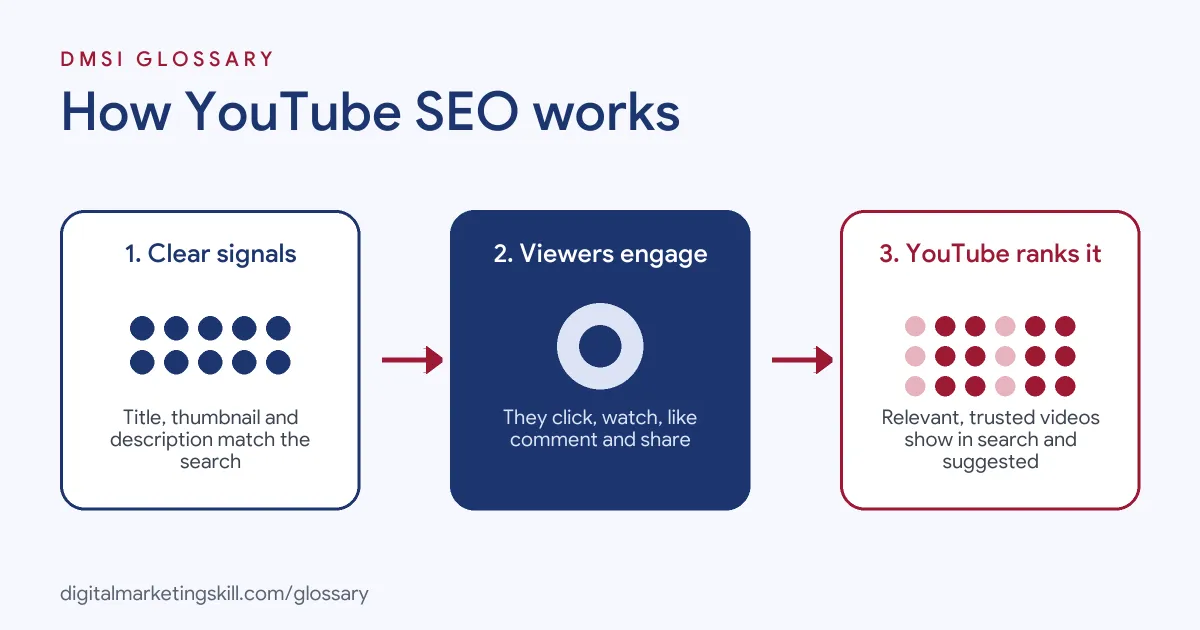
YouTube SEO works by helping the system match your video to what people want. First, you give YouTube clear signals about your topic. Then viewers react to the video. Finally, YouTube uses those signals to decide where to show it.
Relevance
Relevance is about how well your video fits a search. YouTube says it looks at “how well the title, tags, description, and video content match your search query.” So your words need to match the words your viewers use. That is why keyword research is a key first step. For example, a cooking channel might find that people search “easy bread for beginners” more than “artisan loaf”.
Engagement
Next comes engagement. YouTube states that “Engagement signals are a valuable way to determine relevance.” In practice, this means how people behave after they click. For instance, do they keep watching or leave after a few seconds? Do they like, comment or share? A strong thumbnail and title can lift your click-through rate. However, the video itself has to keep people watching.
Quality
Then there is quality. YouTube says it tries to find signals that show “which channels demonstrate expertise, authoritativeness, and trustworthiness.” So a channel that covers one topic well, over many videos, tends to build trust. As a result, a clear focus often beats random uploads on many subjects.
Personal Signals
Finally, results can be personal. YouTube may use a viewer’s search and watch history if they have it turned on. So two people can see different results for the same search. That is why you can’t judge your ranking from one search on your own account.
Metadata That Helps
Some fields carry more weight than others. YouTube says your “title, thumbnail, and description are more important pieces of metadata” than tags. So put most of your effort there. For example, a clear description can explain the topic, list key steps and link to related videos. Also, chapters split a long video into parts with their own labels. Captions help too, because they make the video easier to follow for more people. Together, these details tell the system what your video covers. In addition, they help viewers decide quickly if it is right for them. As a result, the right people click, and they are more likely to keep watching. This is also where search intent matters, because a good description promises exactly what the viewer came for.
Examples of YouTube SEO
- A local bakery teaching bread. The owner finds that beginners search for simple recipes. So she titles her video around “easy bread for beginners” and adds chapters for each step. After that, viewers can jump straight to the part they need.
- A software company with tutorials. The team writes full descriptions with links to help pages. In addition, they add captions to every video. As a result, viewers who watch without sound can still follow along.
- A fitness coach with a series. She groups her workout videos into playlists by goal. Then she links each video to the next one in the series. So viewers keep watching, and the channel builds a clear topic focus.
YouTube SEO vs Google SEO
| Point | YouTube SEO | Google SEO |
|---|---|---|
| What ranks | Videos and channels | Web pages |
| Main signals | Relevance, engagement, quality | Relevance, content quality, links, page experience |
| Key text fields | Title, description, captions | Title tag, headings, body text |
| Visual factor | Thumbnail has a big effect on clicks | Images help, but text leads |
| Main tool | YouTube Studio | Google Search Console |
How to Do YouTube SEO
- Find what people search. Type your topic into the YouTube search bar and note the suggestions. These show real phrases people use.
- Check the search intent. Look at the top videos for that phrase. Then decide if people want a tutorial, a review or a quick answer.
- Write a clear title. Put the main phrase near the start. Keep it honest, so it matches what the video delivers.
- Design a strong thumbnail. Use a clear image and a few bold words. Make sure it still reads well on a small phone screen.
- Write a useful description. Explain what the video covers in the first lines. After that, add links, resources and related videos.
- Add chapters. List timestamps in the description. YouTube says the first one must start at 00:00, and you need at least three.
- Add captions. Upload or check captions so more people can follow your video.
- Review YouTube Studio. Check views, watch time and click-through rate. Then improve titles and thumbnails on videos that underperform.
Best Practices for YouTube SEO
- Match the viewer’s words. Use the same phrases your audience types, not your own internal jargon.
- Hook viewers early. Show the value in the first few seconds, so people don’t leave straight away.
- Keep tags simple. YouTube says tags “play a minimal role” in discovery, so spend your time on titles and thumbnails instead.
- Stay on topic. A focused channel builds trust. Also, it helps the system understand who your videos are for.
- Use playlists. Group related videos so viewers keep watching one after another.
- Repurpose your best ideas. Turn long videos into short-form video clips that point back to the full version.
Common Mistakes to Avoid
- Clickbait titles. A title that oversells may get clicks. However, viewers leave fast when the video doesn’t deliver.
- Empty descriptions. A one-line description gives YouTube very little to work with.
- Stuffing tags. Dozens of tags won’t lift your ranking and can look spammy.
- Ignoring the thumbnail. A blurry or busy thumbnail can hurt clicks, even for a great video.
- Judging rank from your own account. Results are personal, so check data in YouTube Studio instead.
- Uploading with no plan. Random topics make it hard to build an audience that returns.
Where You’ll Use YouTube SEO at Work
YouTube SEO shows up in video, content and channel roles. For example, real remote job listings ask for:
- “Demonstrated results growing organic traffic through experience with YouTube SEO or video content optimization.” (YouTube Copywriter).
- “Knowledge of YouTube SEO and audience engagement strategies.” (YouTube Video Creator/Editor – Intern).
Beyond these roles, you’ll use it in video marketing, social media and content jobs. It also pairs well with YouTube Ads when a brand runs paid and organic video side by side.
Learn It in the WordPress and SEO Track
You can learn YouTube SEO and wider search skills in the AI-Powered WordPress and SEO Specialist track. Every track includes a U.S. Project Internship from day one, with unlimited 1-on-1 mentoring.
Frequently Asked Questions
Do tags still matter on YouTube?
Only a little. YouTube says tags help mainly when your topic is often misspelled. Your title, thumbnail and description matter much more.
Can I pay to rank higher in YouTube search?
No. YouTube says it doesn’t accept payment for better placement in organic search results. Paid placement is a separate thing, done through ads.
How long does YouTube SEO take to work?
It varies. Some videos pick up views quickly, while others grow slowly over months. So keep improving titles and thumbnails as you learn.
Do chapters help YouTube SEO?
Chapters help viewers find the part they need. In addition, they make your video easier to understand. You need at least three timestamps, starting at 00:00.
Is YouTube SEO different from Google SEO?
Yes, in a few ways. Both care about relevance and quality. However, YouTube leans more on viewer behaviour, thumbnails and watch time.
Sources: YouTube Help: How YouTube search works; YouTube Help: Add tags to your YouTube videos; YouTube Help: Video Chapters; remote job listings on Himalayas and Himalayas.