
DNS, short for Domain Name System, is the system that turns a domain name such as example.com into the numeric IP address of the server that hosts it. It works like a directory lookup that runs in the background every time someone opens a website or sends an email. For marketers, DNS is where you connect a domain to hosting, verify tools and set up the records that help your emails reach the inbox.
Key Takeaways
- Cloudflare describes DNS as “the phonebook of the Internet.”
- Four types of DNS server work together to answer a lookup: the recursive resolver, the root, the TLD server and the authoritative nameserver.
- Records hold the instructions. For example, an A record points to an IP address and an MX record directs mail.
- Each record has a time-to-live (TTL), which sets how long servers keep a cached copy.
- Marketers use DNS to launch sites, verify ad and analytics tools, and protect email with TXT records.
What Is DNS?
Computers find each other using IP addresses, which are strings of numbers. People, however, remember names. ICANN explains that the Domain Name System “uses letters, numbers, and hyphens to form a name that is easier to remember.” So DNS sits in the middle and translates between the two.
Here is a simple way to picture it. You know your friend’s name, but your phone needs their number to call. Your contacts app does the matching for you. In the same way, DNS matches a domain name to the right server, and it does so in a fraction of a second.
Without DNS, every visitor would need to type a number to reach your site. In other words, it is one of the quiet systems that makes the web usable.
How DNS Works
A DNS lookup passes through several servers before your browser gets an answer. According to Cloudflare, there are “typically 8 steps in a DNS lookup” when nothing is cached. In practice, caching often lets the process skip steps.
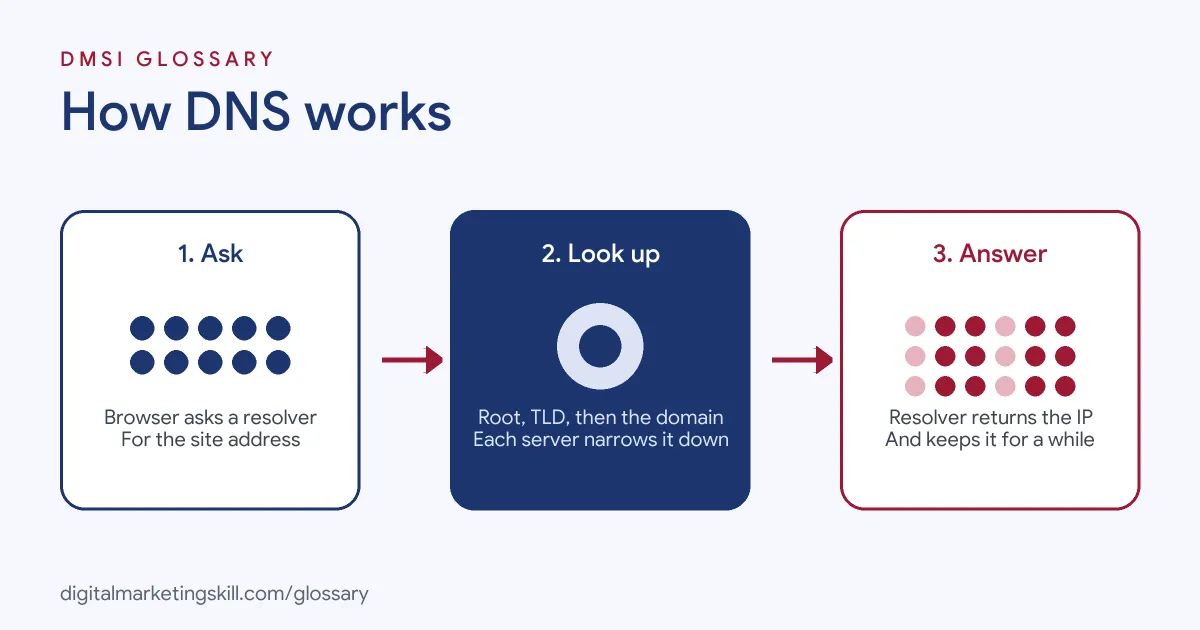
The Four Servers in a Lookup
Cloudflare lists four servers involved in loading a webpage:
- Recursive resolver: receives the request from your device and does the legwork of finding the answer.
- Root nameserver: the first stop, which points the resolver towards the right TLD server.
- TLD nameserver: handles the last part of the name, such as “com” in example.com.
- Authoritative nameserver: the final stop, which returns the IP address for the domain.
When you buy a domain, your registrar or host usually provides the authoritative nameservers. That is where you edit your records.
DNS Records
Records are the instructions stored for your domain. Each type has its own job:
| Record | What it does | Marketing use |
|---|---|---|
| A | Holds the IPv4 address of a domain | Points your domain to your web host |
| AAAA | Holds the IPv6 address of a domain | Same job for newer IPv6 addresses |
| CNAME | Forwards one name to another; does not give an IP address | Connects a subdomain to a landing page or shop tool |
| MX | Directs mail to an email server | Sets up business email |
| TXT | Stores text notes, often used for email security | Verifies tools and publishes email authentication |
| NS | Stores the name server for a domain | Moves DNS control to a new provider |
The descriptions above follow Cloudflare’s guide to DNS records.
Caching and TTL
Lookup answers are stored for a while, so the next lookup is faster. Cloudflare explains that this data can be cached in the browser, the operating system and the resolver. Each copy lasts for a set time called the TTL, or time-to-live. As a result, when you change a record, some visitors may still see the old setting until their cached copy expires.
DNS Examples
Here are three made-up examples of everyday DNS tasks:
- Launching a new site: A café moves to a new web host. The developer updates the A record so the domain points to the new server.
- Adding a landing page tool: A coach sets up offers.example.com. She adds a CNAME record that points the subdomain to her page builder.
- Improving email delivery: An online shop adds TXT records for email authentication. Its newsletters then pass checks at the receiving mail servers.
Each task takes only a few minutes in a settings panel. Yet a single typo can take a site or inbox offline, so care matters.
How to Update DNS Records
The menus vary between providers, but the steps are much the same:
- Find your provider. Check which nameservers your domain uses. That tells you where to make changes.
- Take a screenshot. Save the current records first, so you can undo a mistake.
- Copy the exact values. Tools you connect, such as a host or email platform, give you the record type, name and value.
- Add or edit the record. Paste the values carefully, with no extra spaces.
- Check the TTL. Lower it before a planned move, so changes spread faster.
- Test the result. Use a lookup tool to confirm the new record is live, then check the site or tool works.
Related Terms You Will Hear
A few related words come up whenever you work in a domain’s settings panel:
- Zone: the full set of records for one domain, managed in one place.
- Nameserver: the server that holds your zone and answers questions about it.
- Propagation: the period while old cached answers expire and the new ones spread.
- Registrar: the company you rent the domain from. It may or may not also host your records.
- Subdomain: a prefix such as shop.example.com, which can point somewhere different from the main site.
Knowing these words helps you follow setup guides from hosts, email platforms and ad tools. It also makes it easier to explain a problem to support teams.
Best Practices for DNS
- Keep access in the business’s name. The company, not a freelancer, should own the registrar and DNS logins.
- Turn on two-step sign-in. Anyone who controls your records can redirect your site and email.
- Document every change. Note what you changed, when and why.
- Remove old records. Unused CNAMEs pointing at tools you no longer pay for can cause problems.
- Set up email authentication. Add an SPF record, DKIM and DMARC so mailbox providers can trust your mail.
Common Mistakes to Avoid
First, people delete the MX records while fixing the website, and email stops. Second, they add two SPF records instead of one combined record. Third, they panic when a change does not show at once, then make more edits. Usually, the cache simply has not expired yet. Finally, teams lose track of who holds the login. Each problem is avoidable with a written record of your settings.
DNS vs Domain Name vs Hosting
These three terms are often mixed up. Here is the difference:
| Term | What it is | Simple comparison |
|---|---|---|
| Domain name | The address people type | The name on the door |
| DNS | The system that links the name to a server | The directory that gives directions |
| Hosting | The server that stores your website files | The building itself |
So you rent a domain, rent hosting, and then use DNS to connect them.
Where You’ll Use DNS at Work
DNS tasks appear often in website and digital marketing roles. For example, remote job listings ask candidates to:
- “Configure and maintain web servers, domains, DNS records, SSL certificates, and email-related DNS records.” (PHP and WordPress Websites Webmaster).
- “Handle hosting environments, domains, DNS, SSL, and WordPress management” (IT and Business Administrator).
- “Manage hosting environments, domains, DNS, SSL, backups, and performance optimization.” (Junior and Mid-Level Web Developer and Digital Marketing Specialists).
So if you want to work as a WordPress Developer or Website Manager, you will edit DNS regularly. Even email marketers need it, because sender authentication lives there.
Learn It in the WordPress and SEO Track
You can practise connecting domains, hosting and DNS in the AI-Powered WordPress and SEO Specialist track. There, you build a WordPress site or store and rank it with an SEO content plan. The track is about 90% hands-on, with unlimited 1-on-1 mentoring and a U.S. Project Internship from day one.
For background on picking a host, read our guide to website hosting services.
Frequently Asked Questions
What does DNS stand for?
It stands for Domain Name System. It translates domain names into the IP addresses that computers use.
Why are my DNS changes not showing yet?
Servers and browsers cache records for the length of the TTL. Until the cached copy expires, some people may still see the old setting.
What DNS records do I need for a website?
Usually an A record, or a CNAME, that points your domain to your host. You will also need MX records if you use business email.
Is DNS the same as hosting?
No. Hosting stores your site files. DNS simply tells browsers which server to visit.
How does DNS affect email marketing?
Email authentication records, such as SPF and DMARC, are published as DNS TXT records. Mailbox providers check them to decide whether to trust your mail.
Sources: Cloudflare: What is DNS?; Cloudflare: DNS records; ICANN: Beginner’s guides; remote job listings on Himalayas.