
An AI assistant is a software tool that understands requests written or spoken in everyday language and responds by answering questions, drafting content or completing tasks. Popular examples include ChatGPT, Gemini, Claude and Microsoft Copilot. It matters because marketers now use these tools every day to research, write, analyse data and save time, so knowing how to use one well is a core work skill.
Key Takeaways
- Most modern assistants run on large language models, which predict and generate text based on patterns in their training data.
- They can make mistakes, so you must check facts, numbers and quotes before you use their output.
- Some providers let human reviewers read a sample of chats. Never paste confidential client data into a consumer tool.
- Settings such as custom instructions let you give the tool standing guidance, so you repeat yourself less.
- Remote job listings now ask for hands-on experience with assistants such as Claude, ChatGPT or Gemini.
What Is an AI Assistant?
Think of it as a capable helper that you talk to in plain words. You type or say what you need, and the tool replies in seconds. For example, you might ask it to summarise a report, suggest ten subject lines or explain a confusing chart.
Under the hood, most of these tools use a large language model. The model has learned patterns from huge amounts of text, so it can write fluent answers on almost any topic. However, fluent is not the same as correct. That is why you should treat every answer as a first draft.
An assistant is also different from an AI agent. In short, an assistant mainly responds to you, turn by turn, while an agent is built to plan and carry out multi-step tasks with more independence. Many products now blend the two.
How an AI Assistant Works
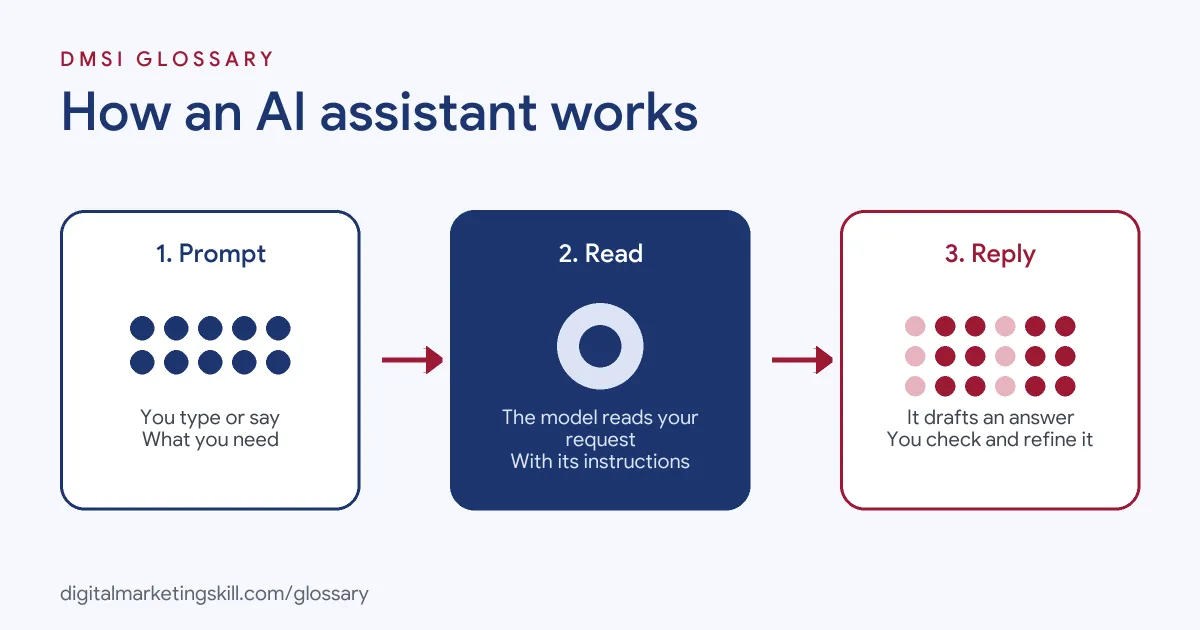
Each exchange follows a simple loop. First, you give the tool a request, called a prompt. Next, the underlying model reads your prompt together with any hidden instructions and earlier messages. Finally, it generates a reply, which you can accept, edit or refine with a follow-up.
Hidden Instructions
You never see everything the model sees. Providers add their own instructions before your message. For instance, Anthropic explains that Claude’s web interface and mobile apps “use a system prompt to provide up-to-date information, such as the current date, to Claude at the start of every conversation.” It adds that these updates “do not apply to the Claude API.”
Your Own Standing Instructions
You can add guidance of your own, too. OpenAI says custom instructions “allow you to share anything you’d like ChatGPT to consider in its response.” According to its help centre, Free and Go users can save up to 1,500 characters, while paid plans allow up to 5,000. As a result, you can tell the tool your role, audience and preferred spelling once, rather than in every chat.
Privacy and Review
What happens to your chats depends on the tool and your settings. Google’s Gemini privacy hub states that human reviewers review some of the data it collects. It also asks users: “Please don’t enter confidential information that you wouldn’t want a reviewer to see.” Meanwhile, it says temporary chats are kept for 72 hours and “are not used to train Google’s AI models.” So always check the settings before you share work data.
AI Assistant Examples
Here are three ways a marketer might use one in a normal week:
- Campaign analysis: A PPC specialist exports a search terms report and asks the tool to group the terms by theme. Then they check the groups by hand before adding negative keywords.
- Content drafting: A social media manager asks for five caption ideas for a product launch. After that, they rewrite the best one in the brand’s voice.
- Email planning: An email specialist asks the tool to outline a three-step welcome sequence. They then add real offers, links and brand details.
In each case, the person stays in charge. The tool speeds up the first draft, and the human checks and improves it.
Popular AI Assistants Compared
The main tools work in similar ways, but each sits inside a different set of products:
| Tool | Company | Useful detail |
|---|---|---|
| ChatGPT | OpenAI | Custom instructions of up to 1,500 characters on Free and Go plans, or 5,000 on paid plans |
| Gemini | Temporary chats are kept for 72 hours and not used to train Google’s models | |
| Claude | Anthropic | Claude’s apps use a system prompt that includes the current date |
Plans and features change often, so check each provider’s help centre before you choose one for client work.
How to Use an AI Assistant Well
These steps help you get useful, safe results from the start:
- Check the data settings. Find out whether chats may be reviewed or used for training, and switch off what you do not want.
- Set standing instructions. Add your role, audience and style, such as British English, in the custom settings.
- Give context in the prompt. Say who the content is for, what the goal is and what format you need.
- Share safe material only. Remove names, contact details and anything confidential first.
- Ask for options. Request three or more versions, so you can pick and combine.
- Verify everything. Check facts, figures and quotes against the original source.
- Edit before you publish. Finally, rewrite the result in your own or the brand’s voice.
A Simple Request Formula for Your AI Assistant
A good request usually has four parts. First, give a role, such as “You are an email marketer.” Second, state the task, such as “Write three subject lines.” Third, add context, such as the audience, offer and tone. Finally, name the format, such as “a numbered list under 50 characters each.”
Here is an example you can adapt: “You are an email marketer for a small bakery. Write three subject lines for a weekend cake offer aimed at local parents. Use British English and keep each under 50 characters.” Because every part is clear, your AI assistant has far less to guess.
Best Practices for Using an AI Assistant
- Be specific. Vague prompts give vague answers. Clear goals and examples give better ones.
- Keep a prompt library. Save prompts that work, so your team can reuse them.
- Use it for structure first. Outlines, lists and summaries are where these tools save the most time.
- Watch for invented details. Look out for AI hallucination, where the model states false facts with confidence.
- Follow your employer’s policy. Many companies set rules on which tools staff may use.
Common Mistakes to Avoid
Beginners often make the same errors. First, they publish the output without checking it. Second, they paste private client data into a free tool. Third, they accept the first answer instead of asking for changes. Finally, they let every post sound the same, because they never add their own ideas. Each of these is easy to avoid once you treat the tool as a helper, not an author.
Where You’ll Use an AI Assistant at Work
Employers now name these tools directly in job listings. For example, recent remote roles ask for:
- “Practical experience using AI assistants or agents, such as Claude, ChatGPT or Gemini, to analyse campaigns and improve workflows” (Google Ads Specialist).
- Making brands, listings and expertise “legible to AI assistants” (Staff Product Manager, Search and AI Visibility).
- Growing “visibility in AI assistants such as ChatGPT, Google AI Overviews, Gemini, and Perplexity” (Senior SEO Strategy Lead).
So the skill works in two directions. You use these tools to work faster, and you also help brands show up when customers ask them questions.
Learn It in the Full Stack Programme
AI fundamentals, covering strategy and planning, is part of every DMSI track. To use an AI assistant across search, social, email and websites, choose the Full Stack programme, which covers all four tracks and all ten courses. You finish with one portfolio project from each track. You also join a U.S. Project Internship from day one, with unlimited 1-on-1 mentoring.
Looking for more tools to try? See our round-up of AI marketing tools.
Frequently Asked Questions
What is an AI assistant in simple terms?
It is a tool you talk to in everyday language. It answers questions, drafts content and helps with tasks, based on patterns it learned from large amounts of text.
Is ChatGPT an AI assistant?
Yes. ChatGPT is one of the best-known examples, alongside Gemini, Claude and Microsoft Copilot.
Are AI assistants always accurate?
No. They can make mistakes and even invent facts. Google, for example, warns that Gemini can make mistakes, so always check important details.
Is it safe to share work data with an AI assistant?
Only with care. Some providers have human reviewers who read a sample of chats, so avoid confidential data and check your settings and employer’s policy first.
Will AI assistants replace marketers?
They change the work rather than remove the need for judgement. Employers still need people who can brief the tools, check the output and make decisions.
Sources: Google: Gemini Apps Privacy Hub; OpenAI Help Centre: Custom instructions for ChatGPT; Anthropic: System prompts release notes; remote job listings on Himalayas.