
Broad match is the Google Ads keyword setting that lets your ad show for searches related to your keyword, even when the search doesn’t contain your exact words. It is the default match type and the one with the widest reach. It matters because, used well, it finds valuable searches you would never think to add, but used carelessly, it can spend your budget on searches that never turn into customers.
Key Takeaways
- Google makes it the default for every keyword. You write it with no symbols.
- Ads can show for related searches, including ones that don’t contain the keyword’s literal meaning.
- Google says “it’s critical to use Smart Bidding with broad match.”
- Google may also look at your landing page, your other keywords and recent search activity to judge relevance.
- The search terms report and negative keywords are your main tools for keeping it on track.
What Is Broad Match?
When you add a keyword in Google Ads, you also choose how closely searches must match it. There are three keyword match types: broad, phrase and exact. This one is the loosest of the three.
Google Ads Help explains that it “extends its reach beyond exact and phrase match by identifying related queries.” In practice, this means you can add fewer keywords and still appear for many different searches. Google says this helps advertisers “spend less time building keyword lists.”
It is also the starting point. Google states that “broad match is the default match type for all keywords.” So if you type a keyword without quotation marks or square brackets, it uses this setting. Many beginners don’t realise this, which is why it is worth knowing from day one.
How Broad Match Works
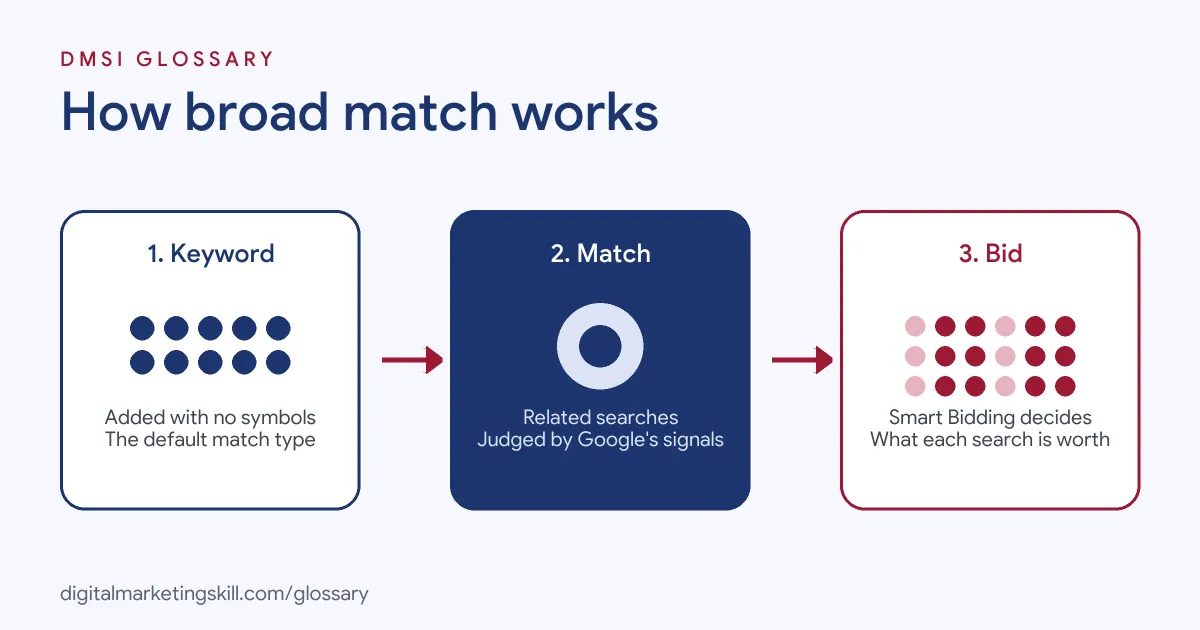
The process works in three steps. First, you add a keyword with no symbols. Next, Google looks at each search and decides whether it is related to your keyword. Finally, Smart Bidding decides how much to bid for that particular search, or whether to bid at all.
The Signals Google Uses
Google says it uses “additional signals to ensure relevance and intent in expansions.” Its keyword matching article names some of them. Google may consider recent search activity, the content of your landing page and assets, and the other keywords in the same ad group. That’s why a tidy, well-themed ad group helps Google make better choices.
Broad Match and Smart Bidding
Google is clear on this point: “It’s critical to use Smart Bidding with broad match.” The reason is that every search is different. Smart Bidding looks at signals at the moment of each auction, so it can bid more for searches likely to convert and less, or nothing, for weaker ones. The wider reach also gives Smart Bidding more data to learn from.
In other words, the match type finds the searches, and Smart Bidding judges them. Without good conversion tracking, Smart Bidding has nothing reliable to judge by.
How It Overlaps With Other Match Types
Google explains that broader match types cover all the searches of narrower types, plus more. So a loose keyword can also match the searches a phrase or exact keyword would catch. Also, Google advises against adding near-duplicates such as ‘red car’ and ‘car red’. Only one of them will match both searches, so the second adds nothing.
Broad Match Examples
Here are three made-up examples that show how this setting can help or hurt:
- Example: online florist. The keyword is flower delivery. With good tracking and Smart Bidding, Google also finds searches like “send a birthday bouquet”. These bring sales the florist never added as keywords.
- Example: accounting software company. The keyword is invoicing software. Google also shows the ad for “free invoice template”. The company adds “template” and “free” as negatives, because those searchers rarely buy.
- Example: local gym with no tracking. It runs broad match with manual bids. Clicks are cheap, but few people join. Once it sets up conversion tracking and Smart Bidding, spend moves towards searches that bring in members.
In each case, results depend on the support around the keyword, not the setting alone.
Broad Match vs Phrase Match vs Exact Match
Here is how the three options compare when you decide what to use:
| Match type | Written as | Reach | Works best when |
|---|---|---|---|
| Broad match | flower delivery | Widest | You have conversion tracking and Smart Bidding |
| Phrase match | “flower delivery” | Middle | You want related searches that keep your keyword’s meaning |
| Exact match | [flower delivery] | Narrowest | You want tight control over proven, high-value searches |
Many accounts use a mix. For instance, they keep exact match on their best keywords and test looser matching to find new ones.
How to Use Broad Match
Follow these steps to set it up safely:
- Set up conversion tracking. Make sure Google Ads records the sales, leads or calls you care about.
- Switch to a Smart Bidding strategy. For example, choose one that aims for conversions or conversion value.
- Theme your ad groups tightly. Keep each ad group to one topic, because Google uses the other keywords as a signal.
- Add your keywords without symbols. To convert existing ones, Google lets you change the match type in the keyword list or in bulk.
- Add negative keywords. Block searches you already know are wrong, such as “jobs” or “free”.
- Check the search terms report. Look at the real searches each week and add new negatives where needed.
- Compare results. Judge it on cost per conversion against your other keywords, not on clicks.
Reading the Search Terms Report
The search terms report is where you see what your keywords really matched. Google Ads Help describes a search term as “a word or set of words that a person enters when searching on Google.” So the report shows the real words people typed before they saw your ad.
Look for three things. First, find searches that converted, and consider adding them as exact or phrase keywords. Next, spot searches that are clearly off topic, and add them as negatives. Finally, check the match type column, which shows how closely each search related to your keyword. Google’s own example is a glasses seller adding “wine” as a negative when “wine glasses” triggered its ads.
Best Practices
- Never run it blind. Loose matching without tracking and Smart Bidding is the fastest way to waste a budget.
- Write relevant landing pages. Google may use your landing page content as a signal, so make it match the ad.
- Remember how negatives work. Google says “negative keywords won’t match to close variants or other expansions,” so add plural and singular forms yourself.
- Give it time. Smart Bidding needs data, so avoid judging results after a few clicks.
Common Mistakes
Many beginners use this setting without knowing it, simply because it is the default. Others pair it with manual bidding, so they pay the same for a great search and a poor one. Some never open the search terms report, and only notice the waste when the budget runs out. Finally, a few people give up on it after one bad week, instead of fixing the tracking and negatives first.
Where You’ll Use Broad Match at Work
The real listings we checked didn’t name broad match on its own. However, paid search roles regularly ask for match type skills. For example, one Google Ads Specialist listing asks for a “solid grasp of campaign structure, keyword analysis, match types, negatives and bid strategies.” Another, for a Senior Media Strategist, asks candidates to “own SEM account architecture, bid strategy, keywords, and match types.”
So if you want to work as a Google Ads Specialist or PPC Specialist, expect to explain when you would use it and how you keep it under control. Our guide to Google Ads optimisation covers the wider routine.
Learn It in the Google Specialist Track
You can practise broad match in the AI-Powered Google Specialist track. There, you launch and measure a Google Ads campaign with conversion tracking, which is exactly what this match type needs to work. You also join a U.S. Project Internship from day one, with unlimited 1-on-1 mentoring.
Frequently Asked Questions
What is broad match in Google Ads?
It is the keyword match type that lets your ad show for searches related to your keyword, even without your exact words. It is the default for all keywords.
How do you write a broad match keyword?
Type the keyword with no symbols. Quotation marks make it phrase match, and square brackets make it exact match.
Is broad match a good idea for beginners?
It can be, but only with conversion tracking and Smart Bidding in place. Without them, it often spends money on searches that don’t convert.
How do I stop broad match showing for the wrong searches?
Check the search terms report and add irrelevant searches as negative keywords. Also keep each ad group focused on one theme.
Does broad match work with manual bidding?
It can run that way, but Google advises against it. In fact, Google calls Smart Bidding critical for this match type.
Sources: Google Ads Help: About broad match; Google Ads Help: About keyword matching options; Google Ads Help: About negative keywords; Google Ads Help: About the search terms report; remote job listings on Himalayas.