
A featured snippet is a special box at the top of some Google results that shows a short extract from one web page, answering the searcher’s question before the usual list of links. Google picks the page and the text automatically. It matters because the box gives one page extra space and visibility, and it often answers questions read aloud by voice assistants.
Key Takeaways
- Google says featured snippets are boxes where “the format of a regular search result is reversed,” showing the description first.
- Google’s systems choose them automatically. You can’t mark a page as a featured snippet.
- Google shows them only when it believes the format will help, and sometimes shows more than one.
- You can opt out with nosnippet, data-nosnippet or a lower max-snippet value.
- Clear, direct answers under well-written headings give a page its best chance of being chosen.
What Is a Featured Snippet?
Most search results show a title first, then a short description. A featured snippet flips that order. Google’s documentation describes them as “special boxes where the format of a regular search result is reversed,” so the answer appears first and the page link follows.
For example, if you search “how long to boil an egg”, you may see a short paragraph with the answer, taken from one cooking site, above all the other results. That paragraph is the snippet. The site it came from gets a prominent link.
Google explains why it shows them. According to its blog, it displays them “when we believe this format will help people more easily discover what they’re seeking.” It also says they “aren’t meant as a sole source of information,” which is why normal results still appear below.
Snippets can also show up inside the “People Also Ask” group, according to Google’s documentation. So one well-written answer can appear in more than one place on the results page.
How a Featured Snippet Works
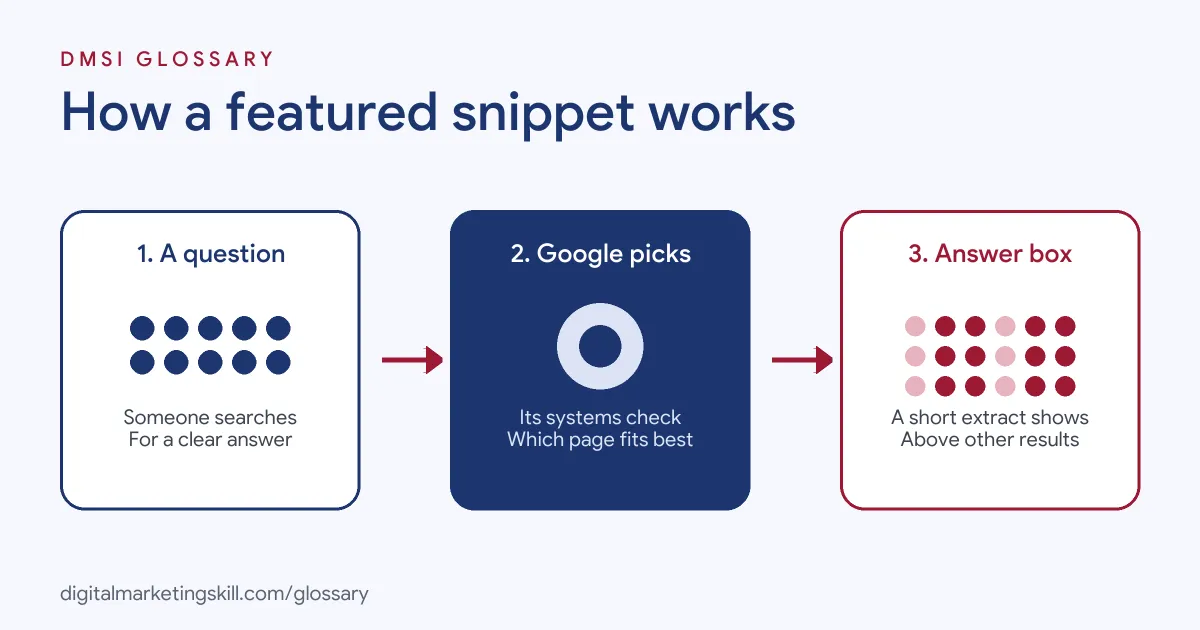
The process has three stages. First, someone searches a question. Next, Google’s systems check whether a page would make a good snippet for that search. Finally, if one does, Google promotes a short extract from it into the box at the top.
How Google Chooses
Selection is automatic. Google says its “systems determine whether a page would make a good featured snippet” for a search, and if so, they promote it. You can’t request it. In fact, when Google’s own help page asks how to mark a page as a featured snippet, the answer is simply: “You can’t.”
Google has also said that quality matters. Its blog admits it once “didn’t weigh the authoritativeness of results strongly enough for such rare and fringe queries.” As a result, it may choose not to show a snippet when the available content looks low quality.
Voice Search
Snippets also power some spoken answers. Google’s blog says that for spoken snippets it will “cite the source page in the spoken result.” It also adds a link in the Google Home app, so people can read more. That’s why snippet-friendly writing often overlaps with voice search work.
How to Opt Out
Some sites prefer not to appear in these boxes. Google offers controls. The nosnippet rule blocks “all snippets (including featured snippets and regular snippets).” Text marked with data-nosnippet is excluded too. If you want to keep normal snippets but avoid the box, Google suggests you “experiment with setting the max-snippet rule to lower lengths,” though it doesn’t guarantee the result.
Featured Snippet Examples
Here are three made-up examples of the common formats:
- Paragraph example: A search for “what is a lead magnet” shows a two-sentence definition from a marketing blog.
- List example: A search for “how to clean a cast iron pan” shows five numbered steps from a cooking site.
- Table example: A search for “UK clothing size conversion” shows a small table comparing sizes from a retailer’s guide.
In each case, the page answered the question clearly and in a format that’s easy to lift. Notice too that each answer is short enough to fit in a small box, yet complete enough to make sense without the rest of the page.
Featured Snippet vs Rich Result vs AI Overview
These search features are easy to mix up:
| Feature | Source of the content | How you influence it |
|---|---|---|
| Featured snippet | A short extract from one page | Clear answers and good structure; no markup can request it |
| Rich result | Structured data on the page | Valid markup for a supported feature |
| AI Overview | An AI summary drawing on several pages | Helpful, indexed content eligible for a snippet |
In short, a snippet quotes one page, a rich result decorates a listing, and an AI summary combines several sources.
How to Win a Featured Snippet
Google gives no special markup for this. However, these steps help your page offer a clean, quotable answer:
- Find question searches. Look for queries in Search Console and keyword tools that start with what, how, why or which.
- Check the current box. Search the question and note the format Google shows: paragraph, list or table.
- Use the question as a heading. Then put a direct answer of one or two sentences right below it.
- Match the format. Use a numbered list for steps and a table for comparisons.
- Add depth after the answer. Expand with examples and detail, so the page is useful beyond the extract.
- Check snippet controls. Make sure you haven’t added nosnippet or a very short max-snippet by mistake.
- Track and refine. Finally, watch impressions and clicks for those queries, and improve the answer if you don’t win.
Writing a Snippet-Ready Answer
A good answer is short, plain and complete on its own. Start by repeating the key words from the question. Then give the answer in the first sentence, not the third. Avoid “it depends” openings, and keep jargon to a minimum. For example, under the heading “What is a lead magnet?”, a strong opening line is “A lead magnet is a free resource you offer in exchange for someone’s email address.”
Best Practices for a Featured Snippet
- Answer first, then explain. Put the direct answer at the top of each section.
- Keep headings honest. Each heading should match the question its section answers.
- Use clean HTML. Real lists and tables are easier for Google to use than images of text.
- Stay accurate. Google says it weighs authoritativeness, so wrong or thin answers are less likely to win.
- Think about voice. Write answers that sound natural when read aloud.
Common Mistakes to Avoid
A common mistake is burying the answer under a long introduction. Another is using vague headings, so Google can’t tell which question a section answers. Some sites also put key steps inside images, which Google can’t easily quote. Others block snippets by accident with a strict max-snippet value. Lastly, many chase snippets for every keyword, even where a long answer serves readers better.
Where You’ll Use Featured Snippets at Work
Job listings usually group this work under “SERP features”. For example, remote SEO roles ask candidates to:
- “Run content audits, apply intent mapping, and improve CTR and SERP feature capture on your highest-value pages” (SEO Manager).
- Show an “Understanding of technical SEO elements, SERP features, and competitive content analysis” (SEO Content Writer).
- “Conduct content audits, improve SERP feature capture, manage link-building tactics” (Head of SEO).
So if you want to work as an SEO Specialist or Website Manager, expect to plan and write content that can win these boxes.
Learn It in the WordPress and SEO Track
You can practise this in the AI-Powered WordPress and SEO Specialist track. It covers SEO and content marketing, and you build a WordPress site or store and rank it with an SEO content plan. You also get unlimited 1-on-1 mentoring and a U.S. Project Internship from day one.
For more, read our guide to SEO content writing and our tips on voice search optimisation.
Frequently Asked Questions
What is a featured snippet in simple terms?
It is a box at the top of some Google results that shows a short answer taken from one web page, with a link to that page.
Can I mark my page as a featured snippet?
No. Google’s documentation says you can’t. Its systems decide automatically whether a page would make a good snippet.
Do I need schema markup for a featured snippet?
No markup can request one. Clear answers, good headings and well-structured lists or tables matter more.
How do I stop my page appearing in one?
Use the nosnippet rule or data-nosnippet. To keep normal snippets, try a lower max-snippet value, though Google doesn’t guarantee it.
Are featured snippets the same as AI Overviews?
No. A snippet quotes one page, while an AI Overview is an AI-written summary that can draw on several pages.
Sources: Google Search Central: Featured snippets and your website; Google: A reintroduction to featured snippets; Google Search Central: AI features and your website; remote job listings on Himalayas.