
Local SEO is the work of helping a business show up when people nearby search for what it offers, such as “plumber near me” or “best coffee in Brighton”. It focuses on Google Maps, the local results on Google Search and the business’s own Google Business Profile. It matters because these searches often come from people who are ready to call, visit or book today.
Key Takeaways
- Google ranks local results on three factors: relevance, distance and prominence.
- A complete, verified Google Business Profile is the starting point.
- Reviews, replies, photos and accurate hours all help a listing stand out.
- Google says “there’s no way to request or pay for a better local ranking on Google.”
- Your business name, address and categories must follow Google’s rules, or your profile can run into problems.
What Is Local SEO?
Ordinary SEO helps a website rank for a topic anywhere. The local version helps a business rank in a place. So a dentist in Leeds doesn’t need to beat every dentist in the country. Instead, they need to show up for people searching in and around Leeds.
Most of this happens through Google Business Profile, the free listing that appears in Maps and in the local pack on search results. It shows your name, address, hours, photos, reviews and a link to your site. Meanwhile, your website supports the profile with clear location pages and contact details.
For example, someone types “bike repair” on their phone. Google shows a map with three nearby shops. The shop with complete details, recent photos and lots of good reviews is far more likely to get the call.
How Local SEO Works
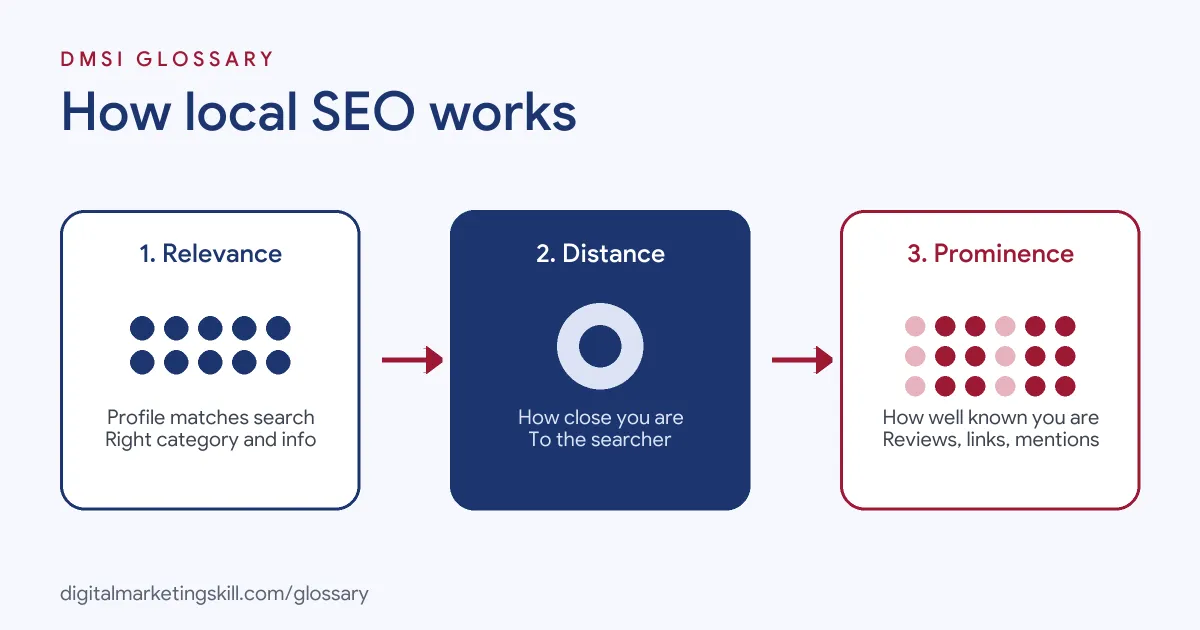
Google lists three main factors for local results: relevance, distance and prominence. Together, they decide which businesses appear and in what order. Local SEO means improving the two you can influence.
Relevance
Google defines relevance as “how well a Business Profile matches what someone is searching for.” So the right categories and a full description matter. If you run a vegan bakery, your profile should say so clearly.
Distance
Distance “refers to how far each business is from the customer who’s searching.” If the searcher hasn’t shared a location, Google estimates it. You can’t change where your shop is, so you focus on the other two factors instead.
Prominence
Prominence “means how well-known a business is.” According to Google, links, review counts and ratings all feed into it. In practice, a business with many good reviews and mentions across the web tends to look more prominent than a new one with none.
Your Website’s Role in Local SEO
Your site also helps. Google’s local business structured data lets you mark up details such as your name, address, opening hours and phone number. Google says markup like this can help those details appear in Search features. However, you “must include the required properties”, which are the name and address, to be eligible.
Who Can Have a Profile
Not every business qualifies. Google’s guidelines say a business needs a location customers can visit, or it must travel to customers. A virtual office, such as a rented mailing address where you don’t actually work, is not eligible. Individual practitioners, like a solicitor or a therapist, must be reachable in person at the verified location during their stated hours. Service-area locations must also be staffed and able to receive customers during the posted hours. So check these rules before you create a profile, because a listing that breaks them can run into problems later.
Local SEO Examples
- Café: A café adds its opening hours, menu photos and an “outdoor seating” attribute. It replies to every review. As a result, it starts to appear more often for “coffee near me”.
- Plumber: A plumber works from home and visits customers. Following Google’s rules, he hides his home address and sets a service area instead.
- Dental practice: A practice with three sites creates one profile per location, each with its own hours and phone number, plus a matching page on its website.
Local SEO vs Traditional SEO
| Local | Traditional | |
|---|---|---|
| Main goal | Show up for nearby searchers | Rank for a topic in any location |
| Key asset | Google Business Profile plus location pages | Website content and links |
| Ranking factors | Relevance, distance and prominence | Relevance, quality, links and page experience |
| Typical result | Calls, directions and visits | Website visits and sign-ups |
In short, both share the same basics. However, the local version adds a physical place and a profile you have to manage. Many businesses need both. A local shop wants to appear in Maps, but it also wants its blog posts and product pages to rank. So the two kinds of work support each other rather than compete.
How to Set Up Your Local Presence
- Create or claim your Google Business Profile, then verify it.
- Use your real-world business name. Google says “including unnecessary information in your business name isn’t permitted.”
- Add a precise address. If you visit customers instead, hide the address and set a service area.
- Pick categories that describe what your business is. Google advises using “as few categories as possible.”
- Add regular hours, special hours, your phone number, website and attributes.
- Upload photos and videos of your work, your team and your premises.
- Ask happy customers for reviews, and reply to all of them, good and bad.
- Add a page for each location on your website, with the same name, address and phone number.
After that, keep the profile current. Out-of-date hours are one of the fastest ways to lose a customer’s trust. Set a monthly reminder to check every detail.
Local SEO Best Practices
- Complete everything. Google says “businesses with complete and accurate info are more likely to show up in local search results.”
- Reply to reviews. According to Google, replying “shows that you value their feedback.”
- Keep one profile per location. Google warns that duplicates can cause problems with how your details display.
- Stay consistent. Use the same name, address and phone number everywhere you appear online.
- Post photos regularly. Fresh images show customers what you offer today.
For a deeper checklist, read our guide to Google Business Profile optimisation.
Common Mistakes to Avoid
Many businesses stuff keywords into their name, such as “Best Cheap Plumber London”. That breaks Google’s rules. Others use a virtual office or a PO box, which Google does not accept as a business address. Some create several profiles for one location. Many also ignore reviews, or reply only to the good ones. Some also add categories for things they sell rather than what they are, even though Google asks for categories that describe the business itself. Finally, some owners pay someone who promises a top ranking, even though Google says ranking can’t be bought. Good local work takes steady effort, not a shortcut.
Where You’ll Use Local SEO at Work
Local search is a common part of SEO and agency roles. For example, recent remote job listings ask candidates to:
- “Lead Local SEO strategy across Google Business Profiles and other local search platforms” (Head of SEO, AEO and Local Search).
- Show a “strong understanding of local SEO fundamentals, keyword optimization, and content formatting” (SEO Location Landing Page Specialist).
- Use “Local SEO and listing management tools such as Yext, BrightLocal or Uberall” (SEO Strategist).
So if you want to work as an SEO Specialist or Website Manager, especially for local businesses or agencies, you will need these skills.
Learn It in the WordPress and SEO Track
You can learn search optimisation in the AI-Powered WordPress and SEO Specialist track. There, you build a WordPress site or store and rank it with an SEO content plan, so you finish with a real project to show employers. You also join a U.S. Project Internship from day one, with unlimited 1-on-1 mentoring.
Want more detail on what moves rankings? Read our blog post on what actually moves local search rankings.
Frequently Asked Questions
What is local SEO in simple terms?
It is the work of helping a business appear when nearby people search for what it sells, mainly in Google Maps and local results.
What are Google’s local ranking factors?
Google names three: relevance, distance and prominence. Reviews, links and complete details all help.
Can I pay Google for a better local ranking?
No. Google states there is no way to request or pay for a better local ranking. Ads are separate from these results.
Do I need a website for this?
A profile alone can work, but a website with clear location pages and contact details supports it and gives customers more to read.
Should a service-area business show its address?
No. Google says service-area businesses should hide their address and set the areas they serve instead.
Sources: Google Business Profile Help: Tips to improve your local ranking; Google Business Profile Help: Guidelines for representing your business; Google Search Central: Local business structured data; remote job listings on Himalayas.