
AI Overviews are AI-generated summaries that Google shows at the top of some search results, with links to the web pages behind the answer. They give searchers the gist of a topic quickly, then point them to sources for more detail. They matter because they change how people find, read and click on your content in Google Search.
Key Takeaways
- Google describes the feature as an “AI-generated snapshot” with links to supporting information.
- Google says there are no extra requirements or special optimisations needed to appear as a supporting link.
- A page only qualifies if it is in Google’s index and can show in Search with a snippet.
- Search Console counts traffic from these features in its Performance report, under the Web search type.
- Unique, helpful content and sound technical SEO remain the best way to earn a place.
What Are AI Overviews?
When you search Google, you may see a short written answer above the usual list of links. That box is the summary. It combines information from several pages and shows links you can click to check the facts.
Google’s help centre says AI Overviews “can take the work out of searching by providing an AI-generated snapshot.” They appear “when our systems determine that generative AI can be especially helpful.” For example, they often show up for questions where you’d otherwise open several pages to get the full picture.
Google treats the feature as a core part of Search. According to its help page, “Features cannot be turned off.” However, searchers can choose the Web filter, which “displays only text-based links without features like AI Overviews.”
The feature sits alongside AI Mode, which Google suggests for queries “where further exploration, reasoning, or complex comparisons are needed.” Both are examples of generative AI inside a search engine.
How AI Overviews Work
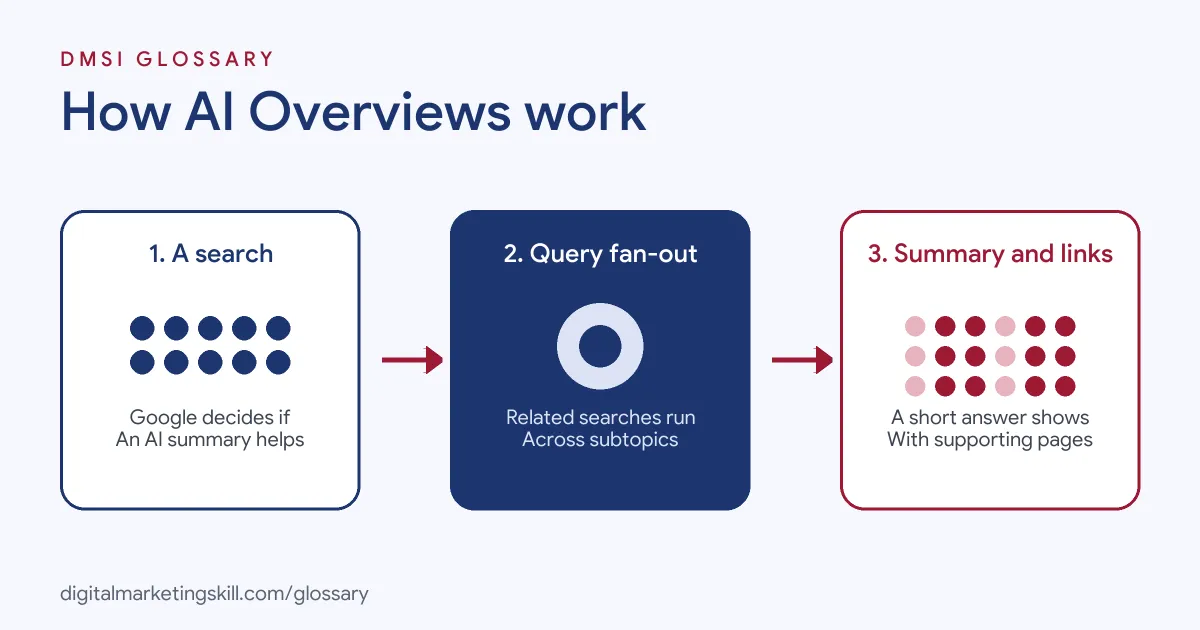
The process has three stages. First, Google decides whether an AI summary would help for the query. Next, its systems search across subtopics and sources to gather information. Finally, it writes a short answer and shows links to the pages that support it.
Query Fan-out
Google’s Search Central documentation says AI Overviews and AI Mode may use a “query fan-out” technique. This means “issuing multiple related searches across subtopics and data sources.” As a result, the answer can draw on a wider set of pages than a single search would show.
How Pages Get Chosen as Links
To appear as a supporting link, a page must be “indexed and eligible to be shown in Google Search with a snippet.” Google adds that “there are no additional requirements to appear in AI Overviews or AI Mode, nor other special optimizations necessary.” It also says there is “no special schema.org structured data that you need to add.”
In other words, the basics of good SEO still apply. Google must be able to crawl the page, the page must return a working status code, and it must have indexable content.
How Site Owners Control Their Content
You can limit how much of your content appears. Google points to the nosnippet, data-nosnippet, max-snippet and noindex controls. However, its blog warns that “more restrictive permissions will limit how your content is featured in our AI experiences.”
What It Means for Clicks
A summary at the top of the page can answer simple questions before anyone scrolls. So some searches that once sent a visit may now end on Google. On the other hand, Google says the people who do click tend to stay longer. That’s why many teams now track engaged visits and leads from search, rather than raw clicks alone.
AI Overviews Examples
Here are three made-up examples of how this affects different sites:
- Example 1, recipe blog: Someone searches how long to boil an egg. The summary answers directly, and the blog appears as one of the links. As a result, fewer people click, but those who do want the full method.
- Example 2, software company: A buyer asks how two project tools compare. Google’s systems search several subtopics and link to a detailed comparison page from the company’s blog.
- Example 3, local plumber: A homeowner asks why a boiler is losing pressure. The summary explains common causes and links to a plumber’s clear, practical guide.
AI Overviews vs AI Mode vs Featured Snippets
These search features are easy to confuse:
| Feature | What it shows | Best suited to |
|---|---|---|
| AI Overviews | An AI-written summary with supporting links | Getting the gist of a topic quickly |
| AI Mode | A conversational AI search experience | Exploration, reasoning and complex comparisons |
| Featured snippet | A short extract taken from one page | Quick answers drawn from a single source |
In short, a featured snippet quotes one page, while an AI summary can combine several.
How to Optimise Your Content for AI Overviews
Google says you don’t need special tricks. Even so, these steps follow its own advice:
- Check indexing. Use Search Console to confirm your key pages are indexed and can show a snippet.
- Make content unique. Google’s blog says to focus on “unique, non-commodity content that visitors from Search and your own readers will find helpful and satisfying.”
- Answer real questions fully. People ask “longer and more specific questions” in AI search, so cover the follow-up questions too. Your search intent research helps here.
- Keep structured data honest. If you use it, make sure “all the content in your markup is also visible on your web page.”
- Add strong images and video. Google says people now search with photos too, so support your text with high-quality visuals.
- Update your business listings. Keep your Merchant Center and Business Profile details current.
- Measure the full value. Finally, look beyond clicks to time on site and conversions.
Best Practices for AI Overviews
- Write for people first. Google says unique and valuable content matters for its blue links as well as its AI features.
- Lead with a clear answer. Then expand with detail, examples and evidence.
- Don’t block what you want shown. Check robots.txt and snippet controls before you complain about missing visibility.
- Judge quality, not just volume. Google reports that clicks from results pages with AI Overviews “are higher quality, where users are more likely to spend more time on the site.”
- Track Web search traffic. Remember that this traffic is part of the overall Web figures in Search Console.
Common Mistakes to Avoid
One common mistake is chasing a special “AI schema”, which Google says doesn’t exist. Another is publishing thin pages that repeat what every other site says. Some owners also add strict snippet limits, then wonder why their content isn’t used. Others judge results by clicks alone, even though Google says visitors from these pages tend to be more engaged. Finally, many forget the basics, such as crawlable pages and a working status code.
Where You’ll Use AI Overviews at Work
SEO and content roles now mention AI search visibility directly. For example, remote job listings ask candidates to:
- “Own Gremlin’s SEO, AEO, and GEO strategy so we’re found and cited in Google, AI Overviews, ChatGPT, Claude, and Perplexity” (Sr. Content Marketing Manager, B2B SaaS).
- Show “Growing AEO fluency: You understand how AI-driven search is changing content visibility” (Senior Content Marketer, SEO).
- Accept that “Search itself is changing, and this role sits right in the middle of that change” (Senior Content Marketer, SEO).
So if you want to work as an SEO Specialist or Website Manager, you’ll need to understand how AI summaries choose and link to pages.
Learn It in the WordPress and SEO Track
You can learn to create search-ready content in the AI-Powered WordPress and SEO Specialist track. It covers AI fundamentals, SEO and content marketing, and you build a WordPress site or store and rank it with an SEO content plan. You also get unlimited 1-on-1 mentoring and a U.S. Project Internship from day one.
For more on AI search, read our guide to generative engine optimisation and our tips on voice search optimisation.
Frequently Asked Questions
What are AI Overviews in simple terms?
They are short AI-written answers at the top of some Google results, with links to the pages that support them.
Can I turn off AI Overviews?
Google says users can’t switch the feature off. However, the Web filter shows only text-based links without it.
How do I get my site into AI Overviews?
Google says there are no special requirements. Your page needs to be indexed and eligible for a snippet, with helpful, unique content.
Do I need schema markup for AI Overviews?
No. Google says there is no special schema.org structured data you need to add for its AI features.
Where can I see traffic from AI Overviews?
Search Console includes it in your overall search traffic. You’ll find it in the Performance report under the Web search type.
Sources: Google Search Central: AI features and your website; Google Search Help: AI Overviews; Google Search Central Blog: Top ways to ensure your content performs well in Google’s AI experiences; remote job listings on Himalayas.