
A heatmap is a visual report that shows where visitors click, tap, move and scroll on a web page, using warm colours for busy areas and cool colours for quiet ones. It turns thousands of visits into one picture you can read at a glance. Marketers use a heatmap to see what people actually do on a page, so they can fix what is ignored, confusing or hidden.
Key Takeaways
- Microsoft Clarity describes a heatmap as “a visualization tool that makes it easy to analyze aggregated information about how users interact with the website.”
- The main types are click maps, scroll maps and area maps. Some tools add conversion and attention maps.
- Scroll maps show how far down people get, so you can check whether key content is seen.
- A heatmap shows what happens. Surveys and user tests help explain why.
- Heatmaps are a core tool in conversion rate optimisation and UX work.
What Is a Heatmap?
Picture a shop floor after a busy day. If you could see every footstep, you would spot the aisles people love and the corners nobody visits. A heatmap does this for a web page. Red and orange show where activity is high. Blue and green show where it is low.
Clarity explains that it “tracks all visitor clicks and scrolls on mobile, desktop, and tablet and automatically generates a heat map.” Instead of reading tables of numbers, you see the patterns on top of the page itself.
As a result, problems are easy to spot. For example, if people click an image that is not a link, the map shows a hot spot there. Or if few people scroll far enough to see your sign-up form, the scroll map shows the drop.
How a Heatmap Works
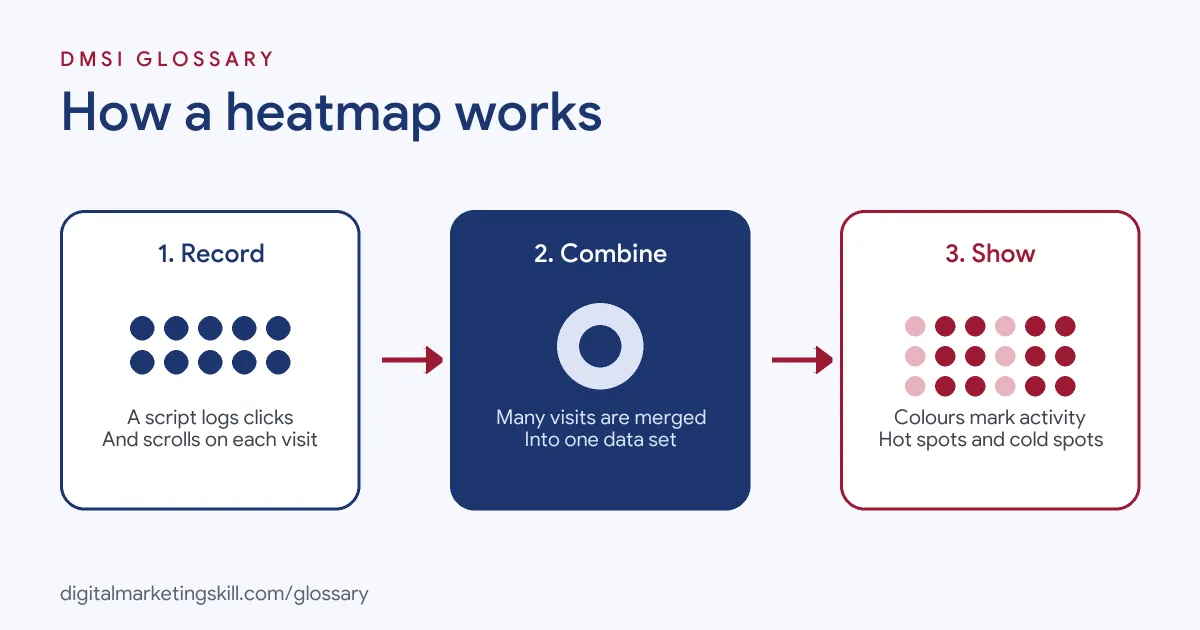
The process is simple. First, a small tracking script records clicks, taps and scrolls. Next, the tool combines data from many visits to the same page. Finally, it lays that data over a picture of the page as colours.
Click Maps
A click map shows where people click on desktop or tap on mobile. Clarity suggests using click maps to “see if your CTAs are getting any attention.” In addition, it helps you find “dead clicks” on things that look clickable but are not.
Scroll Maps
A scroll map shows how far down the page visitors get. Clarity calculates an average fold to show how much people see before they scroll. It suggests using scroll maps to check whether you have “the right hierarchy of elements on your page.” If key content sits below the point where most people stop, move it higher.
Area Maps and Other Types
Clarity explains that area maps “display the total clicks for all the elements within a selected area.” So you can draw a box around a section and see how much attention it gets in total. It also offers conversion maps for e-commerce sites, which show which clicks lead to purchases, and attention maps.
Heatmap Examples
Here are three made-up examples:
- Landing page: A course provider’s heatmap shows many clicks on a course photo. It turns the photo into a link to the sign-up form, and sign-ups rise.
- Blog post: A scroll map shows most readers stop halfway down. The writer moves the key tip and the email sign-up box higher.
- Product page: A click map shows shoppers keep tapping the “delivery” tab. The shop adds delivery details next to the price instead.
In each case, the map revealed behaviour the team had not expected. Without it, they might have guessed at the problem and changed the wrong thing.
Types of Heatmap Compared
| Type | What it shows | Best question to ask |
|---|---|---|
| Click map | Where people click or tap | Are people clicking the main button? |
| Scroll map | How far people scroll | Do people see the key content? |
| Area map | Total clicks in a chosen area | How much attention does this section get? |
| Conversion map | Clicks linked to purchases | Which elements lead to sales? |
Most teams start with click and scroll maps, because they cover the most common questions with little set-up.
How to Use a Heatmap
- Choose a tool. Options include Microsoft Clarity, Hotjar and features inside some analytics suites.
- Install the tracking code. Add it to your site, often through a plugin or tag manager.
- Check privacy and consent. Update your privacy notice and follow your cookie consent set-up.
- Pick key pages. Start with high-traffic landing pages, product pages and checkout steps.
- Wait for enough visits. Patterns become clearer with more data.
- Compare devices. Look at mobile and desktop separately, because behaviour often differs.
- Act and test. Turn findings into changes, then test them with an A/B test.
Best Practices for a Heatmap
- Start with a question. For example, “Why do people leave this page?” keeps your review focused.
- Use it with other data. Combine heatmaps with analytics, recordings and surveys.
- Segment the data. Look at new versus returning visitors, or by traffic source.
- Know how people read. Nielsen Norman Group found people often scan in an F-shaped pattern, with many fixations “concentrated at the top and the left side of the page.”
- Re-check after changes. Run a fresh heatmap to confirm the new layout works as you hoped.
Common Mistakes to Avoid
First, teams draw conclusions from a handful of visits. Second, they mix mobile and desktop data, which hides real differences. Third, they treat a hot spot as success, even when it shows confusion. Finally, they collect data but never change anything. A heatmap only helps when it leads to a clear change that you then measure.
Reading a Heatmap Step by Step
When you open a new report, follow the same order each time. First, look at the top of the page, because that is where most attention lands. Next, check whether the main call to action is a hot spot or a cold one. Then scan for bright spots on items that are not links, since these often show confusion. After that, switch to the scroll map and find the point where most visitors stop. Finally, compare what you see with your goal for the page.
For example, imagine a made-up pricing page where most clicks land on a small “compare plans” link rather than the main button. That suggests visitors want more detail before they choose. So you might add a simple comparison table near the top, then test whether more people pick a plan.
How a Heatmap Supports CRO
Heatmaps play a big part in conversion rate optimisation. Analytics tells you which page loses visitors. The map then shows where on that page attention fades or clicks go astray. That gives you a clear hypothesis to test. For instance, if few people reach the form, moving it higher becomes an obvious experiment.
Where You’ll Use a Heatmap at Work
Heatmaps appear in many CRO, UX and content roles. For example, remote job listings ask candidates to:
- “Use heatmaps and section-reach data for every live page to find where readers drop off, close the open loops the ad created, and rewrite underperforming sections.” (Landing Page Copywriter and Strategist).
- Show “Strong analytical skills with the ability to interpret data from tools like Google Analytics, heatmaps (ex: microsoft clarity), and session recordings to derive actionable insights.” (CRO Specialist).
- “Set up and analyze heatmaps, scroll maps and click data on our landing pages.” (Consumer Researcher).
So if you plan to work as an SEO Specialist, Website Manager or WordPress Developer, a heatmap will help you show clients what to fix and why.
Learn It in the WordPress and SEO Track
You can learn to build and improve websites in the AI-Powered WordPress and SEO Specialist track. Your portfolio project is a WordPress site or store that you rank with an SEO content plan. The track is about 90% hands-on, with unlimited 1-on-1 mentoring and a U.S. Project Internship from day one.
For page ideas, read our guide to landing page optimisation.
Frequently Asked Questions
What is a heatmap in simple terms?
It is a colour picture of a web page that shows where visitors click and how far they scroll. Hot colours mean lots of activity.
What are the main types of heatmap?
Click maps, scroll maps and area maps are the most common. Some tools also offer conversion and attention maps.
How much traffic do I need for a heatmap?
Clarity says there is no minimum traffic limit to generate one. However, patterns are more reliable with more visits.
Can heatmaps work on mobile?
Yes. Tools such as Clarity track taps and scrolls on phones and tablets as well as desktops.
What is the difference between a heatmap and a session recording?
A heatmap combines many visits into one picture. A session recording replays one visitor’s journey in detail.
Sources: Microsoft Clarity: Heatmaps overview; Nielsen Norman Group: F-shaped pattern of reading; remote job listings on Himalayas and Himalayas.