
Largest Contentful Paint (LCP) is a Google metric that measures how long it takes for the biggest image, text block or video in view to appear after a visitor opens a page. In simple terms, it tells you when the main content has loaded. It matters because it is one of the three Core Web Vitals, and a slow LCP makes visitors feel the page is broken.
Key Takeaways
- LCP marks the moment the largest visible element finishes rendering in the viewport.
- A good score is 2.5 seconds or less. Anything over 4 seconds is poor.
- Google measures it at the 75th percentile of real visits, separately for mobile and desktop.
- Every LCP time splits into four subparts: time to first byte, load delay, load duration and render delay.
- The most common quick win is making sure the main image starts loading early and is never lazy-loaded.
What Is Largest Contentful Paint?
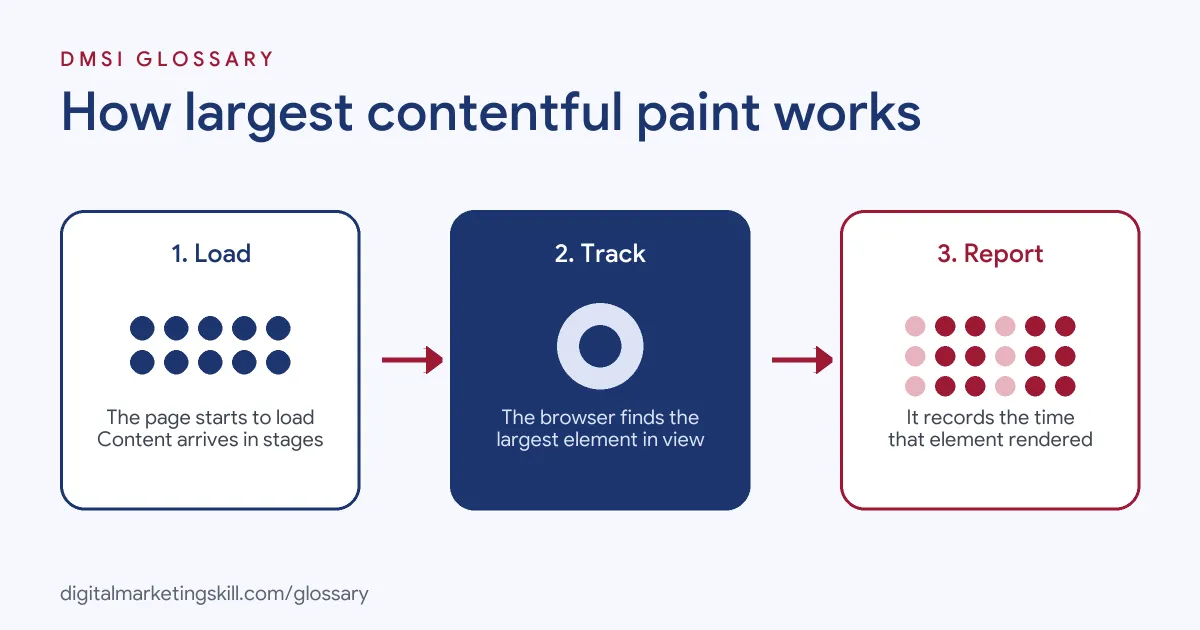
When you open a page, it rarely appears all at once. Text, images and buttons arrive in stages. LCP picks one moment in that process: the point when the largest piece of content in the visible area has rendered. Google uses this as a simple stand-in for “the page has loaded”.
For example, on a blog post the largest element might be the featured image. On a product page, it is often the main product photo. On a text-only page, it could be the first long paragraph or the headline block.
The clock starts when the visitor first navigates to the page. As a result, LCP includes things you might not expect, such as redirects, connection set-up and server response time. That’s why a fast image alone can’t fix a slow server.
How Largest Contentful Paint Works
As the page loads, the browser keeps track of the largest content element it has painted so far. Each time a bigger element appears, it reports a new candidate. As a result, the LCP element can change while the page is still loading.
Which Elements Count
According to Google’s web.dev guide, these element types can become the LCP element:
- Image elements, including the first frame of animated images such as GIFs.
- Images inside an SVG.
- Video elements, using the poster image or first frame, whichever comes first.
- Elements with a background image loaded through CSS.
- Block-level elements that contain text, such as paragraphs and headings.
Chrome also ignores some elements that users wouldn’t see as real content. These include invisible elements, elements that cover the whole viewport like a background, and low-detail placeholder images.
How Size Is Measured
Only the part of an element inside the viewport counts. If an image is resized, the browser uses its visible size or its original size, whichever is smaller. Margins, padding and borders don’t count. So a huge photo that sits mostly below the fold may lose out to a smaller headline at the top.
LCP vs First Contentful Paint
The two names sound alike, but they answer different questions. First Contentful Paint (FCP) records when any content first appears, even a small logo. LCP, by contrast, waits for the main content. Google’s guide explains that LCP is meant to be more selective. PageSpeed Insights rates FCP as good at 1.8 seconds or less, while LCP gets a 2.5-second target. So a page can show something quickly and still feel slow if its main image arrives late.
The Four Subparts of LCP
Google splits every LCP time into four parts that add up to the total, with no gaps or overlaps. Its suggested breakdown for a well-optimised page looks like this:
| Subpart | What happens | Suggested share |
|---|---|---|
| Time to first byte | The server sends the first byte of the HTML | About 40% |
| Resource load delay | The gap before the main image starts loading | Under 10% |
| Resource load duration | The image itself downloads | About 40% |
| Element render delay | The gap between download and display | Under 10% |
The two “delay” parts should be as close to zero as possible. Google stresses that these shares are guidelines, not strict rules.
Largest Contentful Paint Examples
The following made-up examples show typical problems and fixes:
- Lazy-loaded hero (example): A WordPress theme adds lazy loading to every image, including the top banner. The banner waits until layout is done, so LCP is 3.8 seconds. Removing lazy loading from that one image brings it under 2.5 seconds.
- Slow hosting (example): A small shop’s server takes 1.8 seconds to respond. Even with a tiny image, LCP can’t be good, because time to first byte uses most of the budget. Caching and better hosting fix the root cause.
- Hidden by script (example): A landing page hides its hero until a slider script loads. Compressing the image doesn’t help, because the time shifts into render delay instead.
Google’s own guide uses that last pattern to show why you must look at all four subparts together.
Largest Contentful Paint Thresholds
Google rates every page in one of three bands:
| Rating | LCP at the 75th percentile |
|---|---|
| Good | 2.5 seconds or less |
| Needs improvement | Over 2.5 seconds, up to 4 seconds |
| Poor | Over 4 seconds |
The 75th percentile means at least three in four visits must meet the target. For instance, a 75th percentile LCP of 2 seconds is good, while 5 seconds is poor.
How to Measure and Improve Largest Contentful Paint
Use these steps to find and fix a slow LCP:
- Check field data first. Open PageSpeed Insights or the Core Web Vitals report in Search Console to see real-user LCP for mobile and desktop.
- Identify the LCP element. PageSpeed Insights and the Chrome DevTools Performance panel show which element was largest.
- Break down the time. The DevTools Performance panel shows the four subpart timings, so you can see which one is too long.
- Start loading the main image early. Google’s rule of thumb is that it should start loading at the same time as the first resource on the page. A preload link with a high fetch priority can help.
- Remove lazy loading from it. Google warns never to lazy-load the LCP image.
- Shrink the file. Compress it and consider modern formats such as WebP or AVIF to cut load duration.
- Speed up the server. Use caching or a faster host if time to first byte is high.
Best Practices
A few habits stop LCP from slipping over time:
- Put the main image in the HTML. If a script injects it, the browser finds it late.
- Keep render-blocking files small. Large stylesheets and scripts in the page head delay the first paint.
- Test real templates. Product, category and blog templates often have different LCP elements.
- Trust real-user data. Google notes that lab tools like Lighthouse may not match what real visitors experience.
Common Mistakes to Avoid
First, many site owners compress images and expect LCP to drop, even when the real delay is the server or a script. Second, they lazy-load everything with a plugin. Third, they test only on a fast office connection. Finally, they focus on the lab score rather than field data. Each of these leads to effort that doesn’t move the real number.
Where You’ll Use Largest Contentful Paint at Work
Page speed work appears in many SEO and web roles. For example, current remote listings include these lines:
- “Proven experience improving Core Web Vitals, including Largest Contentful Paint, Interaction to Next Paint, and Cumulative Layout Shift using real-user data” (Senior Frontend Engineer, Performance).
- “Lead on performance and Core Web Vitals so every page feels instant on every device” (Staff Full-Stack Engineer).
As an SEO Specialist or WordPress Developer, you will often be the person who spots a slow LCP in a report and explains the fix. For the wider picture, see our page on Core Web Vitals.
Learn It in the WordPress and SEO Track
You can learn to diagnose and fix LCP in the AI-Powered WordPress and SEO Specialist track. There, you build a WordPress site or store and rank it with an SEO content plan, so you practise speed fixes on a real site. You also get unlimited 1-on-1 mentoring and a U.S. Project Internship from day one.
For simple ways to speed up any site, read our guide to website page speed.
Frequently Asked Questions
What is Largest Contentful Paint in simple terms?
It is the time it takes for the biggest visible image or text block on a page to appear. It shows when the main content has loaded.
What is a good LCP score?
Google says 2.5 seconds or less is good, measured at the 75th percentile of real visits. Over 4 seconds is poor.
What usually causes a slow LCP?
Common causes are a slow server, a main image that starts loading late, a large image file, or a script that hides content until it runs.
Should I lazy-load my hero image?
No. Google warns that lazy-loading the LCP image always adds an unnecessary delay. Lazy-load images further down the page instead.
Is LCP the same as page load time?
No. Page load time covers everything on the page, while LCP only tracks when the largest visible element appears.
Sources: web.dev: Largest Contentful Paint; web.dev: Optimise LCP; web.dev: Defining the metric thresholds; About PageSpeed Insights; remote job listings on Himalayas.