
LinkedIn Ads are paid adverts that businesses run on LinkedIn to reach professionals by job title, company, industry, skills and other work details. You build and manage them in LinkedIn Campaign Manager, where you choose an objective, an audience, a format and a budget. They matter because few other platforms let you target people by their working life, which makes LinkedIn a strong channel for B2B leads, hiring and brand building.
Key Takeaways
- LinkedIn Ads let you target people by professional details, such as job title, company and industry.
- You start by choosing an objective. LinkedIn sorts its goals into three groups: awareness, consideration and conversion.
- The main formats include Sponsored Content, Sponsored Messaging, Dynamic Ads and Text Ads.
- LinkedIn’s minimum audience size for an ad set is 300 member accounts, but it suggests at least 50,000 to drive results.
- Ads are sold through an auction, so your cost depends on your bid and how much other advertisers want the same audience.
What Are LinkedIn Ads?
Think of LinkedIn Ads as a way to show your message to one clear type of professional. For example, you could reach finance managers at companies with 200 to 1,000 staff in Germany. On most social platforms, that kind of targeting is much harder.
LinkedIn says its audience is more than one billion members across 200 countries and territories. However, you rarely want all of them. Instead, you narrow the audience to the people who buy, influence or hire for what you offer.
That’s why LinkedIn advertising suits software, training, hiring and business services. In other words, if your buyer is a business or a professional, LinkedIn is often worth testing. It is one part of a wider paid social plan.
How LinkedIn Ads Work
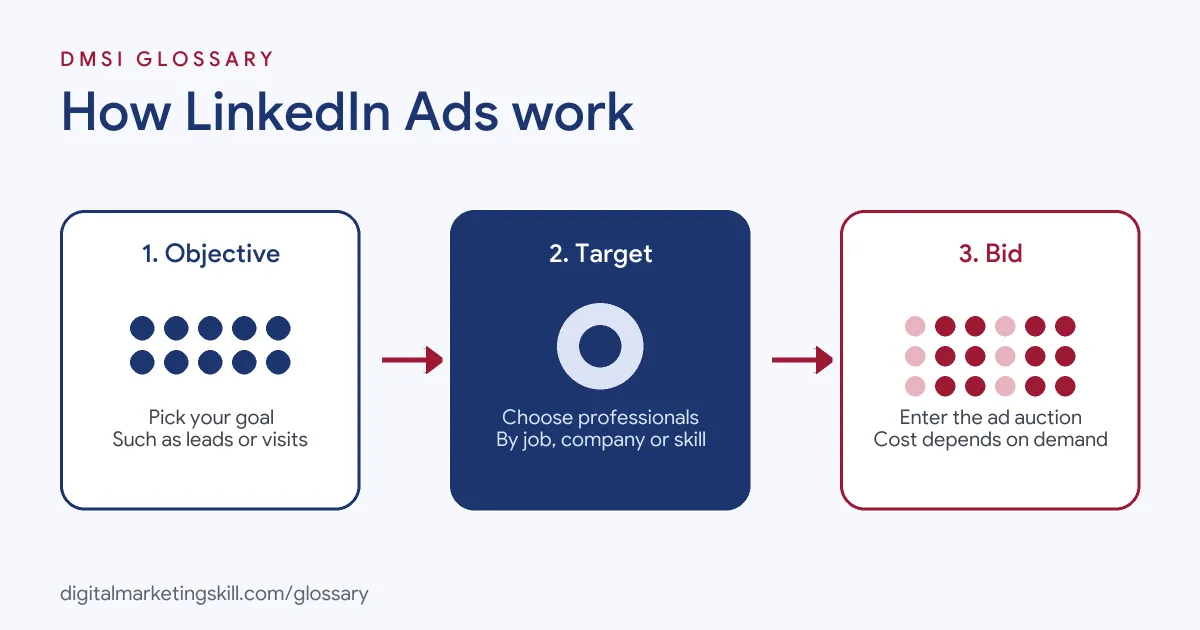
Every campaign follows three steps. First, you choose what you want people to do, which LinkedIn calls the objective. Next, you define who should see the ad. Finally, you pick a format, set a bid and budget, and let the auction decide when your ad shows.
Choosing an Objective
LinkedIn’s help centre says, “The first step when you select your ad set settings is to choose a marketing objective.” It adds that “Each objective offers ad formats and bidding strategies that align with the goals of that objective.”
The options include Brand Awareness, Website Visits, Engagement, Video Views, Lead Generation and Website Conversions. LinkedIn calls Website Visits “the most frequently used objective.” Meanwhile, Lead Generation uses Lead Gen Forms, which are pre-filled with the member’s profile details.
Targeting Professionals
Next, you build the audience. Location is a required targeting option. After that, you can add details such as job title, seniority, company, industry and skills. You can also use Matched Audiences, which let you upload a list, retarget site visitors or use third-party data.
Size matters here. LinkedIn says the minimum audience for an ad set is 300 member accounts, “but we suggest a minimum of 50,000 to drive results.” For Sponsored Content and Sponsored Messaging, it suggests a minimum of 300,000.
Here is a made-up example. You target marketing managers in Ireland, and the forecast shows 20,000 members. That is above the 300 minimum but below the 50,000 LinkedIn suggests. So you could add similar job titles, such as marketing lead, or widen the location to the UK. Then check the forecast again.
The Auction and Costs
Every ad goes through an auction, where your bid competes with other advertisers who want the same people. LinkedIn explains that “The cost required to win the auction depends on the bid and the desirability of your target audience.” So a narrow audience of senior decision-makers usually costs more to reach than a broad one.
LinkedIn Ads Examples
Here are three made-up examples of how firms use LinkedIn ads:
- Software company (example): A payroll tool targets HR directors in the UK and runs Sponsored Content with a Lead Gen Form offering a free guide.
- Training provider (example): A business school promotes a short course to managers with five or more years of experience, using a Website Visits objective.
- Recruitment (example): A tech firm uses LinkedIn Ads to reach software engineers in three cities, so it can grow awareness before it opens new roles.
In each case, the targeting is based on work details that matter to the offer.
LinkedIn Ads Formats Compared
LinkedIn lists four main ad format families. Here is how they differ:
| Format | What it does | Good for |
|---|---|---|
| Sponsored Content | Shows in the feed, like a normal post | Reach, engagement and leads |
| Sponsored Messaging | Lands in the place where work chats happen | Direct, personal offers such as event invites |
| Dynamic Ads | Ads that change to suit each person | Making an ad feel relevant to each viewer |
| Text Ads | Self-service ads you can set up in minutes | Simple, low-effort campaigns |
For most beginners, Sponsored Content is the easiest place to start, because it looks like a normal post in the feed.
How to Set Up LinkedIn Ads
- Create a LinkedIn Page. LinkedIn suggests building your company Page first, so your ads have a trusted home.
- Open Campaign Manager. Create an ad account and add billing details.
- Choose your objective. Pick the action that matches your goal, such as Lead Generation or Website Visits.
- Build your audience. Set a location, then add job titles, industries or company lists. Aim for the sizes LinkedIn suggests.
- Pick a format. For example, choose single image Sponsored Content with a clear headline.
- Set budget and bidding. Choose a daily or total budget and a bid strategy offered for your objective.
- Add tracking. Set up conversion tracking or URL tracking parameters, so you can measure results.
- Launch and review. Check results after a few days, then improve the audience and creative.
Best Practices for LinkedIn Ads
- Match the offer to the audience. Senior buyers respond to useful insight, not hard selling.
- Keep audiences big enough. Very narrow targeting can limit delivery and raise costs.
- Use Lead Gen Forms for leads. Because they are pre-filled, they make it easy for people to respond.
- Test one change at a time. For instance, test a new headline before you change the audience.
- Follow up fast. Send leads to your CRM, so sales can contact them while interest is high.
Common Mistakes to Avoid
A common mistake is stacking so many targeting options that the audience becomes tiny. Another is choosing the wrong objective, such as Engagement when you really want leads. Some advertisers also skip conversion tracking, so they can’t tell which ads bring in customers. Others reuse ads made for Facebook or Instagram without adjusting the tone for a professional audience. Finally, many judge results on clicks alone, rather than on qualified leads.
Where You’ll Use LinkedIn Ads at Work
LinkedIn advertising is a common skill in B2B and paid media roles. For example, real remote job listings ask for:
- “Experience with LinkedIn Ads, B2B lead generation, or marketing to business and institutional audiences.” (Marketing Lead).
- “LinkedIn Ads, TikTok Ads, YouTube and Programmatic experience.” (Paid Media Specialist SR.).
- “Deep platform proficiency in Google Ads, LinkedIn Ads, Google Analytics/GA4, Search Console, and CMS/AB testing tools.” (Growth Marketing Manager).
So if you want to work as a Paid Social Specialist or Social Media Manager, employers will expect you to plan, run and report on LinkedIn campaigns.
Learn It in the Social Media Track
You can learn to run paid campaigns in the AI-Powered Social Media Management and Advertising track. It covers AI fundamentals, content creation, social media marketing and analytics, and social media advertising. Your portfolio project is a paid social campaign that you plan, create and run for a real brand. You also get unlimited 1-on-1 mentoring and a U.S. Project Internship from day one.
Next, read our guides to LinkedIn lead generation and LinkedIn retargeting.
Frequently Asked Questions
What are LinkedIn Ads used for?
They are mostly used for B2B leads, brand awareness, event sign-ups and hiring. Their strength is targeting by job title, company and industry.
Are LinkedIn Ads worth it?
They can be, if your buyer is a business or a professional. Because costs depend on how much advertisers want your audience, judge them on lead quality and sales, not clicks.
What is the minimum audience size?
LinkedIn says an ad set needs at least 300 member accounts. However, it suggests at least 50,000 for good results.
What is a Lead Gen Form on LinkedIn?
It is a form that opens inside LinkedIn and fills in the member’s details from their profile. As a result, people can send their details in a few taps.
Where do I create LinkedIn Ads?
You create and manage them in LinkedIn Campaign Manager. You can also boost posts from your company Page.
Sources: LinkedIn Marketing Solutions Help: Target audience size best practices; LinkedIn: How to set the best objective for your ad campaign; LinkedIn: Advertising costs and pricing; LinkedIn: Advertise to LinkedIn’s audience; remote job listings on Himalayas.