
Pinterest Ads are paid posts that businesses place on Pinterest so their images, videos and products appear in the home feed, search results and related Pins. They look much like normal Pins, so they blend into what people are already browsing. Also, many people use Pinterest to plan purchases, from outfits to kitchen makeovers. As a result, Pinterest Ads can reach buyers early, while they are still collecting ideas.
Key Takeaways
- Pinterest Ads are promoted Pins that appear in the home feed, search and related Pins.
- You choose from objectives such as awareness, consideration, leads and sales.
- Formats include image, video, carousel, collections, showcase and quiz ads.
- Targeting covers audiences, actalikes, interests, keywords, demographics and placement.
- The Pinterest tag tracks conversions and builds audiences from your site visitors.
What Are Pinterest Ads?
Pinterest is a visual search and discovery platform. People save ideas as Pins on boards, for example “living room ideas” or “wedding flowers”. Pinterest Ads let a business pay to show its own Pins to more of the right people.
Think of a home store. A shopper searches “small balcony garden”. Among the results, she sees a promoted Pin of planters from the store. The Pin looks much like any other idea in the grid. So if she clicks, she lands on the product page.
Also, Pinterest describes its pitch simply. It says, “People use Pinterest to find new brands and ideas, so ads are actually useful.” It also says ads can help you “grow your business across the funnel, from expanded awareness to increased sales.” In other words, you can use them for both brand building and direct sales.
Why it matters
Pinterest is different from feeds built around friends and news. Instead, people often come with a plan, such as a recipe, a project or a gift. So your ad can meet them at the idea stage, before they pick a brand. In addition, people save Pins to boards, so they can return to your idea later. All this makes Pinterest a useful extra channel next to other paid social platforms, especially for home, fashion, beauty, food and travel brands.
How Pinterest Ads Work
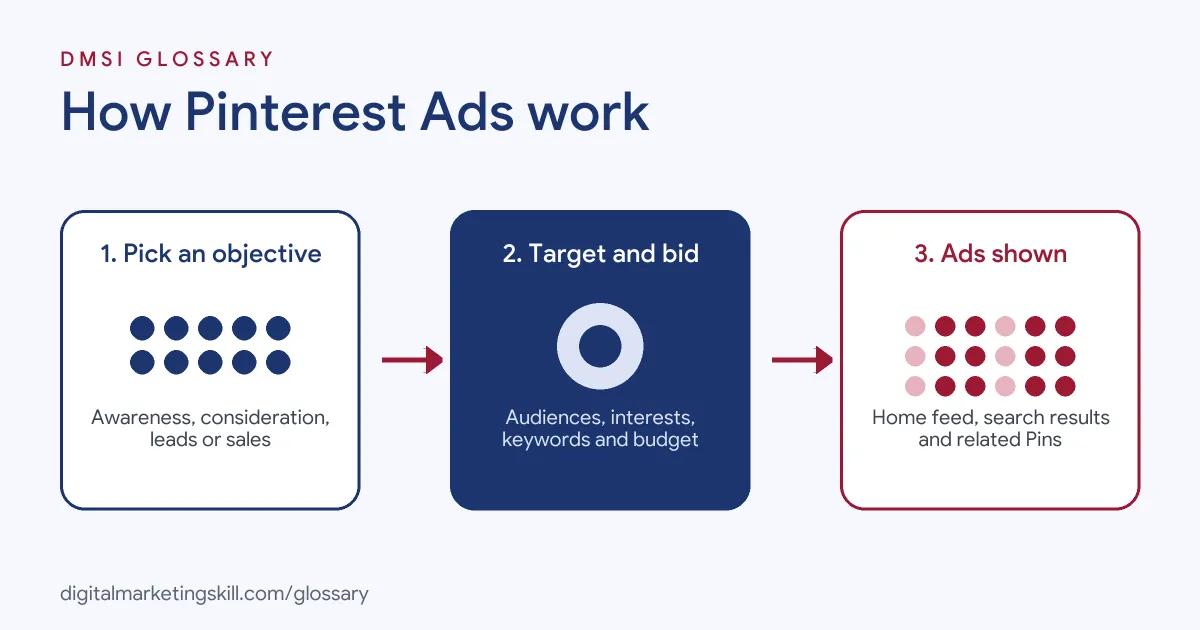
You run Pinterest Ads from Ads Manager in a Pinterest business account. First, each campaign starts with a goal. Then you pick who should see the ad, set a budget and upload your creative. Finally, Pinterest enters your ad into an auction each time there is a place to show one.
Campaign objectives
First, you choose a campaign objective. Pinterest offers brand awareness, video completion, consideration, leads and sales. For example, the consideration goal aims to “help increase the number of Pin clicks or outbound clicks on your ad.” Pinterest also says the objective “determines how you bid in the ad auction” and which formats you can use.
Targeting
Next, you decide who sees the ad. Pinterest lists several options. For instance, with audience targeting, you can use customer lists or site visitors for retargeting. Actalike audiences reach “new people who behave similarly to one of your existing audiences,” much like a lookalike audience on Meta. You can also target interests, keywords and demographics. Alternatively, Performance+ targeting lets Pinterest find people for you automatically.
Ad formats
Then you choose how your ad looks. Pinterest offers several formats. For example, image ads use “a single image that represents your brand or products.” Video ads “use motion to pique interest and build deeper engagement.” Also, carousel ads show several images in one ad, so you can feature different products. In addition, collections ads mix images and video to help people “explore and shop more from your brand.” Finally, there are showcase, quiz and idea ads for more interactive stories. So you can start simple and test richer formats later.
Placements
Pinterest says you can choose where ads appear: “in the home feed, search results or related Pins.” In general, search placements suit keyword targeting, because people are actively looking. By contrast, home feed placements suit discovery and awareness.
Bidding and tracking
Then you set a budget and a bid. Depending on the goal, you can let Performance+ manage bids, or set a maximum CPM, a maximum CPC, or a target CPA. After that, to measure results, you add the Pinterest tag to your website. Pinterest says the tag lets you “track and optimise conversions” and “build audiences for targeting.”
Examples of Pinterest Ads
- A furniture retailer. The store runs a collections ad with one lifestyle video and four product images. It targets keywords such as “Scandi bedroom”. So people who search for that style see the products right away.
- A recipe and meal-kit service. The brand uses a video ad that shows a meal coming together in fifteen seconds. Then it targets interests such as healthy eating and quick dinners, with a leads objective for trial sign-ups.
- A small jewellery shop. The owner installs the Pinterest tag first. After that, she runs a carousel ad to people who visited her site but didn’t buy, using a sales objective.
Pinterest Ads vs Meta Ads
| Point | Pinterest Ads | Meta Ads |
|---|---|---|
| User mindset | Planning, searching for ideas | Social browsing, friends and creators |
| Where ads show | Home feed, search results, related Pins | Facebook and Instagram feeds, Stories, Reels and more |
| Keyword targeting | Yes, based on Pinterest searches | No search keywords; interests and behaviours instead |
| Similar-audience tool | Actalike audiences | Lookalike audiences |
| Tracking code | Pinterest tag | Meta Pixel and Conversions API |
| Automation option | Performance+ | Advantage+ |
So which one should you use? In practice, many brands run both. For example, Meta often brings scale and strong social reach. Meanwhile, Pinterest can catch people while they plan and search. Therefore, test a small budget on each, then compare cost per result and return on ad spend.
How to Set Up Pinterest Ads
- Create a business account. Switch your profile to a business account, or open a new one. Then claim your website.
- Install the Pinterest tag. Add it to your site, and set up key events such as checkout, sign-up and add to cart.
- Open Ads Manager. Click to create a new campaign. Next, pick the objective that matches your goal.
- Set your budget. Choose a daily or lifetime budget. Also pick a bidding option, or let Performance+ handle it.
- Choose your targeting. Add audiences, interests or keywords, plus demographics such as location and language.
- Pick placements. Choose all placements, or focus on search or the home feed.
- Add your creative. Select an existing Pin or upload new images or video. Write a clear title, description and link.
- Launch and review. Check results in Ads Manager after a few days. Then pause weak ads and add budget to strong ones.
Best Practices for Pinterest Ads
- Design for vertical screens. Many people browse on phones, so use tall images and video.
- Show the product in use. Lifestyle images that spark ideas usually feel more natural than plain cut-outs.
- Add clear text overlays. A short line on the image helps people understand the idea at a glance.
- Use keywords in your copy. Pinterest is search-led, so put real search phrases in titles and descriptions.
- Set up tracking first. Without the tag and conversion tracking, you can’t tell which ads drive sales.
- Plan ahead for seasons. People often plan holidays, parties and projects early, so start seasonal campaigns in good time.
Common Mistakes to Avoid
- Reusing square social ads. Creative made for other feeds may look small or cramped on Pinterest.
- Skipping the tag. Without it, you can’t run retargeting or optimise for conversions.
- Picking the wrong objective. If you want sales, an awareness campaign won’t optimise for buyers.
- Targeting too narrowly. Very small audiences can limit delivery. So test broader interests or Performance+ too.
- Judging results too fast. People often save Pins and buy later. Therefore, give campaigns time and check longer conversion windows.
- Linking to a slow page. A great Pin loses its value if the landing page is slow or doesn’t match the ad.
Where You’ll Use Pinterest Ads at Work
Pinterest Ads usually sit in multi-platform paid media roles, next to Meta, TikTok and Google. For example, real remote job listings ask for:
- “Expertise in Google Ads, Meta Ads (Facebook/Instagram), LinkedIn Ads, Pinterest Ads, Amazon Ads, and TikTok Ads.” (Digital Advertising Specialist).
- “Experience with additional paid media platforms such as Meta Ads Manager, Pinterest Ads, or Amazon Marketing Services (AMS).” (Senior TikTok Shop Media Buying Specialist).
- “Hands-on Paid Social media buying experience across at least two of Meta, TikTok, Reddit, or Pinterest” (Associate Director, Programmatic).
Learn It in the Social Media and Paid Social Track
You can learn to plan and run paid campaigns across social platforms in the AI-Powered Social Media Management and Advertising track. Every track includes a U.S. Project Internship from day one, with unlimited 1-on-1 mentoring.
Frequently Asked Questions
Where do Pinterest Ads appear?
They appear in the home feed, in search results and in related Pins. You can choose all placements or focus on one.
What objectives can I choose on Pinterest?
Pinterest offers brand awareness, video completion, consideration, leads and sales. Your choice decides how you bid and which formats you can use.
Can I target keywords on Pinterest?
Yes. Pinterest lets you include or exclude keywords to reach people as they search. This works well for products people actively plan to buy.
What is the Pinterest tag?
It is a piece of code you add to your website. It tracks visits and actions after people see your ads, and it helps you build audiences.
What is an actalike audience?
An actalike audience reaches new people who behave like one of your existing audiences. It works much like a lookalike audience on Meta.
Sources: Pinterest Business: Advertise on Pinterest; Pinterest Help: Campaign objectives; Pinterest Help: Targeting overview; Pinterest Help: Install the Pinterest tag; remote job listings on Himalayas, Himalayas and Himalayas.