
A workflow, in marketing automation, is a set of automatic steps that a tool carries out when something specific happens, such as sending an email when someone fills in a form. You set the starting trigger, the actions and the rules once, and the software runs them for every contact or record that qualifies. It matters because a good workflow handles repetitive tasks reliably, so nobody forgets a follow-up and your team can spend time on work that needs a person.
Key Takeaways
- Every workflow has a trigger that starts it and one or more actions that follow.
- HubSpot says, “Enrollment triggers are a set of criteria that automatically enroll records in a workflow.”
- Zapier calls each of its automations a Zap, which it describes as “an automated workflow that connects your apps and services together.”
- Delays and branches let one workflow send different people down different paths.
- By default, HubSpot enrols a record only the first time it meets the triggers, unless you turn on re-enrollment.
What Is a Workflow?
Think of a workflow as a recipe that a computer follows. It says: when this happens, do that, then wait, then do the next thing. The recipe stays the same, but it runs for every new contact.
For example, a workflow might start when someone downloads a guide. First, it sends a thank-you email. Next, it waits two days and sends a tip. Then, if the person clicks a link to the pricing page, it creates a task for a salesperson. Nobody needs to remember any of it.
Workflows are the building blocks of marketing automation. In practice, different tools use different names. HubSpot says workflows, Mailchimp calls them flows and Zapier calls them Zaps, but the idea is the same.
How a Workflow Works
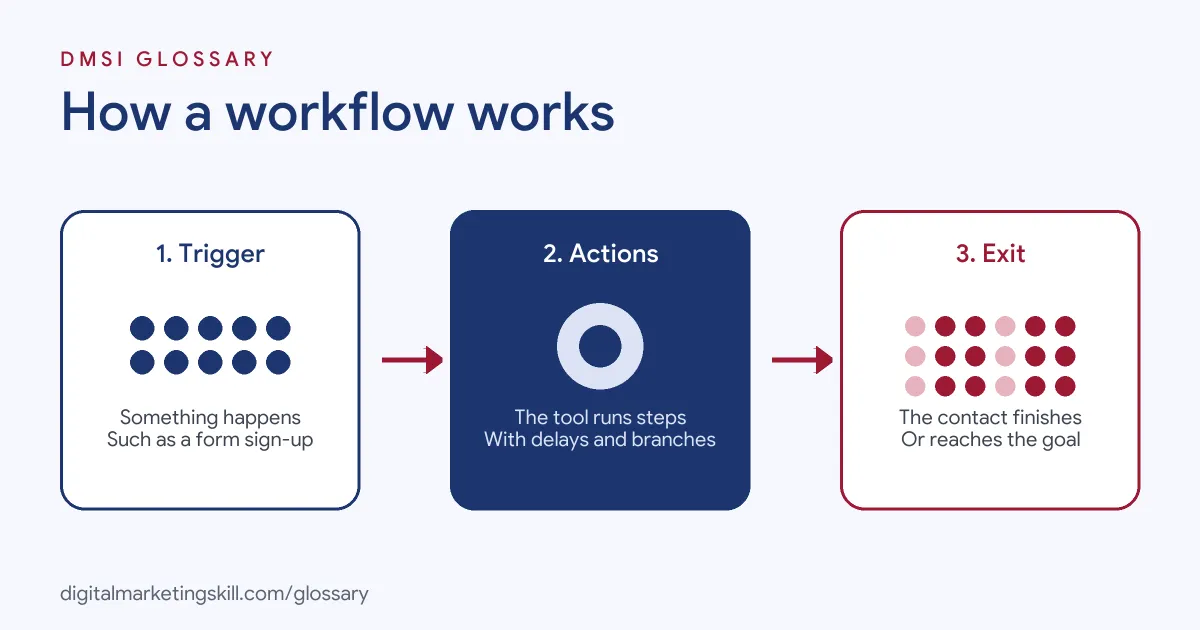
Each workflow runs in three stages. First, a trigger enrols a contact or record. Next, the tool performs a series of actions, often with delays and branches in between. Finally, the contact leaves when they finish the steps or meet a goal or exit rule.
Triggers
The trigger decides who enters. Zapier puts it simply: “A trigger is an event that starts a Zap.” In HubSpot, triggers can be based on filters, events, schedules or webhooks, and you can also enrol records by hand. Mailchimp adds that its Standard plan and higher let you combine up to three triggers in one flow.
Actions
Actions are what the workflow does. Zapier says, “An action is an event a Zap performs after it is triggered.” Common actions include sending an email, updating a contact property, adding a tag, assigning an owner or sending data to another app. For instance, a workflow might copy a new lead from a form into your CRM and then email the sales team.
Delays and Branches
Delays control timing. Mailchimp’s time delay “Prevents contacts from continuing down the flow path for a period of time that you choose.” Branches split people up. Mailchimp’s conditional split sends contacts down one of two paths “based on up to 5 conditions you choose.” Meanwhile, Zapier says a Zap with more than one action, or with filters or searches, “is considered a multi-step Zap.”
Enrolment Rules
You also decide whether people can go through a workflow more than once. HubSpot says, “By default, records will only enroll in a workflow the first time they meet the enrollment triggers.” You can turn on re-enrollment, and you can set rules that remove records early. For example, a monthly reminder workflow needs re-enrollment, while a one-time welcome series usually doesn’t. So think about how often each person should go through it before you switch it on.
Workflow Examples
Here are three made-up examples:
- Lead follow-up (example): When a demo form is submitted, the workflow emails the lead, alerts a salesperson and creates a follow-up task for the next day.
- Online shop (example): When an order is placed, the workflow sends a thank-you email, waits a week, then asks for a review.
- Webinar (example): When someone registers, the workflow sends reminders a day and an hour before, then sends the recording to people who missed it.
In each case, the workflow handles routine steps the same way every time, so nothing slips through. Staff then spend their time on calls and questions that need a real person.
Workflow Tools Compared
Here is how three popular tools describe their workflows, based on their own help pages:
| Tool | What it calls a workflow | Good to know |
|---|---|---|
| HubSpot | Workflow | Uses enrollment triggers, and is available on Professional or Enterprise plans |
| Mailchimp | Flow | Offers delays, conditional splits and percentage splits, with limits by plan |
| Zapier | Zap | Connects different apps with a trigger and one or more actions |
In short, marketing tools run workflows inside one platform, while connector tools like Zapier link many apps together.
How to Build a Workflow
- Pick one repetitive task. Start with something simple, such as following up new leads.
- Write the steps on paper. List the trigger, each action, the delays and the exit point.
- Check your data. Make sure the fields you rely on, such as email or lead source, are filled in.
- Set the trigger. Choose exactly who should enter, and who should not.
- Add the actions and delays. Keep the first version short and clear.
- Add branches only where needed. Split paths when people really need different messages.
- Test it. Run a test contact through every path before you switch it on.
- Review results. Check enrolments, errors and outcomes regularly, then improve.
A Worked Example
Here is a made-up example. A training company gets 200 enquiry forms a month. Before automation, staff replied by hand, often a day later. With a new workflow, every enquiry gets an instant reply with a course guide, and an adviser gets a task within minutes. As a result, the team saves several hours a week, and every lead hears back the same day.
Best Practices for a Workflow
- Name it clearly. For example, “New lead follow-up, demo form” tells everyone what it does.
- Keep it simple. Several small workflows are easier to manage than one huge one.
- Set exit rules. Remove people once they reach the goal, so they don’t get the wrong message.
- Respect consent. Only send marketing emails to people who agreed to receive them.
- Document it. Write a short note on what the workflow does and who owns it.
Common Mistakes to Avoid
A common mistake is building a complex workflow before testing a simple one. Another is setting a trigger that is too broad, so the wrong people get enrolled. Some teams also forget exit rules, so customers keep receiving sales emails after they buy. Others never check for errors, so a broken step goes unnoticed for weeks. Finally, many create overlapping workflows that send the same person several emails at once.
Where You’ll Use Workflows at Work
Building workflows is a core task in CRM, email and marketing operations roles. For example, real remote job listings ask for:
- “Strong experience with HubSpot, including workflows, segmentation, and lifecycle stage management.” (Lifecycle Marketing Specialist).
- Someone to “Set up and optimise CRM workflows, audience segmentation, lead scoring, and automated email sequences.” (Marketing Lead).
- Someone to “Own the marketing email preference center and related workflows, including subscriptions, language preferences, opt-ins, unsubscribes, and consent history.” (Marketing Automation and Campaign Operations Manager).
So if you want to work as a Marketing Automation Specialist or Email Marketing Specialist, employers will expect you to design, test and maintain workflows.
Learn It in the Lead Generation and Email Track
You can build real automations in the AI-Powered Lead Generation and Email Automation track. It covers AI fundamentals, lead generation, and email marketing and automation. Your portfolio project is a lead magnet and an automated email sequence that converts. You also get unlimited 1-on-1 mentoring and a U.S. Project Internship from day one.
Next, read our guide to the email automation workflow for step-by-step ideas.
Frequently Asked Questions
What is a workflow in marketing?
It is a set of automatic steps that a tool runs when something happens, such as sending emails after a form sign-up.
What is the difference between a trigger and an action?
A trigger starts the workflow, such as a new sign-up. An action is what happens next, such as sending an email.
Is a Zap the same as a workflow?
Yes, in practice. Zapier describes a Zap as an automated workflow that connects your apps and services.
Can someone go through a workflow twice?
It depends on your settings. In HubSpot, records enrol only once by default, unless you turn on re-enrollment.
Do I need to code to build a workflow?
Usually not. Most marketing tools use visual builders where you choose triggers and actions from menus.
Sources: HubSpot Knowledge Base: Create workflows; Zapier Help: Learn key concepts in Zapier; Mailchimp Help: About marketing automation flows; remote job listings on Himalayas.