
Marketing automation is the use of software to send the right message to the right person at the right time, automatically, based on rules you set and actions people take. A tool watches for triggers, such as a sign-up or a purchase, then sends emails, updates records or alerts the sales team without anyone pressing a button. It matters because it lets small teams follow up with every lead and customer consistently, which saves time and keeps people moving towards a sale.
Key Takeaways
- Automation runs on triggers, actions and rules. A trigger starts the process, and actions follow.
- Common uses include welcome emails, lead nurturing, abandoned basket reminders and lead scoring.
- Mailchimp describes its flows as a way to “build dynamic, automated marketing paths for your contacts.”
- HubSpot says that by default, records “only enroll in a workflow the first time they meet the enrollment triggers.”
- Automated marketing emails still need consent and a working unsubscribe, and Gmail requires one-click unsubscribe for marketing messages.
What Is Marketing Automation?
Think of marketing automation as a helpful assistant who never forgets to follow up. When someone downloads your guide, the assistant sends a thank-you email. Two days later, it shares a useful tip. If the person visits your pricing page, it tells the sales team.
All of this happens because you set the rules in advance. The software then applies them to every contact, day and night. As a result, a team of two can give hundreds of leads a personal-feeling journey.
It is broader than email automation, although email is the most common channel. Many tools also update your CRM, score leads, send text messages or trigger tasks for your team.
How Marketing Automation Works
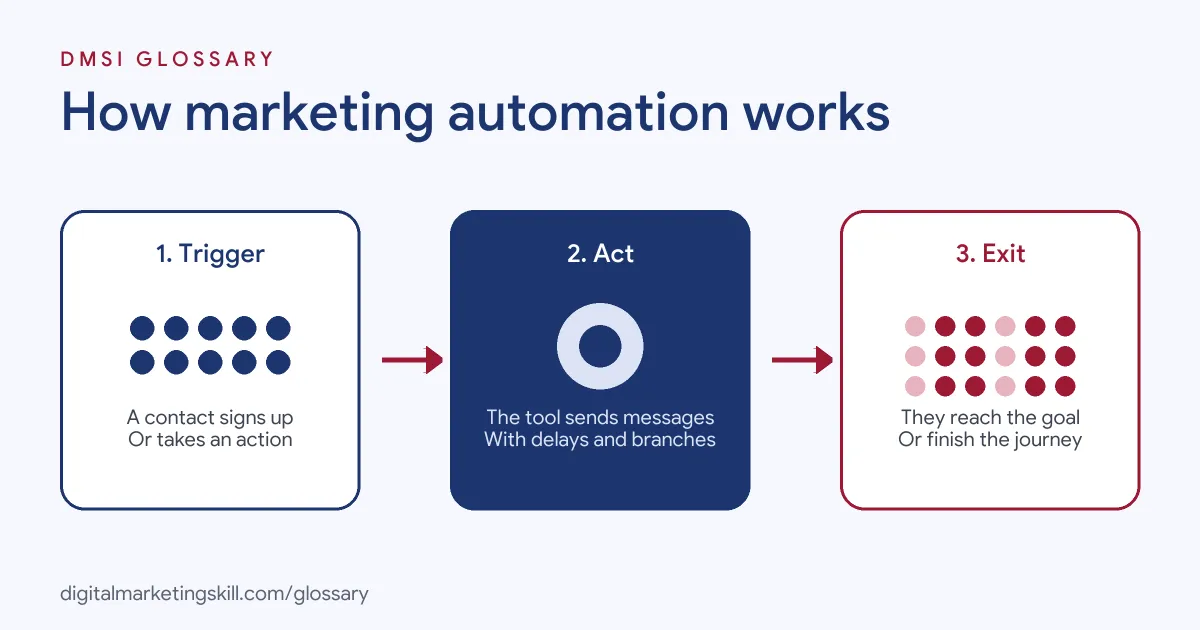
Every automated journey follows three steps. First, a trigger adds a contact, such as a form sign-up or a purchase. Next, the tool runs a series of actions, with delays and branches in between. Finally, the contact leaves the journey when they reach a goal or finish all the steps.
Triggers
Mailchimp defines a trigger as “An event or action that adds a contact to a flow.” Similarly, HubSpot says, “Enrollment triggers are a set of criteria that automatically enroll records in a workflow.” In HubSpot, triggers can be based on filters, events, schedules or webhooks.
Actions, Delays and Branches
Actions are what the tool does, such as sending an email or assigning a lead. Delays control timing, so messages don’t all arrive at once. Mailchimp’s time delay, for example, “Prevents contacts from continuing down the flow path for a period of time that you choose.” Branches send people down different paths. Mailchimp’s conditional split “Splits contacts down one of two branching flow paths based on up to 5 conditions you choose.”
Lead Scoring
Many tools can also score leads as part of a journey. For example, a contact might gain points for opening emails, visiting key pages or booking a demo. Once the score passes a level you choose, the tool alerts sales. Our entry on lead scoring explains how to set the points fairly.
Plan Limits
Features often depend on your plan. For instance, Mailchimp says its Essentials plan allows up to 4 steps in a flow, while Standard and higher allow up to 200 steps. HubSpot lists workflows as available on Professional or Enterprise plans across its hubs. So always check what your plan includes before you design a complex journey.
Marketing Automation Examples
Here are three made-up examples:
- Online shop (example): When someone leaves items in their basket, they get a reminder after one hour and a small discount after a day, unless they buy first.
- Software company (example): A new trial user gets five onboarding emails over two weeks. If they invite a teammate, they move to a different path with team tips.
- Training provider (example): When a lead downloads a course guide and visits the fees page twice, the tool raises their lead score and alerts an adviser.
In each case, the journey reacts to what the person actually does, not just to a fixed calendar.
Types of Automated Journeys Compared
Here are common journeys and what they aim to do:
| Journey | Typical trigger | Goal |
|---|---|---|
| Welcome series | A new sign-up | Introduce the brand and build trust |
| Lead nurturing | A content download | Educate the lead until they are ready to buy |
| Abandoned basket | Items left in a basket | Recover the sale |
| Post-purchase | An order is placed | Help the customer and invite a review or repeat order |
| Re-engagement | No opens or clicks for a set time | Win the contact back or clean the list |
For a common form of timed sequence, see our entry on the drip campaign.
How to Set Up Marketing Automation
- Pick one goal. Start with a single journey, such as a welcome series.
- Map the steps on paper. Write down the trigger, each message, the delays and the exit point.
- Check your data. Make sure the fields you need, such as first name or product interest, are collected.
- Build the journey in your tool. Add the trigger, actions, delays and any branches.
- Set exit rules. Remove people once they buy, book or reply, so they don’t get the wrong message.
- Test it. Run a test contact through every path before you switch it on.
- Measure and improve. Review opens, clicks, conversions and unsubscribes, then improve one step at a time.
A Worked Example
Here is a made-up example with simple numbers. A shop’s abandoned basket journey reaches 1,000 people a month. If 8% of them come back and buy, that is 80 recovered orders. At an average order of £50, that is £4,000 a month from one journey that runs by itself. The shop then tests a shorter first delay to see if the rate improves. Because only one thing changes, the team can tell exactly what caused any rise or fall.
Best Practices for Marketing Automation
- Get consent first. Only send marketing to people who agreed to hear from you.
- Make leaving easy. Gmail requires marketing messages to support one-click unsubscribe and show a clear unsubscribe link.
- Keep it human. Write as a person would, and use personal details only when they help.
- Connect sales and marketing. Pass hot leads to sales quickly, and record what happens next.
- Review journeys regularly. Offers, prices and links change, so check every journey from time to time.
Common Mistakes to Avoid
A common mistake is building a huge, complex journey before testing a simple one. Another is forgetting exit rules, so customers keep getting “Buy now” emails after they have bought. Some teams also send too often, which pushes up unsubscribes and spam complaints. Others set up a journey and never look at it again, so broken links stay live for months. Finally, many automate messages without clean data, so names and offers show up wrong.
Where You’ll Use Marketing Automation at Work
This is a core skill in email, CRM and demand generation roles. For example, real remote job listings ask for:
- “Practical experience with email marketing, CRM platforms, and marketing automation, such as HubSpot, Klaviyo, ActiveCampaign, or equivalent tools.” (Marketing Lead).
- Someone who “Utilizes Customer Relationship Management (CRM) systems, customer information, and marketing automation platforms like Marketo and SFDC to create and deploy effective marketing campaigns.” (Senior Demand Generation Manager).
- “Experience working with CRM and marketing automation platforms such as SFMC, AJO, or similar technologies” (CRM Data Manager).
So if you want to work as a Marketing Automation Specialist or Email Marketing Specialist, employers will expect you to plan, build and improve automated journeys.
Learn It in the Lead Generation and Email Track
You can build real automated journeys in the AI-Powered Lead Generation and Email Automation track. It covers AI fundamentals, lead generation, and email marketing and automation. Your portfolio project is a lead magnet and an automated email sequence that converts. You also get unlimited 1-on-1 mentoring and a U.S. Project Internship from day one.
Next, read our marketing automation guide and our round-up of marketing automation tools.
Frequently Asked Questions
What is marketing automation in simple terms?
It is software that sends messages and updates records for you, based on rules you set and actions people take.
Is it only for email?
No. Email is the most common channel, but many tools also update your CRM, score leads, send texts or create tasks.
Which tools are used for it?
Popular tools include HubSpot, Mailchimp, Klaviyo, ActiveCampaign and Marketo. The right one depends on your size and needs.
Will automation make my emails feel robotic?
Not if you write them well. Clear, friendly messages sent at the right moment often feel more personal than mass emails.
How do I measure results?
Track conversions from each journey, plus opens, clicks and unsubscribes. Then compare the results with your goal.
Sources: Mailchimp Help: About marketing automation flows; HubSpot Knowledge Base: Create workflows; Google: Email sender guidelines; remote job listings on Himalayas.