Google Keyword Planner shows you search demand, not ranking difficulty, and treating the two as the same thing wastes months of content effort. The tool’s own numbers come from ad auction data, built for advertisers, not for organic rankings. This guide shows what each number actually measures and how to turn it into a keyword you can rank for.
Key Takeaways
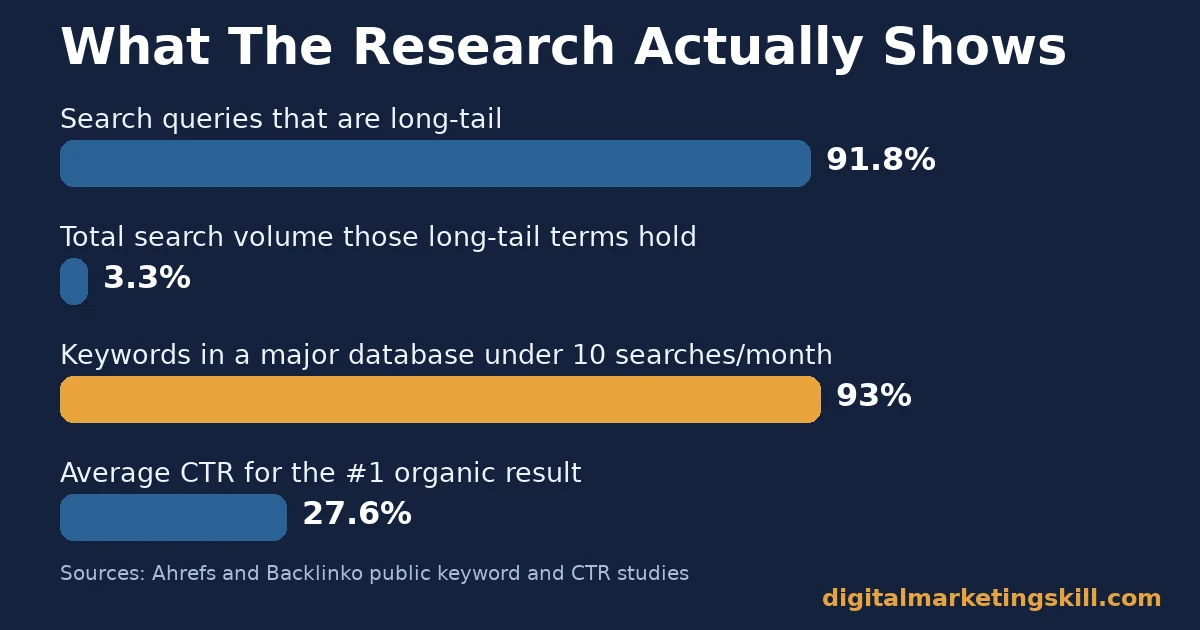
- Most searches are tiny. Ahrefs found that almost 93% of keywords in its U.S. database get fewer than 10 searches a month. Google Keyword Planner hides most of this long-tail demand behind volume ranges.
- Long-tail traffic adds up. Backlinko’s analysis of over 306 million keywords found that 91.8% of all queries are long tail, yet they represent only 3.3% of total search volume individually.
- Position still decides clicks. Backlinko’s study of 4 million Google results found the #1 organic result gets an average 27.6% click-through rate, about 10 times the rate at position 10.
- Competition in the tool is an ad metric. Google’s own documentation describes Keyword Planner’s competition score as a guide for advertisers bidding on a term, not a measure of organic ranking difficulty.
- Forecasts update fast. Google refreshes Keyword Planner forecasts daily, based on the last seven to ten days of auction data, adjusted for seasonality, so a forecast is a short-term snapshot, not a yearly plan.
In this guide
- The Gap Most Google Keyword Planner Guides Skip
- How Google Keyword Planner Actually Works
- What Each Google Keyword Planner Number Is Actually Built For
- How To Turn Each Number Into An SEO Action
- Measuring Whether Your Keyword Research Worked
- Common Mistakes When Reading Google Keyword Planner Data
- The One Decision Rule: Rank For What You Can Win This Quarter
- A Real Case: Applying Keyword Research To A Real Website
- Frequently Asked Questions About Google Keyword Planner
- Build This Skill Properly, Wherever You Live
The Gap Most Google Keyword Planner Guides Skip
Most tutorials treat Google Keyword Planner as a popularity contest. Type in a seed term, sort by volume, and pick the biggest number. That approach ignores why the tool exists. Google built Keyword Planner for advertisers planning ad spend, not for writers planning content.
Here are the ground rules for this guide. The search-volume and click-through figures below come from named studies by Ahrefs and Backlinko, each analysing large public datasets. So read them as a snapshot of search behavior at the time of the study, not a permanent ranking. Google’s own documentation explains what each metric is built to measure. None of the figures here replace checking live data in your own Keyword Planner account for your market.
A quick, honest check before you read further: open your last three published pages and ask what search volume you targeted and why. If the answer is “it had the biggest number,” that single habit is probably costing you rankings you could already have won.
How Google Keyword Planner Actually Works
Keyword Planner has two tools inside one interface. “Discover new keywords” takes a seed term or a website URL and returns related terms. “Get search volume and forecasts” takes a list you already have and returns data for it instead of new ideas.
Every keyword in both tools carries the same three numbers. Average monthly searches estimates demand over the past 12 months for your chosen location and language. Competition shows how many advertisers bid on that term, not how hard it is to rank organically. The forecast tab projects clicks, impressions and cost for a chosen bid and budget, refreshed daily from the last seven to ten days of auction data.
That auction-data origin matters. Google’s own help documentation frames the whole tool around ad planning. An SEO writer can still use the data, but has to translate it, the same way a weather forecast for sailors still works for a hiker who reads it differently.
There is also a practical access point worth knowing. “Discover new keywords” works well at the start of a project, when you have a topic but no list yet. “Get search volume and forecasts” works better once you already have a list, perhaps from a competitor’s page or your own brainstorm, and just need the numbers attached. Many researchers skip straight to sorting by volume and miss this distinction, which is part of why the output feels more random than it needs to.
What Each Google Keyword Planner Number Is Actually Built For
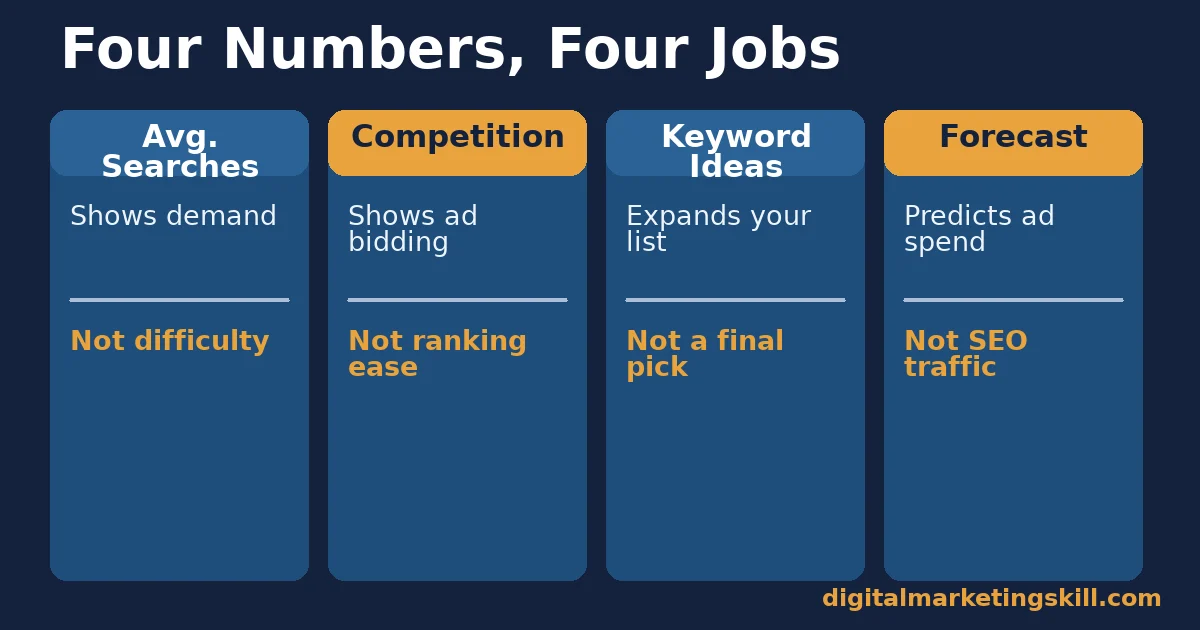
Four pieces of data come out of Keyword Planner. Each one answers a different question, and mixing them up is the most common keyword research mistake. Knowing which question each number answers takes a few minutes to learn, but it changes how you read every keyword list for good.
Average Monthly Searches: Built To Show Demand, Not Difficulty
This number tells you how many people search a term. It says nothing about how many pages already compete for it. A term with 10,000 searches a month and 50 strong competing pages is harder to rank for than a term with 500 searches and two weak pages. For the broader picture beyond keyword data alone, see our guide to website SEO tips. Google Keyword Planner was never built to answer the difficulty question, so looking to it for an answer it cannot give is where most keyword research plans go wrong first.
Competition Score: Built For Advertisers, Not Rankings
This score counts how many advertisers bid on a keyword in Google Ads. A term can show “high” ad competition while ranking organically is easy, or “low” ad competition while every top organic result is a well-linked, authoritative page. The two competitions are not the same contest. A niche topic can carry fierce ad competition because a handful of advertisers chase every click, while the organic results for that same topic sit untouched by any serious content.
Keyword Ideas List: Built To Expand Your Seed List
This list exists to widen your starting point, not to hand you a final target. It mixes head terms, long-tail variants and some loosely related terms together, sorted by volume by default, which buries the long-tail terms that are often easiest to rank for first.
Forecast Tab: Built To Predict Ad Spend, Not SEO Traffic
The forecast estimates paid clicks and cost for a bid you choose. It has no organic-ranking equivalent, because organic position depends on content quality and links, not a bid amount. Treat the forecast as a budgeting tool for ads, never as a traffic prediction for a blog post. A keyword with a large forecasted ad click volume can still bring a new organic page zero visits for months. The forecast assumes a paid placement at the top of the page, not a ranking earned over time.
How To Turn Each Number Into An SEO Action
Reading the data correctly is only half the job. Each number also needs a different action once you understand what it actually measures.
Average Monthly Searches: Lead With A Range, Not One Number
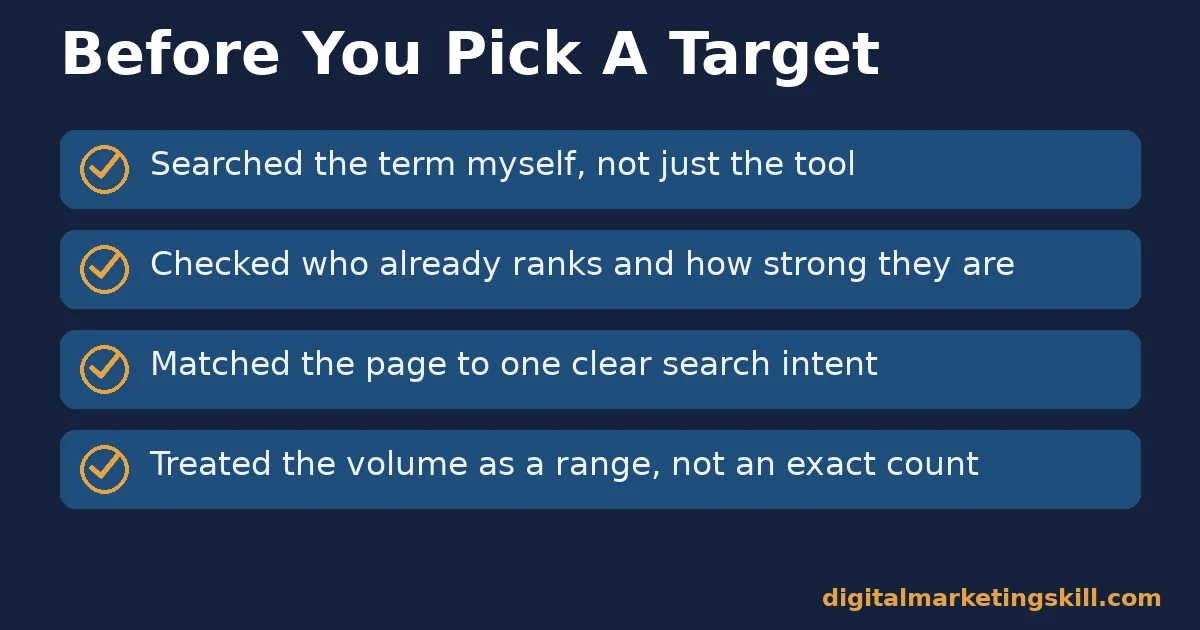
Treat the figure as a rough range, not an exact count. Many accounts without active ad spend only see banded ranges such as “1K–10K” anyway. Use the range to sort ideas into rough tiers, then move on to checking who already ranks before picking a target.
Competition Score: Lead With A Separate Difficulty Check
Ignore the ad-competition score for organic decisions. Instead, search the term yourself and look at who ranks: established sites with many linking pages signal a harder climb, while thin or outdated pages signal an opening. That manual check takes minutes and tells you more than the score does. Pay particular attention to how recently the top pages were updated. A page of ranking content that has gone stale is often more beatable than its position suggests.
Keyword Ideas List: Lead With Filtering For Intent
Before sorting by volume, scan the list for intent. Group ideas into “wants to buy,” “wants to learn” and “wants a specific brand or tool.” Write content for one intent group at a time, because a single page rarely satisfies a buyer and a researcher equally well. Our guide to content marketing covers how to plan a page around one intent properly. A simple label next to each idea, such as “buy,” “learn” or “compare,” turns a flat list into a usable content calendar in a few minutes.
Forecast Tab: Lead With It Only For Paid Campaigns
Use the forecast exactly where it was built to be used: planning an ad budget. For organic content planning, replace it with your own tracking. Publish, then check Google Search Console after a few weeks for the real queries and clicks a page earns. If you are starting from scratch, our guide to creating a blog covers the setup steps first. For paid campaigns, the forecast remains useful exactly as Google built it: a near-term planning estimate for spend, not a long-range prediction.
Measuring Whether Your Keyword Research Worked
Four numbers show whether keyword research is paying off, and none of them live inside Keyword Planner itself.
- Average position. Search Console’s average position for a query shows where your page typically ranks. Track it for your target keyword every few weeks rather than checking once.
- Click-through rate versus expected. Compare your actual CTR at a given position with typical rates, such as the roughly 27.6% average at position 1 that Backlinko measured. A big gap below typical usually points to a weak title or meta description, not a ranking problem.
- Query coverage. The count of distinct search queries, visible in Search Console’s performance report, that bring clicks to one page. Rising coverage means the page is answering more of the topic than the one keyword you planned around.
- Keyword-to-content ratio. How many target keywords you have published content for versus how many you identified. A ratio stuck below half usually means research time is outpacing writing time.
Check these monthly rather than daily. Search rankings move slowly enough that daily checks mostly show noise, not progress. A page sitting at position 14 with a reasonable CTR for that position is often healthier than a page at position 6 with a CTR far below what position 6 normally earns. The second page likely has a title or snippet problem, and a ranking boost alone will not fix that.
Common Mistakes When Reading Google Keyword Planner Data
Four mistakes show up again and again in keyword research built around Google Keyword Planner. Each one is easy to fix once you can name it.
- Sorting by volume first. Volume alone hides difficulty and intent. Sort by relevance to your topic first, then check volume and competition for the shortlist, not the whole list.
- Treating a range as an exact number. A “1K–10K” range could mean very different things for a content plan. Use the low end of the range when you are being cautious about expected traffic.
- Copying a competitor’s exact keyword. If a well-established site already owns page one for a term, a near-identical new page rarely displaces it quickly. Target an adjacent, more specific version instead.
- Stopping at the list, never checking Search Console. Keyword Planner only estimates demand before you publish. Skipping the follow-up check in Search Console means you never learn whether your guess was right.
The One Decision Rule: Rank For What You Can Win This Quarter
When two keyword ideas from Google Keyword Planner compete for your time, pick the one you can realistically rank for within the next three months, not the one with the biggest search-volume number.
Illustrative, invented numbers show the trade-off. Imagine a head term showing 8,000 monthly searches, with every top-ten result from a large, well-linked site. Against that, a long-tail variant shows 90 monthly searches, with mostly thin or outdated pages ranking. The head term might bring more traffic eventually, but it could take a year or more to compete for. The long-tail term could realistically rank within weeks, and once it does, your site has its first topical authority signal to build the head term attempt on later. Depth on a winnable term beats a wait on a popular one.
This rule scales with your list. Instead of picking one keyword at a time, sort your whole export into three tiers. Tier one covers terms you can likely win this quarter; tier two covers terms worth attempting once your site has more authority; tier three covers terms to revisit later with fresh data. Work tier one completely before touching tier two. A handful of finished, ranking pages do more for a new site than a long list of half-targeted ones.
A Real Case: Applying Keyword Research To A Real Website
Abimbola Fafiolu, a graduate of the Digital Marketing Skill Institute, described in a published review how the training changed what they could actually build and rank. As published, they said they were able to use the skill to build a functioning website that ranks in Google.
The case is a small one, and it does not include a search-volume figure or a specific keyword, so treat it as evidence that the underlying skill transfers to a real, live website, not as a promise of a particular ranking. Results vary by niche, competition and effort; see the Institute’s earnings disclaimer for the limits on any outcome mentioned on this site.
What the case does show is the order of operations worth copying: learn the method, build one real site, then let that site’s own ranking performance teach the next lesson. A finished, live, ranking page is a better teacher than another course module. It responds to the same forces, search intent, competition and content quality, that every other page on the web answers to.
Frequently Asked Questions About Google Keyword Planner
Is Google Keyword Planner free to use?
Yes, but it requires a Google Ads account to access, even if you never run a paid campaign. Accounts without active ad spend typically see search volume as a banded range instead of an exact number.
Why does Keyword Planner show a volume range instead of an exact number?
Google limits exact figures to accounts with consistent ad spend. Everyone else sees a range, such as “1K–10K,” which still works fine for sorting ideas into rough demand tiers.
Does Google Keyword Planner measure SEO difficulty?
No. Its competition score reflects advertiser bidding activity, not how hard a term is to rank for organically. Check the actual search results yourself, or use a dedicated SEO tool, to judge organic difficulty.
What is the difference between Keyword Planner and Google Search Console?
Keyword Planner shows estimated demand before you publish anything. Search Console shows the real queries, clicks and position your existing pages already earn. Use Keyword Planner to plan and Search Console to measure.
Should I target long-tail or short-tail keywords first?
For a new or smaller site, long-tail terms are usually the faster path to a first ranking. Ahrefs’ data shows the vast majority of search queries get fewer than 10 searches a month, with far less competition attached to each one. Short-tail, high-volume terms are worth pursuing once your site has some ranking history behind it.
How often does Google Keyword Planner data update?
Forecasts refresh daily from roughly the last seven to ten days of auction activity, adjusted for seasonality. Average monthly search figures update on a slower, ongoing basis as Google recalculates the trailing 12-month window.
Can I use Google Keyword Planner without spending on ads?
Yes. You need a Google Ads account to open the tool, but you do not need to run a campaign or spend anything to use the research features. The trade-off is that you typically see banded search-volume ranges instead of exact numbers until an account has consistent ad spend.
What should I do after I pick a keyword from Keyword Planner?
Search the term yourself and read the pages that rank there, so you understand what searchers expect to find. Then write content that matches that intent at least as well as the current top results, add one thing they are missing, and publish before moving to the next keyword on your list.
Build This Skill Properly, Wherever You Live
If you want structured practice turning tool data like this into real rankings, consider the Master Diploma in Digital & AI Marketing from the Digital Marketing Skill Institute. It includes the AI-Powered WordPress and SEO Specialist track, one of four AI-powered tracks covering ten courses in total, with a Full Stack option for completing all four.
The program is built around hands-on practice rather than theory alone, so you work with real keyword data and a real site, not just slides. It includes unlimited one-on-one coaching and mentoring, a U.S. Project Internship with a verified U.S. Work Reference Letter, and dual US and UK accreditation recognized in more than 100 countries. Everything runs 100% online, so you can build this skill from anywhere in your country.
Start at Digital Marketing Skill Institute. Browse the blog for more SEO guides. Read real outcomes on the reviews page, and when you are ready, apply here. Wherever you live, keyword research is a skill worth building properly, not guessing at. Treat Google Keyword Planner as the starting point it was built to be. Confirm every target with a real search and a real check in Search Console, and the guesswork in your content plan mostly disappears.
Every figure in this guide was checked against its original source before publication. Figures marked as illustrative are invented examples, not real results.