
Google Ads cost confuses most beginners because they look at average click prices instead of the actual mechanics. Your real Google Ads cost depends on your daily budget formula, your bidding approach and your Quality Score, not a single industry number. This guide explains how each piece works and the checks that keep your spend under control.
Key Takeaways
- Your monthly cap is a formula, not a guess. Google calculates your monthly spend limit as your daily budget multiplied by 30.4, the average number of days in a month, per Google’s own Ads Help documentation.
- You rarely pay your maximum bid. Google states you will often pay less than your maximum bid. You only pay what is minimally required to hold your Ad Rank.
- Overdelivery has a hard ceiling. Daily spend can exceed your daily budget on a busy day, but Google caps it at two times your daily budget, and the monthly total never exceeds 30.4 times your daily budget.
- Quality Score does not set your price directly. Google explicitly states Quality Score is not an input in the ad auction; it is a diagnostic tool, not a lever you bid with.
- Six factors set your real Ad Rank. Google names your bid, ad and landing page quality, Ad Rank thresholds, auction competitiveness, search context, and ad asset impact as the actual inputs.
In this guide
- Why Google Ads Cost Numbers Online Are Misleading
- How Google Ads Cost Is Actually Calculated
- What Differs by Bidding Approach
- How to Get the Most From Each Approach
- A Note for Small, Early-Stage Budgets
- Match Your Budget to Your Actual Goal
- Three Budgets, Side by Side
- Red Flags That Predict You Are Overpaying
- Six Terms Worth Knowing Before You Start
- How to Measure Whether Your Google Ads Cost Is Working
- The Rule That Makes Google Ads Cost Easier to Control
- How Seasonality Affects Google Ads Cost
- A Real Case: Why Skill Mattered More Than Budget Size
- Frequently Asked Questions About Google Ads Cost
- Where to Go Next
Why Google Ads Cost Numbers Online Are Misleading
Most articles quote one average cost per click and stop there. That number hides enormous variation by industry, location and competition. It also skips the mechanics that actually decide what you pay.
Two ground rules before you plan a budget. First, any published average CPC is a snapshot from someone else’s accounts, not a promise for yours. Second, your Google Ads cost is set live, auction by auction. The formulas below matter more than any single benchmark number.
How Google Ads Cost Is Actually Calculated
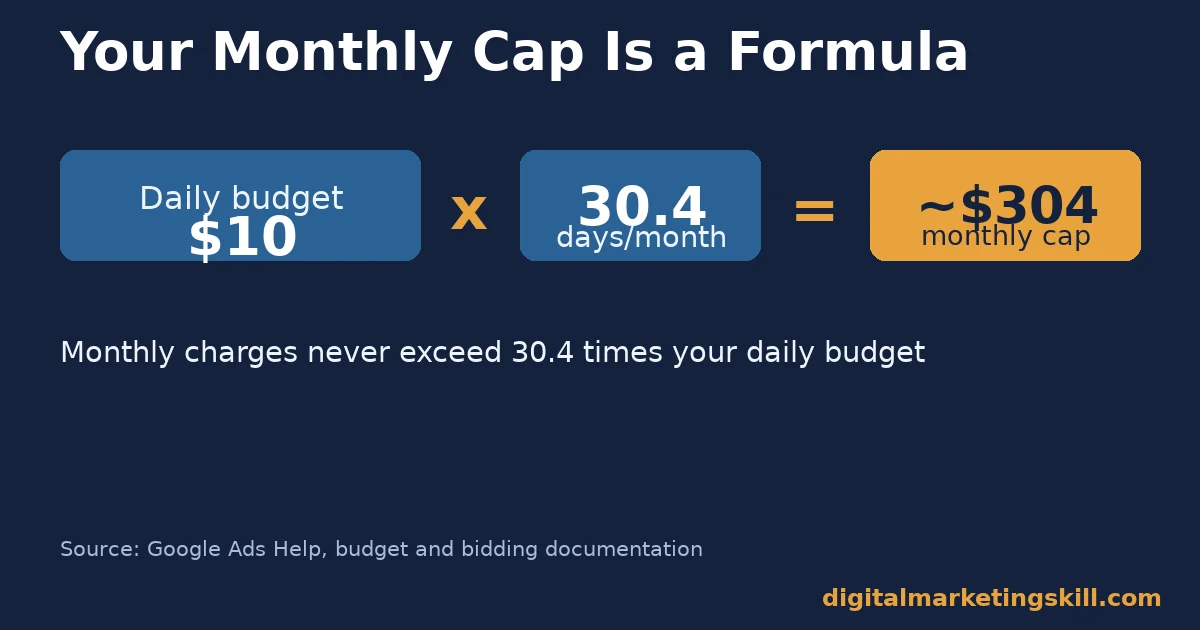
Start with your daily budget. Google turns that into a monthly figure using a fixed formula: daily budget multiplied by 30.4. A $10 daily budget works out to roughly $304 a month, directly from Google’s own documentation.
However, daily spend is not perfectly even. Google allows spend to exceed your daily budget on a busy day. The cap is two times your daily budget on any single day. Across a full month, your total charge still cannot exceed 30.4 times your daily budget, so the formula holds even when daily spend varies.
Within each auction, you rarely pay your maximum bid. Google charges what it calls your actual CPC, which is only as much as needed to beat the next advertiser’s Ad Rank. In other words, a higher maximum bid protects your position, but it does not automatically raise your actual Google Ads cost.
Five Things to Check Before You Set a Budget
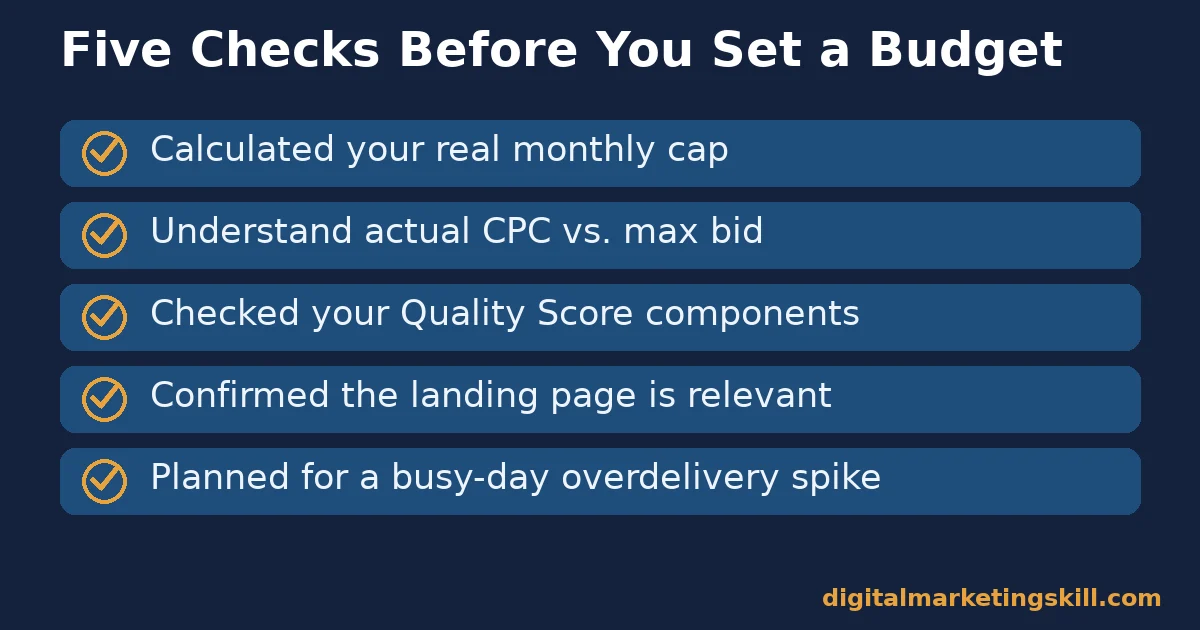
- Have you calculated your real monthly cap? Multiply your planned daily budget by 30.4 before you commit to a number.
- Do you understand actual CPC versus max bid? Your maximum bid is a ceiling, not what you will typically pay.
- Have you checked your Quality Score components? Expected click-through rate, ad relevance and landing page experience each show as above, average or below average.
- Is your landing page actually relevant to the ad? A mismatched landing page quietly raises your real Google Ads cost through lower Ad Rank, and checking your mobile conversion rate specifically matters, since most search traffic now arrives on a phone.
- Have you planned for a busy-day overdelivery spike? Budget with the two-times-daily cap in mind, not just the flat daily number.
Common Mistakes That Inflate Google Ads Cost
Beyond the five checks above, a handful of ordinary mistakes quietly raise Google Ads cost on otherwise healthy accounts. Running search and display campaigns in the same budget often starves search of spend on its best days.
Leaving default bidding settings unchanged after launch is another common one. A strategy chosen on day one rarely stays optimal once real conversion data starts arriving. Review it on a fixed schedule instead of leaving it untouched indefinitely.
A third common mistake is adding too many keywords to one ad group. Tightly themed ad groups usually earn a better Quality Score than broad, mixed ones, which lowers actual CPC through a stronger Ad Rank.
What Differs by Bidding Approach
Manual Bidding: Built for Control
Manual CPC bidding lets you set a maximum bid for each keyword, ad group or placement yourself. You decide exactly where your ceiling sits. The trade-off is time: manual bidding needs regular review, since a bid that was competitive last month can quietly fall behind as the auction shifts.
Automated Bidding: Built for Scale
Automated strategies, such as Maximize Clicks, let Google’s systems adjust bids within your budget in real time. This saves time and reacts to auction changes faster than a human can. The trade-off is visibility: you give up granular control over any single keyword’s maximum bid.
How to Get the Most From Each Approach
Manual Bidding: Review on a Fixed Schedule
If you use manual bidding, set a fixed, repeated day to review bids against performance. Raise bids on keywords converting well, and lower or pause ones that are not. Without this habit, manual bidding slowly drifts out of date.
Automated Bidding: Feed It Clean Conversion Data
If you use an automated strategy, make sure your conversion tracking is accurate first. Automated bidding optimises toward whatever you tell it counts as a conversion. Broken or inflated tracking will actively waste budget, not just fail to help it.
A Note for Small, Early-Stage Budgets
If your total budget is small, resist the urge to spread it across many keywords or campaigns at once. A thin budget split ten ways rarely gathers enough data for automated bidding to learn well, on any single line.
Instead, pick your single highest-intent keyword theme and put the full budget behind it first. Once that one campaign proves it can convert profitably, expanding to a second theme is a far safer next step than starting broad.
This also keeps your Google Ads cost easier to reason about. One focused campaign is simple to audit against the five checks and five metrics in this guide, while ten thin campaigns usually hide their real problems inside the noise. Resist the pressure to look broad too early; narrow and provable usually wins over wide and unproven.
Match Your Budget to Your Actual Goal
Testing a New Offer
If you are testing whether an offer works at all, keep the daily budget small and the keyword list narrow. The goal here is data, not scale, so a lower Google Ads cost with slower learning is an acceptable trade.
Generating Qualified Leads
If lead generation is the goal, budget enough to exit the learning phase quickly on your main keywords. Too small a budget here often stalls automated bidding before it has enough data to optimise well.
Scaling Ecommerce Revenue
If you are scaling an online store, budget around a target return on ad spend, not a flat daily number. Let profitable campaigns absorb more budget, and cut spend fast on campaigns that fall below your target. Pairing this with retargeting ads toward people who already visited often lowers your blended cost per conversion.
Three Budgets, Side by Side
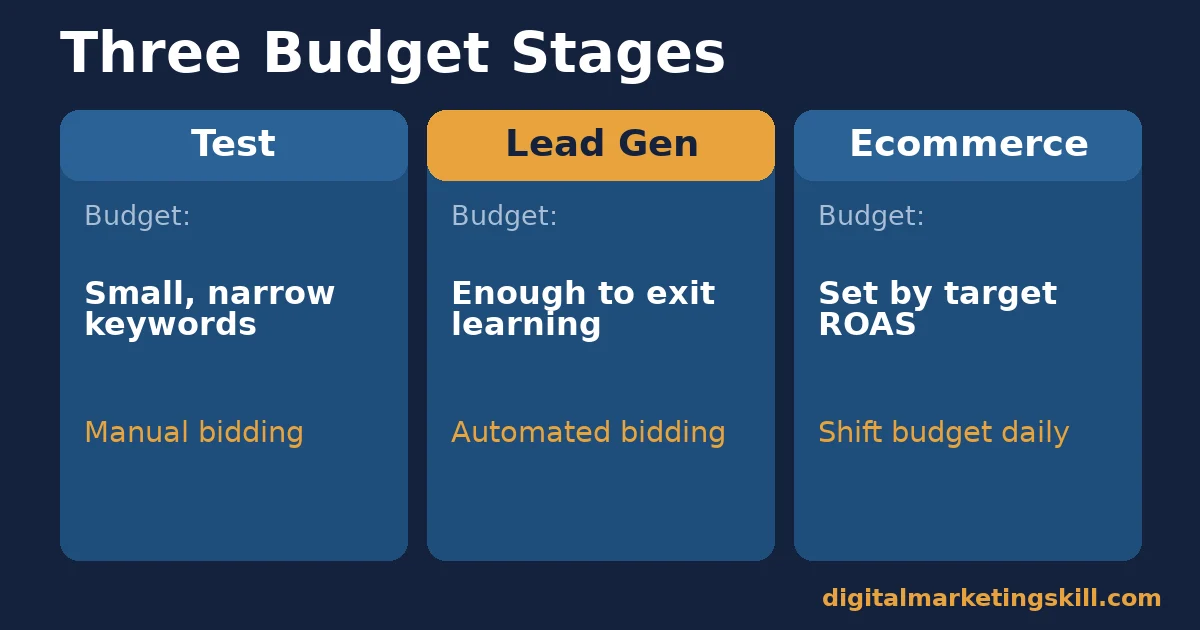
Here is how the Google Ads cost picture might look across three stages. These specific figures are illustrative, invented numbers, built from the mechanics above, not one real account’s results.
- New test campaign: $10 daily budget, narrow keyword list, manual bidding, actual CPC close to the maximum bid while data is thin.
- Established lead-gen campaign: $50 daily budget, automated bidding on conversions, actual CPC well below the historical maximum bid thanks to a strong Quality Score.
- Scaling ecommerce campaign: budget set by target return on ad spend rather than a flat number, with spend shifting daily toward the best-performing products.
Each stage uses the same underlying formulas. What changes is how much you let automation decide versus how much you control by hand. Recognising which stage your account is actually in, honestly, usually matters more than any single tactic in this guide.
Red Flags That Predict You Are Overpaying
A few patterns show up again and again in overspending accounts. First, broad match keywords with no negative keyword list routinely waste spend on irrelevant searches. Second, a landing page that does not match the ad’s promise quietly damages Ad Rank and raises actual CPC over time.
Third, ignoring the search terms report for weeks at a time lets wasted spend compound. Review it often, since each irrelevant search that triggers your ad is a preventable cost, not an unavoidable one.
Six Terms Worth Knowing Before You Start
A short glossary helps here, since Google Ads cost discussions use a few specific terms often.
- Actual CPC. What you really pay per click, usually below your maximum bid.
- Ad Rank. The score that decides if your ad shows and where, based on six factors.
- Quality Score. A 1-10 diagnostic score, not an auction input, built from three components.
- Negative keyword. A term you exclude so your ad stops showing on irrelevant searches.
- Impression share. The share of eligible auctions where your ad actually showed.
- Conversion tracking. The system that tells Google, and you, which clicks actually became results.
Knowing these six terms makes every other section of this guide, and every Google Ads report, easier to read correctly.
How to Measure Whether Your Google Ads Cost Is Working
Five Numbers Worth Tracking
- Actual CPC versus max bid. A large, consistent gap suggests you could likely lower your maximum bid without losing position.
- Cost per conversion. The number that actually matters more than cost per click, since a higher CPC with a higher conversion rate can still win.
- Impression share lost to budget. Shows how often your budget, not your bid or quality, is the limiting factor.
- Quality Score component status. Tracks whether your expected CTR, ad relevance and landing page experience are improving or slipping.
- Search terms waste rate. The share of spend going to searches you later excluded. A high rate signals your targeting needs tightening.
Review these five together, not in isolation. A low cost per click with a poor cost per conversion is not actually a win. Most of these numbers live inside Google Analytics as well as the Ads interface, so checking both gives a fuller picture.
A Short Monthly Audit Script
Run through these five short questions on a fixed schedule, not only when spend feels high.
- “What is my actual CPC versus my maximum bid, this cycle?”
- “Which keywords are driving wasted spend in the search terms report?”
- “Has my Quality Score component status changed on my top keywords?”
- “Is my conversion tracking still firing correctly on every goal?”
- “Am I budgeting against the 30.4 formula, not just the daily number?”
A short, repeated audit like this catches drift long before it becomes a real budget problem. Write the answers down each time, even briefly, so you can spot a slow trend that a single check would miss entirely.
What to Do Right After a Fix
After you fix a landing page or tighten an ad group, resist judging results within the first day or two. Auction signals and Quality Score components take time to update as Google gathers fresh performance data on the change.
Give a meaningful change at least one to two weeks of steady spend before deciding whether it worked. Checking too early, and reacting to normal day-to-day noise, is one of the most common ways advertisers undo a genuinely good fix.
The Rule That Makes Google Ads Cost Easier to Control
Fix quality and targeting before you touch your bid. Raising a bid to win more clicks on a badly targeted campaign just raises your Google Ads cost without raising results. Fixing relevance and landing page quality first often lowers your actual CPC on its own, through a better Ad Rank.
Worked example: a campaign with a $2 actual CPC and a 1% conversion rate costs $200 per conversion. The same campaign, with the landing page fixed to lift conversion rate to 2%, costs $100 per conversion at the same spend, without touching a single bid.
This is why experienced advertisers so often say to fix the page before the bid. A bid increase only ever buys more of the same conversion rate, while a landing page fix can double or triple it at no extra spend.
How Seasonality Affects Google Ads Cost
Auction competitiveness is not constant across an industry’s calendar, even in an evergreen sense. Retail-adjacent categories, travel, and anything tied to recurring buying windows see real swings in how many advertisers are bidding at once.
When more advertisers compete for the same searches, Ad Rank thresholds rise, and your actual CPC tends to rise with them, even if your own account has not changed at all. This is normal, not a sign your campaign is broken.
The practical response is to plan flexible budgets rather than one fixed number you never revisit. Set a baseline daily budget, then review and adjust it on your fixed schedule as competition in your category shifts.
A Real Case: Why Skill Mattered More Than Budget Size
The Digital Marketing Skill Institute publishes named student outcomes on its reviews page. Graduate Kofi B. described the deciding factor in a remote hiring process this way: “What won me the remote role in Canada was my AI marketing knowledge. I could do the work of a 3-person team. My location became irrelevant.”
This is one real, named testimonial, not a representative sample, and it carries no income figure or guarantee. Still, it reflects the same lesson this guide makes about Google Ads cost: skill in reading and fixing a campaign usually beats simply spending more.
That skill shows up whether in a job interview or inside an ad account. No course or guide can honestly guarantee income, consistent with the Institute’s own earnings disclaimer.
Frequently Asked Questions About Google Ads Cost
How much does Google Ads cost per click?
It varies enormously by industry and competition, from roughly a dollar in some categories to well over fifty dollars in competitive fields like legal services, according to one agency’s analysis of thousands of keywords. Your own actual CPC depends on your Ad Rank, not a single universal number.
What is a good daily budget to start with Google Ads?
Enough to gather meaningful data without risking money you cannot afford to lose. Multiply your planned daily budget by 30.4 to see your real monthly exposure before you commit to a number. If that monthly figure feels uncomfortable, lower the daily budget and narrow your keyword list instead of leaving both wide open.
Does a higher Quality Score always lower my Google Ads cost?
Quality Score itself is not an auction input, so it does not directly set your price. However, the underlying quality signals it measures, like ad relevance and landing page experience, do feed into Ad Rank, which can lower your actual CPC.
Can Google Ads cost more than my set budget?
On any single day, yes, up to two times your daily budget, to account for traffic swings. Across a full month, Google caps total charges at 30.4 times your daily budget, so you are protected over time.
Is manual or automated bidding cheaper?
Neither is inherently cheaper. Manual bidding gives you more control but needs regular review. Automated bidding reacts faster to auction changes but depends entirely on accurate conversion tracking to perform well. Many advertisers start manual, confirm tracking is accurate, then move to automated once there is enough conversion history to work with.
Why did my Google Ads cost suddenly increase?
Usually one of three things: rising competition in your auction, a drop in your Quality Score components, or your budget allowing more of the two-times daily overdelivery to run. Check the search terms report first, since wasted clicks are the most common hidden cause.
Does pausing and restarting a campaign lower Google Ads cost?
Not usually, and it can make things worse. Restarting often resets some of the performance history your Quality Score components rely on, so a campaign can temporarily pay more per click right after a restart than it did before you paused it.
Where to Go Next
Use the five checks and five metrics in this guide before you raise a single bid. That short review usually finds more savings than any bidding trick.
If you want to build this skill properly, not just patch one campaign, the Digital Marketing Skill Institute’s Master Diploma in Digital & AI Marketing includes a dedicated Google Specialist track among its ten courses across four AI-powered tracks.
It also includes unlimited 1-on-1 coaching and mentoring, and real project work inside a U.S. partner company from day one. It is dual US and UK accredited, recognised in more than 100 countries, and delivered 100% online, so you can study wherever you live.
Read more on the digital marketing blog, see real outcomes on the reviews page, and when you are ready, check the Master Diploma program page or apply. Everything the Institute publishes about itself is on digitalmarketingskill.com, so you can verify any claim here before you rely on it.
Every figure in this guide was checked against its original source before publication. Figures marked as illustrative are invented examples, not real results.
