
Performance Max is a goal-based Google Ads campaign type that lets you advertise across all of Google’s channels from a single campaign. You set the goal and supply the assets, and Google’s AI decides where, when and how to show your ads. It matters because one campaign can reach people on Search, YouTube, Display, Discover, Gmail and Maps, so it is now a core skill for anyone who runs Google Ads.
Key Takeaways
- This campaign type runs on YouTube, Display, Search, Discover, Gmail and Maps from one campaign.
- It works best when you have clear conversion goals and conversion tracking in place.
- You supply asset groups (text, images, logos and videos) and audience signals. Google builds the ads.
- It uses Smart Bidding, which bids in each auction based on how likely a conversion is.
- It works alongside Search campaigns. An exact match keyword in a Search campaign takes priority.
What Is Performance Max?
Most Google Ads campaign types run on one channel. A Search campaign shows text ads on search results, for example, while a Video campaign runs on YouTube. This campaign type is different. According to Google, it gives you access to the full range of Google Ads inventory from one campaign, and it is meant to complement your keyword-based Search campaigns.
So instead of building five campaigns, you build one. You tell Google what a good result looks like, such as a sale or a lead. Then Google’s AI mixes your headlines, images and videos into ads that fit each place it shows them.
For example, an online shoe shop could run one campaign with a sales goal. The same assets might appear as a text ad on Search, a video on YouTube and an image ad in Gmail. Meanwhile, the shop sees the results in one place.
How Performance Max Works
A campaign runs on three building blocks. First, you set goals and a budget. Next, you add asset groups and audience signals. Finally, Google’s AI uses those inputs to bid and build ads across its channels.
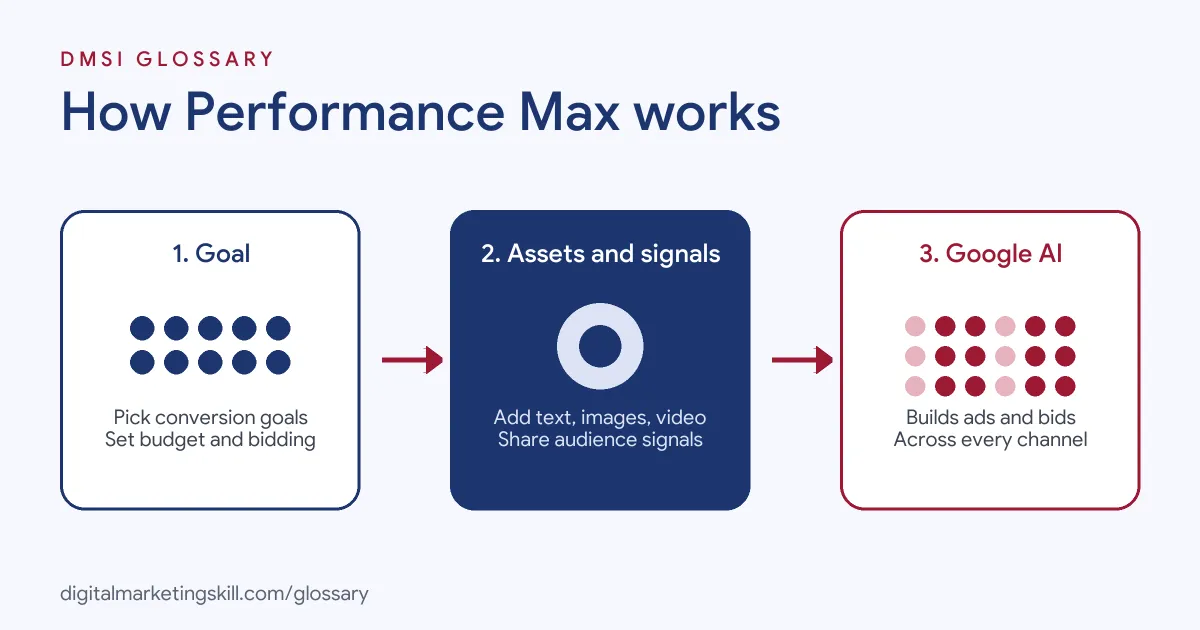
Goals and Smart Bidding
You start by choosing the conversion actions that matter, such as purchases or form fills. You can also set an optional target, like a cost per acquisition (CPA) or a return on ad spend (ROAS). After that, Smart Bidding takes over. In Google’s words, “real-time auctions bid based on your conversion probability.”
That’s why tracking comes first. Google’s setup guide says to add conversion actions as goals and allow 24 to 48 hours for the system to update.
Asset Groups
Google defines asset groups as “collections of creative assets”, such as images, text, logos and videos. Google recommends 11 or more headlines (up to 15, each up to 30 characters) and four or more descriptions. It also suggests at least one video for each orientation. If you don’t upload a video, the campaign can create one for you. However, Google recommends uploading your own.
Audience Signals
You can also give Google hints about who your customers are. For instance, you might add your customer list or people who visited your site. Google says this “accelerates campaign learning using high-intent audiences.” These are signals, not strict targeting, so the campaign can still reach people outside them.
Final URL Expansion
Next, there is final URL expansion. When it is on, “Google may replace your Final URL with a more relevant landing page” on your site. It may also write matching headlines. Even so, you stay responsible for what those pages say.
Reports and Insights
Because Google makes many choices for you, reports matter a lot. Google lists options such as asset-level metrics, channel performance, placement reports and conversion tracking. It also highlights “insights, like rising search trends and asset reporting.” So you can still see which channels spend your budget and which images or headlines do best. Then you use that view to decide what to change next.
Performance Max Examples
- Online store: A homeware brand links its product feed and sets a ROAS target. The campaign then shows its products on Search, YouTube and Gmail.
- Lead generation: A language school sets “submit lead form” as its goal. It adds separate asset groups for adult courses and children’s courses, each with its own images.
- Local business: A furniture shop picks the “Local store visits and promotions” objective. As a result, its ads can appear on Maps when people search nearby.
In each case, the business gives Google a clear goal and strong assets. That is what makes the campaign work.
Performance Max vs Search vs Demand Gen
Here is how it compares with two other common campaign types:
| Campaign type | Where ads show | Best for |
|---|---|---|
| Search | Google search results, based on keywords | Capturing people who search for what you sell |
| Performance Max | Search, YouTube, Display, Discover, Gmail and Maps | Reaching conversion goals across every Google channel at once |
| Demand Gen | YouTube, Discover, Gmail and the Display Network | Image and video ads that build interest and drive action |
In practice, many advertisers run it next to a Search campaign. Google notes that “Search campaigns containing an exact match keyword are prioritized to serve over Performance Max.” So you keep control of your most important keywords.
How to Set Up a Performance Max Campaign
Google’s own setup guidance follows this order:
- Add your business name and logos to your brand guidelines, so they match your verified name.
- Set up conversion tracking and add the right conversion actions as goals.
- Create a new campaign and choose Sales, Leads or Local store visits and promotions. Then pick Performance Max.
- Set a daily budget and a bidding strategy. Avoid very tight CPA or ROAS targets at the start.
- Build one asset group per theme, product or audience. Add text, images and videos.
- Add audience signals, such as your remarketing lists, and relevant search themes.
- Check Ad Strength, then publish the campaign.
After launch, give the campaign time to learn. Google suggests waiting two to three weeks before you replace low-performing assets.
Best Practices to Follow
- Fix tracking first. The campaign learns from conversions, so wrong data means wrong decisions.
- Split asset groups by theme. Google recommends separating them “by content category, theme, language, or target audience”.
- Fill every asset type. Make sure text, images and videos appear in every asset group.
- Use broad signals. Google advises against signals that are too narrow.
- Check the reports. Look at channel performance, placement and asset reports to see what is working.
For a wider plan, read our guide to Google Ads strategy.
Common Mistakes to Avoid
Many beginners launch without conversion tracking, so the campaign has nothing useful to learn from. Others upload only one image and two headlines, which gives Google little to work with. Some set a strict ROAS target on day one, and the campaign barely spends. Another common error is judging results after a few days. Some also forget the brand guidelines. Google says your business name should match your verified legal name or domain, or your ads may be disapproved. Finally, some advertisers turn on final URL expansion and never check which pages Google sends people to. As a result, visitors can land on pages that were never meant for ads, such as an old blog post.
Where You’ll Use Performance Max at Work
This campaign type comes up again and again in Google Ads job listings. For example, recent remote listings ask candidates to:
- “Manage and optimise Google Ads campaigns across Search, Performance Max, Shopping, Display and YouTube for multiple client accounts” (Google Ads Specialist).
- Show “strong experience with Performance Max, Shopping campaigns, Merchant Center feeds and Smart Bidding strategies” (Google Ads Specialist).
- “Own the practice’s Shopping and Performance Max standards, including feed quality and Merchant Center best practices” (Senior Director, Paid Search).
So if you want to work as a Google Ads Specialist or PPC Specialist, employers will expect you to set up, track and improve these campaigns.
Learn It in the Google Specialist Track
You can learn Google Ads campaign types like this one in the AI-Powered Google Specialist track. There, you launch and measure a Google Ads campaign with conversion tracking, so you finish with results you can show an employer. You also join a U.S. Project Internship from day one, with unlimited 1-on-1 mentoring.
New to the platform? Start with our glossary entry on Google Ads.
Frequently Asked Questions
What is Performance Max in simple terms?
It is one Google Ads campaign that shows your ads across Search, YouTube, Display, Discover, Gmail and Maps. Google’s AI decides where each ad appears.
Does Performance Max replace Search campaigns?
No. Google says it complements Search campaigns. If a search matches an exact match keyword, the Search campaign serves first.
Do I need conversion tracking before I start?
Yes, in practice. The campaign bids based on your conversion goals, so it needs accurate tracking to learn.
How many headlines should a Performance Max asset group have?
Google recommends 11 or more headlines, with a minimum of three and a maximum of 15. Each one can be up to 30 characters.
What are audience signals?
They are hints about your likely customers, such as your customer lists. They help the campaign learn faster, but they do not limit who sees your ads.
Sources: Google Ads Help: About Performance Max campaigns; Google Ads Help: Create a Performance Max campaign; Google Ads Help: Asset group best practices; Google Ads Help: About Demand Gen campaigns; remote job listings on Himalayas.