
A prompt is the instruction or question you give an AI tool, such as ChatGPT, Gemini or Claude, to tell it what you want. It can be one short line or a detailed brief with context, examples and rules about the format of the answer. It matters because the quality of what you get back depends heavily on how clearly you ask.
Key Takeaways
- A prompt is a plain-language request to an AI model. You don’t need to code to write one.
- Good prompts usually include an instruction, some context, the input to work on and the format you want.
- Adding a few examples, called few-shot prompting, often improves results.
- AI output varies from one run to the next, so you test and refine rather than expect perfection first time.
- You stay responsible for checking facts, tone and brand rules in anything the AI writes.
What Is a Prompt?
Google describes prompt design as “the process of creating prompts, or natural language requests, that elicit accurate, high quality responses” from a language model. In other words, a prompt is how you talk to the AI.
Think of it like briefing a new freelancer. If you say “write a post”, you will get something generic. However, if you say who the post is for, what it should achieve and how long it should be, the result gets much closer to what you need.
For example, compare these two requests. The first is “Write an Instagram caption for our café.” The second is “Write three Instagram captions for a family-run café in Leeds. Promote our new vegan breakfast. Keep each under 30 words and end with a question.” The second one gives the AI far more to work with.
How a Prompt Works
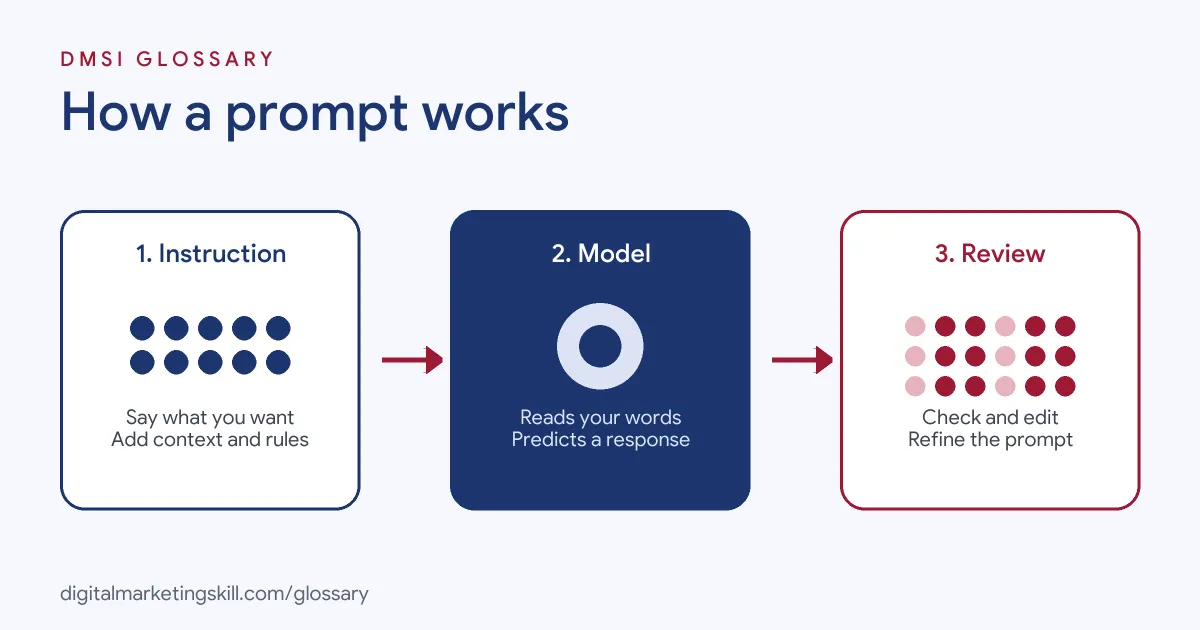
Every exchange with an AI tool follows three steps. First, you write your request. Next, the model reads it and predicts a response. Finally, you review the result and refine your wording if you need to.
The Four Parts of a Good Prompt
The Prompt Engineering Guide breaks a request into four elements:
- Instruction: “a specific task or instruction you want the model to perform”.
- Context: “external information or additional context that can steer the model to better responses”.
- Input data: “the input or question that we are interested to find a response for”.
- Output indicator: “the type or format of the output.”
You don’t always need all four. Still, checking for each one is a quick way to spot what’s missing.
Zero-Shot and Few-Shot Prompts
A zero-shot request has no examples. A few-shot request includes a handful of examples so the model can copy the pattern. Google’s guide recommends including few-shot examples in most cases. OpenAI agrees and adds that your examples should cover a varied set of inputs, not near-duplicates.
Adding Context
Context is often the difference between a generic answer and a useful one. Google’s guide shows this with a router example. When the request included the device’s troubleshooting guide, the model gave specific steps instead of general advice. The same is true in marketing. Paste your brand guidelines, product notes or past results, and the output starts to sound like your business.
There is a limit, though. OpenAI explains that every model has a context window, so you can only pass in so much text at once. It also suggests placing changing context near the end of your request, after the fixed instructions.
Why Answers Vary
OpenAI notes that “the content generated from a model is non-deterministic.” So the same prompt can give slightly different answers each time. That’s why teams test their prompts on several inputs before they rely on them.
Prompt Examples for Marketers
- Ad copy: “You are a paid social copywriter. Write five Facebook ad headlines for a running shoe aimed at beginners. Each under 40 characters. Avoid the words ‘best’ and ‘ultimate’.”
- Email: “Here is our last newsletter [paste]. Write a subject line and preview text in the same friendly tone. Give three options in a table.”
- SEO: “List ten questions a first-time buyer might ask about home insurance. Group them by stage: research, comparison and purchase.”
In each case, the request names a role, a task, limits and a format. That combination does most of the work. Then, once you have a draft, you can ask follow-up questions, such as “make it shorter” or “add a stronger call to action”.
Types of Prompts Compared
| Type | What it looks like | When to use it |
|---|---|---|
| Zero-shot | A clear instruction with no examples | Simple, common tasks |
| Few-shot | An instruction plus a few sample inputs and outputs | When you need a set style or structure |
| Chained | A big task split into smaller steps, one after another | Complex jobs, such as research then drafting |
| System or developer instructions | Standing rules set before the conversation starts | Brand voice or rules a tool should always follow |
OpenAI explains that developer messages are “prioritized ahead of user messages”. So standing rules act like a style guide the model keeps in mind.
How to Write a Prompt Step by Step
- Decide what a good result looks like. For example, “three captions under 30 words.”
- Write a clear instruction. Google says “clear and specific instructions” are an effective way to shape what the model does.
- Add context, such as your audience, product and goal.
- Paste any input the AI needs, like notes or a draft.
- Set constraints. State what the model should and should not do.
- Ask for a format, such as a table, a list or one sentence.
- Add one to three examples if style matters.
- Review the answer, then reword, reorder or split the request if it misses.
Google’s guide admits that prompt design “can sometimes require a few iterations.” So expect to refine.
Best Practices
- Be specific. Name the audience, the channel and the length.
- Break big jobs down. Google suggests “breaking things down into simpler components” for complex tasks.
- Use clear sections. OpenAI suggests Markdown headings or XML tags to separate instructions from pasted material.
- Save what works. Keep a library of tested prompts for tasks you repeat.
- Check every output. AI can state wrong facts with confidence, so verify before you publish.
For ready-made templates, read our guide on how to write ChatGPT prompts as a digital marketer.
Common Mistakes to Avoid
Many beginners write one vague line and blame the tool for a bland answer. Others cram five tasks into one request, so the model does each one badly. Some forget to say who the audience is. Another common error is pasting private customer data into a public tool. Finally, people publish the first draft without checking facts or brand tone. As a result, small errors reach customers and damage trust. Each of these is easy to fix with a little structure.
Where You’ll Use Prompts at Work
Prompting is now a listed skill in many marketing and AI roles. For example, recent remote job listings ask for:
- “Advanced proficiency in prompting LLMs (Claude, Gemini, or similar) and generative AI tools” (Generative AI Content and YouTube Advertising Specialist).
- Training designers “through hands-on workshops, prompt engineering sessions, and collaborative workflows” (Generative AI Content and YouTube Advertising Specialist).
- Learning circles “where educators share AI prompts, lesson plans, and case studies” (AI Specialist).
So whether you work in social media, email, Google Ads or SEO, employers increasingly expect you to use AI tools well and check their output.
Learn It in Every DMSI Track
AI fundamentals, including strategy and planning with AI tools, are part of every track. Social media is where you will write prompts most often, for captions, graphics and video ideas. So the AI-Powered Social Media Management and Advertising track is a natural fit. There, you plan, create and run a paid social campaign for a real brand. You also join a U.S. Project Internship from day one, with unlimited 1-on-1 mentoring.
New to AI? Start with our glossary entry on generative AI.
Frequently Asked Questions
What is a prompt in AI?
It is the text you type to tell an AI tool what to do. It can be a question, an instruction or a detailed brief.
What makes a good prompt?
A clear task, useful context, the input to work on and the format you want. Examples help when style matters.
What is the difference between a prompt and prompt engineering?
The first is a single request. OpenAI describes prompt engineering as “the process of writing effective instructions for a model” so that results stay consistent.
Do longer prompts work better?
Not always. Detail helps when it adds context or rules. However, padding with vague words can make results worse.
Can I reuse the same prompt?
Yes. Many teams keep a library of tested requests. Even so, check each output, because answers can vary between runs.
Sources: Google AI for Developers: Prompt design strategies; OpenAI: Prompt engineering guide; Prompt Engineering Guide: Elements of a prompt; remote job listings on Himalayas.