
Click-through rate (CTR) is the percentage of people who click your ad, search result or email link after they see it. You work it out by dividing clicks by impressions. It matters because it shows quickly whether your message is relevant to the people seeing it, and in Google Ads it also feeds into how your ads compete.
Key Takeaways
- CTR equals clicks divided by impressions. So 5 clicks from 100 impressions is a 5% CTR.
- Google Ads, Search Console, Meta and email tools all report it, but each counts slightly differently.
- Google says a good CTR depends on what you advertise and where your ads show.
- In Google Ads, CTR feeds into expected CTR, which is part of Quality Score and Ad Rank.
- A high CTR is not the final goal. You still need clicks that turn into sales or leads.
What Is Click-Through Rate?
Google Ads Help calls CTR “a ratio showing how often people who see your ad or free product listing end up clicking it.” In other words, it tells you what share of viewers took the next step.
For example, say your search ad appears 2,000 times and gets 80 clicks. Your CTR is 80 ÷ 2,000, which is 4%. If a new headline lifts clicks to 120 from the same 2,000 impressions, your CTR rises to 6%. That suggests the new headline speaks to searchers more clearly.
CTR is often the first number marketers check, because it moves fast. However, it only measures interest. It doesn’t tell you whether those people went on to buy.
How Click-Through Rate Works
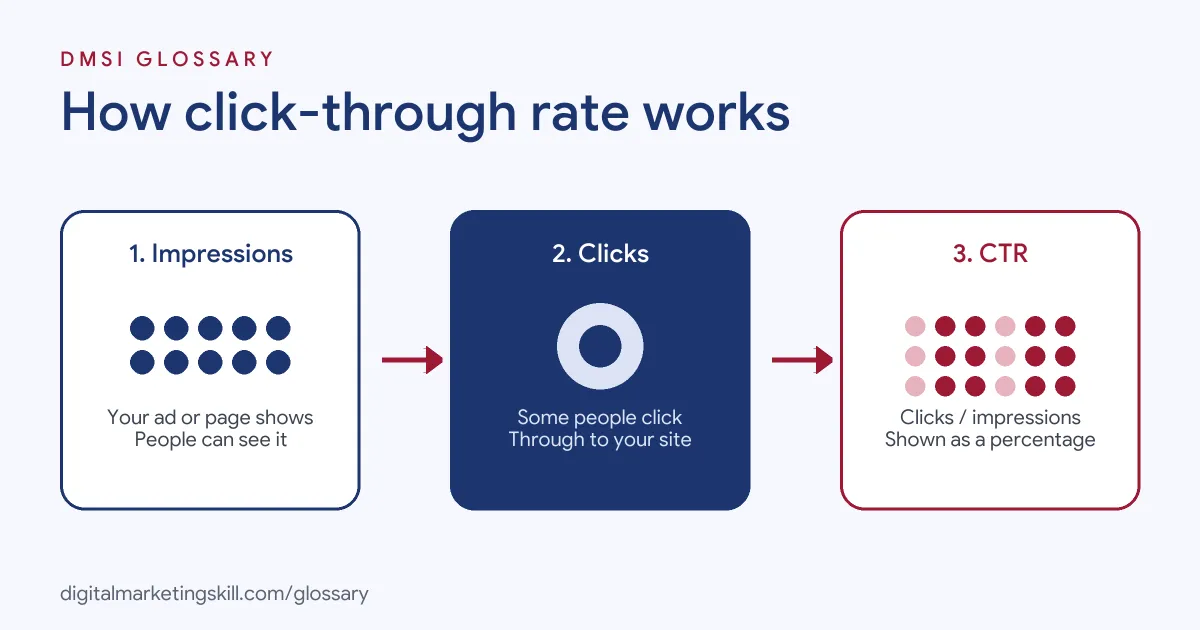
Every CTR needs two numbers. First, impressions count how often your ad or page appeared. Next, clicks count how many people clicked it. Finally, you divide clicks by impressions and show the result as a percentage.
The Formula
Google gives the formula as clicks ÷ impressions = CTR. Its own example is simple: “if you had 5 clicks and 100 impressions, then your CTR would be 5%.” You can learn more about the first half of that sum in our glossary entry on impressions.
CTR in Google Ads
In Google Ads, every ad, keyword and free listing has its own CTR. Google notes that clicks are more likely when your keywords, ads and listings closely match each other and your business. In addition, CTR “contributes to your keyword’s expected CTR, which is a component of Ad Rank.” So a low click-through rate can affect more than one report.
Expected CTR and Quality Score
Google Ads also shows an expected CTR for each keyword. It is one of the three parts of Quality Score, alongside ad relevance and landing page experience. Google rates it as above average, average or below average. That rating compares your ads with other advertisers’ ads that showed for the exact same search over the last 90 days. So if your expected CTR is below average, your ad is less likely to earn a click than competing ads. Start by rewriting the headline, then check that the keyword really belongs in that ad group.
CTR in Search Console
For organic search, Google Search Console reports CTR as “the click count divided by the impression count.” There, an impression means your site appeared in Google Search results. As a result, you can see which pages and queries get seen often but clicked rarely.
To find them, open the Performance report and select the Pages tab. Then sort the table by impressions. Pages near the top with a low CTR are your best candidates for a clearer title and meta description, because many people already see them.
Click-Through Rate Examples
Here are three ways a marketer might use CTR:
- Search ad test: An accountant runs two ads for “tax return help.” One mentions a fixed fee, while the other mentions speed. After enough impressions, the higher-CTR ad becomes the main version.
- Organic title rewrite: A blog post gets 10,000 impressions but only 100 clicks in Search Console, which is a 1% CTR. The writer rewrites the title to match the search better, then tracks the change.
- Email campaign: A newsletter goes to 5,000 people and gets 150 link clicks. The team compares that 3% CTR with past sends to judge the subject and layout.
In each case, CTR shows which version earns more attention. Then the team checks conversions to confirm the winner.
Click-Through Rate vs Conversion Rate vs CPC
These three metrics sit side by side in most ad reports, so it helps to know how they differ:
| Metric | Formula | What it tells you |
|---|---|---|
| Click-through rate (CTR) | Clicks ÷ impressions | How appealing your ad or listing is |
| Conversion rate | Conversions ÷ clicks | How well your landing page turns visits into results |
| Cost per click (CPC) | Cost ÷ clicks | How much you pay, on average, for each visit |
A strong campaign needs all three to work together. For instance, a high CTR with a low conversion rate often means the ad promises something the page doesn’t deliver.
How to Improve Click-Through Rate
Use these steps to lift CTR without attracting the wrong clicks:
- Check intent first. Make sure each keyword or audience matches what you sell. Irrelevant impressions drag CTR down.
- Group tightly. Put closely related keywords in the same ad group, so the ad can speak to them directly.
- Echo the search. Use the searcher’s words in your headline where it reads naturally.
- Give a clear reason to click. State a benefit, an offer or a next step.
- Add assets. Google says it judges assets and formats on relevance, CTR and how prominent they are on the page. Sitelinks and callouts give people more reasons to click.
- Test one change at a time. Run two versions, wait for enough impressions, then keep the winner.
- Check conversions. Confirm the higher-CTR version also brings more leads or sales.
Best Practices for Click-Through Rate
- Compare like with like. Google says a good CTR is “relative to what you’re advertising and on which networks.” Don’t compare search ads with display ads.
- Use your own history. Your past results are a better benchmark than a general average.
- Look at keyword level. An account average can hide one weak keyword that wastes budget.
- Watch position. Higher positions usually earn more clicks, so read CTR alongside average position.
- Pair it with conversion data. Clicks that never convert are cost, not success.
Common Mistakes to Avoid
Beginners often misread this metric. First, they chase a high CTR with clickbait, which brings visits that don’t convert. Second, they judge an ad after a handful of impressions, when the numbers are still random. Third, they compare CTRs across networks, devices or industries that behave differently. Finally, they ignore organic CTR in Search Console, where a better title can win more visits without extra spend.
Where You’ll Use Click-Through Rate at Work
CTR is part of the daily reporting in paid media roles. For example, remote job listings ask candidates to:
- “drive continuous improvements in ROAS, CPA, CTR, and conversion rates” (Media Buyer).
- “Monitor campaign performance and analyze metrics (CTR, CPC, CPM, ROAS, conversions), providing actionable insights” (Marketing Ads Specialist).
- Track “click-through rate (CTR), conversion rate, cost per click (CPC), and return on ad spend (ROAS)” (Facebook Ads Manager).
So as a Google Ads Specialist or PPC Specialist, you will report on click-through rate every week. More importantly, you will need to explain what is driving it and what you plan to change.
Learn It in the Google Specialist Track
You can learn to measure and improve click-through rate in the AI-Powered Google Specialist track. There, you launch and measure a Google Ads campaign with conversion tracking, so you see how CTR links to real results. You also work on a U.S. Project Internship from day one, with unlimited 1-on-1 mentoring.
Working on email as well? Our guide to email click-through rate covers what moves it in the inbox. For search ads, see Google Ads optimisation.
Frequently Asked Questions
How do you calculate click-through rate?
Divide clicks by impressions, then multiply by 100. For example, 30 clicks from 1,000 impressions gives a CTR of 3%.
What is a good CTR?
Google says it depends on what you advertise and on which network. So compare against your own past results and similar campaigns rather than one fixed number.
Does CTR affect Quality Score?
Yes, indirectly. Expected CTR is one of the three parts of Quality Score, and Google says your CTR contributes to it.
Why is my CTR high but sales are low?
The ad may promise something the landing page doesn’t deliver, or it may attract the wrong people. Check your conversion rate and search terms next.
Where can I see organic CTR?
Open the Performance report in Google Search Console. It shows clicks, impressions, CTR and average position for your pages and queries.
Sources: Google Ads Help: Clickthrough rate (CTR); Search Console Help: Performance report; Google Ads Help: About Ad Rank; Google Ads Help: About Quality Score; remote job listings on Himalayas.